Nice catch! Please let support know about this.
Could you write about this more? Or give link. I have a CHR lab and BGP-VPLS works on 7.19 but died when I upgraded the lab upto 7.20beta4.
Edit: after upgrade, I changed MPLS LDP interface configs a little to conformance of the documentation, reverted back and BGP-VPLS works again with iBGP-RR.
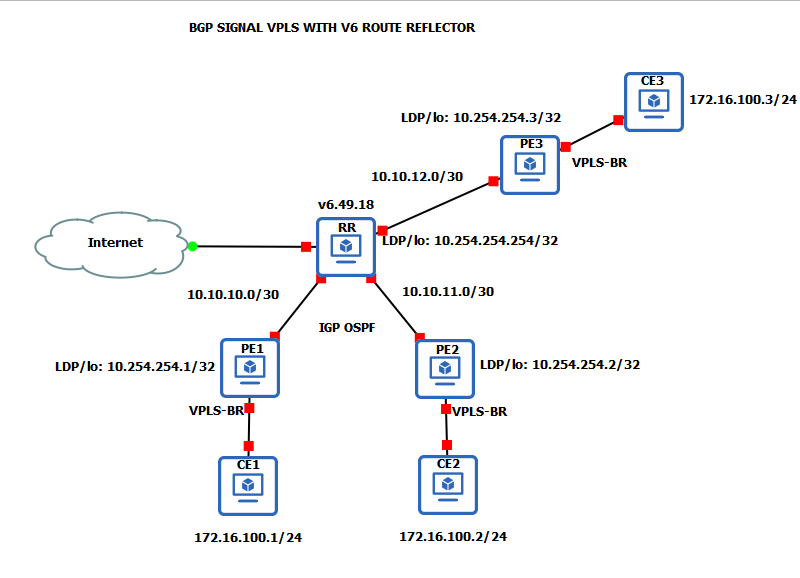
This is the the basic topology i’m working on, If the route reflector is v6 it’s working properly as expected but if I change the route reflector to any v7 it won’t work VPLS is up (using BGP Signal VPLS) everything is up mpls forwarding table is ok, but both CE1 and CE2 can’t reach on Layer3.
But normal VPLS is working on either v6 or v7 route reflector
V6 RR + V7 PE + BGP Signal VPLS is working
V7 RR + v7 PE + BGP Singal VPLS is not working
V7 RR + v7 PE + VPLS is working
EDIT: What I didn’t try is to form full mesh with ebgp session without route reflector if v7 BGP Signal VPLS will work
is VPLS hardware offloaded ?
Nope, In V6 for CRS317 i think on P role not in PE that’s what I know, in our use case since there’s only a handful customer avail L2VPN mostly L3VPN we don’t need large amount of throughput, for L3VPN we are happy to pass 2 to 3ishg of L3VPN at the moment with minimal hit to CPU on 1036
The CRS317-1G-16S+ switch, running RouterOS v6.41 and later, supports hardware offloading of certain MPLS functions. To achieve this, the switch needs to be configured as a "P" (Provider) router in a PE-P-PE MPLS network setup. This offloading allows for faster label switching, potentially at wire speed
Google 
This is a well known problem, from a year or more. The only workaround is a full BGP mash, as you tryed. Be carefull also with CCR2216, if any, when using MPLS/LDP. When running, packet loss is introduced on forwarding plane.
Really? do you guys reported it and what does support say is that architecture specific?
Its interesting because I experiencing the opposite. BGP signaled VPLS works, LDP signaled doesn’t.
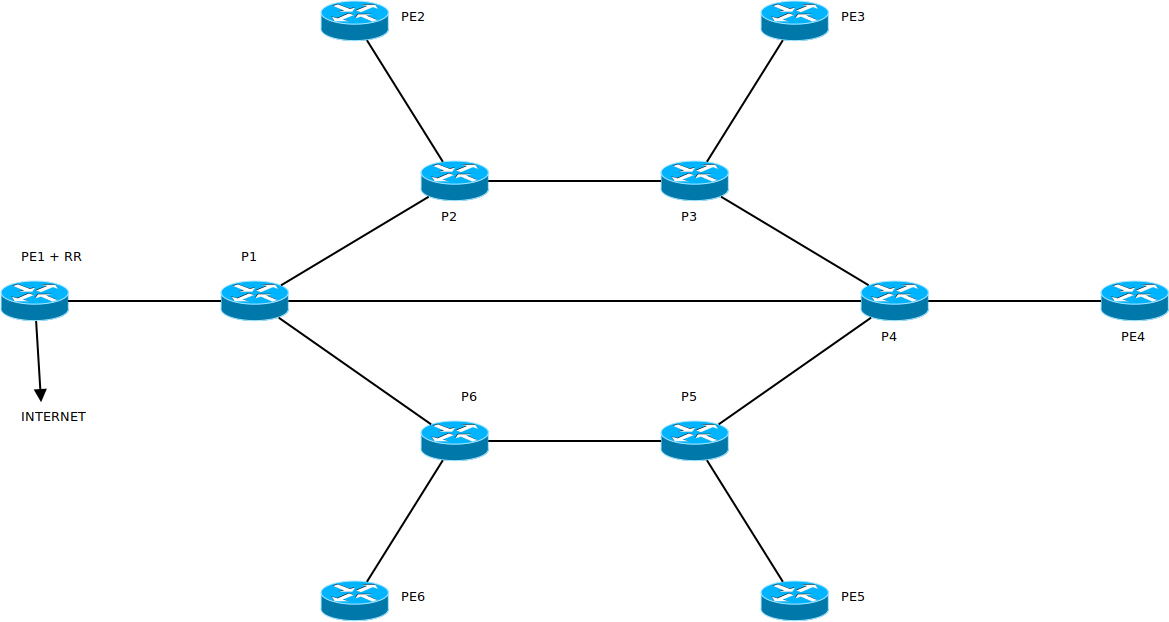
I use this topology to test things, the inner ring is P only, those routers runs only OSPF + MPLS, on PE routers, the PE routers runs iBGP too, PE1 is RR, other PEs are RR-client.
I configured L2VPN + L3VPN. The BGP L[23]VPN config from PE1:
/routing bgp vpls
add bridge=VPLS_A bridge-horizon=3 cisco-id=10.0.10.11&65530:3 disabled=no export-route-targets=65530:3 import-route-targets=65530:3 name=VPLS_A rd=65530:3
add bridge=VPLS_B bridge-horizon=4 disabled=no export-route-targets=65530:4 import-route-targets=65530:4 name=VPLS_B rd=65530:4 site-id=11
/routing bgp vpn
add disabled=no export.redistribute=connected .route-targets=65530:1 import.route-targets=65530:1 instance=bgp-instance-1 label-allocation-policy=per-vrf name=bgp-mpls-vpn-1 \
    route-distinguisher=65530:1 vrf=VRF_A
add disabled=no export.redistribute=connected .route-targets=65530:2 import.route-targets=65530:2 instance=bgp-instance-1 label-allocation-policy=per-prefix name=bgp-mpls-vpn-2 \
    route-distinguisher=65530:2 vrf=VRF_B
The MPLS config from the same PE1:
/mpls interface
add interface=all mpls-mtu=1500
/mpls ldp
add afi=ip,ipv6 disabled=no lsr-id=10.0.10.11 preferred-afi=ip transport-addresses=10.0.10.11,b00b::10:0:10:11
/mpls ldp interface
add accept-dynamic-neighbors=yes afi=ip,ipv6 interface=ether2
VPLS_B interfaces are up and running, but VPLS_A IFs aren’t:
[admin@rtr1.PE] > /interface/vpls/print
Flags: R - RUNNING; D - DYNAMIC
Columns: NAME, PEER, BGP-VPLS
#    NAME   PEER        BGP-VPLS
0 RD vpls1  10.0.10.13  VPLS_B
1 RD vpls2  10.0.10.15  VPLS_B
2 RD vpls3  10.0.10.12  VPLS_B
3 RD vpls4  10.0.10.14  VPLS_B
4 RD vpls5  10.0.10.16  VPLS_B
[admin@rtr1.PE] >
I can ping all other PE IP’s (IPv4 and IPv6) over VPLS_B. Configs almost identical, except loopback IPs, router-id and VPLS site-id. We have another project, where we using LDP signaled VPLS with eBGP and cisco on the other side, and its works fine with minimal config:
/mpls interface add interface=ether1 mpls-mtu=1512
/mpls ldp add afi=ip lsr-id=10.43.0.126 vrf=main
/mpls ldp interface add accept-dynamic-neighbors=yes afi=ip interface=ether1 transport-addresses=10.43.0.126
/routing bgp connection add afi=l2vpn,l2vpn-cisco,vpnv4 cisco-vpls-nlri-len-fmt=bytes connect=yes \
    listen=no local.address=10.43.0.126 .role=ebgp multihop=yes \
    name=JPoP-IPv4 remote.address=10.7.255.255/32 .as=XXXX tcp-md5-key=*** templates=default
/routing bgp vpls add bridge=VPLS cisco-id=10.43.0.126&65000:076540 \
    export-route-targets=65000:076540 import-route-targets=65000:076540 name=bgp-vpls1 rd=65000:076540
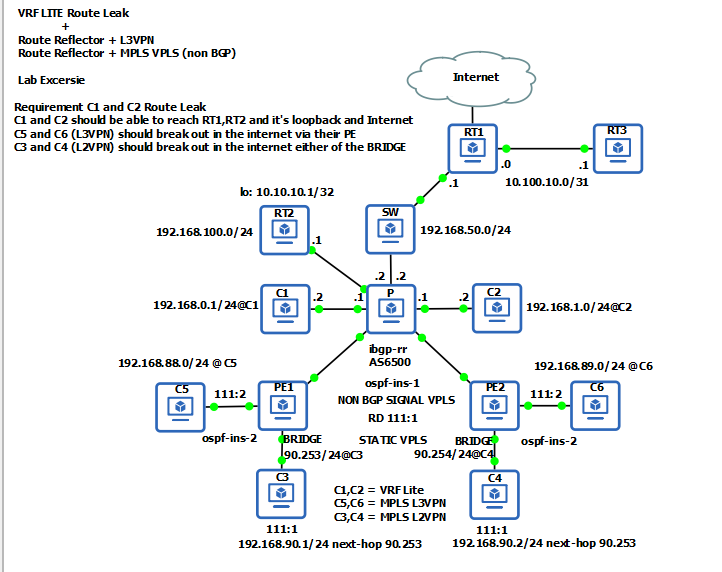
I have another example all router is v7 but the VPLS this time is static non BGP signal in all of my example P is route reflector and LDP only and I don’t use cisco style id
for the “P” it’s role is ibgp-rr and all PE is ibgp
# P Router
/mpls ldp
add disabled=no lsr-id=10.254.254.1 transport-addresses=10.254.254.1
/mpls ldp advertise-filter
add advertise=yes disabled=yes prefix=10.254.254.0/29
add advertise=no disabled=yes prefix=0.0.0.0/0
/mpls ldp interface
add disabled=no interface=ether5
add disabled=no interface=ether6
/routing bgp connection
add afi=ip,l2vpn,vpnv4 as=65000 disabled=no local.address=10.254.254.1 .role=ibgp-rr name=TO-PE1 nexthop-choice=\
    force-self output.default-originate=always remote.address=10.254.254.2/32 router-id=10.254.254.1 routing-table=main \
    templates=default
add afi=ip,l2vpn,vpnv4 as=65000 disabled=no local.address=10.254.254.1 .role=ibgp-rr name=TO-PE2 nexthop-choice=\
    force-self output.default-originate=always remote.address=10.254.254.3/32 router-id=10.254.254.1 routing-table=main \
    templates=default
/routing ospf interface-template
add area=backbone disabled=no interfaces=lo passive
add area=backbone dead-interval=15s disabled=no hello-interval=5s interfaces=ether5
add area=backbone dead-interval=15s disabled=no hello-interval=5s interfaces=ether6

# PE1 Router

/routing bgp template
set default afi=ip,l2vpn,vpnv4 as=65000 disabled=no router-id=10.254.254.2 routing-table=main
/routing ospf instance
add disabled=no mpls-te-address=10.254.254.2 mpls-te-area=0.0.0.0 name=ospf-instance-1
add disabled=no name=ospf-instance-2 originate-default=never router-id=C5 vrf=C5
/routing ospf area
add disabled=no instance=ospf-instance-1 name=backbone
add disabled=no instance=ospf-instance-2 name=custC

/interface vpls
add arp=enabled bridge=BRIDGE disabled=no mac-address=02:CB:FE:DA:C2:88 mtu=1500 name=TO-P peer=10.254.254.1 \
    pw-control-word=default pw-l2mtu=1550 pw-type=vpls vpls-id=111:1

/mpls ldp
add lsr-id=10.254.254.2 transport-addresses=10.254.254.2
/mpls ldp advertise-filter
add advertise=yes disabled=yes prefix=10.252.254.0/29
add advertise=no disabled=yes prefix=0.0.0.0/0
/mpls ldp interface
add interface=ether5

/routing bgp connection
add afi=ip,l2vpn,vpnv4 as=65000 disabled=no local.address=10.254.254.2 .role=ibgp name=TO-P remote.address=\
    10.254.254.1/32 router-id=10.254.254.2 routing-table=main templates=default
/routing bgp vpn
add disabled=no export.redistribute=connected,ospf .route-targets=111:2 import.route-targets=111:2 .router-id=C5 \
    label-allocation-policy=per-vrf name=bgp-mpls-vpn-1 route-distinguisher=111:2 vrf=C5
/routing ospf interface-template
add area=backbone dead-interval=15s disabled=no hello-interval=5s interfaces=lo passive
add area=backbone dead-interval=15s disabled=no hello-interval=5s interfaces=ether5
add area=custC dead-interval=15s disabled=no hello-interval=5s interfaces=ether1
I’m going to try your topology too and see what I can find
BTW it seems when I upgrade from 7.19.2 to 7.20beta4 then BGP VPN inherits instance name but connections doesn’t. bgp connection shows “instance=*0” after upgrade so I must fix it by hand.
I thought beta4 should fix that it’s in the changelog if my memory serves correctly…
Another issue is upgrade from 7.19.2 to 7.20beta4 kills LDP signaled VPLS over eBGP. Something changed in VPLS sintax?
config:
/routing bgp vpls
add bridge=VPLS cisco-id=10.47.128.14&65000:76540 disabled=no export-route-targets=65000:76540 import-route-targets=65000:76540 name=bgp-vpls1 rd=65000:76540
RIB:
routing/route/print detail where afi~"l2vpn"
Flags: X - disabled, F - filtered, U - unreachable, A - active;
c - connect, s - static, r - rip, b - bgp, o - ospf, i - isis, d - dhcp, v - vpn, m - modem, a - ldp-address, l - ldp-mapping, g - slaac, y - bgp-mpls-vpn, e - evpn; H - hw-offloaded;
+ - ecmp, B - blackhole
      afi=l2vpn-cisco contribution=candidate dst-address=10.47.128.14&65000:76540 routing-table=main belongs-to="cisco-bgp-vpls"
       bgp.ext-communities=rt:65000:76540,raw:000afde800012afc
       debug.fwp-ptr=0x20342120
Yes it should, in case of vpn, fixed, but for me in the connection section it didn’t.
Blockquote
Another issue is upgrade from 7.19.2 to 7.20beta4 kills LDP signaled VPLS over eBGP
This i haven’t tried it yet VPLS over eBGP…
pppoe issue still not fixed mtu defaults to 1480
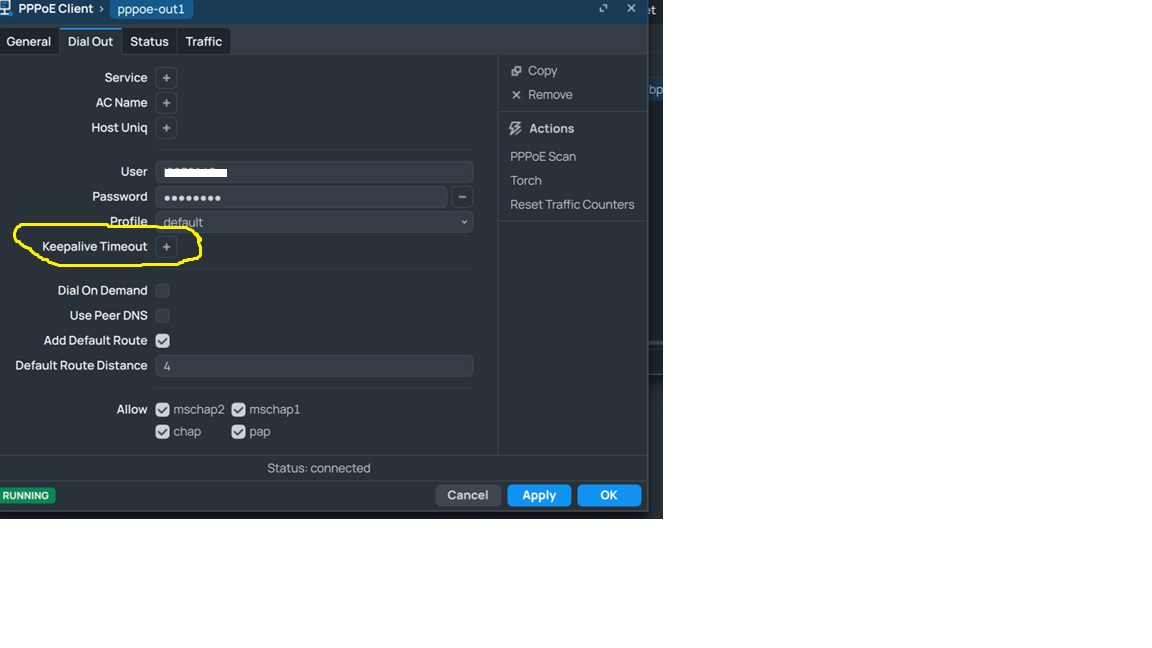
“ppp - do not send initial echo request if keepalive-timeout=disabled;”
this feature came in 7.20 beta 2 but reverted in beta4
Yes exactly i am facing this issue (pppoe isp) ONLY with mikrotik while VYOS/OPENWRT/OPNSENSE/IPFIRE happily works with their default settings giving me mtu of 1492 ,while mk defaults to 1480 and 1488 if you adjust mtu manually ,i send many emails to mikrotik support they say there is some device between isp and their device which causes it.i tried many things but in vain..
edit
Now it works KEEPalive timeout after disabling all is good!!! keep it up
I try this with very simple topology LAN1 → R1 → R2 → LAN2 with ebgp and bgp signal vpls it’s working with v7.19.1 will try in v7.20beta4
Perhaps in the slew of /container feature, you should consider adding “events” to container some
/container add on-change={ :put "$[get $.id name] changed from $from to $to" }
or broken out to on-stop= on-stopping= on-error-state= on=start= on=stop= … – just quite a few of them, and you can just provide the “state” (ideally both from and to) as variable to one generic script handler.
Right now even with all the good changes in /container, it’s still a shitshow to script container, properly, without either a lot of script to poll and check states, or error-prone :delay.
1 Like
It’s better to add mtu and “client-allowedips” options to wireguard peers config, rather than use default 0.0.0.0/0,::/0
*) veth - added dhcp=yes/no property to be able to easily run a container in LAN, runs a special dynamic dhcp-client on interface and sets acquired address/gateway/dns to in-container interface;
Also tried it but could not get it to work.
Added a DHCP server to the bridge interface where the veth is attached.
I also can see DHCP requests on that bridge interface, but no DHCP offer.
Can anyone post a working configuration?