Also would avoid the need of some stupid pooling log that are triggered by time-scheduled script.
An example? Do something whne some user logs-in via any protocol.
I use that for some “fail2ban” tool.
Based on your description of what you need in container scripting… To me seems like a hook-based / event-based scripts trigger (in this case related to container) wolud solve your problem.
I agree with “events everywhere”‡ – but more pointing out that unlike most of RouterOS, the /container operatations are already asynchronous. i.e. If you “interface”, the next script line can use it. But in container you issue a “start”, which many take time, but the CLI returns immediately… so if you want to next say use the new 7.20 /container/shell cmd= “after container started”, you a :for/etc or :delay. And with the new “shared devices”, the likelyhood of failure you’d want to handle goes up – but stuck with polling.
But even some alternative to “full” event support, be a wait=yes that at least make the CLI/script wait until any state change, that way you can avoid the :for/:delay when trying to script /container.
‡ which could be just a listen along with print on command in CLI, which API already has (and presumable webfig/winbox), but not exposed to scripting engine.
I have to agree 100%. Management of network gear should be in dedicated management VRFs. It’s just a good security practice and industry standard. The lack of HW Offload support with VRFs is incredibly disappointing especially when MikroTik has acknowledged that its available in hardware they just need to put in the work on their software. I noticed that with VRFs enabled I cannot even use my gear as a proper P router let alone a PE. At this point of relegated my MikroTik routers to simple switches. Lots of great features and capability which mean nothing if I can’t properly secure the device.
I’ve got a vlan interface on the CRS320 bridge with IP 192.168.10.38/24, and the rest of the network resides behind the tagged VLAN on the CRS309. Communication is only able to pass over the VXLAN interfaces if either:
VXLAN hardware offloading is disabled on CRS354, OR
Hardware offloading is disabled for the sfp-sfpplus1 bridge port on the CRS354, OR
Both are disabled
Enabling or disabling hardware offloading on the CRS320 makes no difference. I’ve also tried changing the link between the CRS309 and and 354 to untagged vlans, which did not work either. The 309 is running SwitchOs, so I’ve omitted the config for that. Is hardware offloading both of these functions supported? I don’t see anything in the docs to indicate that it wouldn’t be…
This topology works in my testing but not in the real hardware for now, as soon as v7.20 become stable i’m going to try this in real world with real hardware, this is working fine in GNS3
So it’s expected that VXLAN HW offloading doesn’t work properly yet with real hardware? If so, that’s disappointing, since the docs (seem to, by my reading, correct me if I’m wrong) indicate that it’s been supported on the hardware I’m trying to use for two major versions. I haven’t noticed anything terribly wrong with the BGP/EVPN side of things in the beta on real hardware, other than lack of support for some of the L3 features which I was aware of before starting, and sometimes having to disable and re-enable a “/routing/bgp/evpn” entry to get it to pick up VTEPs after a reboot. If someone could clarify exactly what is supported currently for VXLAN hardware offload, that would be very helpful, hopefully I’m just configuring things wrong.
If you have issues with a beta feature, then you should open a support ticket with the needed informations to reproduce issues. Then engineers might fix them.
In beta4 this has ben fixed again on my limited testing with GNS3, we are early on the beta stage things might change quite fast or slow who knows all of us don’t have visibility on MT is doing, the hardware offload not to mentioned (VRF + hardware offload) sure these things will follow because there’ s no point of buying/using all this high performance gear without this important features.
Imho we should wait at least 3 to 4 stable version to fully realized all of this, just my 0.002$
Just out of curiosity… Is the switch-marvel package available in the installation packages on these CRS with ARM? Have you tried installing it to see what happens?
The swtich-marvell package is available on the CRS520 (but not installed), but not on the CRS354. Is this package required for hardware offload? I can give installing it on the CRS520 a try, but as far as I can tell the issues is on the CRS354.
EDIT:
I’m unable to install switch-marvell on the CRS520. After enabling, applying, and rebooting, it remains stuck in the disabled state, with no messages in the logs other than “enabled switch-marvell-7.20beta4”.
Yes it would be helpful when they add a list of chip types supported by these packages (instead of only a manufacturer name) so people can lookup the chip type in their device and not be tempted to install a package that is not for them.
I’ve tried removing all BGP/EVPN configuration, setting it up as a simple VXLAN tunnel with manually defined VTEPs, and downgraded both the software and routerBOARD firmware on the CRS354 to 7.19.2. The issue with hardware offloading persists. At least it’s not a beta issue. Given that the CRS354 is listed as supporting VXLAN hardware offloading (and my configuration is pretty much identical to the example), I’ll open up a support ticket, unless anyone here has any other advice.
Solution found, in case someone else runs into this:
Disable hardware offload on physical bridge port, enable on vxlan interface, enable “dont fragment“ on the vxlan interface
Send traffic down the interface
While traffic is flowing, enable hardware offload on bridge port
VXLAN will be properly offloaded.
Perhaps a reboot alone would be enough to start offloading the VXLAN, without going through the hassle of ensuring traffic is flowing while the changes are made. This seems to persist after reboot, so maybe that would have been enough in the first place. Enabling “don’t fragment“ without either following the above steps or rebooting didn’t get it to offload, which is why I previously dismissed it as a solution.
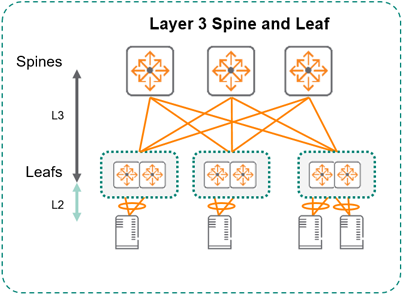
That was with EVPN/VXLAN re-enabled. Aside from occasionally having to disable and re-enable “/routing/bgp/evpn” instances to get the routes to propagate properly after reboots, it looks like everything is working fine, at least with only one spine (I have 5 leaves, only one of which is a mikrotik device, yay interoperability!). The line in the VXLAN hardware offloading docs about not working over ECMP gives me concern that it won’t work with two spines, but I haven’t tried that yet. I did purchase two spines, but I’ve left one in the box for now to make returns easier if necessary. I don’t plan to unbox that one until I have the rest of the network working on the current single-spine setup, so it might be a few weeks. Currently I’ve only migrated one VLAN for testing.