Love you you guys know so much about mikrotik’s plans 
Could you elaborate on this one?
I can confirm, wireguard handles much better in 7.20b2, I’ve narrowed the issue on ingress to a packet buffer problem. For example iperf coming from a 10G/25G line into the router (wireguard) and out to a 2.5G or 1G client results in a slower output (max around 800Mb/s) and lots of tx-queue-drops on the ingress 25G port. But this is an understandable problem, I don’t think even my CCR2216 has deep enough packet buffers for this kind of situation, especially when using BBR.
Stable TCP throughput on wireguard is now at approximately ~1.8Gb/s with 4 parallel threads on iperf3 on the CCR2216 and I’m not seeing any weird RX errors on my WG interface (as of yet).
Stable UDP throughput on wireguard is now at approximately ~1.5Gb/s with 4 parallel threads on iperf3 on the CCR2216.
Flooding the router with excessive UDP traffic (10G+) no longer kills/crashes the router, but you can still DDOS the target at the other end of the WG tunnel by effectively consuming all the bandwidth which makes sense and is no different than a regular DDOS without wireguard.
Issues:
The below code does not work, it outputs “Invalid File Name”.
/export show-sensitive file=/sata1-part1/backup/test.rsc
MT7996
Oooer, shut-up and take my money 
MT7996
Filogic 680
May 2023 	4x4 	4x4 	4x5
Up to 13.5 Gbit/s
4096-QAM
Up to 320 MHz
*) ipv6 - added support for IPv6 ND proxying of individual addresses;
thanks, please add support for prefixes
having problem with routing bgp instance after upgrade.
thx
They know more than Mikrotik themselves 
You realise this is an early beta? Report the issue, I am sure they will fix this before rc.
Yay, my container-removal-issue is fixed \o/
Now, what might the container property “auto-restart-interval” do? Does it restart a container at regular intervals or does it restart crashed containers (or maybe something else)?
Otherwise, CCR2116, CRS317 and Chateau 5G AX upgraded and running without issues.
EDIT:
Found out, auto-restart-interval restarts containers on failure. Nice, one fidely scheduler less.
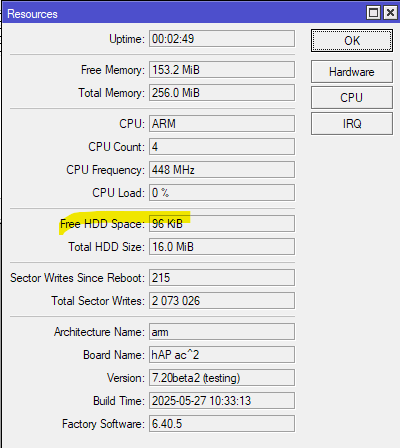
Additional evergreen (beside of memory leak), ROM space shortage on 16MB hAP ac^2 with wifi-qcom-ac. It is quite obvious - RouterOS 7.20 for ARM is roughly 100kB bigger than RouterOS 7.19. Netinstall procedure has been applied with manual configuration.
Several fixes for switch 88E6393X! Maybe it will solve my 2,5Gbps problems? One can always hope.
Love the separate log for containers
The DHCPv6 client is broken. The pd-prefix parameter is filled incorrectly.
On version 7.19.1, this script works fine in the DHCPv6 client
:if ($"pd-valid" = 1) do={
  /ipv6 firewall address-list remove [find list=allowed]
  :delay 1s
  /ipv6 firewall address-list add address=$"pd-prefix" comment="!!! Check YOUR pool from ISP" list=allowed
  /ipv6 firewall address-list add address=fe80::/16 list=allowed
  /ipv6 firewall address-list add address=ff02::/16 comment=multicast list=allowed
  :delay 1s
}
In version 7.20beta, the pd-prefix parameter has an “@” instead of a subnet mask.
We’re getting an error:
(dhcp-ia) failure: 2a00:1220:a:d::/@ is not a valid dns name (/ipv6/firewall/address-list/add; line 4)
I had to rewrite the script:
:local okAddr "/64"
:local locTmp ""
:if ($"pd-valid" = 1) do={
  /ipv6 firewall address-list remove [find list=allowed]
  :delay 1s
  :set locTmp [/ipv6/dhcp-client/get value-name=prefix number=0]
  :set okAddr [:pick $locTmp 0 [:find $locTmp ","]]
  /ipv6 firewall address-list add address=$okAddr comment="!!! Check YOUR pool from ISP" list=allowed
  /ipv6 firewall address-list add address=fe80::/16 list=allowed
  /ipv6 firewall address-list add address=ff02::/16 comment=multicast list=allowed
  :delay 1s
}
Lots of good changes in container!
On these specifically…
I tried this out, works! But… few minor issues with it…
-
should be some timeout= on it (or something)… since if the command has an error… it drops you to the interactive shell prompt. Meaning that if cmd= was used in a script (and cmd had error), it HANG a script.
-
on /container/shell cmd= … it be nice if had some “start-if-stoppped=yes” too, so it be closer to “docker run”. I wanted to try using command like “awk”/“sed”/etc from RouterOS script, but ran into that default alpine image does not stay running (so need the “tail -f /dev/null” and start-on-boot=yes to use the new cmd= syntax) — so be nice if the “use alpine to run UNIX shell commands” use case worked without a lot pre-configuration.
-
Overall, the CLI experience could still be improved in container. Beyond the asynchronous nature of /container commands which makes scripting start/stop/etc difficult. But the new errors (below) do not appear in terminal, and NO ERROR results from CLI POV from remote-image= things (like from check-certificates=yes). Error should show up WITHOUT using /container/print
I tried using the default container settings, so lscr.io as the “presumed-registry” to load alpine for above. But remote-tag= is still pretty picky, so just “alpine” or “alpine:latest” did not work. The good news the “improved error and log messages” were helpful! The bad news is I got various errors trying to find a remote-tag that work for alpine… eventually “ghcr.io/linuxcontainers/alpine:latest” worked (which bypassed default lscr.io)…
Specific issues:
- perhaps the default for the /certificates/builtin should be to be enabled as this one may not be obvious to everyone especially if default is now to check-certificates…
- registry-1.docker.io does get the SSL cert error EVEN with built-in certs enabled
- default registry of lscr.io got an authentication error using just “linuxcontainers/alpine:latest” as remote-tag – I’m still not sure why, perhaps its just lscr.io logic for tags, but maybe a bug on RouterOS?
on which OIDs ?
“arm - improved system stability when processing encrypted traffic;” — Can you please describe in more detail, in what cases? Is this related to IPSEC?
Agree. More details please.
Come on, buy a decent newer router already.
FWIW, most early beta’s are generally bigger than the final stable package. Still a lot of 16MB flash units in production, so problem is not limited to hAPac2 (which is a great router, albeit dated)