*) ip - added socksify feature and new NAT action “socksify”;
Is there documentation?
*) ip - added socksify feature and new NAT action “socksify”;
Is there documentation?
While there should be. You can almost guess…
/interface/list add name=REQUIRE_PROXY
/interface/list/member add list=REQUIRE_PROXY interface=<what-interface-to-force-sock-proxy>
/ip/firewall/nat/add action=socksify socks5-port=1080 socks5-server=127.0.0.1 in-interface-list=REQUIRE_PROXY chain=<input-or-srcnat>
My question is should the chain= be “input” or srcnat/etc… I’m kinda not sure why it’s NAT, since it seem like a “mangle thing”, not NAT. But I guess that comes later in packet flow. And likely before other NAT rules depending on specific filter. But docs be helpful and clarify…
Now that EVPN is underway… and this new"sockify" Netfilter action… just missing some:
/ip/firewall/mangle action=ebpf ebfp-module=disk1/my-eBPF-code that allow the sockify-like scheme to be extended to other custom things.
@MT
Openflow seems to work with faucet at first try the question is how does hardware offload came into play? since the ports is being handled now in the openflow->ports not in the bridge could you please give clarity on this please?
Will input.filter-nlri will now allow you “discard” a prefix rather than added it as “filtered”? Can you add that filter via the GUI?
Can wait to see some EVPN docs to test out as well as to see what sort of hardware accel support/performance we might see.
Great your lab works OOB in GNS3 will going to lab it on real hardware this week and see if this will fly thanks a ton
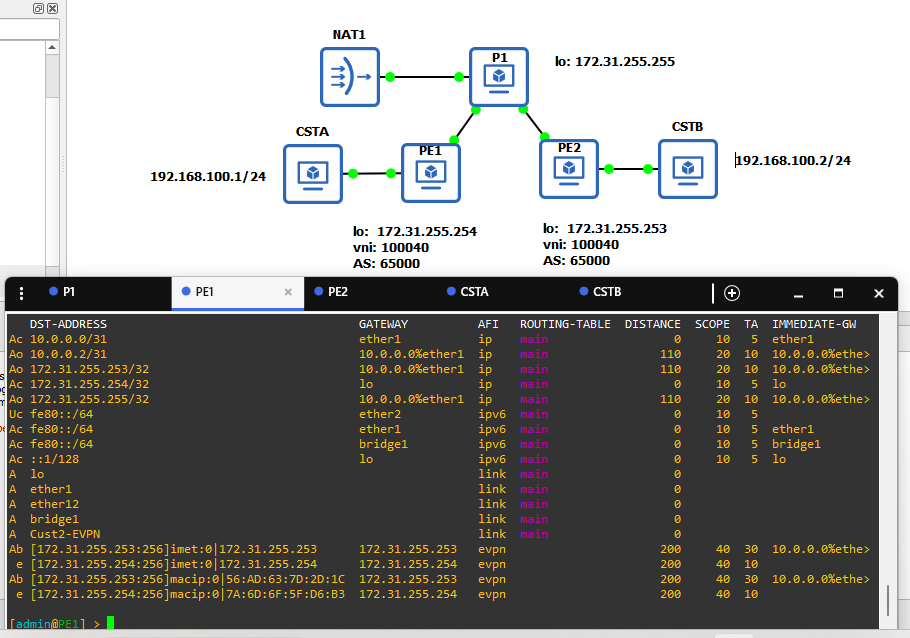
/routing/route/print where afi=“evpn” yields no result this is clearly a bug
[admin@PE1] > /routing/route/print
Flags: U - UNREACHABLE, A - ACTIVE; c - CONNECT, b - BGP, o - OSPF, e - EVPN
Columns: DST-ADDRESS, GATEWAY, AFI, ROUTING-TABLE, DISTANCE, SCOPE, TARGET-SCOPE, IMMEDIATE-GW
   DST-ADDRESS                                    GATEWAY          AFI   ROUTING-TABLE  DISTANCE  SCOPE  TA  IMMEDIATE-GW
Ac 10.0.0.0/31                                    ether1           ip    main                  0     10   5  ether1
Ao 10.0.0.2/31                                    10.0.0.0%ether1  ip    main                110     20  10  10.0.0.0%ethe>
Ao 172.31.255.253/32                              10.0.0.0%ether1  ip    main                110     20  10  10.0.0.0%ethe>
Ac 172.31.255.254/32                              lo               ip    main                  0     10   5  lo
Ao 172.31.255.255/32                              10.0.0.0%ether1  ip    main                110     20  10  10.0.0.0%ethe>
Uc fe80::/64                                      ether2           ipv6  main                  0     10   5
Ac fe80::/64                                      ether1           ipv6  main                  0     10   5  ether1
Ac fe80::/64                                      bridge1          ipv6  main                  0     10   5  bridge1
Ac ::1/128                                        lo               ipv6  main                  0     10   5  lo
A  lo                                                              link  main                  0
A  ether1                                                          link  main                  0
A  ether12                                                         link  main                  0
A  bridge1                                                         link  main                  0
A  Cust2-EVPN                                                      link  main                  0
Ab [172.31.255.253:256]imet:0|172.31.255.253      172.31.255.253   evpn                      200     40  30  10.0.0.0%ethe>
 e [172.31.255.254:256]imet:0|172.31.255.254      172.31.255.254   evpn                      200     40  10
Ab [172.31.255.253:256]macip:0|56:AD:63:7D:2D:1C  172.31.255.253   evpn                      200     40  30  10.0.0.0%ethe>
 e [172.31.255.254:256]macip:0|7A:6D:6F:5F:D6:B3  172.31.255.254   evpn                      200     40  10

[admin@PE1] > /routing/route/print where afi="ip"
Flags: A - ACTIVE; c - CONNECT, o - OSPF
Columns: DST-ADDRESS, GATEWAY, AFI, ROUTING-TABLE, DISTANCE, SCOPE, TARGET-SCOPE, IMMEDIATE-GW
   DST-ADDRESS        GATEWAY          AFI  ROUTING-TABLE  DISTANCE  SCOPE  TARGET-SCOPE  IMMEDIATE-GW
Ac 10.0.0.0/31        ether1           ip   main                  0     10             5  ether1
Ao 10.0.0.2/31        10.0.0.0%ether1  ip   main                110     20            10  10.0.0.0%ether1
Ao 172.31.255.253/32  10.0.0.0%ether1  ip   main                110     20            10  10.0.0.0%ether1
Ac 172.31.255.254/32  lo               ip   main                  0     10             5  lo
Ao 172.31.255.255/32  10.0.0.0%ether1  ip   main                110     20            10  10.0.0.0%ether1
[admin@PE1] > /routing/route/print where afi="evpn"

[admin@PE1] >
when we will get some VRF improvement? The following hasn’t it been improved:
\
*) bth - added extra file-share functionality for use with apps;
can i get more info pls
Very cool! let us know how it goes.
BTW ..what’s the name of your nice icon set in GNS3 ?
OpenFlow seems to work with Faucet as a /container. Good work.
But the scripting around /container is still a PITA, since status things (stopped, extracting, etc) is asynchronous - so not easy to add/remove containers. But new “/container/shell cmd=” also seems work & super useful… so I wrote a script to set up the Faucet OpenFlow controller as /container to test it. The script below sets up Faucet as container along with ALL needed OpenFlow configuration to create a dumb switch, similar to MikroTik’s example, just from RouterOS array with Faucet config. Script is far from perfect (or even good example)… more wanted to show where the scripting still has some rough edges to deal with /container (see MANY :delay’s below, and 100+ lines code to polling status isn’t much better):
{
:local rootpath "disk1/faucet"
:local ofports {"ether6";"ether7"}

:put "remove any previous faucet containers"
/interface/veth remove [find name=veth-faucet]
/ip/address remove [find comment=faucet]
:if ([:len [/container/find name=faucet]]>0) do={
    :put "...removing existing faucet container"
    :do {
        /container stop [find name=faucet]
        :delay 31s } on-error={}
    /container remove [find name=faucet]
    :delay 2s
    /ip/address remove [find comment=faucet]
    /interface/veth remove [find name=veth-faucet]
    /openflow port remove [find switch=faucet]
    /openflow remove [find name=faucet]
}

:put "add faucet container"
/interface/veth add address=172.19.7.7/24 gateway=172.19.7.1 gateway6="" name=veth-faucet
/ip/address add address=172.19.7.1/24 interface=veth-faucet network=172.19.7.0 comment=faucet
/container add name=faucet interface=veth-faucet logging=yes root-dir=$rootpath start-on-boot=yes check-certificate=no remote-image=registry-1.docker.io/faucet/faucet:latest
:put "waiting for extract of faucet..."
:delay 60s
/container start [find name=faucet]
:delay 10s
:put "started, adding config..."

:put "setup OpenFlow"
/openflow add controllers=tcp/172.19.7.7/6653 disabled=no name=faucet verify-peer=none version=1.3 datapath-id=0/00:00:00:00:00:07
:delay 3s
:foreach p in=$ofports do={
    /openflow port add disabled=no interface=$p switch=faucet
}

:put "calculate 'dp_id' needed for faucet config"
:local dpidnum 7
# TODO: previously the datepath-id was automatically generated...
#    ... but getting datapath-id to a number/hex for faucet config was just too hard/annoying
#  :local dpidarr [:deserialize delimiter=":" from=dsv options=dsv.plain [:pick [/openflow/get [find] datapath-id ] 2 64]]
#  :local dpid "0$[:pick [/openflow/get [find] datapath-id ] 0 1]"
#  :foreach h in=($dpidarr->0) do={:set dpid "$dpid$h"}
#  :local dpidnum [:convert from=hex to=num $dpid]
:put "...using $dpidnum from $[/openflow/get [find] datapath-id ]"

:put "generate a faucet config file (to be added to container)"
:local faucetConfig {
    "vlans"={
        "vlan100"={
            "vid"=100;
            "description"="untagged"
        }
    };
    "acls"={
        "allowall"={
            {
                "rule"={
                    "actions"={"allow"=1}
                }
            };
        }
    };
    "dps"={
        "routeros"={
            "dp_id"=$dpidnum;
            "hardware"="Generic";
            "drop_broadcast_source_address"=false;
            "drop_spoofed_faucet_mac"=false;
            "interfaces"={}
        }
    }
}
:foreach p,n in=$ofports do={
    :set ($faucetConfig->"dps"->"routeros"->"interfaces"->"$[:tostr ($p+1)]") {
        "acl_in"="allowall";
        "name"="$n";
        "native_vlan"="vlan100"
    }
}


# uses new /container shell cmd= to add a configuration file
# (via RouterOS array to JSON then python in container to get YAML for faucet.yaml
:put "save default config to /tmp"
/container/shell [find name=faucet] cmd="mv /etc/faucet/*.yaml /tmp"
:delay 2s

:put "serialize faucet ROS array config into JSON"
:local jsonconf [:serialize $faucetConfig to=json options=json.pretty]
:put $jsonconf

:put ""
:put "use python inside container to get YAML, using 7.20+ new /container/shell cmd="
/container/shell [find name=faucet] cmd="echo '$jsonconf' | python -c 'import sys, yaml, json; yaml.dump(json.load(sys.stdin), sys.stdout)' > /tmp/faucet-new.yaml"
:delay 2s
/container/shell [find name=faucet] cmd="echo \"---\n\" > /etc/faucet/faucet.yaml"
/container/shell [find name=faucet] cmd="python3 -c 'import yaml, sys; d = yaml.safe_load(sys.stdin); d[\"dps\"][\"routeros\"][\"interfaces\"] = {int(k): v for k, v in d[\"dps\"][\"routeros\"][\"interfaces\"].items()}; yaml.dump(d, sys.stdout, sort_keys=False)' < /tmp/faucet-new.yaml >> /etc/faucet/faucet.yaml"

/container/shell [find name=faucet] cmd="cat /etc/faucet/faucet.yaml"
:delay 2s

:put "check and apply configuration"
/container/shell [find name=faucet] cmd="check_faucet_config /etc/faucet/faucet.yaml"
:delay 2s
/container/shell [find name=faucet] cmd="pkill -HUP -f faucet.faucet"
}
But specifically OpenFlow’s datapath-id needs to be number(integer) for Faucet, but converting the X/YY:YY:YY:YY:YY:YY into a number is not easy. It be handy if the OF datapath-id was a status/read-only attribute as an int.
_edits:
This is a default icon set on gns3 v3.0.4 on my docker home lab, i think the icon set called affinity blue
*) dhcpv4-server - added “lease-agent-circuit-id” and “lease-agent-remote-id” variables to the lease script;
A step in the right direction but can you please add ‘circuit ID’ and ‘Remote ID’ as assignable variables to static leases (and then let you specify no MAC address)
That way we finally can use DHCP Option 82 directly on the router and not need to use an external RADIUS server
*) routing-filter - added filter-wizard (filter generator with v6-like syntax);
Amazing. Thank you very much
Recreating routing filters was a PAINFUL experience when it couldnt’ automatically be converted. I’m happy to use scriptable filters when it actually a benefit but 99% of the time its just tedius
This is at least a big step in the right direction. Ideally i’d also like to see a ‘routing filter converter’ wizard or terminal command where I can paste in a config export from V6 and it’ll convert it to V7. The same way it does when upgrading from V6 to V7 - but that process is not possible when you are buying a router which only comes with V7 from factory
what is the point of BGP instance? looks like we have the same in the template?
For anyone playing around with EVPN. I imagine the answer is no but can the tunnels be Traffic Engineered or are we still only able to do this with VPLS?
Instance was needed to link evpns, and also it will now allow to add other features that required per instance configuration.
Seems the bridging capability for LTE is broken. If a connection on a bridged interface is established, the internet int’t accesible anymore through the LTE-modem.
/interface lte apn
add add-default-route=no apn=internet.t-d1.de ip-type=ipv4 name="t-mobile FIXED" use-network-apn=yes use-peer-dns=no
/interface lte
add add-default-route=no apn=internet.t-d1.de ip-type=ipv4 name="t-mobile BRIDGE#1" passthrough-interface=net-050 passthrough-mac=auto \
    use-peer-dns=no
add add-default-route=no apn=internet.t-d1.de ip-type=ipv4 name="t-mobile BRIDGE#2" passthrough-interface=net-051 passthrough-mac=auto \
    use-peer-dns=no
set [ find default-name=lte1 ] allow-roaming=no apn-profiles="t-mobile FIXED,t-mobile BRIDGE#1,t-mobile BRIDGE#2" band=""
IPSEC ikev2 tunnels are only possible between Mikrotiks with v7.20beta. No ikev2 between v7.20beta and older versions independent from authentication method (eap-radius/pre-shared key/digital signature). No IPSEC ikev2 from Android to v7.20beta either, independent from the client (Standard, NCP, strongSwan).
firewall - allow “dst-limit” matcher to work properly above value 10000;
Wow, I believe this is 18 year old issue…
by janisk » Wed Aug 22, 2007 12:28 pm
currently do not use pps for anything other but icmp and limiting packets to max value of 10 pps
this is a bug, that values greater than that will not be accurate
if you set 33,0 pps then you will get 24 as a result
34 to 49 pps will give you 33 pps
50 to 99 = 50
100 to 10000 = 100
10001 to .. = no limitsthis is a result of a minor settings bug, which is known, and is being fixed. after that you will be able to use specific settings
So just be patient, everything will be solved eventually 