It is better to add the TPROXY module for iptables together with the containers package so that there are no problems with udp redirection in containers with network services.
One downside to the new release is the change of the standard VETH name inside the container from eth0 to the external name VETH, which will require adapting internal entrypoint scripts in many places.
Could you take a look mrz, some people including me having problem after upgrading to v 7.20b.
I did not have any evpn setup just simple bgp and some of peers having problem with instance
Is this strictly to prevent this from happening in the future or does it perform any restoration/fixes on devices that have been damaged and restored manually?
“added tab-width user configuration in /console/settings”
While this part is very nice for display purposes,
“replace TAB characters with spaces when editing scripts”
this part is a very bad change. I’ve lost all tabs in my scripts and when I need to edit them in some external editor, I need to restore them each time. Absolutely unacceptable.
Please return it back! I mean, TAB character should NOT be replaced, and tab-width parameter should only be used to correctly display TAB character in WinBox or console.
Has anyone had issues with IPv4 DHCP client? I have a remote router that cannot get an Internet connection from my ISP there. The ISP equipment and router have both been power cycled. The ISP can communicate with their equipment. My WiFi network seems to be working. But still no connection. The connection seems to have gone away at 01:00 which is the time my upgrade script would have installed the new update. I am dead in the water until I am physically there which will be 6/9 so cannot provide any more information and cannot rollback.
Are you really telling us that you do a nightly scripted install of each beta version on a router on a site where you are not physically present and have no other backdoor access to?
Re: installing a beta via script, it is not a critical site so I take the risk. I know it is bad practice but it is just a nice-to-have-working site. I have never had a problem until now, but there is always a first time for everything. Once I get there, I will will roll back and figure out the DHCP client issue.
I’m curious too… Running some tests with faucet on RB1100AHx4… I see good amount of CPU in profile for “openflow” (although still below max), and various speed tests show ~200-300M using OpenFlow+Faucet (vs 700-900M when NOT passing through the ROS OF switch). So I’m not seeing HW offload there. And my current speeds via OpenFlow seem much slower than I expected… even considering older RB1100AHx4. I’ll try RB5009 at some point with OpenFlow.
But if there are routers that HW offload OpenFlow, that be good to know…
Being forced 7.20 to use Winbox 4 with this terrible GUI is complete dictatorship. Remove this requirement as soon as possible. Instead of doing this, improve masquerade NAT and add FastTrack support for x86.
Thanks for the quick test and that is somehow expected, for sure this can be improved in the next few release at least the wait is over and now the fun part begins
I didn’t have good luck on this multiple veths to homebridge however…
Now did get to see what these look like:
Tried a couple times, but I kept getting [one of the new] error messages on RB1100AHx4 when using TWO VETHs for homebridge…
Specifically: # could not acquire interface: veth-homebridge-scz get ifindex failed (6)
with config:
Container extracts okay, and gets to stopped state. But when you go to “start” that when get this error.
Worse…even when container is stopped (since it got that error), one of the VETH shows running & cannot be removed:
/interface/veth/print
Flags: X - disabled; R - running
 0  R name="veth-faucet" address=172.19.7.7/24 gateway=172.19.7.1 gateway6=""
 1  R name="veth-homebridge-dsi" address=192.168.163.249/24 gateway="" gateway6=""
 2    name="veth-homebridge-scz" address=192.168.74.249/24 gateway=192.168.74.1 gateway6=""
 /container/print detail
 1 S ;;; could not acquire interface: veth-homebridge-scz get ifindex failed (6)
     check-certificate=no name="homebridge"
     tag="registry-1.docker.io/homebridge/homebridge:latest" os="linux"
     arch="arm" interface=veth-homebridge-dsi,veth-homebridge-scz envlists=""
     cmd="" entrypoint="" stop-signal=15-SIGTERM root-dir=disk1/homebridge
     mounts=homebridge hostname="" domain-name="" workdir="/homebridge"
     logging=yes start-on-boot=yes auto-restart-interval=none
     memory-high=unlimited devices="" passed-devs="" config-json=...
/interface/veth> remove 1
failure: in use by container
If I remove one of the VETH from the /container, and leave the one NOT running configured for use… I get a different error:
;;; could not acquire interface: same set of overlapping interfaces must be used for different containers that run at the same time (6)
And only a reboot will allow the “stuck” VETH to be removed. Disabling it has no effect, got same “failure: in use by container” when trying to remove - which is odd since it is disabled… The stuck VETH show “R - running” just for the failed tried to be added to /container with MULTIPLE VETHs…
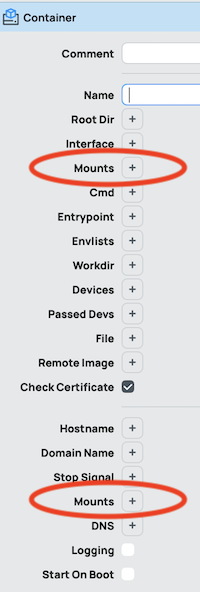
Somewhat unrelated but… at least in WinBox4… there are TWO editable Mounts items shown in dialog box for container:
Just because you don’t like the interface doesn’t mean it’s ugly. On the other hand, I agree with you that we need improvements in NAT, but at the Carrier Grade NAT (CGNAT) level.
Hi Mikrotik, we understand that things like tunnels need to be improved, but we need improvements in NAT at the Carrier Grade NAT (CGNAT) level. We need BFD and everything that’s on the roadmap for that protocol to be fully implemented. We hope to find a solution very soon. Some of us use Mikrotik for ISPs, not for tunnels to watch movies or video cameras.