Hi,
Already disabled on LAN bridge, which do NOT include ISP vlan interface.
Just disabling Accept RA in IPv6 settings made it.
Hi,
Already disabled on LAN bridge, which do NOT include ISP vlan interface.
Just disabling Accept RA in IPv6 settings made it.
CCR2216 13d 18h 49 165 Lifetime 1 232 718 since Nov 2025 nothing is written to disk.
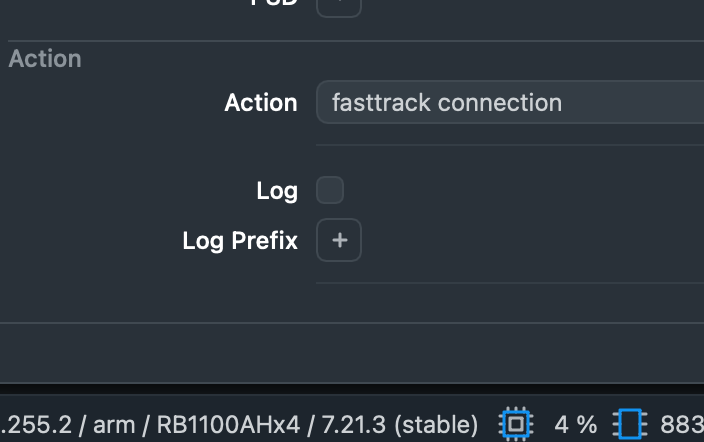
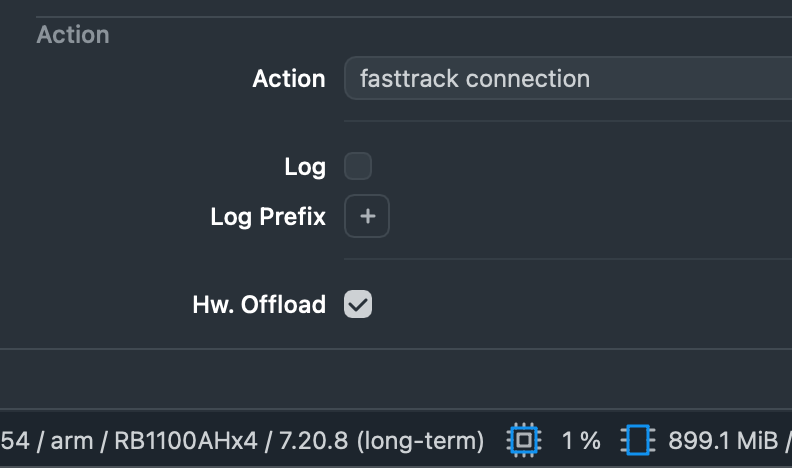
from v 7.21 :
*) firewall - hide hw-offload setting from devices that do not support it;
I think this setting applies to L3HW capable devices
Yes it looks like that indeed. Should this be seen as a bug in 7.20.8?
Probably not a bug (because probably ROS was smart enough not to try to configure uncapable switch chips) ... rather an "cosmetic oversight" which probably triggered some people into complaints about the feature not working.
It falls into same category as hiding /system/health on devices with none of sensors (command print used to return empty results in previous ROS versions).
On my CRS354-48P I got POE-trouble after updating to 7.21.3.
Every port got POE-error on every single port (48):
/interface/ethernet/poe/print detail
0 ;;; poe-out status: controller_error name="ether1-SWServer" poe-out=auto-on poe-voltage=auto poe-priority=10 power-cycle-ping-enabled=no power-cycle-interval=none
1 ;;; poe-out status: controller_error name="ether2-SWKK" poe-out=auto-on poe-voltage=auto poe-priority=10 power-cycle-ping-enabled=no power-cycle-interval=none
2 ;;; poe-out status: controller_error name="ether3-SWWoho" poe-out=auto-on poe-voltage=auto poe-priority=10 power-cycle-ping-enabled=no power-cycle-interval=none 3 ;;;
I tried soft reboot, hard reboot with wait but nothing worked.
After I downgraded to 7.20.8 al the errors dissapeared.
Did you update routerboot (System -> Routerboard -> upgrade)? Did you try to cold boot the device (with power removed for 10+ seconds)?
Yes, I know this kind of procedures are not normal for "simple ROS upgrade", but PoE devices can be a bit trickier. Their PoE controller seems to be a separated entity with its own "will" ...
This is a known issue on CRS354-48P-4S+2Q+RM with RouterOS 7.21.3 where all PoE ports may show controller_error. The problem has been fixed in RouterOS 7.22rc3.
After upgrading my CCR1009-8G-1S-1S+ from 7.20.8 to 7.21.3 my GBIC- ONT Fiber module from my provider wasn’t working anymore.
Interface is an ONT from Zyxel → PMG3000-D20B
This interface has internal webinterface for status; wasn’t even pingable after upgrade.
Also manually setting the speed to 1GBit full didn’t solve the issue.
All SFP- details were shown on the first tab as usual.
I had to downgrade back to 7.20.8 for SFP- ONT to work again…
All in all the 7.21.x firmware was the worst experience I had using RouterOS from 7.8 or something if I remember correctly.
First time ever upgrading a number of CRS354s to 7.21.0 crashed our network. If it was correlated to the PoE-controller bug, something with RSTP or configurations that were not migrated in the process, was more guessing than anything else. Thanks god, it was a LAN with direct access, so we downgraded to 7.20.6 and one device to 7.20.7 to get everything working again. Still, redundant connections didn’t work anymore and had to be unpatched.
Later we tried again to migrate to 7.21.1 / 7.21.2 one by one device to analyze the problem and find a solution.
The PoE-controller bug on CRS354 devices was difficult to notice at first. After restart the log didn’t show any problems, phones did start - and restart occasionally day after day. Later we noticed log entries and more and more ports failed. Luckily I saw a post in this forum and a few days later the release of 7.22rc3 had the solution.
The positive is that we now explicitly configured what was working oob implicitly.
Yesterday we decided to go with 7.22rc3, hope for a stable release soon and forget about 7.21. All devices are working fine so far.
This release works overall fine on the hAP ac2 but I cannot use ZeroTier anymore.
I can install ZT just fine and after reboot I still have some space left. However once I enable ZT and join a network, free space goes to 20 Kb and log is full of messages it can’t write configuration due to the lack of space. Rebooting the device disables ZT and free space is still 20 Kb. I removed all backups and minimized the configuration (just a handful of fw rules, few vlans, no address lists or blocklists) but that’s not enough, flash is way too small now.
That’s very sad since I was able to use ZT without an issue just few months ago…
This is a know issue with hAP ac2
There are hidden system log files that are consuming the space.
The only way to clear it atm is by Netinstalling the device unfortunately
I have several tickets open regarding these issues. Note your device is very close to losing all config on reboot with almost no space
I have scheduled the command "/console clear-history" to run regularly every month, which helps quite a bit, because I obviously forget to delete the history manually.
Version 7.22 has been released:
[ Edit: this has been resolved in 7.23beta5, thanks. ]
I’ve noticed an LTE IPv6 regression when upgrading from 7.21.2 to 7.21.3 on a Chateau LTE7.
On 7.21.2, once LTE connects, I get an IPv4 (CGNAT, expected), a link-local IPv6, and a global IPv6 address on the WAN lte1 interface, the latter I think being set from an RA from my mobile ISP.
On 7.21.3, I get only the IPv4 and link-local IPv6, no global IPv6 address.
This happens irrespective of /ipv6/settings/set accept-router-advertisements(-on).
7.21.2:
[admin@MikroTik] > /ipv6/address/print detail
Flags: X - disabled, I - invalid; D - dynamic; G - global, L - link-local; S - slave; d - deprecated
 0  D    address=::1/128 from-pool="" interface=lo actual-interface=lo vrf=main eui-64=no advertise=no no-dad=no auto-link-local=yes

 1  DL   address=fe80::d2ea:11ff:fe1a:65c8/64 from-pool="" interface=bridge actual-interface=bridge vrf=main eui-64=no advertise=no no-dad=no auto-link-local=yes

 2  DL   address=fe80::ae50:43ff:fe1a:eefd/64 from-pool="" interface=lte1 actual-interface=lte1 vrf=main eui-64=no advertise=no no-dad=no auto-link-local=yes

 3  DG   address=2001:8004:5130:d81:ae50:43ff:fe1a:eefd/64 from-pool="" interface=lte1 actual-interface=lte1 vrf=main eui-64=no advertise=no no-dad=no auto-link-local=yes valid=44m34s preferred=14m34s
[admin@MikroTik] > /ipv6/settings/print
                     disable-ipv6: no
                          forward: yes
            multipath-hash-policy: l3
                 accept-redirects: yes-if-forwarding-disabled
     accept-router-advertisements: yes
  accept-router-advertisements-on: WAN
       disable-link-local-address: no
   stale-neighbor-detect-interval: 30
           stale-neighbor-timeout: 60
             min-neighbor-entries: 1024
        soft-max-neighbor-entries: 2048
             max-neighbor-entries: 4096
                  allow-fast-path: yes
            ipv6-fast-path-active: no
           ipv6-fast-path-packets: 0
             ipv6-fast-path-bytes: 0
            ipv6-fasttrack-active: yes
           ipv6-fasttrack-packets: 0
             ipv6-fasttrack-bytes: 0
7.21.3:
[admin@MikroTik] > /ipv6/address/print detail Flags: X - disabled, I - invalid; D - dynamic; G - global, L - link-local; S - slave; d - deprecated 0 D address=::1/128 from-pool="" interface=lo actual-interface=lo vrf=main eui-64=no advertise=no no-dad=no auto-link-local=yes 1 DL address=fe80::d2ea:11ff:fe1a:65c8/64 from-pool="" interface=bridge actual-interface=bridge vrf=main eui-64=no advertise=no no-dad=no auto-link-local=yes 2 DL address=fe80::ae50:43ff:fe1a:eefd/64 from-pool="" interface=lte1 actual-interface=lte1 vrf=main eui-64=no advertise=no no-dad=no auto-link-local=yes
Downgrading to 7.21.2 (also 7.21.1, 7.20.8) and the global IPv6 address reappears.
Upgrading to 7.22.1 and the regression still occurs.
The ISP is Telstra Australia. IPv6 is over RA, there’s no DHCPv6 prefix delegation. The full config on the Chateau LTE7 is essentially factory standard; this is the first thing I tried when I turned it on.