Having issues with AirPlay audio with 7.21. It has worked for years but stops with 7.21. Both receiver and “transmitter” are on the same wifi interface (qcom 5ghz AX on a CAP AX), multicast enhancement enabled. I see the device in Airplay fine but once I select it the audio never plays. Works fine using Airplay video, but not for Airplay 1 audio only. Falling back to 7.20 resolves it.
BGP L2VPN AFI has been broken since ROS 7.20 and continues to not work on this RC. No prefixes are being received from the BGP peer. Downgrading to 7.19.x resolves the issue [SUP-204802].
/routing bgp instance
add as=65000 disabled=no name=bgp65000
/routing bgp connection
add afi=l2vpn-cisco disabled=no instance=bgp65000 local.address=10.1.1.5 .role=ibgp name=ROUTE-REFLECTOR remote.address=10.1.1.10 .as=65000
/routing/bgp/session/print
Flags: E - established
 0 E name="ROUTE-REFLECTOR-1" instance=bgp65000
     remote.address=10.1.1.10 .as=65000 .id=10.1.1.10 .capabilities=mp,rr,as4 .afi=l2vpn,l2vpn-cisco .messages=2211 .bytes=81003 .eor=""
     local.role=ibgp .address=10.1.1.5 .as=65000 .id=10.1.1.5 .cluster-id=10.1.1.5 .capabilities=mp,rr,enhe,gr,as4 .afi=l2vpn-cisco .messages=1491 .bytes=28394 .eor=""
     output.procid=20
     input.procid=20 .ignore-as-path-len=yes ibgp
     multihop=yes hold-time=3m keepalive-time=1m uptime=1d49m46s490ms last-started=2025-12-03 13:14:22 prefix-count=0
Mikrotik found a genius solution to this - remove straight access to all pre-7.20 downloads from their “new shiny” website.
About the issue of DSTNAT rule failing to match on my RB5009 that i mentioned in the post above: V7.21rc [testing] is released! - #17 by CGGXANNX
I did further testing on the RB5009 with 7.21rc1 and there seems to be a bug with the in-interface assignment in the dstnat chain for connections coming from an untagged VLAN of a bridge port:
I've added two rules to dstnat and filter that log TCP connections with destination port 855
/ip firewall nat
add action=accept chain=dstnat dst-port=855 log=yes log-prefix=NAT protocol=tcp
/ip firewall filter
add action=accept chain=forward dst-port=855 log=yes log-prefix=FILTER protocol=tcp
Here are the log results with connection attempts from several VLANs and ports of the RB5009:
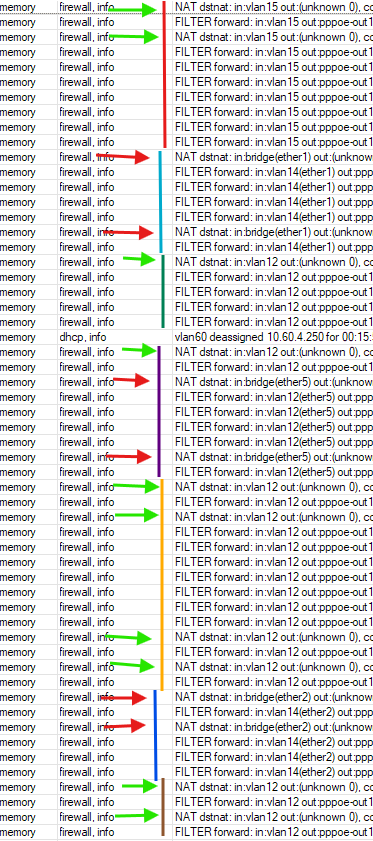
When the connection is coming from a tagged VLAN of an ethernet port, in the DSTNAT chain the in-interface is correctly identified. In the screenshots they are marked by the green arrows. In the filter table, chain forward, the in-interface is also correct.
However, if the VLAN is an untagged VLAN of the port, in the DSTNAT chain the in-interface is incorrectly assigned as bridge (with information about the port), as you can see pointed by the red arrows. When the packet reaches the forward chain of the filter table, however, the in-interface becomes the correct one (but it has the bridge port information attached).
I've tested with access ports and hybrid ports (ether1, ether2, ether5 in the screenshot). If the VLAN is tagged, then the interface is correct in the DSTNAT chain, but if it's untagged, then it's identified as bridge, which is incorrect and was the reason why my DSTNAT rules could not match (because they have checks on in-interface-list/in-interface). In the screenshot you can see for example that vlan12 can be correctly detected or not based on whether it's untagged on the port or not (it's tagged ether1 and ether2 and untagged on ether5).
The bridge has Bridge VLAN Filtering with L2 hardware offload on all bridge ports active (H flag).
Test on a spare RB750Gr3, also with Bridge VLAN Filtering and hardware offload, doesn't show the issue!
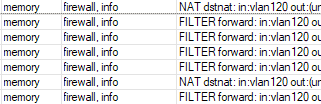
Have modifications been made to the VLAN handling for the RB5009? The problem did not exists on versions <= 7.20.5.
The issue with fasttrack only working for a short moment after reboot, and then not anymore is unrelated to the VLAN configuration, the problem happens on my RB5009 regardless of ports and VLAN modes. However, on the RB750Gr3 fasttrack appears to be working normally. Maybe it's another change in the bridge handling of the RB5009 that broke FastPath?
My RB5009 has all ports in a single bridge with VLAN only (the bridge interface is not use with L3).
I am newbie here and was really surprised from omitting previous versions from download section. IMHO it is not a smart move.
DNS forwarders do not support VRF, so DNS support for VRF is incomplete.
/ip dns
set allow-remote-requests=yes cache-max-ttl=3d cache-size=51200KiB doh-max-server-connections=10 servers=8.8.8.8@vrf_wan,8.8.4.4@vrf_wan

[admin@router-edge] /ip/dns/forwarders> add name=9.9.9.9 dns-servers=9.9.9.9@vrf_wan
invalid or unexpected vrf or routing table value
I created a support ticket [SUP-205477] a few days ago.
Just a couple of things, when updating from 7.21_beta9 to this version my BTH stopped working it was showing as revoked and disabled. Also when I try to scan the QR code in dark mode my phone refuses to scan the QR code, as soon as I turn off dark mode it grabs the QR code with no problems.
Sorry I know the dark mode is related to Winbox 4 but just pooling them together.
Is that standard fair when updating to a new version for the BTH to turn off ?
Can you create a supout.rif file when issue is active and send it to support@mikrotik.com?
You have not provided your configuration, so I have to guess. Is there a chance you are using this setting?
/interface bridge settings
set use-ip-firewall=yes
Or maybe you are using containers on the RB5009?
nmt has right, wifi7 without 6GHz is not wifi7. I bet it will be appearing slowly.
Hi,
I don't have use-ip-firewall set (/interface bridge settings export is empty). I do have containers but all the VETHs are in separate bridges, the main bridge only has hardware ports.
I am reluctant to send the supout.rif right now because it's my home's main router and I cannot reduce the configuration to strip out sensitive informations (comments and credentials in scripts) that are included in supout.rif. I am pasting some export output here, maybe they are enough to reproduce the issue?
I am back to 7.20.5 so the exports are produced by that version. But I've made no configuration changes in my two attempts to upgrade to 7.21rc1.
/interface ethernet export
/interface ethernet
set [ find default-name=ether1 ] advertise=1G-baseT-full,2.5G-baseT
set [ find default-name=ether2 ] advertise=1G-baseT-full
set [ find default-name=ether3 ] advertise=1G-baseT-full
set [ find default-name=ether4 ] advertise=1G-baseT-full
set [ find default-name=ether5 ] advertise=1G-baseT-full
set [ find default-name=ether8 ] advertise=1G-baseT-full
set [ find default-name=sfp-sfpplus1 ] auto-negotiation=no comment=GPON mac-address=XX:XX:XX:XX:XX:XX speed=2.5G-baseX
/interface veth export
/interface veth
add address=10.23.8.5/24,2001:470:xxxx::5/80 dhcp=no gateway=10.23.8.1 gateway6=\
    2001:470:xxxx::1 mac-address=PP:PP:PP:PP:PP:PP name=veth-alpine
add address=10.23.8.6/24,2001:470:xxxx::6/80 dhcp=no gateway=10.23.8.1 gateway6=\
    2001:470:xxxx::1 mac-address=RR:RR:RR:RR:RR:RR name=veth-unbound
add address=10.23.7.4/24 dhcp=no gateway=10.23.7.1 gateway6="" \
    mac-address=QQ:QQ:QQ:QQ:QQ:QQ name=veth-udpxy
/interface bridge export
/interface bridge
add admin-mac=YY:YY:YY:YY:YY:YY arp=reply-only auto-mac=no frame-types=admit-only-vlan-tagged \
    name=bridge vlan-filtering=yes
add admin-mac=MM:MM:MM:MM:MM:MM auto-mac=no name=containers protocol-mode=none
add admin-mac=NN:NN:NN:NN:NN:NN auto-mac=no name=iptv protocol-mode=none
/interface bridge port
add bridge=bridge interface=ether2 pvid=14
add bridge=bridge frame-types=admit-only-untagged-and-priority-tagged interface=ether3 pvid=14
add bridge=bridge interface=ether4 pvid=14
add bridge=bridge frame-types=admit-only-untagged-and-priority-tagged interface=ether5 pvid=12
add bridge=bridge interface=ether6 pvid=14
add bridge=bridge interface=ether7 pvid=14
add bridge=bridge frame-types=admit-only-untagged-and-priority-tagged interface=ether8 pvid=15
add bridge=bridge edge=yes frame-types=admit-only-untagged-and-priority-tagged interface=sfp-sfpplus1 pvid=1000
add bridge=bridge interface=ether1 pvid=14
add bridge=iptv interface=veth-udpxy
add bridge=containers interface=veth-alpine
add bridge=containers interface=veth-unbound
/interface bridge vlan
add bridge=bridge tagged=bridge,ether1,ether2 untagged=ether5 vlan-ids=12
add bridge=bridge tagged=bridge,ether1,ether2 untagged=ether8 vlan-ids=15
add bridge=bridge tagged=bridge,ether1,ether2 vlan-ids=60
add bridge=bridge tagged=bridge untagged=ether1,ether2,ether3,ether4,ether6,ether7 vlan-ids=14
add bridge=bridge tagged=bridge untagged=sfp-sfpplus1 vlan-ids=1000
add bridge=bridge tagged=ether1,ether2 vlan-ids=124
add bridge=bridge tagged=ether1,ether2 vlan-ids=128
add bridge=bridge tagged=ether1,ether2 vlan-ids=122
add bridge=bridge tagged=ether1,ether2 vlan-ids=126
add bridge=bridge tagged=ether1,ether2 vlan-ids=120
add bridge=bridge tagged=ether1,ether2 vlan-ids=132
add bridge=bridge tagged=ether1,ether2 vlan-ids=130
/interface vlan export
/interface vlan
add arp=reply-only interface=bridge name=vlan12 vlan-id=12
add arp=reply-only interface=bridge name=vlan14 vlan-id=14
add arp=reply-only interface=bridge name=vlan15 vlan-id=15
add arp=reply-only interface=bridge name=vlan60 vlan-id=60
add comment=GPON interface=bridge name=vlan1000 vlan-id=1000
/ip settings export
/ip settings
set ipv4-multipath-hash-policy=l4
The vlan12, vlan14, vlan15, vlan60 interfaces have normal /ip address and DHCP server assignment, with the DHCP servers having add-arp=yes because the interfaces all have arp=reply-only.
vlan1000 has PPPoE client on top (which is WAN).
In the firewall the raw and mangle tables are empty. /ip firewall connection export is empty. /routing rule export is empty. The dstnat rule from the previous post which is moved to the top is the first rule that is hit.
The issues encountered are:
- DSTNAT rules see wrong
in-interfacewhen the connection is from untagged VLAN. - Fasttrack ineffective, counters don't increment although connections have
Fflag (symptoms like last year when I had DHCP snooping enabled onbridgeand you've explained to me that it disabled FastPath).
Do you have an option to disable the container package, reboot and see if this fixes the problem?
I've to go out soon so will not be able to redo the upgrade and disable the container package right now. But now that you mention it, previously when I that the real dstnat rules (not debugging rules) with logging turned on and reboot, it does appear that the rules get hits correctly until the log lines from the containers starting up appeared.
Also, maybe the fasttrack thing is related to that too. Like I mentioned in the previous posts, fasttrack does work for a short moment after reboot, with the counters counting a few tens of KiB, then stopped. Maybe they stopped after the containers have started, but I can only verify this in a few hours.
The same behavior is reproduced in our labs, it is somehow container related. We will look for solution. Thanks for the report! 
The problems of ports with DHCP Has the problems of ports with DHCP been implemented? This version seemed better in this problem.
I’m having the same issus with fast track and with containers. What I did do is reaply
config changed by mac-msg(winbox):admin@F8:E4:3B:7F:DF:63 (/interface bridge settings set allow-fast-path=yes use-ip-firewall=no use-ip-firewall-for-pppoe=no use-ip-firewall-for-vlan=no; /interface ethernet switch l3hw-settings set; /interface ethernet switch l3hw-settings advanced set; /ip firewall connection tracking set; /ip neighbor discovery-settings set; /ip settings set; /ipv6 settings set)
Now it looks like fast track is working with passthrough counters working.
Just need to reboot now and see it the reapply setting work after reboot.
Update in a minute…
Update:
Still no passthrough counters.
If I wait for the container to run then reset Allow fast path
Counters start working again.
Update: I believe I track it down to Allow Fast Path
Maybe also look at this change:
veth - show only when container package installed
I also seen that even with container package is uninstall.
I still have veth interfaces running.
Please change this back… And make it a re-release rc1..
IPIP tunnel won’t establish since 7.21.
If put over IPsec (that works on 7.20), IPIP interface status is UP on 7.21 peer and DOWN on 7.20 peer (keepalive enabled on both sides)
I just took notice that in rc1 I have no veth interface. It’s completely missing.
(Webfig, Winbox and cli)
model CRS309-1G-8S+
That topic again? I also ended up setting the lifetime very low. The lifetime in the screenshot is only that high because of a Windows bug. However, the Preferred Lifetime of the old IPv6 addresses was always set to 0.
In RouterOS's case, when you reboot the router, it doesn't notify the other devices in LAN that the old prefix should be deprecated, it just reboots. After the reboot of course the router also has no knowledge about the prefix from the previous boot, and will just advertise the new fresh prefix.
On the clients, all prefixes old and new are marked as preferred until the preferred lifetime expires. An upgrade to 7.21rc1 for example, with two reboots (one for the RouterBOARD upgrade) will leave 3 active preferred prefixes on the client devices.
When the prefix changes without the router being rebooted, then the router does correctly advertise the old prefix(es) as deprecated. Maybe it should be modified to save the old prefix information of the interfaces (including remaining lifetime) to storage before the reboot, so that it can still be able to advertise them as deprecated in case the prefixes change after reboot.
Somewhat similar to how the DHCP server remembers active leases at reboot. The DHCP server also periodically saves the leases to storage to deal with unexpected power losses. That could also be done for dynamic IPv6 prefixes being advertised on interfaces.
This is related to this change in the latest RC.
When you install the container package, the VETH menu will be visible again.