To upgrade, click "Check for updates" at /system package in your RouterOS configuration interface, or head to our download page: http://www.mikrotik.com/download
Everything went smoothly
I encountered an issue after the update (please post about the device, configuration, and unexpected symptoms)
I encountered an issue, but solved it (please post the solution)
0voters
If you experience version related issues, then please send supout file from your router to support@mikrotik.com. The file must be generated while a router is not working as suspected or after some problem has appeared on the device
Please keep this forum topic strictly related to this particular RouterOS release.
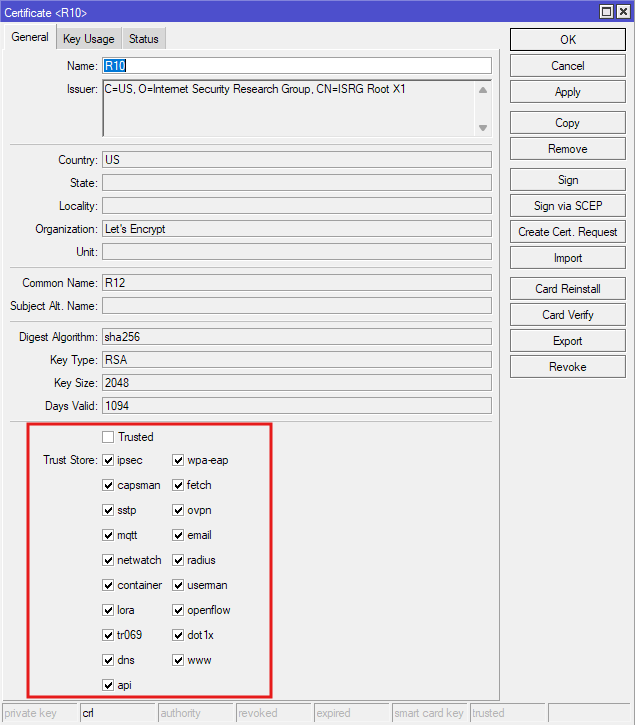
That allows you to specify the individual sections where the certificate should be trusted.
As an example: Before this version, if you implement EAP-TLS authentication with User Manager, for Dot1X or Hotspot, WPA2/3-Enterprise, etc, the client being authenticated only needs to present a certificate signed by any of the CA you might have in your certificate list. Which means if you have that R12 intermediate certificate from Let's Encrypt in your list for example (like in my screenshot), in theory Let's Encrypt would be able to issue fake certificates that allow login to your Hotspot or WPA2-Enterprise WiFi. This is actually a big security hole.
Now in 7.21 even if I have this R12 certificate from Let's Encrypt in my list, I can turn off the checkboxes like userman, dot1x, radius, etc... on this particular certificate, and only keep dns and fetch for example, and Let's Encrypt won't be able to issue certificates that can give access my EAP-TLS WPA3-Enterprise WiFi anymore.
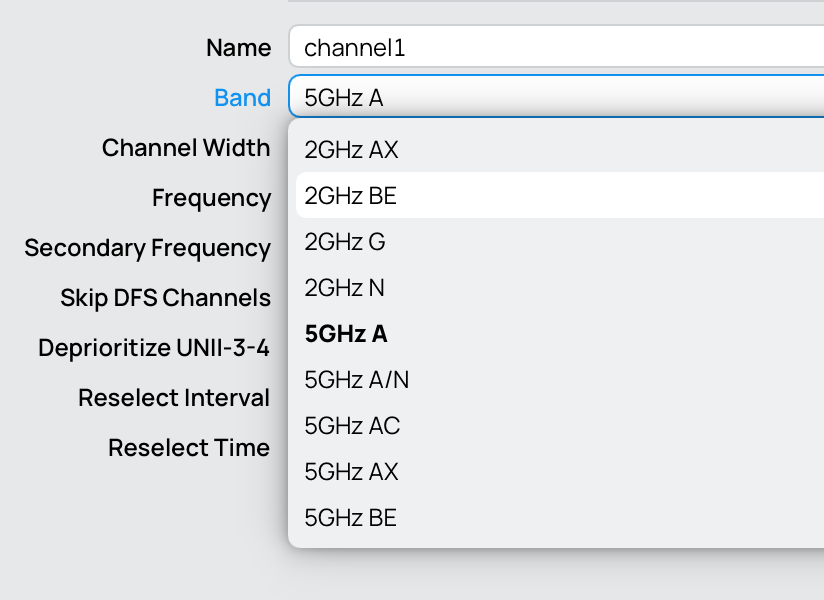
And 6GHz will be congested even faster if everybody start using 320MHz channels… Just like old days when 5GHz AC band and 80MHz channels become popular
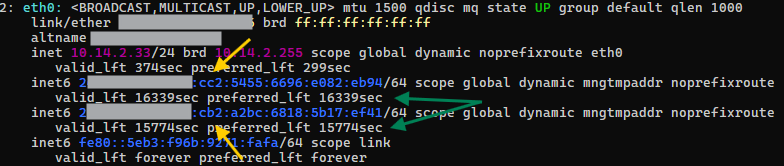
My ISPs only give out dynamic IPv6 prefixes via DHCPv6 which change with each PPPoE redial/router reboot. Those prefixes have both Valid Lifetime and Preferred Lifetime set at 5 hours. The problem is that when the router reboots for example, RouterOS doesn't announce that the old prefixes are deprecated, which means after a reboot the clients all have multiple prefixes, both new as well as the old, no longer valid ones, marked as preferred. As a result, they may have no IPv6 connectivity to the internet if they pick the addresses with the old prefixes as source addresses.
Until now I was able to workaround the issue by setting:
/ipv6 nd prefix default
set preferred-lifetime=10m valid-lifetime=10m
And the advertised prefixes are valid/preferred for at most 10 minutes. Which means when the issue occurred after a router reboot/redial, clients will have a period of invalid "preferred" addresses for at most 10 minutes, before the old addresses disappear and IPv6 WAN connectivity is possible again.
Now with the change in 7.21 the two settings above are ignored. Instead, the lifetime is now taken from the pool with the ISP prefix, and in my case with 5 hours lifetime.
I am now sitting here with my devices having no IPv6 for the next 4.3 hours:
Well theoretically without IPV6 for the next 4.3 hours as you wouldnt deploy this for real yet.
My question is why do I see a new button called APP on my ax3, just below Tools and just before Container but on my RGB450 RB, the new APP button is missing??
7.21rc1, and latest winbox on both, plus boards updated to firmware etc.
Unfortunately. after a few hours trying 7.21rc1 on my home RB5009, I have to downgrade back to 7.20.5. This is the first time I had to downgrade something on this RB5009. The issues I encountered include:
Fasttrack (both IPv4 and IPv6) no longer working. All the counters on the "dummy" dynamic rules are not increasing except for a few KiB and a few packets on the IPv4 dummy counters which appear to have increased for a very short time right after reboot.
Very simple DSTNAT rules simply no longer work, in both the IPv4 and IPv6 NAT tables. Here as some of the rules:
The counters are simply not increasing and stays at 0 except for the first rule which has a couple of packets counted. When I turn on logging on all of the rules and reboot the router, it turns out that right after reboot for some seconds, the DSTNAT rules would be hit (hence the few packets counters). However after a few tens of seconds, none of the counters are increasing and nothing is logged anymore. Something might have changed internally after the post boot activities have completed. Replacing in-interface-list with in-interface made no difference.
It might have something to do with the fasttrack counters also stop increasing after a short period after boot.
Anyway, I've downgraded back to 7.20.5 and everything is working normally again. Once I've more time, I'll try to reproduce the issues on other devices.
On upgrading to this from beta9 (?) my iperf3 container will no longer auto-start on boot. /container/print complains:
Flags: S - STOPPED
Columns: NAME, ROOT-DIR, INTERFACE, CPU-USAGE, TAG
#   NAME           ROOT-DIR        INTERFACE  C  TAG
;;; child spawn failed: container run error
0 S iperf3:latest  /iperf3:latest  veth1      0  quay.io/tangent/iperf3:latest
The logs say the same thing.
If I remove it and re-add it, it runs until the next reboot, and then the problem recurs.
This is on an RB4011, so no /app without USB storage or a tmpfs imitation.
It doesn't matter because this container writes nothing but one tiny temporary file per connection attempt internally, on /tmp, which I recall being auto-mapped onto tmpfs by the container.npk runner.