Are you sure about that? With a static IP and no defined default route, there will normally be no internet access.
Hello @pe1chl
I am aware of what you are saying. Despite it not being the correct configuration, I didn't touch it because it worked. But yes, I am sure that everything was working before the upgrade.
I only restricted neighbor access in a previous setup modification, and I have all my configurations under Git control. I was always able to upgrade firmware versions until now without any issues.
Please check this bug on your Mikrotik’s:
IN Webfig/WinBox
Routing - Rules
ANY NEW RULE => INVALID
ANY ACTIVE RULE => DISABLE => ENABLE => INVALID
print in ssh gives additional information:
/routing/rule> print
Flags: X - DISABLED, I - INACTIVE; * - DEFAULT
0 I ;;; lte
;;; invalid chain name
dst-address=1.0.0.1/32 action=lookup-only-in-table table=lte chain=""
adding role via ssh => OK
I wonder how many people actually use wifi-qcom-ac on RB4011iGS+5HacQ2HnD-IN since it doesn't support 2.4Ghz wifi on that device... and since it is the only device that I am aware of that use QCA9984, which increases wifi-qcom-ac size by hefty 0.5MB, maybe they could just skip supporting it in wifi-qcom-ac, or maybe make wifi-qcom-4011 as a separate package, and make many more users happy campers 
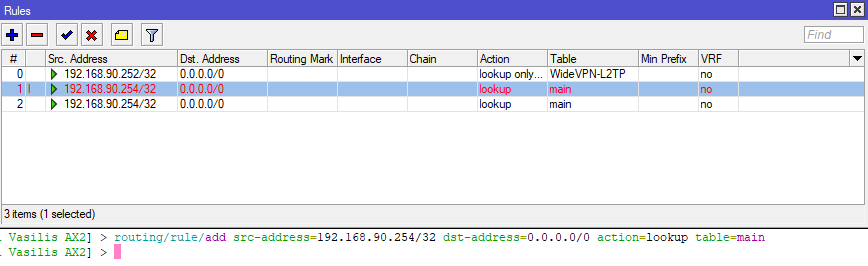
Same bug like @ortazebra
If you add/edit the routing rules with WinBox, set the chain to user to workaround the issue while keeping the behavior of <= 7.21.
True, I never installed wifi-qcom or wifi-qcom-ac on my RB4011 despite there being plenty of space, because it would mean the 2.4 GHz WiFi no longer works and I cannot have that.
Of course the dream solution wouldbe to have a wifi-4011 package that supports both the 2.4 and 5 GHz WiFi on this particular router. And then the driver could be deleted from wifi-qcom-ac.

It makes me 
Here in smol-homenet everything works.
Not YOLO enough to install a .0-version at work o_O
This seems to fix an issue I had with ipsec (ikev1, profile dh-group=ecp521 enc-algorithm=aes-128 hash-algorithm=sha256, proposal auth-algorithms=sha256 enc-algorithms=aes-128-cbc pfs-group=ecp256) getting stuck at “message-1-sent” that I’ve had with Chateau lte18 ax since I got it. (The other side logged “reserved field non-zero”).
Doesn’t seem to tie up with a changelog entry though. It would be nice if whatever fixed this could be backported to long-term
There's also RBD25G-5HPacQD2HPnD, and the LTE6 kit version of it, RBD25GR-5HPacQD2HPnD&R11e-LTE6
oh yes thats the trick to fix it
MikroTik hAP ax². Everything is perfect after the update. I can’t believe a router can be this great!
Now that 7.22 is released as stable, please update the documenation of /routing/rule as it seems to have changed under the hood.
Please update wifi documentation. WiFi - RouterOS - MikroTik Documentation
I was actually just about to post questioning this, is this intended for where CAPsMAN isn’t needed and you’re setting up an individual router only / average home setup? Like a singular hAP AX3 for example?
After upgrading the E62iUGS-2axD5axT to RouterOS version 7.22 with the wifi-mediatek package installed, RDP sessions started to lag and freeze. Only the RDP sessions are affected — all other resources on these hosts continue to work normally at that time. Rolling back to 7.21.3 resolves the issue.
I have been waiting patiently for this release. I wanted the reverse proxy functionality. The question did someone figured out how to use it? I tried to configure it with built in certificate authority that I use for SSTP VPN because I only need it for local services that are never going to be exposed to the internet. From what I see official documentation has not yet been updated. I will appreciate any help on the matter. Thank you everybody in advance!
Ra guard work like a charm. I was looking for a dhcp snooping like for ipv6, now it's done!