From 7.20.8. It looks like the issue is with wpa3-psk. I set the authentication type to wpa2-psk but that didn't work. What ultimately worked was to remove the security configuration profile and re-add it.
Currently both station-bridge are on 7.22, the AP is back on 7.20.8. I will do another upgrade attempt tomorrow morning for the AP.
In such cases the best thing you can do (at least when you have some time and expertise) is to do a /export show-sensitive file=config and download it, netinstall the router with no default config, and import the exported file again from a winbox connected to MAC-address.
But, it is a tricky operation and when you do not fully understand the matter you may cause more problems than you have now.
Well, that is a good find! I do not really remember where that was happening, I can only guess from some context. I do not see log messages like that recently in our log server. The router where it was happening likely was replaced after that with a more modern type, so the export/import has occurred already.
Only thing I currently see is “in:(unknown 0)” for log messages from the “output” chain for traffic that originates from the router itself.
Thank you for your time in helping me solve this problem , I tried many ways but failed at last.
luckily, i got a backup image (ROS is running in PVE)
Then , i exported the configs in the ROS running now , use the backup image to return to the last version
Re-update in ros winbox packages manager, and re-upload the config file just exported after the update is done.
Magically, after the re-update and re-config-upload, my log became normal : [BadIP_Added] prerouting: in:pppoe-out1 out:(unknown 0) ,the problem is gone.
Well, i’d like to say : buckup is necessary, indeed.
Thank you again for your kind and generous help, i wish you have a good day!
Not OP, but facing the same issue since updating to 7.22 and I’ve downgraded one router to 7.21.3 for some troubleshooting.
Routing table on 7.21.3 of the very same container:
$ ip rule list

90:	from all masquerade
200:	from all lookup local
5210:	from all fwmark 0x80000/0xff0000 lookup main
5230:	from all fwmark 0x80000/0xff0000 lookup default
5250:	from all fwmark 0x80000/0xff0000 unreachable
5270:	from all lookup 52
2147483646:	from all lookup main
2147483647:	from all lookup default
And on 7.22:
$ ip rule list

1:	from all lookup local
2:	from all lookup main
3:	from all lookup default
5210:	from all fwmark 0x80000/0xff0000 lookup main
5230:	from all fwmark 0x80000/0xff0000 lookup default
5250:	from all fwmark 0x80000/0xff0000 unreachable
5270:	from all lookup 52
anything specific I can check?
It’s table 52 which is not accounted for, since the lookup to main happens with a higher priority; adding an explicit routing rule in main mitigates the issue
upgrading from 7.21.3 to 7.22 screwed my “skin” configurations … it went from (on 7.21.3)
/user group set full skin=wifiquefunciona7
to
/user group set full skin=*E491A
(or any other random string)
on 7.22.
confirmed on RB3011s, RB4011s, CCRs and HeXs (funny enough, not in ALL routers, but at least once in all these models, i would say happened on 40% of routers I upgraded)
simple to reconfigure, it works, no problem … but clearly the upgrade procedure didn’t handled that well enough.
Yep, I have the same issue. Set the chain to “local”. The GUI will still show it invalid but if you do /routing/rules print at the command line it will show without the invalid tag.
Upgrades from 7.21.3 to 7.22 and had big issues with CapsMAN.
SOO many logs that it took a while to see what was wrong but more or less all access points registered and clients connected but after 30 seconds all AP’s vanished and then restored connection again and the cycle continued.
After some troubleshooting I saw in the log Disconnecting accesspoint@IPAddress, data channel timeout and then I remembered the entry in the changelog
wifi - added keepalive message in CAPsMAN data channel;
So I assumed this was related to SSID’s where I use CapsMAN processing for the traffic, removed this from Datapath config and all worked. Stable as a rock now. This alsoe explains other issues I saw on 7.21.* but did not correlate to Datapath and capsman processing.
I assume this is a firewall rule somewhere on CapsMAN as default for Inbound is drop. Have not had time to troubleshoot but in the end I do not need CapsMAN processing as everything was setup without it.
Same issue here — CRS328-24P-4S+ became completely unreachable after upgrading to 7.22
After upgrading from 7.21.3 to 7.22, my CRS328-24P-4S+ became unresponsive. I lost all connectivity — no WinBox, no WebFig, no SSH, no MAC-Telnet from other devices on the network.
I had to physically connect a laptop directly to the switch and downgrade back to 7.21.3. After the downgrade, everything came back to normal immediately.
Similar to @HoracioDos experience in post #4. The switch simply stopped being accessible on the network after the upgrade.
Device: CRS328-24P-4S+
Previous version: 7.21.3
Upgraded to: 7.22
Fix: Downgrade to 7.21.3 via direct connection
Just to clarify: I never lost local access to the router or switches, and the RB5009 maintained internet connectivity at all times. Only the switches lost the ability to reach the internet and it was perfectly solved adding the static default route /ip route add dst-address=0.0.0.0/0 gateway=192.168.10.1 and /ip dns set servers=192.168.10.1
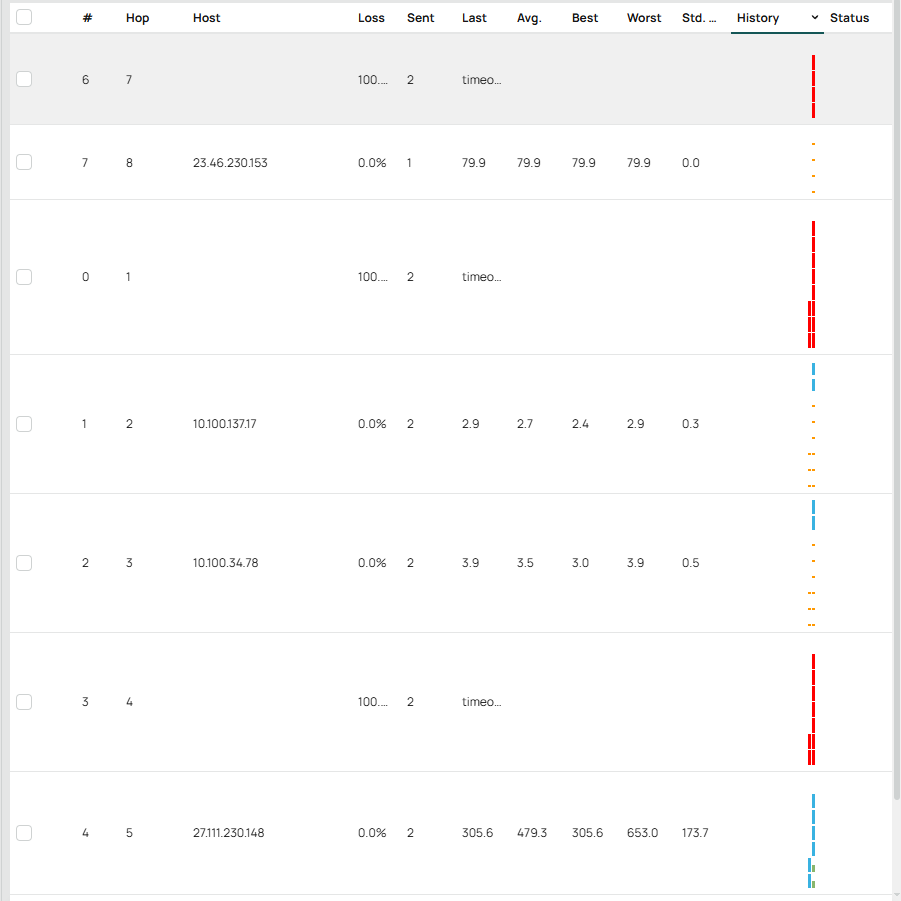
Hello, I encountered the following issue after installing 7.22
Device: Mikrotik Hex
Issue: Traceroute tool on web, history column bars are now expanding vertically instead of horizontal, causing the results to expand endlessly, screenshot attached for reference.