V7.22rc [testing] is released!

route - removed preset rules and use routing/settings policy-rules (introduced in v7.22beta1);

Can someone explain what this is? I was changing some routes and they got marked as invalid, because it seems the chain now must be set. I have the selection between a few chains (ie local/main/user and some more) but I am not sure what exactly each one does. I did notice that choosing the ‘mangle’ route makes DNS lookups take ages - they are fast with ‘user’.

Here is the relevant part in the documentation: IP Routing - RouterOS - MikroTik Documentation.

There is currently a bug when using the routing rules with WinBox that make the property becomes chain="". If you want to keep the same behavior as <= 7.21, when adding or editing routing rules in WinBox you'll need to set the chain to user, by default, this is the chain matching this:

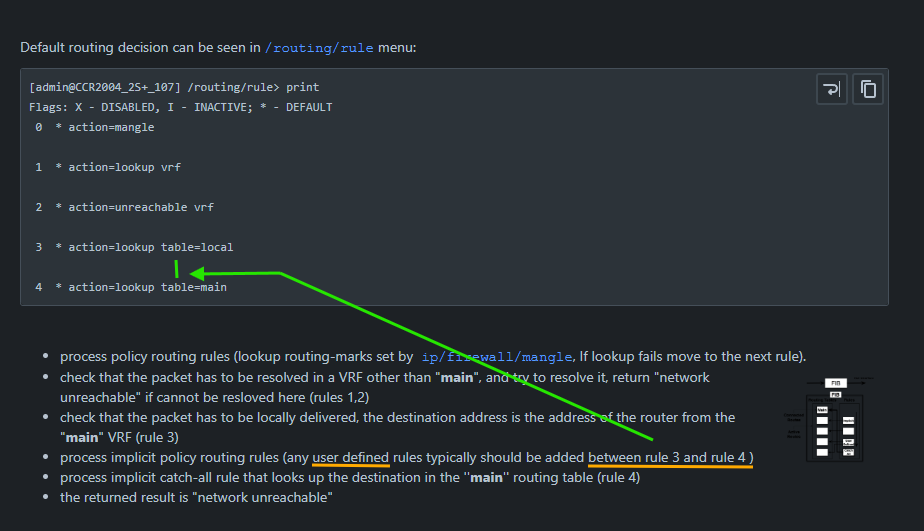
  • process implicit policy routing rules (any user defined rules typically should be added between rule 3 and rule 4)

It's not an issue when adding/editing the rules with the command line. You can also use the command unset on the command line to clear the chain property if you don't want it to have the user value.

Yes, I've updated my script to check for acme-status. Unfortunately, it' a string that changes value with each stage of the ACME process, I'm not sure that I've caught all possible values (generating private key, generating ssl certificate signing request, requesting SSL certificate, requesting validation...). While the success status is unique, the error status contains the whole error string and this can also be many things (not only something containing http-01 challenge validation failed, it can also have too many certificates (5) already issued...).

So, for now I'm breaking the delay loop when the acme-status is the success message, or something containing failed or that too many certificates substring, but also when over 90 seconds have elapsed.


Also, there is no command to manually trigger the renewal of an existing ACME certificate (because I want to prepare the firewall and www service beforehand), so my script now just runs the command to get a new certificate with a different name (timestamp appended to the end) and when successful, removes the old certificate.

Must of tried to pull a cert when testing and forgot!

None of the 7.22rc versions work on my CRS304-4XG. I uploaded the autogenerated supout file.

I totally agree. There must be an option to turn the automatic blackhole route adding completely off and to add the blackholes manually when and if needed.

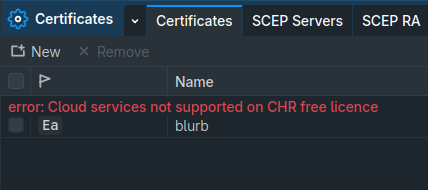
Oh, I've had that happen myself. FWIW, you also don't get it in 60d trial license either (screenshot show free). And, you don't get /ip/cloud in trial either. Apparently need a paid license – I'd never noticed until 7.22 when I went to try the new /app feature, which needs /ip/cloud for HTTPS support.

Yeah I just wanted to catch up with all the latest APP/container stuff and came to a full stop, I didn't try grabbing a free CHR License trial so thanks for that snippet. I'm just using caddy for the moment trying to decide If I want to pay £45 or just get a Hap be with thread and matter which is prolly the better choice but not what I want right now.

If I disable and re-enable a /routing/rule , or create a new one, it is marked as invalid (red). there does not seem to be any way to make it active

Update: problem seems to exists in v7.22rc3, 7.22rc4, and also 7.23beta1-nightly

v7.22rc2 is fine.

@normis @mrz It s needed a better documentation about Routing Rules.

  • Implicit rules, explicit rules.
  • Devices with and without contrack active and its implication on routing rules.
  • Implications on hardware off-load (L2 and L3)
  • Chains
  • Possible future interactions with flowspec.
  • And Etc…

select chain, it helped in my case.

Changes are made before rc4 and existing rules works until you disable/change/add new etc.

My rules are simple - some IPs over WG tunnel, without “chain=local” routes are invalid, with selected chains works:

add action=lookup chain=local disabled=no src-address=192.168.138.222/32 table=overWG
add action=lookup disabled=no src-address=192.168.138.233/32 table=overWG

@kowal It worked, thank you

No, don't select chain=local. For the custom routing rules that you added, the default chain is supposed to be user, not local!

Version 7.22 has been released:

I must read docs about diffrences, but with chain=user it simply doesn’t work

Unfortunately there is no documentation, i.e. the existing documentation about /routing/rule has not been updated and now is no longer valid. The workings have changed a couple of times during 7.22 development and now 7.22 has been released but the final state of /routing/rule and what that “chain” means is now unclear.

The documentation is currently not up-to-date, you'll have to dig up old discussions in the beta & rc threads (you can look for my posts in the beta thread).

The "chain" mechanism was introduce pretty late (until one of the rcs). Previously in the beta, this was as introduced in the documentation in January:

IP Routing - RouterOS - MikroTik Documentation

(here is the documentation changelog)

Previously, under 7.21 and older, when you added routing rules to the table, the rules were implicitly placed at the location pointed at by the green arrow, between the built-in rule #3 (local address lookup) and #4 (main table fallback). That's why when no routing rules matched, the default action was to lookup in the main table.

The betas of 7.22 made those invisible default rules visible, and you were expected to insert your rules between position #3 and #4 to have the same effects as under older versions.

But soon there were many problems with this approach, especially with export & import, as well as adding new rules (example).

So later in one of the RC versions, the built-in routing rules were removed. To keep the ability for moving custom routing rules as well as the implicit ones around, the new /routing settings policy-rules parameter has been introduced, which now has a list of chain names. This is the default content:

policy-rules=mangle,vrf-lookup,vrf-unreach,local,user,main

As you can see, the user chain is placed by default exactly at the position between local and main, and this corresponds to the position between #3 and #4 mentioned above. To keep the behavior from the previous versions, when you add routing rules without specifying the chain with the command line (not with WinBox, because of the current bug in WinBox), the rules implicitly are in the user chain. NOT local.

Of course, to be able to put custom rules around the built-in implicit rules, placing all rules in the place of user is not enough. That's why you can define custom chain names too, and place those chain names in different location of the policy-rules array. But the default pre-defined chain for custom rules is user.

Unfortunately, the documentation has not been fully updated, MikroTik only updated it to remove the old built-in rules and to list the new policy-rules setting.

Page Comparison - IP Routing (v.59 vs v.60) - RouterOS - MikroTik Documentation

But there is still the paragraph mentioning:

(any user defined rules typically should be added between rule 3 and rule 4)

although there is nothing showing what rule 3 and rule 4 are supposed to be anymore.


EDIT: Documentation has been updated and old mentions of the rules have been removed.
I need to check it one more time, but in my case on device with overWG table those “invisible” rules are…… invisible on v7.22.

I’ve checked on my home router (it has zero changes under /routing/rule) and those rules are also missing, strange

You should read the rest of my post :wink: (about what happened in a very late RC version).