I once made a suggestion that wasn't very well received by some on the forum... Lots of jokes...
My suggestion was about those features and settings that are still CLI-only, and some that will remain CLI-only forever.
P.S.: Before talking about the suggestion itself:
It's important to say that, temporarily, it's completely understandable that there's a lag between the release of the feature itself and the release of the GUI interface for that feature.
So I don't think the MikroTik team is going down the wrong path regarding this.
I just think the delta between one date and the other is getting too large.
The suggestion was:
To create a menu for this item in Winbox or the Web Interface, and use that a different color highlight(e.g., a red rectangle) to these menus and attributes.
If possible, make at least the configuration fields (applied on CLI) appears as read-only. No Status, no nothing complex to present.
If present as read-only is not possible, just make the dummy menu to be there.
Present a message like: “This feature or attribute is manageable just via CLI.”.
Especially in development methodologies and technologies that completely separate the backend from the front-end. Like several software programs from the early 2000s.
Newer technologies, which use premises like API-First, REST, and REST-Conf, especially for Network Operating System (NOS) scenarios, avoid this "this world and that world" duality.
I have high hopes for the REST API, especially stemming from https://github.com/tikoci/restraml, which I believe is a work created by Amm0. It even has a pretty nice Swagger schema...
One way I found to explain it to friends who are a little less tech-savvy, but not that tech-savvy... was to show the various software programs that integrate documentation within the software development code itself. So when building the release, the documentation is already ready.
system - improved stability for internal RouterOS service communication;
could have solved the race condition where dynamic Simple Queue doesn’t get recreated when DHCP release/renew happens at the same second? We observed that we’ve been slowly losing Simple Queue count on every unclean DHCP renewal (where DHCP lease gets recreated because of CPE flap or any DHCPDISCOVER event on existing leases).
The description is already incorrect compared to the intro, and 7.23rc3 already exist.
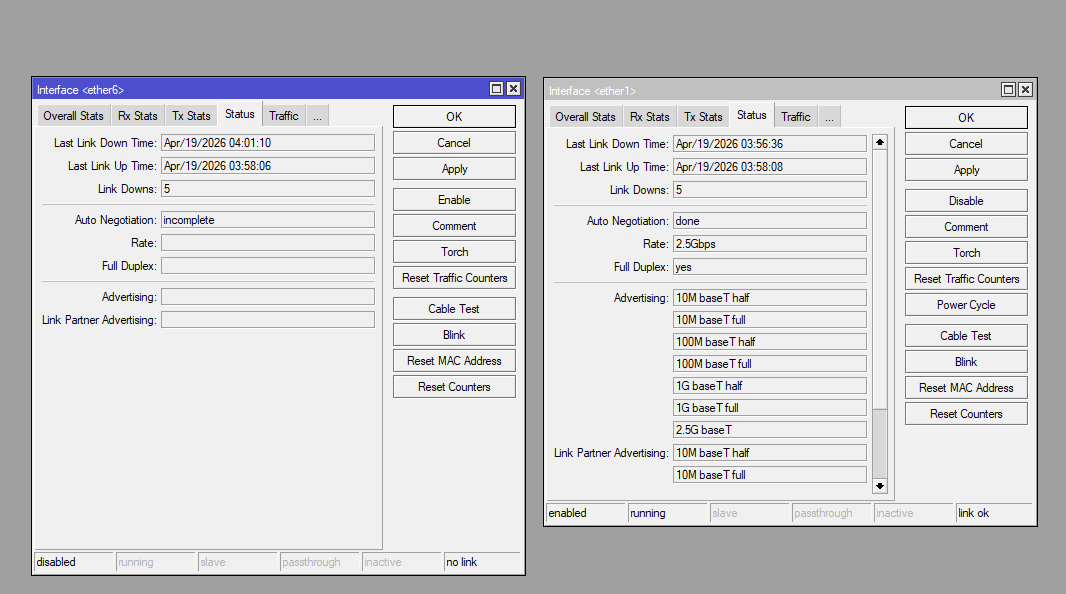
And the screenshot is Apr/19, just some minutes ago... today is May/07...
rc2 is Apr/21... So I can not trust a single word you wrote...
@irghostIn which previous version did it work?
In which MikroTik documentation is it clearly stated that the D-Link DUB-E250 is compatible with any MikroTik peripheral?
So,
it was never declared compatible,
it never worked in the past,
so it's a reckless purchase unrelated to the RouterOS version,
and it's just spam here.
RouterOS doesn't include all the drivers for all the possible combinations,
there are already space issues,
imagine if it were to be compatible with everything.
I already use this adapter successfully on other systems and only tested it on RouterOS because support appears to have been added in v7.23.
I am not complaining that an unsupported adapter does not work. I am reporting reproducible behavior issues after testing a newly recognized USB Ethernet device on RouterOS.
The adapter is detected correctly, traffic passes normally, but there are still observable problems:
missing Rate / Duplex reporting
auto-negotiation shown as "incomplete"
incorrect link-state propagation when the interface is disabled
That is exactly the kind of feedback RC testing is supposed to provide.
If MikroTik intentionally considers these limitations normal for the current USB Ethernet implementation, that is completely fine — but reporting the behavior is still useful for development and debugging.
I did not say I thought the current cli/gui development situation was unacceptable, I was replying to the post immediately before mine telling them that, historically, a lot of features begin life as “cli only”. Which personally does not bother me much either.
Well, considering it is not detected at all on older RouterOS versions and suddenly starts appearing as a USB Ethernet interface on v7.23, that was a fairly strong hint.
But you are free to buy the same adapter yourself and test it on older versions if you want to verify it experimentally: D-Link DUB-E250
Also, the 7.23 changelog literally contains:
“usb - fixed crash when using Ethernet adapter”
So yes, USB Ethernet support and fixes are clearly being worked on in this branch.
Here you are wrong. If you download the driver from D-Link D-Link Technical Support, you'll see that the adapter uses the very common Realtek RTL8156 chipset. Currently RouterOS only has driver for this chipset on the x86 platform, since 7.16:
and not yet for your hAP ax³ which is ARM64. All the USB adapters that use the chipsets from Realtek share the same kernel module r8152 which is already bundled with RouterOS. The problem is that the module from the pretty old kernel version 5.6.3 (which RouterOS still uses) does not even supports all revisions of the 1GbE RTL8153 chipset, and has no support for the 2.5GbE RTL8156, for which you either need to backport from at least kernel 5.13 or compile from the source code provided by Realtek:
And apparently this is currently only done for x86. If MikroTik has not mentioned "ARM64 - added RTL8156 driver support" in their changelog then you can assume that there is no magical support for your router yet.
That your hAP ax³ sees the adapter with some broken properties is solely due the fact that the chipsets from Realtek have some shared basis for interfacing with the kernel (and in the most recent kernel the up-to-date version of the r8152 kernel module is used for all of them), but it is clear that the ancient r8152 module from 5.6.3 has no knowledge of any new or change stuffs that come with the RTL8156 chipset.
Perhaps instead of going back/forth here... For the USB/LTE/5G things, you really should collect a supout.rif and submit to MikroTik with device connected, so MikroTik have the USB IDs/etc to see if they match. Sometimes variants of support things have subtle different USB IDs that RouterOS DIY version of "hotplug" fails to find. But yeah "USB ethernet not working" hard to be actionable by anyone without more details.