Now that would a great future update for MT to put on their wireguard module… a redirect to 2FA after connecting…
Or I suppose a work around might be to the radius server on the MT where a user has to put in another password?"???
Did anyone notice that arp ping still doesn’t work? Guess this is a major downside if gateway doesn’t respond to ICMP echo request and you have check-gateway set to arp…
[admin@Mikrotik] > tool/ping arp-ping=yes interface=bridge-lan count=5 192.168.0.1
SEQ HOST SIZE TTL TIME STATUS
0 ping failed
1 ping failed
2 ping failed
3 ping failed
4 ping failed
sent=5 received=0 packet-loss=100%
Hi all
Not sure if what I’m seeing is correct but I thought Ros7 utilizes all cores more efficiently.
The attached image shows only 1 CPU being used on a 2216 that’s only doing BGP and nothing else.
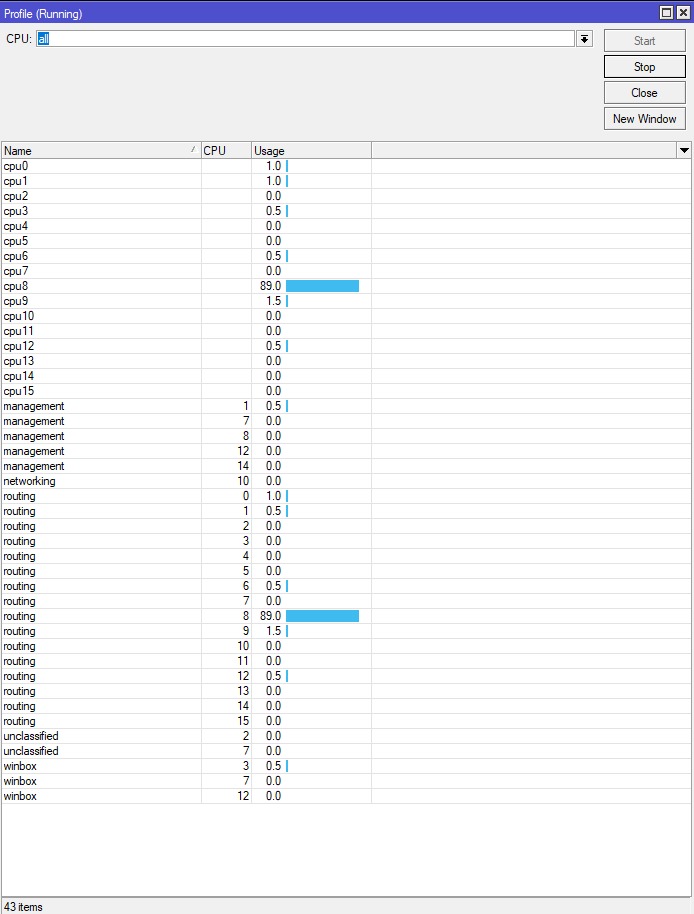
Yes… I have the same problem with this, is there any solution?
It is not like all activity w.r.t. BGP is now spread over all cores. That would require a multithreaded implementation of the BGP protocol, which is apparently hard to do.
However, the handling has been split in some different processes, e.g. for filtering and route table maintenance, and there is a separate process for each peer.
When you have only a single peer, that probably does not bring you much.
After updating to 7.5, when I want to add a new entry to QoS (simple), I noticed that it causes an interruption of the internet connection for the given subnet for which I am setting it up. Someone had that too? What is the answer?
I would like to add that the previously added entries work, and the new ones do not.
From which version?
Also, please show a /queue/simple/export made both before and after you have added the new entry.
I updated one by one as “stable” appeared, ie from the previous one, ie 7.4.1. I admit, I don’t know if the problem has arisen now. Maybe it was already during an earlier upgrade. I am unable to establish this.
before
/queue simple
add max-limit=50M/50M name=limit-vlan6 target=VLAN_6_LAN
add max-limit=15M/15M name=limit-guest target=VLAN_8_Guest
after
/queue simple
add max-limit=50M/50M name=limit-vlan6 target=VLAN_6_LAN
add max-limit=15M/15M name=limit-guest target=VLAN_8_Guest
add max-limit=70/70 name=limit-vlan4 target=VLAN_4_VMs_admin
The last entry does not work (VLAN_4_VMs_admin), and even cuts the Internet for hosts in that subnet.
70 BYTES is not a lot.
Should be 70M/70M, no ?
Up to latest v6 releases the principle was that every release (e.g. 6.x) was kind of a feature freeze. Then the minor releases (e.g. 6.x.y) were more or less bug fixes. This kind of release cycle is not prominent in v7 yet as the whole v7 is still largely work in progress. I expect that with some 7.10 things will slowly converge and we’ll see more “bug fix only” releases from that point forward.
And I really don’t see need for major version inflation (e.g. v8 after 7.7). We’ve had v6 around pretty long time (I’m not around long enough to remember v5) while there were quite a few major changes in the v6 series (e.g. brand new wireless driver which is proprietary now, bridge with VLAN functionality, etc.).
OMG, you are right, and I thought I tried it in the 70M / 70M configuration before and it didn’t work … ehhh … well, it actually works.
Thanks @mkx
Thanks for explanation. Regards 
I’m still hoping that someone at MikroTik has a list of features of v6 that are no longer working in v7, and assigns some priority to fixing those or putting up a list of features in the documentation that “are gone and will not come back”.
Upgrade from 7.3.1 to 7.5. CCR2004-1G12S+XS and RB4011 many reboots after 2-12h. Downgrade back to 7.3.1
Hello,
I am using the CHR Version.
Weired things with VLAN and “user service tag” for 802.1ad.
It works fine - I mean mac learning.
UDP and ICMP are working fine too but TCP does not work.
I am not able to :
- telnet between two CHR
- ssh between two CHR
- set up an BGP session
This issue does not exist with 6.48.6
HTH
Hello mikrotik team
I can’t use this rule in new terminal on 7.5
ip firewall connection remove [find]
Could you check it?
CRS328-24P-4S+
Ports 17-24 don’t have a tab for POE in winbox.
But port 22 is powering my WAP right now.
New version v7.6 has been released!
http://forum.mikrotik.com/t/v7-6-stable-is-released/161553/1