it's a usb flash drive??
src=/disk1/
Seems like it’s impossible to set certain permissions on mounted files from inside container. For example chmod +x some script, but it’s still not executable. So no scripts in a mounted directory can work. Is this intended design, or more of a bug? I understand mounts are usually used for non-executable storage but there are cases where it could be necessary or desirable to host an entire application including the main executable binaries on the mountpoint
Edit: And I’m still getting permission problems after upgrading RouterOS and trying to start a container that I made in 7.6beta4 …
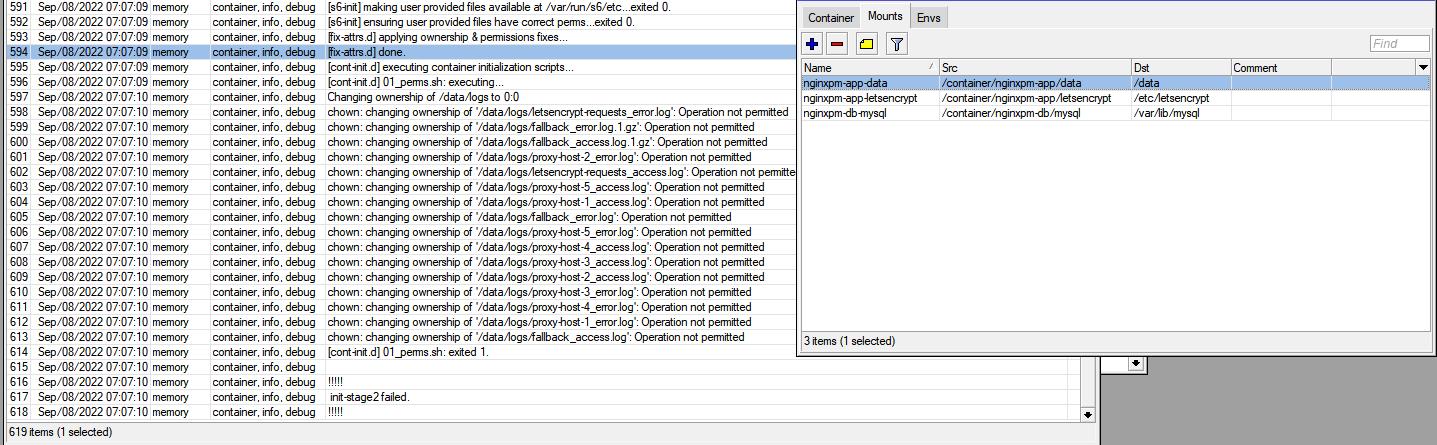
this has been a problem for me ever since containers were re-introduced, that the entire container needs to be recreated each upgrade and data is lost. I thought this was fixed by now as per changelogs?? 
This is with jc21/nginx-proxy-manager:latest & jc21/mariadb-aria:latest images. I don’t think it’s an issue with the images, because everything works on deployment and continues to work fine (including stopping/starting/rebooting the chr instance and/or containers) until routeros upgrades to a new version
In our case - cheap Dlink DES-3200-A1 in the middle between rb1100ahx2 and rb2011 randomly drops multicast packets in both directions. So, LDP session periodically restarted (and OSPFv2 too) - rb2011 die due OOM. It’s still alive, but with CPU under 100% loads, networking process consume 85%, SNMP not working, VPLS tunnel dead, telnet/mac-telnet still alive.
OSPFv3 broken - now it complains about wrong checksum every 10 seconds…
Are you by chance using a USB stick formatted with exfat/fat filesystem as storage on router for your container mount points ?
If underlying filesystem does not support permissions, chmod from inside a container to a mounted directory won’t do anything.
Nope, described issue is on a chr with no other external disk, just mounting to a path on the native storage
Aand I think I just found another issue. The new “start-on-boot” feature only seems to work on a single container even if it was enabled for multiple containers.
My chr also didn’t reboot properly after I enabled that on my containers (not accessible several minutes after rebooting to test the feature). Fortunately it did boot up fine again after manually resetting the instance through the cloud console. I’m not sure if that was some bad luck on my side or a reproducible bug, but I’m leaving it here for the record anyway…
I´ve taken a new CRS326-24G-2S+, blow away the config, build up from scratch a simple bridge config, have updated ROS and FW to 7.6Beta6 and activated in the Switch-menu L3HW-offloading. After that I´ve activated the IPv6-HW offloading, too via CLI and like the first time the Switch died after a few seconds.
So in my conclusion this feature is not production ready!!
*) l3hw - fixed “H” flag presence for accelerated connection tracking entries;
does this work for anyone? I have l3hw offloading enabled on my CCR2116 and fasttrack enabled for all established,related connections but I’ve never seen a H flag in the connection list (ipv4/ipv6). Even when I filter hw-offloaded connections, there are 0 entries. I know it’s working, else I wouldn’t get 2% cpu utilization at 2.5Gb/s throughput.
Yes. USB flash drive formatted as ext4.
Just did a test on my CRS309, it worked one way for me (traffic from one port to another offloaded, the other direction not). Then I tried to disable and re-enable ip6 l3hw, and it caused temporarily loss of connectivity to the router, once recovered the ipv6 was no longer working, even after disabling the l3hw. Afterwards the connectivity to the router lost a few more times (for a few seconds). After that I rebooted the router and re-enabled l3hw again, and for now it works OK both directions… I only have a couple of test servers with ipv6, don’t use ipv6 for anything else for now…
So, yes, looks like definitely not production ready yet, but so was the ipv4 l3hw in the first versions, so I am hopeful that all the issues will get resolved soon…
Thanks for the feedback! We reproduced the issue and already fixed it! The fix will be in the next beta. Meanwhile, it is recommended to restart the router after enabling l3hw ipv6.
Maybe the packets are routed by the hardware (switch chip) and do not enter the CPU at all? Do you non-wh-offloaded FastTrack connections (without H flag) in the connection list? Or is the list empty? The latter means the routing is fully performed by the hardware (which is good, unless you want to Firewall it first).
While we found some issues with l3hw ipv6 in DX3000 switch chips, we couldn’t reproduce your issue. Does your CRS326 become completely unresponsive, or does only IPv6 traffic gets dropped? Can you access the switch via Winbox L2 (by MAC address)?
@raimondsp: all 3 Switches became completly unresponsive, no L2 and no L3.
I only got access back after resetting the config via reset-button.
I seem to have lost 5G on this beta and the latest RG502QEAAAR13A02M4G modem firmware on my Chateau 5G.
That’s strange. Please create a support ticket, so we can try to reproduce your issue.
Support ticket raised, 7.6beta runs fine on my Chateau LTE12 while I await a response.
Anyone seeing issues with WPA3 and iOS 16 (released today)?
After upgrading iPhone 12 to iOS 16.0 it was unable to connect to wpa2-psk,wpa3-psk networks I have on my hAP ac3 running RouterOS 7.6beta6 with WifiWave2 package. Before the upgrade (iOS 15.6) it was connecting fine.
After changing the interface to be only wpa2-psk the iPhone is connecting fine again.
@CTassisF
In a previous release this type of issue with WPA3 was mentioned. Maybe this will help:
http://forum.mikrotik.com/t/v7-5rc-is-released/160339/18
Mentioned setting this helped:
/interface/wifiwave2/security/set (yourWiFiprofile) sae-pwe=hunting-and-pecking
Thanks! Changing this config fixed the issue with iPhone + iOS 16 + WPA3.
The problem of global variables that disappear still persists, someone from mikrotik who can say if they are taking action on the matter?