If you have not created a support ticket, they might not even be aware since they do not read each and every post on this forum. It’s a user forum. Not a technical forum.
Did you create a support ticket ?
Did they respond to it ?
Hi,
Dose MT container supports the systemd, privileged docker image ?
Examples
docker run -ti --privileged=true -v /sys/fs/cgroup:/sys/fs/cgroup:ro -p 80:80 local/centos7-systemd
docker run --tmpfs /tmp --tmpfs /run -it -v /sys/fs/cgroup:/sys/fs/cgroup:ro  -p 80:80 local/r8-systemd-httpd
MT
MikroTik RouterOS 7.6beta6 (c) 1999-2022

[admin@MikroTik] > container/shell number=0
0;root@MikroTik:/[root@MikroTik /]# systemctl
System has not been booted with systemd as init system (PID 1). Can't operate.
Failed to connect to bus: Host is down

0;root@MikroTik:/[root@MikroTik /]# cat etc/os-release
NAME="Rocky Linux"
VERSION="8.6 (Green Obsidian)"
ID="rocky"
ID_LIKE="rhel centos fedora"
VERSION_ID="8.6"
PLATFORM_ID="platform:el8"
PRETTY_NAME="Rocky Linux 8.6 (Green Obsidian)"
ANSI_COLOR="0;32"
CPE_NAME="cpe:/o:rocky:rocky:8:GA"
@raimondsp
Okay, support ticket opened: SUP-92398
in a ccr2216 device the l3hw option on some ports is disabled, however when it is restarted the l3hw option is enabled again and the NAT fails.
@ IPv6-HW offloading:
@ raimondsp:
It seems to be, that the issue has something to do with the SPP+ connection. When I connect the switch via 1GBit copper everything seems to work.
But when I use the SFP+ slot, the switch stops responding via L2 and L3.
(used SFP+ module: MikroTik S+RJ10)
For me l3hw offloading doesn’t seem to work at all. I read the help page multiple times, but couldn’t find anything I may have misconfigured. I got it working once for a few seconds, after making changes to the bridge configuration, then there was a H entry in the connection list. But a few seconds later the connection disappeared and the list remained empty. I can’t use port-based hw-offloading, because I use many tunnels that can’t be offloaded, so I’d need a lot of acl rules to redirect the traffic to the cpu. But when I tried it, not even simple inter-vlan routing worked between some networks. Some hosts were only reachable by ping, while others couldn’t be reached at all. This was between a 802.3ad bond (2xSFP+) and a SFP+ port, didn’t try 1G ports.
I'm having the same issue, but I'm on 7.5, having wpa2-psk only has resolved the issue (wpa3-psk was previously enabled).
Interestingly though, iOS 16 had no issue connecting to our guest network (slave interface), which had the exact same security config.
We received the support ticket and investigating the issue. Thank you!
Are we talking about IPv4 or IPv6 HW Offloading? Please post your "/interface/export", "/ip/export", and (in the case of ipv6) "/ipv6/export" output.
*) lte - disabled RPLMN on Chateau 5G;
RG502QEAAAR11A07M4G_01.001.01.001
Solved the problem that AT+QNWCFG=“clr_rplmn” could not clear RPLMN
when you used certain SIM cards
Hi MikroTik, is the above fix, solving a problem that has already been resolved by Quectel on the latest R11A07 firmware?
@raimondsp
IPv6 hw offload didn’t work either in my test, but currently I’m focusing only on IPv4.
I removed like 90% of the configuration and ended up with probably the most simple setup. However it still isn’t working.
Here is the export of /int and /ip. There are some routes with invalid gateways, which are only visible in the export, not in the cli or winbox, so I couldn’t remove them. (another issue that needs to be fixed)
For the test I ran iperf3 between 172.20.164.8 - 192.168.66.2.
/int/ex
# sep/13/2022 18:14:45 by RouterOS 7.6beta6
# software id =
#
# model = CCR2116-12G-4S+
# serial number =
/interface bridge
add add-dhcp-option82=yes dhcp-snooping=yes frame-types=admit-only-vlan-tagged name=BRIDGE protocol-mode=none vlan-filtering=yes
/interface ethernet
set [ find default-name=ether1 ] advertise=10M-full,100M-full,1000M-full disabled=yes l2mtu=1580 name=E01.WAN
set [ find default-name=ether2 ] advertise=10M-full,100M-full,1000M-full disabled=yes l2mtu=1580 name=E02
set [ find default-name=ether3 ] advertise=10M-full,100M-full,1000M-full disabled=yes l2mtu=1580 loop-protect=on name=E03
set [ find default-name=ether4 ] advertise=10M-full,100M-full,1000M-full l2mtu=1580 name=E04.PVE-MGMT
set [ find default-name=ether5 ] advertise=10M-full,100M-full,1000M-full disabled=yes l2mtu=1580 name=E05
set [ find default-name=ether6 ] advertise=10M-full,100M-full,1000M-full disabled=yes l2mtu=1580 name=E06
set [ find default-name=ether7 ] advertise=10M-full,100M-full,1000M-full disabled=yes l2mtu=1580 name=E07
set [ find default-name=ether8 ] disabled=yes l2mtu=1580 name=E08
set [ find default-name=ether9 ] disabled=yes l2mtu=1580 name=E09
set [ find default-name=ether10 ] disabled=yes l2mtu=1580 name=E10
set [ find default-name=ether11 ] disabled=yes l2mtu=1580 name=E11
set [ find default-name=ether12 ] disabled=yes l2mtu=1580 name=E12
set [ find default-name=ether13 ] disabled=yes name=OOBM
set [ find default-name=sfp-sfpplus1 ] advertise=1000M-half,1000M-full,2500M-full,5000M-full l2mtu=9570 mtu=9000 name=S1.UPLINK speed=10Gbps
set [ find default-name=sfp-sfpplus2 ] advertise=10000M-full l2mtu=9570 mtu=9000 name=S2.UPLINK speed=10Gbps
set [ find default-name=sfp-sfpplus3 ] l2mtu=9570 mtu=9000 name=S3.PVE speed=2.5Gbps
set [ find default-name=sfp-sfpplus4 ] disabled=yes name=S4
/interface vlan
add interface=BRIDGE name=0066.SERVER vlan-id=66
add interface=BRIDGE name=0099.MGMT vlan-id=99
add interface=BRIDGE name=0164.LAN vlan-id=164
/interface bonding
add lacp-rate=1sec mode=802.3ad mtu=9000 name=BOND.SWITCH slaves=S1.UPLINK,S2.UPLINK transmit-hash-policy=layer-3-and-4
/interface ethernet switch
set 0 l3-hw-offloading=yes
/interface ethernet switch port
set 0 l3-hw-offloading=no
set 1 l3-hw-offloading=no
set 2 l3-hw-offloading=no
set 3 l3-hw-offloading=no
set 4 l3-hw-offloading=no
set 5 l3-hw-offloading=no
set 6 l3-hw-offloading=no
set 7 l3-hw-offloading=no
set 8 l3-hw-offloading=no
set 9 l3-hw-offloading=no
set 10 l3-hw-offloading=no
set 11 l3-hw-offloading=no
set 12 l3-hw-offloading=no
set 13 l3-hw-offloading=no
set 14 l3-hw-offloading=no
set 15 l3-hw-offloading=no
/interface lte apn
set [ find default=yes ] ip-type=ipv4
/interface wireless security-profiles
set [ find default=yes ] supplicant-identity=MikroTik
/interface bridge port
add bridge=BRIDGE frame-types=admit-only-untagged-and-priority-tagged interface=E04.PVE-MGMT pvid=99
add bridge=BRIDGE frame-types=admit-only-vlan-tagged interface=S3.PVE
add bridge=BRIDGE frame-types=admit-only-vlan-tagged interface=BOND.SWITCH multicast-router=disabled trusted=yes
/interface ethernet switch l3hw-settings
set ipv6-hw=yes
/interface bridge vlan
add bridge=BRIDGE comment=LAN tagged=BRIDGE,BOND.SWITCH,S3.PVE vlan-ids=164
add bridge=BRIDGE comment=MGMT tagged=BRIDGE,BOND.SWITCH vlan-ids=99
add bridge=BRIDGE comment=SERVER tagged=BRIDGE,S3.PVE vlan-ids=66
/interface ovpn-server server
set auth=sha1 cipher=aes128,aes192,aes256 mac-address=00:24:D3:F2:66:C7 max-mtu=1492 netmask=30 port=5222
/ip/ex
# sep/13/2022 18:13:34 by RouterOS 7.6beta6
# software id =
#
# model = CCR2116-12G-4S+
# serial number =
/ip ipsec profile
set [ find default=yes ] dh-group=ecp256 enc-algorithm=aes-256 hash-algorithm=sha512 prf-algorithm=sha512 proposal-check=strict
/ip ipsec proposal
set [ find default=yes ] auth-algorithms=sha256 enc-algorithms=aes-256-cbc lifetime=12h pfs-group=ecp256
/ip pool
add name=LAN ranges=172.20.164.1-172.20.164.59
/ip dhcp-server
add add-arp=yes address-pool=LAN allow-dual-stack-queue=no authoritative=after-2sec-delay bootp-support=none interface=0164.LAN lease-time=1w name=LAN
/ip address
add address=192.168.99.1/28 interface=0099.MGMT network=192.168.99.0
add address=172.20.164.60/24 interface=0164.LAN network=172.20.164.0
add address=192.168.66.1/24 interface=0066.SERVER network=192.168.66.0
/ip cloud
set ddns-enabled=yes ddns-update-interval=1m
/ip dhcp-server lease
add address=172.20.164.1 allow-dual-stack-queue=no client-id=1:4c:20:b8:e5:2:3c mac-address=4C:20:B8:E5:02:3C server=LAN
add address=172.20.164.6 allow-dual-stack-queue=no client-id=1:42:4b:fc:6d:b:7f mac-address=42:4B:FC:6D:0B:7F server=LAN
/ip dhcp-server network
add address=172.20.164.0/24 dns-server=192.168.66.21 domain=lan gateway=172.20.164.60 ntp-server=172.20.164.60
/ip firewall address-list
add address=172.20.164.0/24 list=ADMIN
add address=10.0.0.0/8 list=PRIVATE
add address=172.16.0.0/12 list=PRIVATE
add address=192.168.0.0/16 list=PRIVATE
/ip firewall connection tracking
set icmp-timeout=4s loose-tcp-tracking=no udp-timeout=30s
/ip neighbor discovery-settings
set discover-interface-list=all protocol=lldp,mndp
/ip settings
set max-neighbor-entries=8192
/ip firewall filter
add action=fasttrack-connection chain=forward comment="FASTTRACK HW-OFFLOAD" connection-state=established,related dst-address-list=PRIVATE hw-offload=yes \
    src-address-list=PRIVATE
add action=fasttrack-connection chain=forward comment=FASTTRACK connection-state=established,related hw-offload=no
add action=accept chain=forward comment="ESTABLISHED, RELATED" connection-state=established,related
/ip firewall service-port
set irc disabled=no ports=6667,6697
set sip disabled=yes ports=5060,5061,5070
/ip proxy
set max-cache-object-size=512000KiB
/ip route
add check-gateway=none disabled=no distance=1 dst-address=172.16.0.0/14 gateway=*1A routing-table=main scope=30 suppress-hw-offload=no target-scope=10
add disabled=no dst-address=10.13.37.2/32 gateway=*1A routing-table=main suppress-hw-offload=no
add dst-address=10.242.6.1/32 gateway=*1A
add disabled=no distance=1 dst-address=0.0.0.0/0 gateway=192.168.33.2 pref-src=0.0.0.0 routing-table=*404 scope=30 suppress-hw-offload=no target-scope=10
add disabled=no dst-address=10.242.99.0/24 gateway=*1A routing-table=main suppress-hw-offload=no
/ip service
set telnet disabled=yes
set ftp disabled=yes
set www disabled=yes port=4480
set www-ssl tls-version=only-1.2
set api disabled=yes
set api-ssl disabled=yes
/ip socks
set max-connections=250 version=5
/ip ssh
set always-allow-password-login=yes forwarding-enabled=both host-key-size=4096 strong-crypto=yes
/ip traffic-flow
set cache-entries=256k
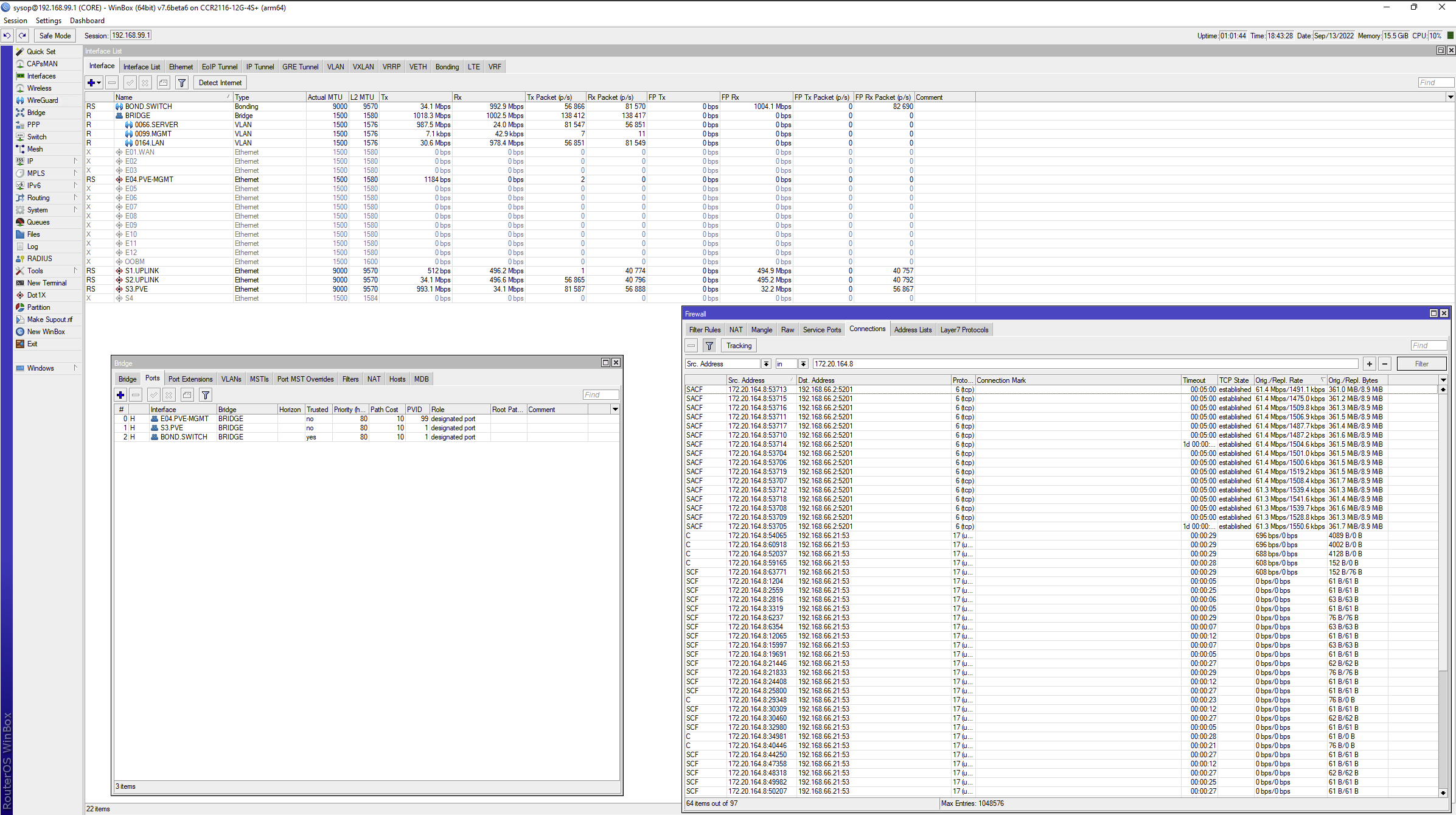
S1+S2 use XS+DA0001; S3 uses S+RJ10 module, will try 1G ports tomorrow, to see if there’s a difference / problem with SFP+ ports.
I found on 7.5 that for L3 hardware off loading on my CRS328, not all VLANs would be offloaded.Each new VLAN I added required a reboot for it to work. But I can see on yours that you’ve rebooted.
dumped-saved-advertisements is broken in 7.5 and 7.6beta6 as per this thread http://forum.mikrotik.com/t/v7-bgp-dump-saved-advertisements/158893/7
Soooo…
Question.
/system/device-mode/print
            mode: enterprise
[...]
            l2tp: no
[...]
/interface/l2tp-server/export verbose
/interface l2tp-server server
# inactivated, not allowed by device-mode
[...] enabled=no [...]
/log/print
05:46:01 l2tp,info first L2TP UDP packet received from x.y.x.z
05:46:02 l2tp,info first L2TP UDP packet received from x.y.z.x
l2tp is disabled via setting and via device-mode, how is it listening?
@ IPv6-HW offloading:
@ raimondsp: even the 7.7Alpha72 preview doesn´t help… :-/
Short update, with an SFP+ connection the switch doesn´t boot but with only some copper connections it does.
BUT: even only with copper connections the switch reboots sponaniously every several minutes with a kernel failure. MT is investigating the issue 
+1 for OSPFv3 wrong checksum (7.6beta6 on rb2011)
“Wrong checksum” problem will be fixed in the next beta
Was able to get 32b windows netinstall working today and after installing 7.6beta6 the drive now works correctly. I wasn’t expecting netinstall to fix this but since no one else reported a similar problem it seemed worth trying.
Hello. When will BFD appear?
@ IPv6-HW offloading:
@ raimondsp: good news, the deactivation of IGMP Snooping was the deal
Switch didn´t reboot spontaniously anymore and even the problem with the SFP+ connection which prevents the boot is gone. (in 7.7 Alpha72)
So you “only” have to fix the IGMP Snooping problem 
Good Job!!
P.S: if you need additional files or infos from me, ask!