CCR2116: L3HW NAT is fixed with 7.6beta6 (broke with 7.5)
CPU switch rules are still broken though.
BFD is a work in progress. It has been since Sep 4, 2021. For over a year now.
waiting on this one too in v7…
What’s new in 7.6beta7 (2022-Sep-16 09:27):
*) bgp - fixed reporting of session uptime;
*) branding - execute “autorun.scr” file when installing branding package;
*) certificate - restricted maximum retry attempt window for Let’s Encrypt certificate to 60 minutes;
*) container - allow changing container related parameters while it is running;
*) health - improved voltage reading on RBmAP-2nD;
*) hotspot - fixed SSL usage on all HotSpot pages;
*) l3hw - improved connected host offloading on startup;
*) l3hw - improved connected IPv6 host offloading when routing table is nearly full for 98DX224S, 98DX226S, and 98DX3236 switch chips;
*) l3hw - made route offloading selection work only on unicast;
*) lte - added interface name in MTU debug logging message;
*) ospf - fixed checksum calculation;
*) ospf - improved logging when invalid configuration is detected;
*) route - fixed disappearance of inactive static routes after upgrade;
*) routerboard - set “Delete” as default key to enter booter menu (“/system routerboard upgrade” required);
*) sms - fixed handling of SMS send attempts on unsupported modems;
*) user-manager - accept any username for outer authentication;
*) user-manager - added “comment” parameter for batch user creation;
*) user-manager - added support for multiple accounting sessions;
*) user-manager - added variables to print profile name and end time in voucher templates;
*) user-manager - forced username verification against client’s certificate for EAP-TLS;
*) webfig - fixed creation of new IPv6 routes;
*) winbox - changed order of tabs under “User Manager” menu;
*) wireless - fixed incorrectly applied ingress priority to non-wireless packets;
Problem SUP-92054 is not solved with 7.6beta7. Please, fix it.
The changelog does not even indicate that the issue is resolved in this release. Wait for the release that fixes the issue.
What about recognition of LTE modules? Is it going to be resolved? No mention in the changelog 
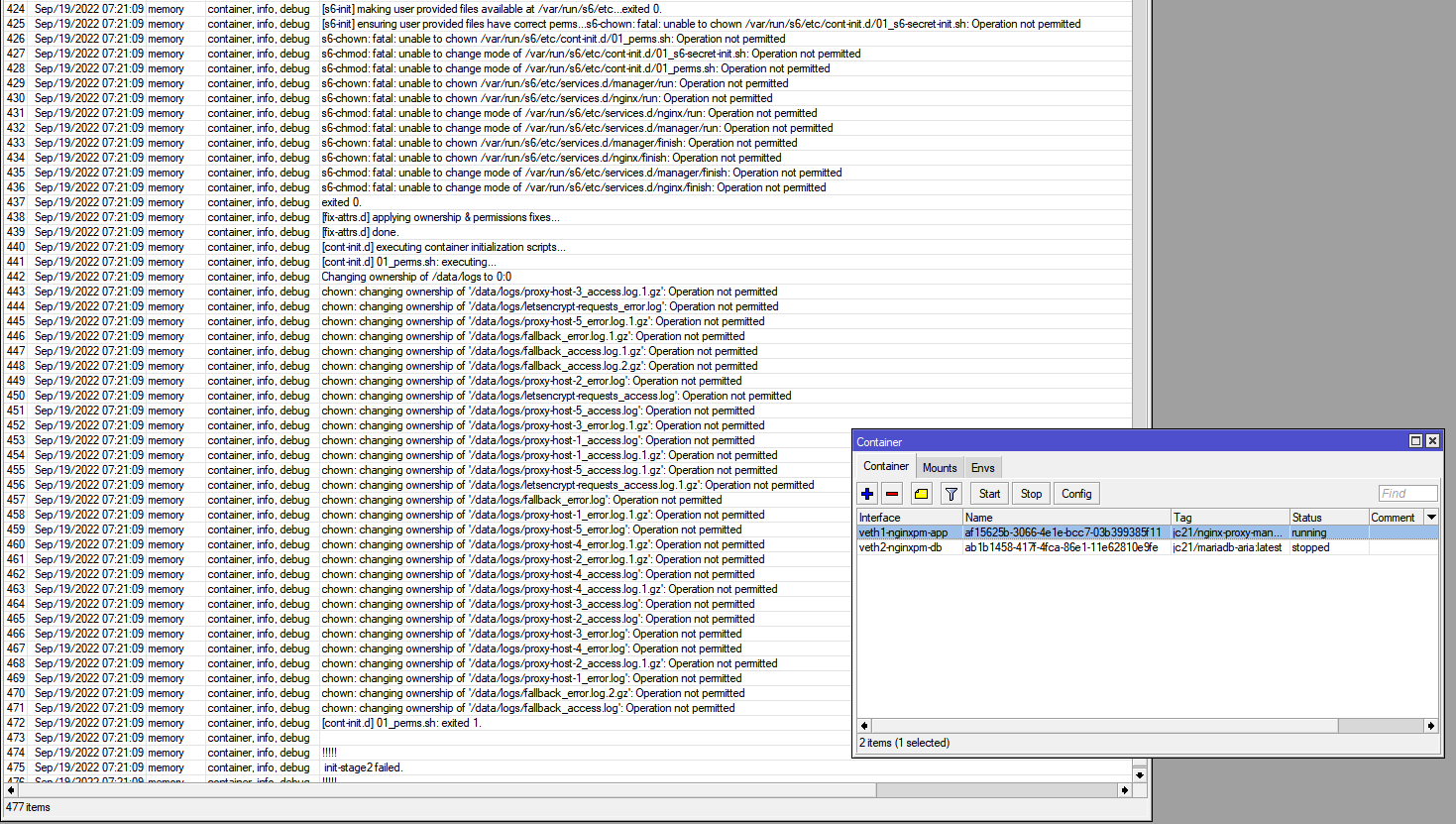
I know nothing is explicitly mentioned in the changelogs for this, but Once again the container was working fine until the version upgrade and occurs every time after upgrading to new beta (already reported for 7.6beta6: http://forum.mikrotik.com/t/v7-6beta-testing-is-released/160567/107)…
It’s a real tedious and time-consuming headache to recreate and reconfigure each time. When will this be fixed?? Pls guys
I don’t know what problem you’re still having, I’ve just upgraded from 7.6beta6 to 7.6beta7 and my AdGuadHome container auto started just fine:
 17:19:18 container[...] [info] AdGuard Home, version v0.107.13
 17:19:18 container[...] [error] creating dhcpv4 srv: dhcpv4: <nil> is not an IP address
 17:19:18 container[...] [info] Initializing auth module: /opt/adguardhome/work/data/sessions.db
 [...]
 17:19:19 container[...] [info] saving filter 1 contents to: /opt/adguardhome/work/data/filters/1.txt
 17:19:19 container[...] [info] updated filter 1: 949769 bytes, 49146 rules
 17:19:19 container[...] [info] Updated filter #1.  Rules: 48908 -> 49146
Show a /container config export , so we can see what you did there.
7.6b7 bgp sessions information ok now…
No! The uptime is ticking but it still displays fake information when a winbox “sessions” screen is open!
The uptime continues to tick up even when the session has been closed or failed.
Started with the previous beta LTE interface reboots when trying to connect . LtAP-2HnD
It seems to be fixed at the CLI. They might need to do additional things to fix this in Winbox, as it is quite common for them to add a new feature in the CLI and it only works in Winbox in a future version. What I see now in the CLI is that the session timer is back when the session is active, but it disappears entirely when the session has stopped. I think Winbox doesn’t know how to handle this and instead just keeps counting the seconds from where it was before rather than clearing it. Probably, in a future version, we will see Winbox fixed.
The nice enhancement we have now, compared to 7.4, is that there are now fields for BGP session last-started and last-stopped date and time at the CLI.
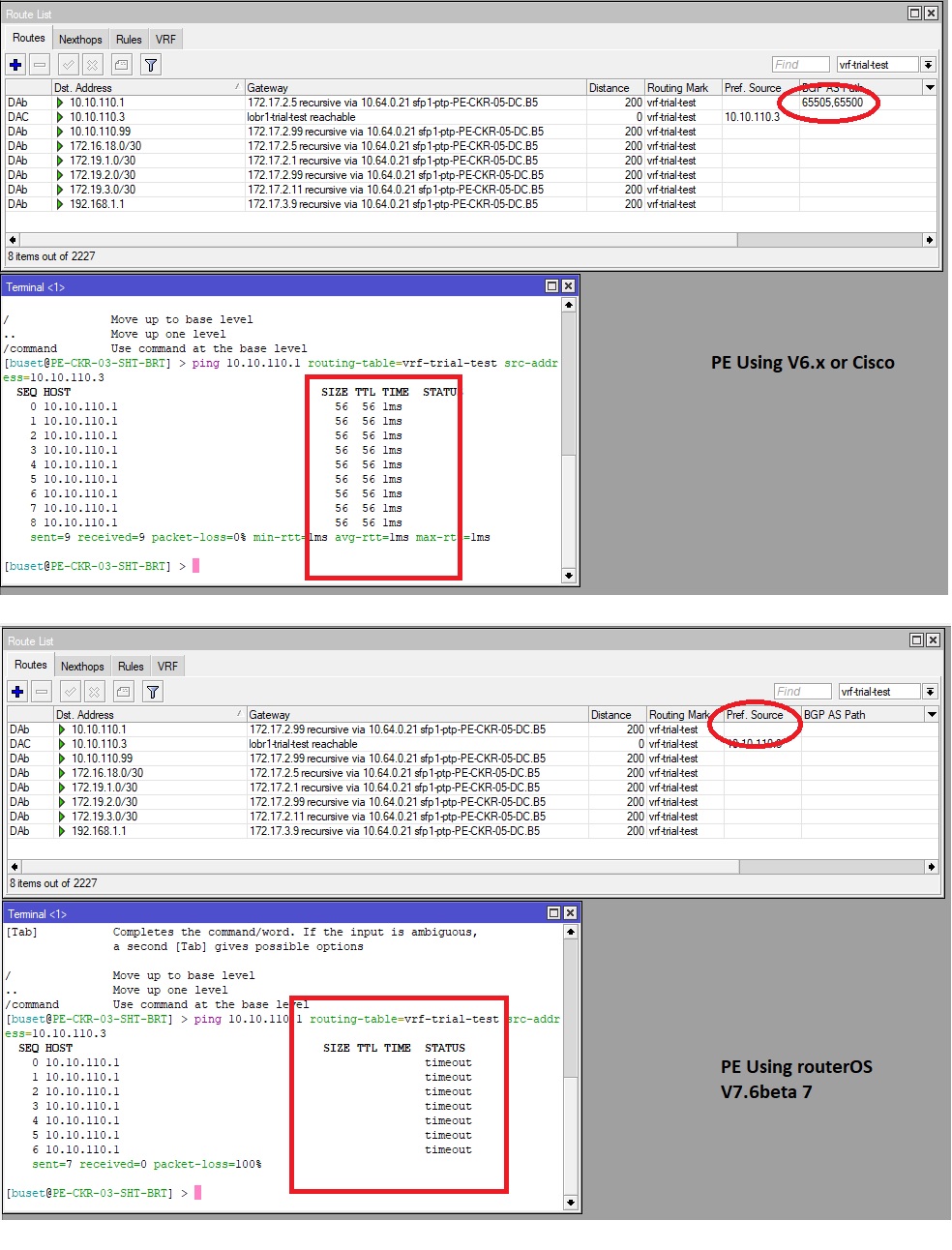
BGP VRF MPLS L3 (PE-CE) in v7.6 beta7
still having problem with routing propagation.
route sent from PE did not propagate correctly to Other PE’s, missing AS-PATH
thx
So am I, I cannot go into production with ROS v7 until this is added, I have several BGP sessions with BFD requirement,
Also still have an issue with BGP-MED values not advertised on IBGP sessions
Seeing the same, Session dropped after a few minutes, and nothing helps restoring the session, have to reboot the router
where is your data stored? on an external flash drive?
What we need in winbox is an auto-refresh of the BGP sessions window, as it was with v6 with the BGP peers window!
It should poll the router for actual information (including the actual uptime) rather than make a single query and display that info forever, including a fake ticking uptime.
That is not what I am claiming! The session gets disconnected and gets restored when the link comes back, but that does not show in the sessions display.
No idea why it does not work for you. I never seen that happening. Did you check the log? Maybe it says something like “EBGP peer is not on a shared network and multihop is not configured”? There is a bug in the new BGP that sometimes makes it mis-detect this situation and you have to enable multihop even though the peer isn’t multihop!
Of course, yes.