Hello.
I’m new to MikroTik. I just bought MikroTik hAP ac2. I really love all the features it offers, it’s amazing but I can’t find out what’s the problem with my WiFi. I replaced my 8 year old tplink N standard router (DDWRT) but download speed is even worse with both N and AC. Upload is great though.
I updated my router to 6.41.3 (including fw). That didn’t help. I tried to change a lot of different WiFi adapter settings, nothing helps.
Here is my speedtest results with AC:
Sometimes I get up to 40Mbps download but that’s max. Upload every time is at least 100Mbps. I tried to test my speed with a few different devices. Same thing.
Wired I’m getting 500/500Mbps or more.
I tried a few different configs that I found here… Changing channel-width, rates disabling firewall didn’t help. Any suggestions?
Other than WiFi I really love this device…Honestly, I’m surprised with SMB performance. I didn’t expect it to be any good but so far it rocks!
Thinking about it, that sounds likely to be caused by some setting issue, likely in the wireless protocol settings.
Its unlikely to be the antenna. That said, here are my thoughts on the antenna for one unit I saw. It could be improved if there was more space in the vertical direction available.
I don’t know if its the same unit that I saw in another thread but there was one where the internal antennas were constrained to fit into the box. They were small metal curly-cues in the corner of the device. I would experiment with opening it up and seeing if they could be extended a bit, so the loop enclosed more space upward. So as to be more like a pigs tail and less like a box. (But not so much that it could not be restored to its previous position if the change was not helpful.)
“Just sayin” They might be dealing with insanely restrictive national regulatory regimes which require they make all sorts of illogical changes. They likely couldn’t explain that here, this being their official organ. But if you met them in real life they could likely be more candid.
Note, that is just my personal guess.
Whatever it is, I doubt if its their fault. I’m sure they know what they are doing.
my hap ac lite and LG 55UJ635V (5 meters distance):
connected to 5hgz (ac) can’t reach more ~ 10mbps
connected to 5hgz (n) can’t reach more ~ 40mbps
connected to 2hgz (n) can’t reach more ~ 30mbps
and very very unstable, even can’t flawless play FHD videos.
Connected wired and got my 100mbps. Other wireless clients works fine.
Same problem here. hAP ac^2 wireless down speed ~10-20mbit/s on both interfaces(802.11n 2.4Ghz && 802.11ac 5GHz), and upload ~100mbit/s constantly.
Fixed channel, playing with tx power, country regulation, encryption, hw retries, etc didn’t help.
I tried almost everything, nothing helped. Then I tried newest RC firmware. I saw incrase in WiFi download speed immediately. I guess that there are no stable FW with fixed WiFi on Ac^2 out there yet. But I’m glad that this problem is fixed on RC fw.
I am seeing the same issue with my hAP ac^2.
Wireless interface seems to grind to a halt with minimal amount of traffic. It suffered from significant packet loss and latency spikes.
With the current stable firmware the download speed was spikey at best, and often flat lining at 0.
6.42rc49 seemed to have improved the situation, there seemed to be some throughput fluctuations, however the latency spikes seems to be much better.
Can’t wait for the stable release to arrive!
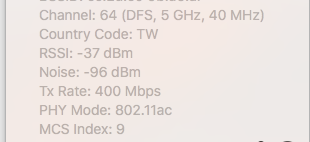
I have the same problems with hAP AC^2. I have 100Mb/s internet channel and upload rate was initially around 94Mb/s (it seems like using the full channel), but download rate on 6.41.3 was very poor: 10-15Mb/s. After upgrading to 6.42rc49 download rate significantly increased, but it’s not stable and bounces around 65-75Mb/s, even in 1m from the router .At the same time I see Tx Rate: 400Mbps (sometimes 800) in Wi-Fi info:
I am very disappointed, because the purpose of buying new device was to get full benefits of 802.11ac standard.
P.S. And I’ve tried different channels and modes, without any significant impact.
Hello , just got my new hp ac2 and i was using before hap ac, so first impression.. wifi very unstable i upgraded to 6.42rc52 and i got a slow connection on 5Ghz AC.
Settings are : Frequency - auto , BAND 5ghz-only-ac , 20/40/80 Ceee. My current bandwidth from ISP is 300 mbits Download and 150 Upload . On my Samsung S8 i have somewhere around 230 mbits download but on my desktop with intel dual band ac 7265 , distance to router is about 4 meters open air. On hap AC with latest stable firmware everything runs ok . Any suggetions ?
same here! Pretty disapointed with wireless part of router. I have 100/20 connection and router gets from 55-75(very fluctuating) in download and 20 in upload. Router is 4m from PC. With Speedport router(ISP) on ame place I can get around 135/26. I am just disapointed with wireless part of HAP AC2…
I had the same problem. Upgraded to 6.42rc52, and get acceptable WiFi throughput. But now I am experiencing complete WiFi blackouts at 5Ghz in some irregular basis. It can be for 10 seconds after some 30 minutes, sometimes for 1 minute and more. The feeling is like somebody would run jammer at 5Ghz. Wait for few minutes, and like nothing happened and throughput is good in both directions.
I tried everything, Channel width, channels, WiFi standatrs, even tryed to leave only old A standart. Exactly the same behavior.
The same issue from my end. I was able to install the latest RC 6.42rc52, but download speed is unstable and poor.
Upload is fine and stable enough.
I just got the AC2 and I am disappointed from the speed provided. I am wondering what is the policy of the vendor. Can be replace it with another one?
This is the worst Router device I have ever owned, considering the download speed.