Hi everyone. I have been struggling to configure VLANS on rb750gr3 with vlan filtering. I have followed LINK C on https://forum.mikrotik.com/viewtopic.php?t=182373 but it doesn’t seem to work. I was trying to configure ether 4 (cctv) on vlan 40 with subnet 192.100.30.1/30, ether2 on vlan20 with subnet 192.168.20.1/24 and ether3 on vlan30 with subnet 192.168.30.1/24. Any clearer guidance with example will be very appreciated. Thanks for your time!
YOu have to decide whether you want vlans or just assign etheports directly.
The problem may be you dont know what you want yet.
Vlans are necessary when you want to send more than one subnet on any given port…in your case doesnt seem to apply?
They are extremely flexible to apply so learning about them now where its a one to one proposition, is also not a bad way to go.
I want to use vlans mainly for the APs i do not wish for any guest to access anything in my network, just internet.
sounds good so APs it is.
A network diagram is helpful as is seeing the current stat of the config
/export file=anynameyouwish ( minus router serial number and any public WANIP information)
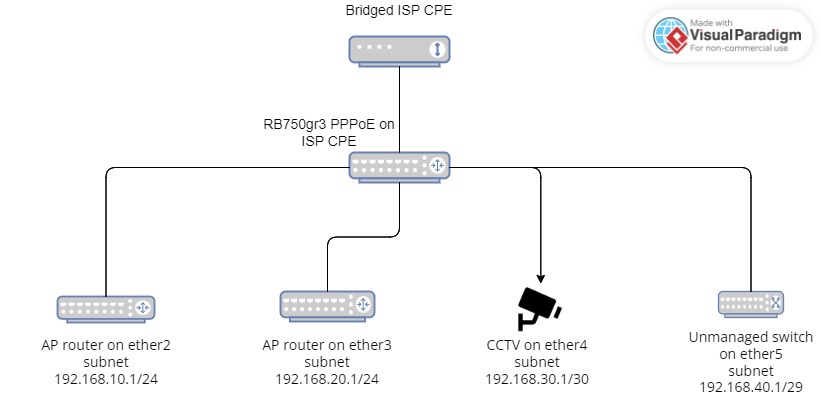
Thanks for your time. Please check below the conf and diagram (hope the diagram is clear).
# mar/30/2023 15:05:05 by RouterOS 6.49.7
# software id = QXU3-9BSF
#
# model = RB750Gr3
# serial number = CC210FFC6E46
/interface ethernet
set [ find default-name=ether1 ] comment="Uplink from CTCPE" loop-protect=on \
    mtu=1596
set [ find default-name=ether2 ] comment="DCOS / R2 / sw-8P" loop-protect=on \
    loop-protect-disable-time=10m mtu=1596
set [ find default-name=ether3 ] comment=R3 loop-protect=on \
    loop-protect-disable-time=10m mtu=1596
set [ find default-name=ether4 ] comment=CCTV loop-protect=on \
    loop-protect-disable-time=10m mtu=1596
set [ find default-name=ether5 ] comment=sw-8p l2mtu=1598 loop-protect=on \
    loop-protect-disable-time=10m
/interface pppoe-client
add disabled=no interface=ether1 name=pppoe-ctfiber user=user
/interface l2tp-server
add name=adu-1.PA-8010ANDGER7.ck******.com user=ad*****
add name=adu-1.PA-8820POLIS.ck******.com user=ad*****
add disabled=yes name=l2tp-ck**** user=ck****
add name=l2tp-hb535 user=hb*****
/interface ovpn-server
add name=ovpn-ck user=ch*****
/interface wireless security-profiles
set [ find default=yes ] supplicant-identity=MikroTik
/ip ipsec policy group
set [ find default=yes ] name=L2TP
/ip ipsec profile
set [ find default=yes ] dh-group=modp2048 dpd-interval=disable-dpd \
    enc-algorithm=aes-256 hash-algorithm=sha256
/ip ipsec proposal
set [ find default=yes ] auth-algorithms=sha256 enc-algorithms=aes-256-cbc \
    pfs-group=modp2048
/ip pool
add name=OVPN-Pool ranges=10.1.1.2-10.1.1.254
add name=L2TP-Pool ranges=10.2.1.2-10.2.1.100
add name=ether3_pool ranges=192.168.20.2-192.168.20.254
add name=ether2_pool ranges=192.168.10.2-192.168.10.254
add name=dhcp_pool20 ranges=192.168.40.2-192.168.40.6
/ip dhcp-server
add address-pool=ether3_pool disabled=no interface=ether3 lease-time=2h name=\
    ether3_dhcp
add address-pool=ether2_pool disabled=no interface=ether2 lease-time=2h name=\
    ether2_dhcp
add address-pool=dhcp_pool20 disabled=no interface=ether5 lease-time=2h name=\
    dhcp1
/ppp profile
set *0 change-tcp-mss=default
add local-address=10.1.1.1 name=OVPN remote-address=OVPN-Pool
add local-address=10.2.1.1 name=L2TP remote-address=L2TP-Pool
set *FFFFFFFE change-tcp-mss=default use-encryption=default
/queue simple
add burst-time=2s/2s max-limit=52M/205M name=192.168.10.0/24_200/50 target=\
    192.168.10.0/24
add burst-time=2s/2s max-limit=52M/205M name=ether3_200/50 target=ether3
/snmp community
set [ find default=yes ] disabled=yes
add addresses=172.168.188.2/32 name=d*****
/system logging action
add email-start-tls=yes email-to=ch****@hotmail.com name=email \
    target=email
/interface l2tp-server server
set default-profile=L2TP enabled=yes max-mru=1700 max-mtu=1700 \
    one-session-per-host=yes use-ipsec=required
/interface ovpn-server server
set auth=sha1 certificate=server cipher=aes256 default-profile=OVPN enabled=\
    yes port=61194 require-client-certificate=yes
/ip address
add address=192.168.10.1/24 comment=DHCP interface=ether2 network=\
    192.168.10.0
add address=192.168.20.1/24 comment=DHCP interface=ether3 network=\
    192.168.20.0
add address=172.168.188.1/24 comment=Fasttrack interface=ether2 network=\
    172.168.188.0
add address=192.168.8.250/24 comment=Failover interface=ether2 network=\
    192.168.8.0
add address=192.100.30.1/29 comment=CCTV interface=ether4 network=\
    192.100.30.0
add address=192.168.40.1/29 comment=DHCP interface=ether5 network=\
    192.168.40.0
/ip dhcp-server network
add address=192.168.10.0/24 dns-server=1.1.1.1,8.8.8.8 gateway=192.168.10.1
add address=192.168.20.0/24 dns-server=1.1.1.1,8.8.8.8 gateway=192.168.20.1
add address=192.168.40.0/29 dns-server=1.1.1.1,8.8.8.8 gateway=192.168.40.1
/ip dns
set allow-remote-requests=yes servers=10.0.0.1,1.1.1.1,8.8.8.8
/ip dns static
add address=172.168.188.2 name=dcos.ck******.com
add address=213.7.231.xx name=ns1monitoring.ck******.com
add address=38.242.199.97 name=ns2monitoring.ck******.com
add address=38.242.199.97 name=mail.ck******.com
add address=172.168.188.1 name=bbhq.ck******.com
add address=10.2.1.150 name=adu-1.PA-8010ANDGER7.ck******.com
add address=10.2.1.151 name=adu-1.PA-8820POLIS.ck******.com
add address=192.100.30.2 name=cctv.ck******.com
/ip firewall filter
add action=fasttrack-connection chain=forward comment=\
    "Allow fasttrack on 172.168.188.0/24" src-address=172.168.188.0/24
add action=accept chain=input comment="Allow incoming good connection states" \
    connection-state=established,related,new
add action=accept chain=forward comment=\
    "Allow forward good connection states" connection-state=\
    established,related,new
add action=drop chain=input comment="Drop input invalid connection state" \
    connection-state=invalid
add action=accept chain=input comment="Accept L2TP ipsec encapsulated" \
    dst-port=1701 ipsec-policy=in,ipsec protocol=udp
add action=accept chain=input comment="Accept IKE" dst-port=500 protocol=udp
add action=accept chain=input comment="Accept IPsec NAT" dst-port=4500 \
    protocol=udp
add action=accept chain=input protocol=ipsec-esp
add action=drop chain=forward comment="Drop forward invalid connection state" \
    connection-state=invalid
add action=accept chain=input comment="Port Scanner Block" disabled=yes \
    protocol=tcp src-address=172.168.188.0/24
add action=accept chain=input disabled=yes protocol=tcp src-address=\
    10.100.1.0/24
add action=add-src-to-address-list address-list="Ports Scanner Attacks" \
    address-list-timeout=1d chain=input disabled=yes dst-port=\
    62222,60080,60090 protocol=tcp
add action=drop chain=input disabled=yes dst-port=62222,60080,60090 protocol=\
    tcp src-address-list="Ports Scanner Attacks"
/ip firewall mangle
add action=change-mss chain=forward disabled=yes new-mss=1700 passthrough=yes \
    protocol=tcp tcp-flags=syn tcp-mss=!0-1700
/ip firewall nat
add action=masquerade chain=srcnat src-address=172.168.188.0/24
add action=masquerade chain=srcnat src-address=192.168.10.0/24
add action=masquerade chain=srcnat src-address=192.168.20.0/24
add action=masquerade chain=srcnat src-address=192.100.30.0/29
add action=masquerade chain=srcnat src-address=192.168.40.0/29
add action=masquerade chain=srcnat src-address=192.168.8.0/24
add action=masquerade chain=srcnat src-address=10.1.1.0/24
add action=masquerade chain=srcnat src-address=10.2.1.0/24
add action=dst-nat chain=dstnat comment=DCOS dst-address=213.7.231.xx \
    dst-port=1-40000 protocol=tcp src-port="" to-addresses=172.168.188.2 \
    to-ports=1-40000
add action=dst-nat chain=dstnat dst-address=213.7.231.xx dst-port=53 \
    protocol=udp to-addresses=172.168.188.2 to-ports=53
add action=dst-nat chain=dstnat dst-address=213.7.231.xx dst-port=1194 \
    protocol=udp to-addresses=172.168.188.2 to-ports=1194
add action=dst-nat chain=dstnat comment=NTP dst-address=213.7.231.xx \
    dst-port=123 protocol=udp to-addresses=172.168.188.2 to-ports=123
add action=dst-nat chain=dstnat comment=CCTV dst-address=213.7.231.xx \
    dst-port=65000 protocol=tcp to-addresses=192.100.30.2 to-ports=65000
add action=dst-nat chain=dstnat dst-address=213.7.231.xx dst-port=65090 \
    protocol=tcp to-addresses=192.100.30.2 to-ports=65090
add action=dst-nat chain=dstnat comment=WoL dst-address=213.7.231.xx \
    dst-port=7 protocol=udp to-addresses=172.168.188.0/24 to-ports=7
add action=redirect chain=dstnat comment="DNS Server" dst-port=53 protocol=\
    tcp to-ports=53
add action=redirect chain=dstnat dst-port=53 protocol=udp to-ports=53
/ip route
add check-gateway=ping comment=PPPoE distance=1 gateway=pppoe-ctfiber
add check-gateway=ping comment=LTE-Backup disabled=yes distance=2 gateway=\
    192.168.8.1
/ip service
set telnet disabled=yes
set ftp address=172.168.188.0/24,10.1.1.0/24,10.2.1.1/32 port=60021
set www address=172.168.188.0/24,10.1.1.0/24,10.2.1.1/32 port=60080
set ssh address=172.168.188.0/24,10.1.1.0/24,10.2.1.1/32 port=62222
set api disabled=yes
set winbox address=172.168.188.0/24,10.1.1.0/24,10.2.1.1/32 port=60090
set api-ssl disabled=yes
/ppp secret
add name=ch***** profile=OVPN service=ovpn
add name=hb***** profile=L2TP service=l2tp
add disabled=yes name=ck**** profile=L2TP service=l2tp
add name=ad***** profile=L2TP remote-address=10.2.1.150 service=l2tp
add name=ad***** profile=L2TP remote-address=10.2.1.151 service=l2tp
/snmp
set contact=ch****@hotmail.com enabled=yes location=HQ \
    trap-community=dcos_com_only_ trap-target=172.168.188.2 trap-version=2
/system clock
set time-zone-name=Asia/Nicosia
/system identity
set name=bbhq.ck******.com
/system logging
add action=email topics=critical
add action=email disabled=yes topics=interface
add action=email topics=firewall
/system ntp client
set enabled=yes primary-ntp=213.7.231.xx secondary-ntp=172.168.188.2
/tool e-mail
set address=mail.ck******.com from=r1@ck******.com port=587 start-tls=yes \
    user=r1@ck******.com
/tool graphing interface
add interface=ether1
add interface=ether2
add interface=ether3
add interface=ether4
add interface=pppoe-ctfiber
/tool graphing resource
add
/tool netwatch
add disabled=yes down-script="interface set ether5 disable=no" host=\
    213.7.231.xx interval=1s up-script="interface set ether5 disable=yes"
add disabled=yes down-script="tool e-mail send to=ch****@hotmail.com s\
    ubject=Uplink_from_CPE_DOWN start-tls=yes body=Uplink_from_CPE_is_DOWN" \
    host=213.7.231.xx interval=10s up-script="tool e-mail send to=ch*****\
    **@hotmail.com subject=Uplink_from_CPE_UP start-tls=yes body=Uplink_from_C\
    PE_is_UP"
Where is the ip pool for the camera subnet?
Where is the server for the camera subnet?
Why do you have pVids on bridge ports but you have no vlans assigned.
Why do you assign three Ip addresses to ether2.
++++++++++++++++++++++++++++++++++++++++++++++
Sorry this is so overly complex for a simple setup, not interested in looking at it at the moment maybe later
Please ignore the current VLAN configuration, i forgot to remove it after removing the Bridge. The 3 subnets on ether2 are → 172.168.188.1/24 is for fasttrack (got 1Gbps which i’m unable to reach without fasttrack), 192.168.10.1/24 is for DHCP and 192.168.8.250/24 is the Failover which is currently disconnected. If ether2 configuration is confusing, i would like to configure ether2’s subnet 192.168.10.1/24 only in VLAN10.
The CCTV is working with static IP (192.100.30.2).
Edit: i have updated the configuration export
DEFINE required VLANS with interface bridge
Give each vlan ip pool, dhcp server, server-network and IP address
each vlan is an interface list member for LAN, not the bridge
/interface bridge ports
add bridge=bridge ingress–filtering=yes frame-types=allow-only-priority-an-untagged interface=ether2 pvid=10
add bridge=bridge ingress–filtering=yes frame-types=allow-only-priority-an-untagged interface=ether3 pvid=20
add bridge=bridge ingress–filtering=yes frame-types=allow-only-priority-an-untagged interface=ether4 pvid=30
add bridge=bridge ingress–filtering=yes frame-types=allow-only-priority-an-untagged interface=ether5 pvid=40
/interface bridge vlans
add bridge=bridge tagged=bridge untagged=ether2 vlan-ids=10
add bridge=bridge tagged=bridge untagged=ether3 vlan-ids=20
add bridge=bridge tagged=bridge untagged=ether4 vlan-ids=30
add bridge=bridge tagged=bridge untagged=ether5 vlan-ids=40
THe other thing is sourcenat describes the outgoing interface to which internal users will get for source address on way out the door.
The way your applying it seems not correct. You shouild only need one rule in most cases.
THis would be fine for example.
/ip firewall nat
add action=masquerade chain=srcnat out-interface=pppoe-ctfiber
What I dont understand is if your IP address is static/fixed or dynamic ( I thought pppoe addresses were dynamic)?
It if was fixed the sourcenat rule is more accurately stated as
add action=src-nat chain=srcnat out-interface=pppoe-ctfiber to-addresses=fixed-WAN_IP
However if its dynamic then the first rule works BUT all your port forwarding rules (which are based on a static fixed IP) would have to change from dst-address= to in-interface=pppoe-ctfiber
Thanks again everyone for your time and effort. Do i need to Enable VLAN Filtering on the bridge?
edit: Also, is ip pool and dhcp server required for the VLANs to work?
Does a gas motor need spark plugs…
THe vlan is like any other subnet it needs full particulars, vlan-filtering=yes is the LAST Step for the vlan configuation. ( yes on the bridge itself )
Can i only work on VLAN30 for now to test or at least one more vlan is required (i.e. vlan40) to work?
Sure you can.
But in my experience it’s easier to fill the blanks immediately for all involved VLANs, since you’re there anyhow.
- Set up IP address
- Setup up DHCP: pool, server, network
Another question. Since ether4 is under Bridge, do i assign DHCP for vlan30 to bridge? And when i configure all VLANS 10,20,30,40 i will need to create 4 DHCP servers under bridge?
Posting latest conf, not sure if it’s done correctly.
# mar/30/2023 18:00:07 by RouterOS 6.49.7
# software id = QXU3-9BSF
#
# model = RB750Gr3
# serial number = CC****
/interface bridge
add ingress-filtering=yes name=bridge vlan-filtering=yes
/interface ethernet
set [ find default-name=ether1 ] comment="Uplink from CTCPE" loop-protect=on \
    mtu=1596
set [ find default-name=ether2 ] comment="DCOS / R2 / sw-8P" loop-protect=on \
    loop-protect-disable-time=10m mtu=1596
set [ find default-name=ether3 ] comment=R3 loop-protect=on \
    loop-protect-disable-time=10m mtu=1596
set [ find default-name=ether4 ] comment=CCTV loop-protect=on \
    loop-protect-disable-time=10m mtu=1596
set [ find default-name=ether5 ] comment=sw-8p l2mtu=1598 loop-protect=on \
    loop-protect-disable-time=10m
/interface pppoe-client
add disabled=no interface=ether1 name=pppoe-ctfiber user=user
/interface l2tp-server
add name=adu-1.PA-8010ANDGER7.ck*****.com user=ad******
add name=adu-1.PA-8820POLIS.ck*****.com user=ad******
add disabled=yes name=l2tp-ckl2tp user=ck****
add name=l2tp-hb*** user=hb*****
/interface ovpn-server
add name=ovpn-ck user=ch****
/interface wireless security-profiles
set [ find default=yes ] supplicant-identity=MikroTik
/ip ipsec policy group
set [ find default=yes ] name=L2TP
/ip ipsec profile
set [ find default=yes ] dh-group=modp2048 dpd-interval=disable-dpd \
    enc-algorithm=aes-256 hash-algorithm=sha256
/ip ipsec proposal
set [ find default=yes ] auth-algorithms=sha256 enc-algorithms=aes-256-cbc \
    pfs-group=modp2048
/ip pool
add name=OVPN-Pool ranges=10.1.1.2-10.1.1.254
add name=L2TP-Pool ranges=10.2.1.2-10.2.1.100
add name=ether3_pool ranges=192.168.20.2-192.168.20.254
add name=ether2_pool ranges=192.168.10.2-192.168.10.254
add name=dhcp_pool20 ranges=192.168.40.2-192.168.40.6
add name=vlan30 ranges=192.100.30.2
add name=dhcp_pool22 ranges=192.100.30.2
/ip dhcp-server
add address-pool=ether3_pool disabled=no interface=ether3 lease-time=2h name=\
    ether3_dhcp
add address-pool=ether2_pool disabled=no interface=ether2 lease-time=2h name=\
    ether2_dhcp
add address-pool=dhcp_pool20 disabled=no interface=ether5 lease-time=2h name=\
    dhcp1
add address-pool=vlan30 disabled=no interface=bridge name=vlan30_dhcp
/ppp profile
set *0 change-tcp-mss=default
add local-address=10.1.1.1 name=OVPN remote-address=OVPN-Pool
add local-address=10.2.1.1 name=L2TP remote-address=L2TP-Pool
set *FFFFFFFE change-tcp-mss=default use-encryption=default
/queue simple
add burst-time=2s/2s max-limit=52M/205M name=192.168.10.0/24_200/50 target=\
    192.168.10.0/24
add burst-time=2s/2s max-limit=52M/205M name=ether3_200/50 target=ether3
/snmp community
set [ find default=yes ] disabled=yes
add addresses=172.168.188.2/32 name=dcos_com_only_
/system logging action
add email-start-tls=yes email-to=ch*******9@hotmail.com name=email \
    target=email
/interface bridge port
add bridge=bridge frame-types=admit-only-untagged-and-priority-tagged \
    ingress-filtering=yes interface=ether4 pvid=30
/interface bridge vlan
add bridge=bridge tagged=bridge untagged=ether4 vlan-ids=30
/interface l2tp-server server
set default-profile=L2TP enabled=yes max-mru=1700 max-mtu=1700 \
    one-session-per-host=yes use-ipsec=required
/interface ovpn-server server
set auth=sha1 certificate=server cipher=aes256 default-profile=OVPN enabled=\
    yes port=61194 require-client-certificate=yes
/ip address
add address=192.168.10.1/24 comment=DHCP interface=ether2 network=\
    192.168.10.0
add address=192.168.20.1/24 comment=DHCP interface=ether3 network=\
    192.168.20.0
add address=172.168.188.1/24 comment=Fasttrack interface=ether2 network=\
    172.168.188.0
add address=192.168.8.250/24 comment=Failover interface=ether2 network=\
    192.168.8.0
add address=192.100.30.1/30 comment=CCTV interface=ether4 network=\
    192.100.30.0
add address=192.168.40.1/29 comment=DHCP interface=ether5 network=\
    192.168.40.0
/ip dhcp-server network
add address=192.100.30.0/30 gateway=192.100.30.1
add address=192.168.10.0/24 dns-server=1.1.1.1,8.8.8.8 gateway=192.168.10.1
add address=192.168.20.0/24 dns-server=1.1.1.1,8.8.8.8 gateway=192.168.20.1
add address=192.168.40.0/29 dns-server=1.1.1.1,8.8.8.8 gateway=192.168.40.1
/ip dns
set allow-remote-requests=yes servers=10.0.0.1,1.1.1.1,8.8.8.8
/ip dns static
add address=172.168.188.2 name=dcos.ck*****.com
add address=213.7.231.xx name=ns1monitoring.ck*****.com
add address=38.242.199.97 name=ns2monitoring.ck*****.com
add address=38.242.199.97 name=mail.ck*****.com
add address=172.168.188.1 name=bbhq.ck*****.com
add address=10.2.1.150 name=adu-1.PA-8010ANDGER7.ck*****.com
add address=10.2.1.151 name=adu-1.PA-8820POLIS.ck*****.com
add address=192.100.30.2 name=cctv.ck*****.com
/ip firewall filter
add action=fasttrack-connection chain=forward comment=\
    "Allow fasttrack on 172.168.188.0/24" src-address=172.168.188.0/24
add action=accept chain=input comment="Allow incoming good connection states" \
    connection-state=established,related,new
add action=accept chain=forward comment=\
    "Allow forward good connection states" connection-state=\
    established,related,new
add action=drop chain=input comment="Drop input invalid connection state" \
    connection-state=invalid
add action=accept chain=input comment="Accept L2TP ipsec encapsulated" \
    dst-port=1701 ipsec-policy=in,ipsec protocol=udp
add action=accept chain=input comment="Accept IKE" dst-port=500 protocol=udp
add action=accept chain=input comment="Accept IPsec NAT" dst-port=4500 \
    protocol=udp
add action=accept chain=input protocol=ipsec-esp
add action=drop chain=forward comment="Drop forward invalid connection state" \
    connection-state=invalid
add action=accept chain=input comment="Port Scanner Block" disabled=yes \
    protocol=tcp src-address=172.168.188.0/24
add action=accept chain=input disabled=yes protocol=tcp src-address=\
    10.100.1.0/24
add action=add-src-to-address-list address-list="Ports Scanner Attacks" \
    address-list-timeout=1d chain=input disabled=yes dst-port=\
    62222,60080,60090 protocol=tcp
add action=drop chain=input disabled=yes dst-port=62222,60080,60090 protocol=\
    tcp src-address-list="Ports Scanner Attacks"
/ip firewall mangle
add action=change-mss chain=forward disabled=yes new-mss=1700 passthrough=yes \
    protocol=tcp tcp-flags=syn tcp-mss=!0-1700
/ip firewall nat
add action=masquerade chain=srcnat src-address=172.168.188.0/24
add action=masquerade chain=srcnat src-address=192.168.10.0/24
add action=masquerade chain=srcnat src-address=192.168.20.0/24
add action=masquerade chain=srcnat src-address=192.100.30.0/29
add action=masquerade chain=srcnat src-address=192.168.40.0/29
add action=masquerade chain=srcnat src-address=192.168.8.0/24
add action=masquerade chain=srcnat src-address=10.1.1.0/24
add action=masquerade chain=srcnat src-address=10.2.1.0/24
add action=src-nat chain=srcnat out-interface=pppoe-ctfiber to-addresses=\
    213.7.231.xx
add action=dst-nat chain=dstnat comment=DCOS dst-address=213.7.231.xx \
    dst-port=1-40000 protocol=tcp src-port="" to-addresses=172.168.188.2 \
    to-ports=1-40000
add action=dst-nat chain=dstnat dst-address=213.7.231.xx dst-port=53 \
    protocol=udp to-addresses=172.168.188.2 to-ports=53
add action=dst-nat chain=dstnat dst-address=213.7.231.xx dst-port=1194 \
    protocol=udp to-addresses=172.168.188.2 to-ports=1194
add action=dst-nat chain=dstnat comment=NTP dst-address=213.7.231.xx \
    dst-port=123 protocol=udp to-addresses=172.168.188.2 to-ports=123
add action=dst-nat chain=dstnat comment=CCTV dst-address=213.7.231.xx \
    dst-port=65000 protocol=tcp to-addresses=192.100.30.2 to-ports=65000
add action=dst-nat chain=dstnat dst-address=213.7.231.xx dst-port=65090 \
    protocol=tcp to-addresses=192.100.30.2 to-ports=65090
add action=dst-nat chain=dstnat comment=WoL dst-address=213.7.231.xx \
    dst-port=7 protocol=udp to-addresses=172.168.188.0/24 to-ports=7
add action=redirect chain=dstnat comment="DNS Server" dst-port=53 protocol=\
    tcp to-ports=53
add action=redirect chain=dstnat dst-port=53 protocol=udp to-ports=53
/ip route
add check-gateway=ping comment=PPPoE distance=1 gateway=pppoe-ctfiber
add check-gateway=ping comment=LTE-Backup disabled=yes distance=2 gateway=\
    192.168.8.1
/ip service
set telnet disabled=yes
set ftp address=172.168.188.0/24,10.1.1.0/24,10.2.1.1/32 port=60021
set www address=172.168.188.0/24,10.1.1.0/24,10.2.1.1/32 port=60080
set ssh address=172.168.188.0/24,10.1.1.0/24,10.2.1.1/32 port=62222
set api disabled=yes
set winbox address=172.168.188.0/24,10.1.1.0/24,10.2.1.1/32 port=60090
set api-ssl disabled=yes
/ppp secret
add name=chrisckr profile=OVPN service=ovpn
add name=hb535l2tp profile=L2TP service=l2tp
add disabled=yes name=ckl2tp profile=L2TP service=l2tp
add name=ad****** profile=L2TP remote-address=10.2.1.150 service=l2tp
add name=ad****** profile=L2TP remote-address=10.2.1.151 service=l2tp
/snmp
set contact=ch*******9@hotmail.com enabled=yes location=HQ \
    trap-community=d****** trap-target=172.168.188.2 trap-version=2
/system clock
set time-zone-name=Asia/Nicosia
/system identity
set name=bbhq.ck*****.com
/system logging
add action=email topics=critical
add action=email disabled=yes topics=interface
add action=email topics=firewall
/system ntp client
set enabled=yes primary-ntp=213.7.231.xx secondary-ntp=172.168.188.2
/tool e-mail
set address=mail.ck*****.com from=r1@ck*****.com port=587 start-tls=yes \
    user=r1@ck*****.com
/tool graphing interface
add interface=ether1
add interface=ether2
add interface=ether3
add interface=ether4
add interface=pppoe-ctfiber
/tool graphing resource
add
/tool netwatch
add disabled=yes down-script="interface set ether5 disable=no" host=\
    213.7.231.xx interval=1s up-script="interface set ether5 disable=yes"
add disabled=yes down-script="tool e-mail send to=ch*******9@hotmail.com s\
    ubject=Uplink_from_CPE_DOWN start-tls=yes body=Uplink_from_CPE_is_DOWN" \
    host=213.7.231.xx interval=10s up-script="tool e-mail send to=ch****\
    09@hotmail.com subject=Uplink_from_CPE_UP start-tls=yes body=Uplink_from_C\
    PE_is_UP"
We start here as base:
http://forum.mikrotik.com/t/using-routeros-to-vlan-your-network/126489/1
Any reason why you do not have VLAN30 interface connected to bridge ?
/interface vlan add interface=bridge name=VLAN30 vlan-id=30
You need one vlan interface as slave to bridge for each vlan you want to use.
Each vlan interface gets its own IP address with the subnet appropriate for that vlan.
The DHCP server should then be connected to that interface, not bridge.
So 4 DHCP servers, each connected to their respective vlan interface.
The best you can do is to download the appropriate config which is presented in the thread I linked to.
The config to be applied is really STEP BY STEP explained in those configs on what you need to do.
It was clearly laid out what all vlans get, the bridge does nothing but bridge.
Looking at the diagram in post #5, I see no absolute need for vlans. It appears that there every ethernet port is in a different subnet; there are no subnets spanning multiple ethernet ports.
@anav’s original response hinted at that.
So while you can create vlans and then create access ports in each vlan, there is no necessisty for that given the requirements in the diagram.
vlans add another layer of abstraction, which can make some things possible that are not possible without vlans, but in this particular instance, I see no need for them.
If your goal is to learn about vlans, then that would be a reason for pursuing the vlan configuration, but it does add complexity to the configuration.
Since you have 5 physical interfaces available, and one is used by the internet connection, and you have 4 subnets defined, each being used by a single port, about the only possible advantage would be that with vlans, if the APs connected to ether2 and ether3 support vlans, and you want to broadcast the same set of SSIDS from both APs and also have the ability to have an SSID corresponding to the wired net on ether5, then vlans would be the only way to achive what you want (given the limited number of ports on the RB750Gr3) and the lack of an external managed switch.
That was so well explained, i also believe that i don’t need vlans. To be honest the goal is to learn VLANs but i wasn’t sure if anybody would bother if i pointed it out like that. Regardless that rb750gr3 does not support vlans, i should create VLANs under /Interface vlan?
Again, thank you everyone for taking your time helping out!
I thought creating VLANs under /Interface vlan was pointless since the rb750gr3 does not support vlans. I will create it now.
My hex ran vlans just fine at home until it was replaced.
Where did you get that idea ?