VLAN-Filtering enabled -> no connection

Hi,

I'm using the CRS510 in switch mode and I'd like your help with a configuration issue.

My Debian PC (no vlan here) is connected to the switch via ether1 for administration.

Setup of RS510 :

IP on bridgeLocal

Bridge / vlan
vlan 4
Tagged : bridgeLocal
Untagged : ether1

Bridge / port /ether1
PVID 4
Frames : admit all
Ingress filtering Off (I tried On, same problem)

MVRP register State : fixed
MVRP Applicant State : non participant

As soon as I enable VLAN filtering, I lose connection to the switch.
Did I missed something ?

Thank you.

If you're tagging bridgeLocal in the bridge vlan configuration you'll need to have a VLAN interface with vlan-id=4 attached to interface bridgeLocal. If that's not there, the switch won't be listening to anything on VLAN 4 with this configuration.

While ghostinthenet gave you one specific reason you lost connection, there are still a lot of unknowns.

How were you connecting from your Debian PC? with winbox or something else? If you were using an ip address, then in addition to creating a vlan interface, the vlan interface will need an ip address, and may need to be added to an interface list if you have a firewall. And for ease of use you will probably also want a dhcp server.

But all these answers are premature, since you haven't even told us what you goal was, and what you were expecting that was different than what you saw.

If you want more eyes and help, you will need to post your config (that works), and describe what your goals is? E.g. are you creating a management vlan? Without knowing what you want to do, providing you guesses is pretty pointless.

Thanks for your replies :

→ I will try with ghostinthenet ‘s recommandations.
→ In case I can’t fix, I will post more information about goal and setup.

1 Like

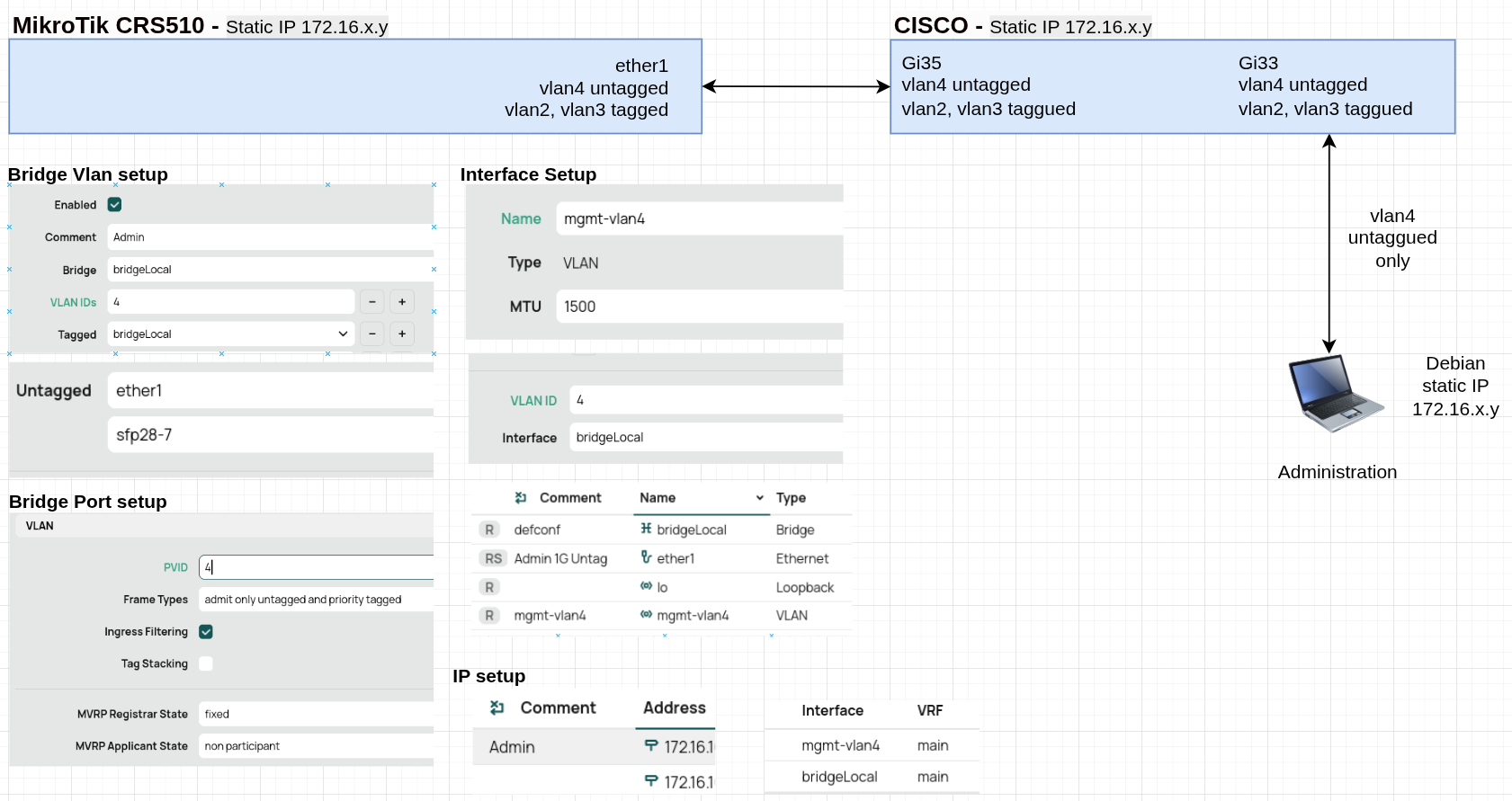
Here is a description (+ schematic) of my test environment to help find my configuration error :

  • VLAN4 is dedicated to switch administration.
  • IP addresses of MikroTik, Cisco, and Debian PC are static (of course, all on the same network).
  • Tests are currently only performed on gigabits ports.
  • Debian PC pings MikroTik through Cisco, which carries VLANs : tagged ID2 ID3, untagged ID4.
  • I use Webfig to configure MikroTik.

The goal for ether1 is as follows :

  • Connect a PC directly to it or through Cisco for administration
    (a PC or laptop without VLANs, in a basic network configuration).
  • Connect another switch in cascade to add ports.

Theses steps seems OK :

  • Creation of VLAN 4 mapped on bridgeLocal.
    Map Tagged (bridgeLocal), and untagged (ether1)
  • Configure each port
    for ether1 PVID=4 with “admin only untaggued and priority tagged”, ingress on

I am not sure about theses :

  • Creation of an interface vlan4, mapped on bridgeLocal
  • Creation a new IP attached to interface mgmt-vlan4
    (First IP, attached on bridgeLocal is still active)

I understand that I need an interface and IP to maintain connection with CRS510.
-> But As soon as I enable VLAN filtering, I lose connection to the switch (two IPs unreachable).

I'm new to this equipment, I clearly haven't quite understood how to configure it :frowning:

I am not sure if what your screen shot is, perhaps webfig?

Please open a terminal and export your config, that's what we are used to seeing, and it is complete.

/export file=dvb91_crs510

This will create a file dvb91_crs510.rsc which you should then download to your PC and edit it to remove the SN and and any public ip addresses. Private ip addresses aren't unique, so it probably isn't worth trying to mask them, but if you do feel the need, make sure you do it in a way that is consistent.

Finally, when you have the exported config sanitized, reply to the thread, but before pasting, click on the </> icon which will place the export into a code block that can be scrolled.

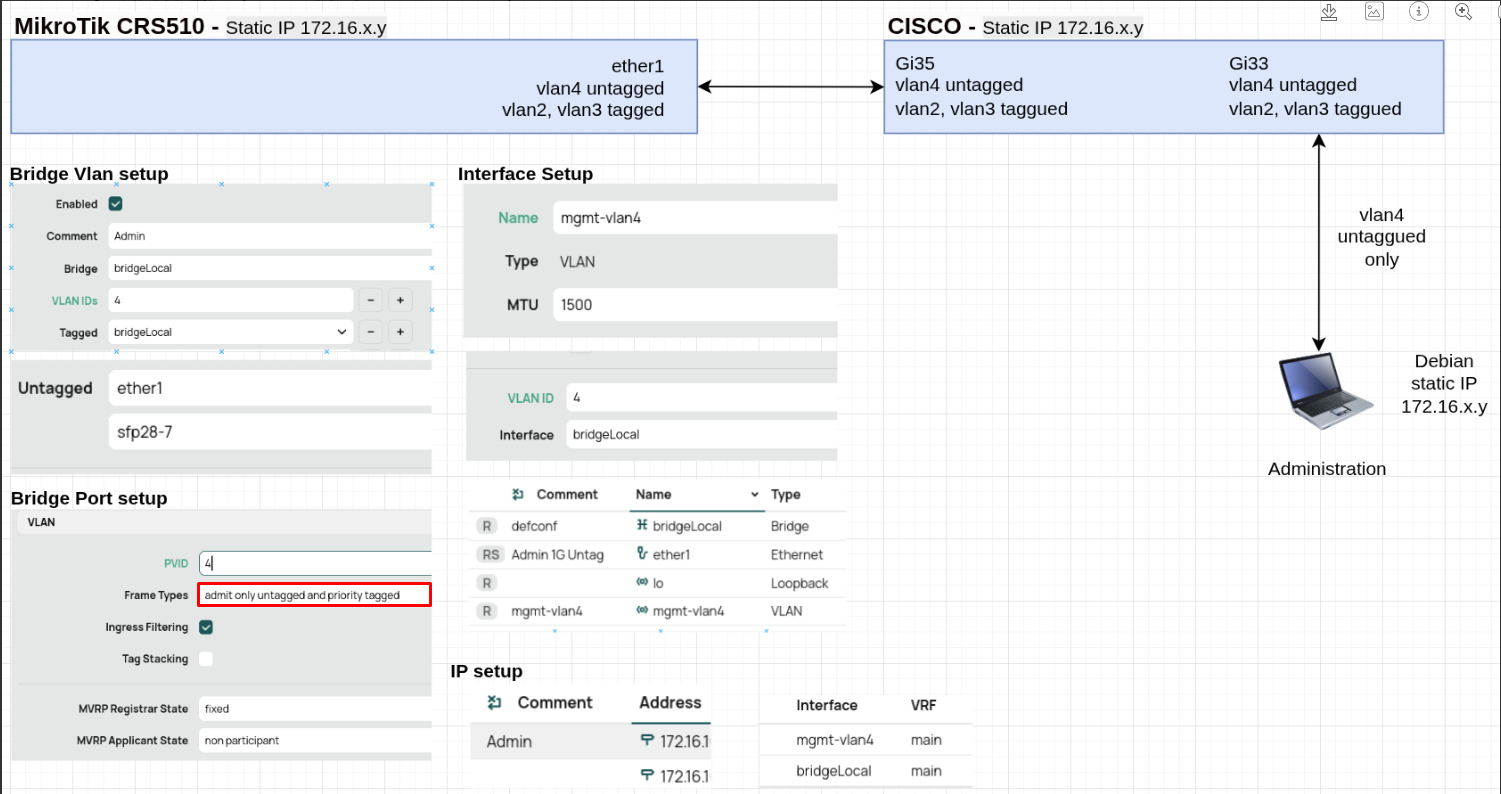
On thing I noticed in your screen shot is that you are limiting frame types to untagged, this will block your vlan2 and vlan3 traffic that is tagged. That should be changed to "admit all" which will allow the untagged vlan 4 as well as the tagged vlan2 and vlan3 traffic.

Yes, screen shot is with webfig.

I created 2 and 3 for the following tests, the real difficulty is understanding why vlan4 is causing problems.

I've just connected Debian directly on ether1.
-> Same issue, ping KO as soon as vlan filtering is ON

Here is my config :

# 2026-01-30 11:43:23 by RouterOS 7.21.1
# software id = RQI2-128D
#
# model = CRS510-8XS-2XQ
# serial number = sn-xx
/interface bridge
add admin-mac=F4xx auto-mac=no comment=defconf name=bridgeLocal
/interface ethernet
set [ find default-name=ether1 ] comment="Admin 1G Untag"
set [ find default-name=qsfp28-1-1 ] auto-negotiation=no speed=10G-baseSR-LR
set [ find default-name=qsfp28-1-2 ] disabled=yes
set [ find default-name=qsfp28-1-3 ] advertise="10M-baseT-half,10M-baseT-full,\
    100M-baseT-half,100M-baseT-full,1G-baseT-half,1G-baseT-full,1G-baseX,2.5G-\
    baseT,2.5G-baseX,5G-baseT,10G-baseT,10G-baseSR-LR,10G-baseCR,40G-baseSR4-L\
    R4,40G-baseCR4,25G-baseSR-LR,25G-baseCR,50G-baseSR2-LR2,50G-baseCR2" \
    disabled=yes
set [ find default-name=qsfp28-1-4 ] disabled=yes
set [ find default-name=qsfp28-2-1 ] auto-negotiation=no comment=\
    "Admin 10G Untag" speed=10G-baseSR-LR
set [ find default-name=qsfp28-2-2 ] disabled=yes
set [ find default-name=qsfp28-2-3 ] advertise="10M-baseT-half,10M-baseT-full,\
    100M-baseT-half,100M-baseT-full,1G-baseT-half,1G-baseT-full,1G-baseX,2.5G-\
    baseT,2.5G-baseX,5G-baseT,10G-baseT,10G-baseSR-LR,10G-baseCR,40G-baseSR4-L\
    R4,40G-baseCR4,25G-baseSR-LR,25G-baseCR,50G-baseSR2-LR2,50G-baseCR2" \
    disabled=yes
set [ find default-name=qsfp28-2-4 ] disabled=yes
set [ find default-name=sfp28-1 ] auto-negotiation=no speed=10G-baseSR-LR
set [ find default-name=sfp28-2 ] auto-negotiation=no speed=10G-baseSR-LR
set [ find default-name=sfp28-3 ] auto-negotiation=no speed=10G-baseSR-LR
set [ find default-name=sfp28-4 ] auto-negotiation=no speed=10G-baseSR-LR
set [ find default-name=sfp28-5 ] auto-negotiation=no speed=10G-baseSR-LR
set [ find default-name=sfp28-6 ] auto-negotiation=no speed=10G-baseSR-LR
set [ find default-name=sfp28-7 ] auto-negotiation=no comment=\
    "Admin 10G Untag" speed=10G-baseSR-LR
set [ find default-name=sfp28-8 ] auto-negotiation=no speed=10G-baseSR-LR
/interface vlan
add comment=MGMT-4 interface=bridgeLocal l3-hw-offloading=no name=MGMT-4 \
    vlan-id=4
/interface list
add name=WAN
add name=LAN
/interface bridge port
add bridge=bridgeLocal comment=Admin frame-types=\
    admit-only-untagged-and-priority-tagged ingress-filtering=no interface=\
    ether1 mvrp-applicant-state=non-participant mvrp-registrar-state=fixed \
    pvid=4
add bridge=bridgeLocal comment=defconf frame-types=\
    admit-only-untagged-and-priority-tagged interface=qsfp28-1-1 \
    mvrp-applicant-state=non-participant mvrp-registrar-state=fixed pvid=4
add bridge=bridgeLocal comment=defconf interface=qsfp28-1-2
add bridge=bridgeLocal comment=defconf interface=qsfp28-1-3
add bridge=bridgeLocal comment=defconf interface=qsfp28-1-4
add bridge=bridgeLocal comment=defconf frame-types=admit-only-vlan-tagged \
    interface=qsfp28-2-1 mvrp-applicant-state=non-participant \
    mvrp-registrar-state=fixed
add bridge=bridgeLocal comment=defconf interface=qsfp28-2-2
add bridge=bridgeLocal comment=defconf interface=qsfp28-2-3
add bridge=bridgeLocal comment=defconf interface=qsfp28-2-4
add bridge=bridgeLocal comment=defconf frame-types=admit-only-vlan-tagged \
    interface=sfp28-1 mvrp-applicant-state=non-participant \
    mvrp-registrar-state=fixed
add bridge=bridgeLocal comment=defconf frame-types=admit-only-vlan-tagged \
    interface=sfp28-2 mvrp-applicant-state=non-participant \
    mvrp-registrar-state=fixed unknown-unicast-flood=no
add bridge=bridgeLocal comment=defconf frame-types=admit-only-vlan-tagged \
    interface=sfp28-3 mvrp-applicant-state=non-participant \
    mvrp-registrar-state=fixed
add bridge=bridgeLocal comment=defconf frame-types=admit-only-vlan-tagged \
    interface=sfp28-4 mvrp-applicant-state=non-participant \
    mvrp-registrar-state=fixed
add bridge=bridgeLocal comment=defconf frame-types=admit-only-vlan-tagged \
    interface=sfp28-5 mvrp-applicant-state=non-participant \
    mvrp-registrar-state=fixed
add bridge=bridgeLocal comment=defconf frame-types=admit-only-vlan-tagged \
    interface=sfp28-6 mvrp-applicant-state=non-participant \
    mvrp-registrar-state=fixed
add bridge=bridgeLocal comment=Admin interface=sfp28-7 mvrp-applicant-state=\
    non-participant mvrp-registrar-state=fixed pvid=4
add bridge=bridgeLocal comment=defconf interface=sfp28-8 \
    mvrp-applicant-state=non-participant mvrp-registrar-state=fixed pvid=4
/ipv6 settings
set disable-ipv6=yes
/interface bridge vlan
add bridge=bridgeLocal comment=Admin tagged=bridgeLocal,qsfp28-1-1 untagged=\
    ether1,sfp28-7 vlan-ids=4
add bridge=bridgeLocal comment=vlan-test-3 tagged="bridgeLocal,ether1,qsfp28-1\
    -1,qsfp28-2-1,sfp28-2,sfp28-4,sfp28-6,sfp28-7,sfp28-8" vlan-ids=3
add bridge=bridgeLocal comment=vlan-test-2 tagged=\
    bridgeLocal,qsfp28-1-1,qsfp28-2-1,sfp28-1,sfp28-3,sfp28-5 vlan-ids=2
/interface list member
add interface=ether1 list=WAN
add interface=sfp28-1 list=LAN
add interface=sfp28-2 list=LAN
add interface=sfp28-3 list=LAN
add interface=sfp28-4 list=LAN
add interface=sfp28-5 list=LAN
add interface=sfp28-6 list=LAN
add interface=sfp28-7 list=LAN
add interface=sfp28-8 list=LAN
add interface=qsfp28-1-1 list=LAN
add interface=qsfp28-1-2 list=LAN
add interface=qsfp28-1-3 list=LAN
add interface=qsfp28-1-4 list=LAN
add interface=qsfp28-2-1 list=LAN
add interface=qsfp28-2-2 list=LAN
add interface=qsfp28-2-3 list=LAN
add interface=qsfp28-2-4 list=LAN
/ip address
add address=xx.9/24 comment=Admin interface=MGMT-4 network=xx.0
add address=xx.8/24 interface=bridgeLocal network=xx.0
/ip dhcp-client
add comment=defconf disabled=yes interface=bridgeLocal
/ip dns
set servers=1.1.1.1
/ip route
add disabled=no distance=1 dst-address=0.0.0.0/0 gateway=xx \
    routing-table=main suppress-hw-offload=no
/system clock
set time-zone-name=Europe/Paris
/system identity
set name=MikroTik-01
/system routerboard settings
set enter-setup-on=delete-key

What are you pinging from the Debian PC?

You have no ip addresses configured on the CRS510.

If that's because you removed it from the config, then I am not going to be able to help. No one can troubleshoot with bad information.

If you just take the default config, (if the CRS510 has one, I don't know since I don't have one. Some "advanced" devices don't provide one, as they expect the users to know how to configure it) However, since your config does have some lines with comment=defconf that appears those lines came from the default config.

Usually, the default config will configure ether1 as the WAN interface and all other ports as part of the bridge. and the bridge does not have vlan-filtering enabled. See this for the behavior when the bridge is not vlan-aware.

But in default config, the bridge will have an ip address of 192.168.88.1/24

When the bridge has vlan-filtering=no, then it is just passing ethernet frames as is. It will pass standard untagged ethenet frames as well as IEEE 802.1Q tagged frames; it just won't allow any tag processing, i.e. tags will not be added or removed by the "bridge" when it is not vlan-aware.

The vlan interfaces (in the linux kernel) will tag egress traffic and untag ingress traffic.

The point being, for the specific case you show in your diagram, ether1 (a bridge port due to this part of the config:

/interface bridge port
add bridge=bridgeLocal comment=Admin frame-types=\
    admit-only-untagged-and-priority-tagged ingress-filtering=no interface=\
    ether1 mvrp-applicant-state=non-participant mvrp-registrar-state=fixed \
    pvid=4

Note that anything to do with vlans is ignored when vlan-filtering=no. In this part, that's the "frame-types=admit-only-tagged-and-priority-tagged", "ingress-filtering=no", and "pvid=4", and they are all ignored when the bridge/switch is operating in non-vlan-aware mode (vlan-filtering=no)

So what does all this mean? Before you turn on vlan-filtering, and you are using a non-vlan-aware device, then the only interface you can communicate with is the bridge interface itself. The only way to communicate with the vlan interfaces is with tagged traffic (which the vlan interface will recognize traffic to it (because it sees the tag) and the tag is then removed, and the untagged version is delivered to the linux ip stack and associated with the vlan-interface.

So before vlan-filtering was turned on, if you were getting a ping response, it was coming from the ip address associated with the bridgeLocal interface, not the MGMT-4 vlan interace associated with vlan 4.

As soon as you turn on vlan-filtering, then you will be connected to a different interface, MGMT-4 which needs a different ip address, and is probably in a different subnet (at least in most cases it should be).

If this still isn't enought to get you going, please follow the instructions to leave the ip addresses in. Just make sure that you keep ip addresses in the same networks, and that there is a one-to-one mapping between you obfuscated ip addresses and your "hidden" private ones. In my opinion, trying to mask private ip addresses is a bit of a waste of time. But if you want to, then replace the first 3 octets with 192.168.0, 192,168.1, and 192.168.

E.g. if your bridge currently has an ip address of 192.168.88.1/24 and you want to hide that fact, then use an editor to do a global replace of 192.168.88. with 192.168.0. etc. But at least then you can show us the complete config, (leave your sn redated, that has no effect on the local troubleshooting).

I just noticed that you put this thead in the SwOS category, which isn't the correct place for it. It should be in Beginner Basics or possibly RouterOS.

If you can understand spoken English, the MikroTik youtube video goes into some depth.

VLANs, pt.2: vlan-filtering and management VLAN you can stop watching when he starts talking about CRS1x/CRS2x devices (unless you have some or just want to learn about old devices).

@BartoszP I think only a moderator can move a topic to a different category. This should topic should probably be in Beginner Basis. The CRS510 doesn't even support SwOS.

Can a moderator move this to Beginner Basics so the correct audience will see it? Thanks.

I'm sorry, I removed the IPs instinctively; it was a mistake on my part (especially since it's a test system). Default IP is 172.16.10.8 (mapped on localBridge), and I am using it for webfig. You will find at the end of the post a new extract with the IPs.

No issue here, I didn't modify that, all ports are on bridgeLocal.

OK

This explains that Debian client (172.16.10.50, without any vlan) can ping Mikrotik bridgeLocal (172.16.10.8).

There's something I'm missing here : client PC pings a port configured with PVID = 4 and frame is "Untagged". So the client PC sees a machine in "address mode", MikroTik treats this traffic as vlan4 and should forwards it to the CPU. The exchange with MikroTiks should work, otherwise that would mean it's impossible to admin a switch with a simple laptop ?

Indeed, that is the observed behavior.

I've noted this point; it's important (and I believe the setup issue lies at this level). Note that this second IP is on the same network (172.16.10.9), and that I keeped the two IPs.

You've right, sorry about that. Please find the original config below. I hope you can take a look at the configuration of my second IP management.

I chose this section because I only use the CRS510 as a Layer 2 switch with vlan filtering. No problem if you prefer to move this post.

Even though it's not easy because of the language, I'm going to watch some Mikrotik videos. Thanks for the link.

Config with IPs :

# 2026-01-30 11:43:23 by RouterOS 7.21.1
# software id = RQI2-128D
#
# model = CRS510-8XS-2XQ
# serial number = snxx
/interface bridge
add admin-mac=F4:xx:xx:xx:xx:xx auto-mac=no comment=defconf name=bridgeLocal
/interface ethernet
set [ find default-name=ether1 ] comment="Admin 1G Untag"
set [ find default-name=qsfp28-1-1 ] auto-negotiation=no speed=10G-baseSR-LR
set [ find default-name=qsfp28-1-2 ] disabled=yes
set [ find default-name=qsfp28-1-3 ] advertise="10M-baseT-half,10M-baseT-full,\
    100M-baseT-half,100M-baseT-full,1G-baseT-half,1G-baseT-full,1G-baseX,2.5G-\
    baseT,2.5G-baseX,5G-baseT,10G-baseT,10G-baseSR-LR,10G-baseCR,40G-baseSR4-L\
    R4,40G-baseCR4,25G-baseSR-LR,25G-baseCR,50G-baseSR2-LR2,50G-baseCR2" \
    disabled=yes
set [ find default-name=qsfp28-1-4 ] disabled=yes
set [ find default-name=qsfp28-2-1 ] auto-negotiation=no comment=\
    "Admin 10G Untag" speed=10G-baseSR-LR
set [ find default-name=qsfp28-2-2 ] disabled=yes
set [ find default-name=qsfp28-2-3 ] advertise="10M-baseT-half,10M-baseT-full,\
    100M-baseT-half,100M-baseT-full,1G-baseT-half,1G-baseT-full,1G-baseX,2.5G-\
    baseT,2.5G-baseX,5G-baseT,10G-baseT,10G-baseSR-LR,10G-baseCR,40G-baseSR4-L\
    R4,40G-baseCR4,25G-baseSR-LR,25G-baseCR,50G-baseSR2-LR2,50G-baseCR2" \
    disabled=yes
set [ find default-name=qsfp28-2-4 ] disabled=yes
set [ find default-name=sfp28-1 ] auto-negotiation=no speed=10G-baseSR-LR
set [ find default-name=sfp28-2 ] auto-negotiation=no speed=10G-baseSR-LR
set [ find default-name=sfp28-3 ] auto-negotiation=no speed=10G-baseSR-LR
set [ find default-name=sfp28-4 ] auto-negotiation=no speed=10G-baseSR-LR
set [ find default-name=sfp28-5 ] auto-negotiation=no speed=10G-baseSR-LR
set [ find default-name=sfp28-6 ] auto-negotiation=no speed=10G-baseSR-LR
set [ find default-name=sfp28-7 ] auto-negotiation=no comment=\
    "Admin 10G Untag" speed=10G-baseSR-LR
set [ find default-name=sfp28-8 ] auto-negotiation=no speed=10G-baseSR-LR
/interface vlan
add comment=MGMT-4 interface=bridgeLocal l3-hw-offloading=no name=MGMT-4 \
    vlan-id=4
/interface list
add name=WAN
add name=LAN
/interface bridge port
add bridge=bridgeLocal comment=Admin frame-types=\
    admit-only-untagged-and-priority-tagged ingress-filtering=no interface=\
    ether1 mvrp-applicant-state=non-participant mvrp-registrar-state=fixed \
    pvid=4
add bridge=bridgeLocal comment=defconf frame-types=\
    admit-only-untagged-and-priority-tagged interface=qsfp28-1-1 \
    mvrp-applicant-state=non-participant mvrp-registrar-state=fixed pvid=4
add bridge=bridgeLocal comment=defconf interface=qsfp28-1-2
add bridge=bridgeLocal comment=defconf interface=qsfp28-1-3
add bridge=bridgeLocal comment=defconf interface=qsfp28-1-4
add bridge=bridgeLocal comment=defconf frame-types=admit-only-vlan-tagged \
    interface=qsfp28-2-1 mvrp-applicant-state=non-participant \
    mvrp-registrar-state=fixed
add bridge=bridgeLocal comment=defconf interface=qsfp28-2-2
add bridge=bridgeLocal comment=defconf interface=qsfp28-2-3
add bridge=bridgeLocal comment=defconf interface=qsfp28-2-4
add bridge=bridgeLocal comment=defconf frame-types=admit-only-vlan-tagged \
    interface=sfp28-1 mvrp-applicant-state=non-participant \
    mvrp-registrar-state=fixed
add bridge=bridgeLocal comment=defconf frame-types=admit-only-vlan-tagged \
    interface=sfp28-2 mvrp-applicant-state=non-participant \
    mvrp-registrar-state=fixed unknown-unicast-flood=no
add bridge=bridgeLocal comment=defconf frame-types=admit-only-vlan-tagged \
    interface=sfp28-3 mvrp-applicant-state=non-participant \
    mvrp-registrar-state=fixed
add bridge=bridgeLocal comment=defconf frame-types=admit-only-vlan-tagged \
    interface=sfp28-4 mvrp-applicant-state=non-participant \
    mvrp-registrar-state=fixed
add bridge=bridgeLocal comment=defconf frame-types=admit-only-vlan-tagged \
    interface=sfp28-5 mvrp-applicant-state=non-participant \
    mvrp-registrar-state=fixed
add bridge=bridgeLocal comment=defconf frame-types=admit-only-vlan-tagged \
    interface=sfp28-6 mvrp-applicant-state=non-participant \
    mvrp-registrar-state=fixed
add bridge=bridgeLocal comment=Admin interface=sfp28-7 mvrp-applicant-state=\
    non-participant mvrp-registrar-state=fixed pvid=4
add bridge=bridgeLocal comment=defconf interface=sfp28-8 \
    mvrp-applicant-state=non-participant mvrp-registrar-state=fixed pvid=4
/ipv6 settings
set disable-ipv6=yes
/interface bridge vlan
add bridge=bridgeLocal comment=Admin tagged=bridgeLocal,qsfp28-1-1 untagged=\
    ether1,sfp28-7 vlan-ids=4
add bridge=bridgeLocal comment=vlan-test-3 tagged="bridgeLocal,ether1,qsfp28-1\
    -1,qsfp28-2-1,sfp28-2,sfp28-4,sfp28-6,sfp28-7,sfp28-8" vlan-ids=3
add bridge=bridgeLocal comment=vlan-test-2 tagged=\
    bridgeLocal,qsfp28-1-1,qsfp28-2-1,sfp28-1,sfp28-3,sfp28-5 vlan-ids=2
/interface list member
add interface=ether1 list=WAN
add interface=sfp28-1 list=LAN
add interface=sfp28-2 list=LAN
add interface=sfp28-3 list=LAN
add interface=sfp28-4 list=LAN
add interface=sfp28-5 list=LAN
add interface=sfp28-6 list=LAN
add interface=sfp28-7 list=LAN
add interface=sfp28-8 list=LAN
add interface=qsfp28-1-1 list=LAN
add interface=qsfp28-1-2 list=LAN
add interface=qsfp28-1-3 list=LAN
add interface=qsfp28-1-4 list=LAN
add interface=qsfp28-2-1 list=LAN
add interface=qsfp28-2-2 list=LAN
add interface=qsfp28-2-3 list=LAN
add interface=qsfp28-2-4 list=LAN
/ip address
add address=172.16.10.9/24 comment=Admin interface=MGMT-4 network=172.16.10.0
add address=172.16.10.8/24 interface=bridgeLocal network=172.16.10.0
/ip dhcp-client
add comment=defconf disabled=yes interface=bridgeLocal
/ip dns
set servers=1.1.1.1
/ip route
add disabled=no distance=1 dst-address=0.0.0.0/0 gateway=172.16.10.254 \
    routing-table=main suppress-hw-offload=no
/system clock
set time-zone-name=Europe/Paris
/system identity
set name=MikroTik-01
/system routerboard settings
set enter-setup-on=delete-key

Moved topic to "Beginers basics" category

3 Likes

Good news !

Following your explanations, further research on the forum, and watching the videos, I managed to activate VLAN filter mode. By methodically following the steps and using only one IP address, it works :ok_hand:

In summary :

  • In Bridge > VLANs
    -> Create vlan, and configure ports (Tagged / Untagged depending on the needs).

  • In Bridge > VLANs
    -> Configure each port (PVID, Frames Types, etc..)

  • In Interface > VLAN
    -> Create an interface "management", VLAN id 4 (for admin)

  • In Address > IP
    -> Pointing IP on "management" interface, not bridgeLocal << Important !
    -> Only one IP by Mikrotik (for my experience)

Note :

I chose to configure the RCR 1510 via WebFig, but I recommend having a USB to RJ45 adapter for console mode (to reconnect to the switch in case of incorrect configuration).

CRS510 is a little difficult to get started with for a beginner, but thanks to the forum, we managed !

Thanks for the support.

1 Like

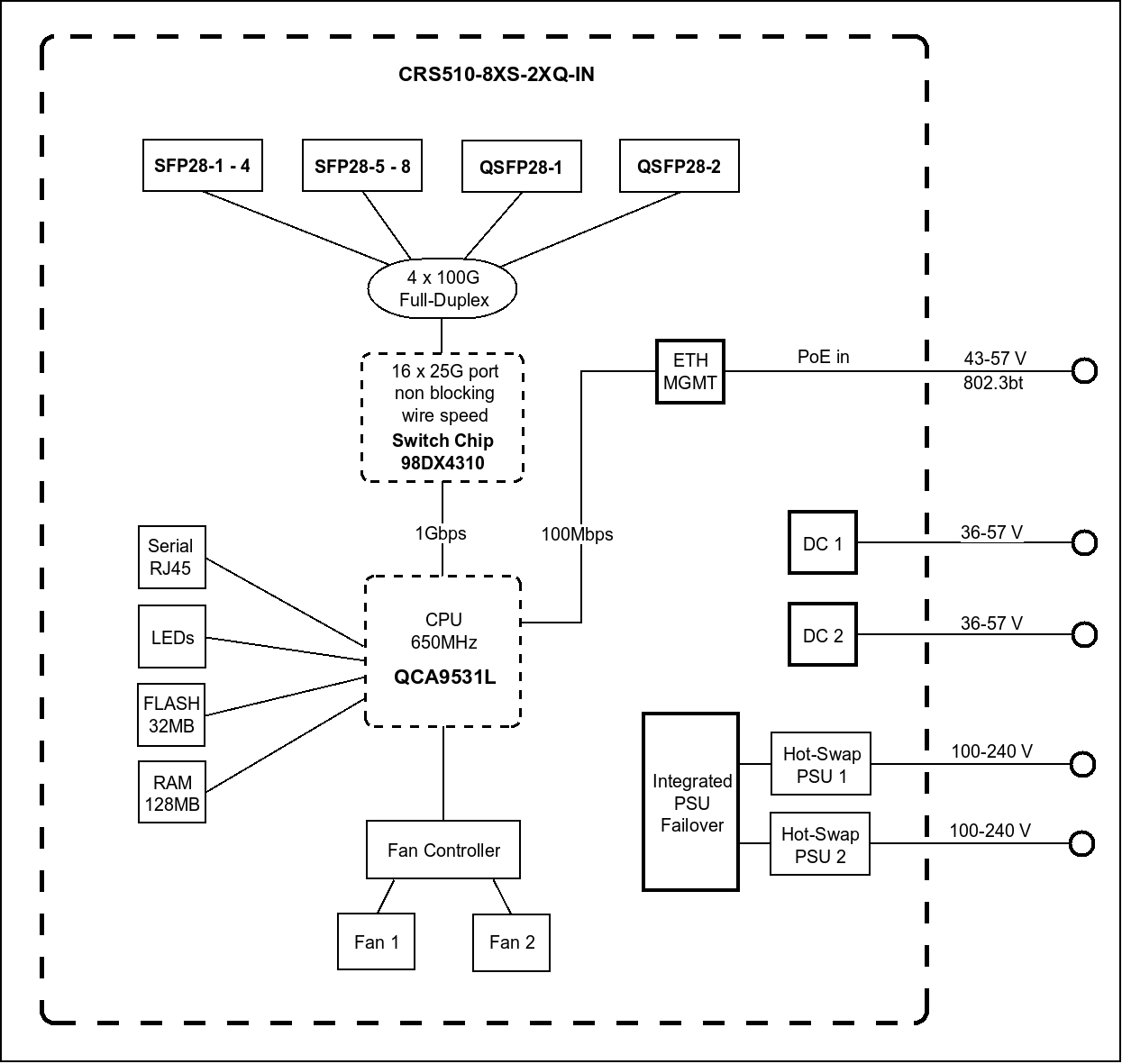
First, let's look at the block diagram of the CRS510 https://cdn.mikrotik.com/web-assets/product_files/CRS510-8XS-2XQ-IN_230330.png

as you can see, the ether1 port is meant only for management. It is 100Mps. And it is not connected to the switch chip, so all traffic through ether1 must use the CPU (which is meant only for management, a single core, 650MHz MIPSBE CPU, the same CPU as in the MikroTik hAP lite RB941-2nD). Compare the switching performance to the "ethernet" (routing) performance, and you will see that you don't want to route between vlans using the CPU in the CRS510. https://mikrotik.com/product/crs510_8xs_2xq_in

Although ROS will allow you do add it to the bridge, doing so isn't a good thing to do. I am not sure exaclty how the bridge/switch integration is done, and if adding a non-switched interface to the bridge affects other traffic. My guess is that all non-switched ports are added to the software bridge, and that the software bridge has its own leaned mac address table, with the "port" to the switch being via the CPU link to the swtich.

At any rate, the ether1 port on the CRS510 is going to be the bottleneck/chokepoint for traffic between the Cisco switch and the CRS510. I don't know if your Cisco switch has any SPF+ 10Gb ports or not, the manual for the CRS510 suggests that the SPF28 may be able to accecpt SPF+ 10Gb, and that would be a much better pipe than the 100Mbs straw that ether1 provides.

1 Like

I didn't mention it, but ether1 port will ultimately only be used as a backup port (for administration via a laptop in case of problems). Given the bandwidth, it's indeed best to avoid using this port for uplink !

For your information, my final configuration is as follows, no risk of bottleneck :

  • SFP28 ports
    -> machines connected via 25G SFP28 modules.

  • QSF28 ports (+ QSF28 to SFP28 adapter)
    -> uplink to Cisco and Trendnet at 10G via SFP+ modules (and no auto-negotiation mode).

Very interesting point :ok_hand:

If you can use something other than ether1 for the connection to the Cisco, then you can use ether1 as an offbridge MGMT port. It would have its own ip address/subnet distict from the ip address used by vlan 4. But is would still be added to the interface list for management access (along with the MGMT-4 interface).

What is going to be providing the routing for traffic between vlan 2 and vlan 3, or will those be isolated subnets that don't need to communicate with any id addresses outside the subnet they are in?

In other words, how does the CRS510 fit into the bigger picture? It's a high performance L2 switch with partial support for L3HW offloading, but not with a stateful firewall. If your application can live with the limitations, (see L3 Hardware Offloading - RouterOS - MikroTik Documentation) then it can provide much higher performance than routing through another router (where the link will be a bottleneck).

Can you post your final config that is working, just as an example for future forum readers?

Noted.

The rules will be controlled by a pfSense firewall in VM, the host server will be connected to the MikroTik via a sfp28 port (25G / trunk).

The CRS510's role is limited to switching (like older Cisco); there are no rules here, 100% of the firewall functions are handled by a firewall in VM.

-> You confirm that with this configuration, the CRS510 is working optimal, with no bootnecks ?

Of course, I'll add it to the post.

[Edit] -> Last config :

# 2026-02-01 17:46:19 by RouterOS 7.21.1
# software id = RQI2-128D
#
# model = CRS510-8XS-2XQ
# serial number = xxx
/interface bridge
add admin-mac=F4:xx:xx:xx:xx:xx auto-mac=no comment=defconf name=bridgeLocal \
    vlan-filtering=yes
/interface ethernet
set [ find default-name=ether1 ] comment="Admin 1G Untag"
set [ find default-name=qsfp28-1-1 ] auto-negotiation=no speed=10G-baseSR-LR
set [ find default-name=qsfp28-1-2 ] disabled=yes
set [ find default-name=qsfp28-1-3 ] advertise="10M-baseT-half,10M-baseT-full,\
    100M-baseT-half,100M-baseT-full,1G-baseT-half,1G-baseT-full,1G-baseX,2.5G-\
    baseT,2.5G-baseX,5G-baseT,10G-baseT,10G-baseSR-LR,10G-baseCR,40G-baseSR4-L\
    R4,40G-baseCR4,25G-baseSR-LR,25G-baseCR,50G-baseSR2-LR2,50G-baseCR2" \
    disabled=yes
set [ find default-name=qsfp28-1-4 ] disabled=yes
set [ find default-name=qsfp28-2-1 ] auto-negotiation=no comment=\
    "Admin 10G Untag" speed=10G-baseSR-LR
set [ find default-name=qsfp28-2-2 ] disabled=yes
set [ find default-name=qsfp28-2-3 ] advertise="10M-baseT-half,10M-baseT-full,\
    100M-baseT-half,100M-baseT-full,1G-baseT-half,1G-baseT-full,1G-baseX,2.5G-\
    baseT,2.5G-baseX,5G-baseT,10G-baseT,10G-baseSR-LR,10G-baseCR,40G-baseSR4-L\
    R4,40G-baseCR4,25G-baseSR-LR,25G-baseCR,50G-baseSR2-LR2,50G-baseCR2" \
    disabled=yes
set [ find default-name=qsfp28-2-4 ] disabled=yes
set [ find default-name=sfp28-1 ] auto-negotiation=no speed=10G-baseSR-LR
set [ find default-name=sfp28-2 ] auto-negotiation=no speed=10G-baseSR-LR
set [ find default-name=sfp28-3 ] auto-negotiation=no speed=10G-baseSR-LR
set [ find default-name=sfp28-4 ] auto-negotiation=no speed=10G-baseSR-LR
set [ find default-name=sfp28-5 ] auto-negotiation=no speed=10G-baseSR-LR
set [ find default-name=sfp28-6 ] auto-negotiation=no speed=10G-baseSR-LR
set [ find default-name=sfp28-7 ] auto-negotiation=no comment=\
    "Admin 10G Untag" speed=10G-baseSR-LR
set [ find default-name=sfp28-8 ] auto-negotiation=no speed=10G-baseSR-LR
/interface vlan
add comment=management interface=bridgeLocal l3-hw-offloading=no name=\
    management vlan-id=4
/interface list
add name=WAN
add name=LAN
/interface bridge port
add bridge=bridgeLocal comment="Admin 1G" ingress-filtering=no interface=\
    ether1 mvrp-applicant-state=non-participant mvrp-registrar-state=fixed \
    pvid=4
add bridge=bridgeLocal comment="Trunk 10G" frame-types=admit-only-vlan-tagged \
    ingress-filtering=no interface=qsfp28-1-1 mvrp-applicant-state=\
    non-participant mvrp-registrar-state=fixed pvid=4
add bridge=bridgeLocal disabled=yes interface=qsfp28-1-2
add bridge=bridgeLocal disabled=yes interface=qsfp28-1-3
add bridge=bridgeLocal disabled=yes interface=qsfp28-1-4
add bridge=bridgeLocal comment="Trunk 10G" frame-types=admit-only-vlan-tagged \
    ingress-filtering=no interface=qsfp28-2-1 mvrp-applicant-state=\
    non-participant mvrp-registrar-state=fixed pvid=4
add bridge=bridgeLocal disabled=yes interface=qsfp28-2-2
add bridge=bridgeLocal disabled=yes interface=qsfp28-2-3
add bridge=bridgeLocal disabled=yes interface=qsfp28-2-4
add bridge=bridgeLocal comment=C01 frame-types=admit-only-vlan-tagged \
    ingress-filtering=no interface=sfp28-1 mvrp-applicant-state=\
    non-participant mvrp-registrar-state=fixed
add bridge=bridgeLocal comment=hote1 frame-types=admit-only-vlan-tagged \
    ingress-filtering=no interface=sfp28-2 mvrp-applicant-state=\
    non-participant mvrp-registrar-state=fixed unknown-unicast-flood=no
add bridge=bridgeLocal comment=C02 frame-types=admit-only-vlan-tagged \
    interface=sfp28-3 mvrp-applicant-state=non-participant \
    mvrp-registrar-state=fixed
add bridge=bridgeLocal comment=hote02 frame-types=admit-only-vlan-tagged \
    ingress-filtering=no interface=sfp28-4 mvrp-applicant-state=\
    non-participant mvrp-registrar-state=fixed
add bridge=bridgeLocal comment=C03 frame-types=admit-only-vlan-tagged \
    interface=sfp28-5 mvrp-applicant-state=non-participant \
    mvrp-registrar-state=fixed
add bridge=bridgeLocal comment=hote3 frame-types=admit-only-vlan-tagged \
    ingress-filtering=no interface=sfp28-6 mvrp-applicant-state=\
    non-participant mvrp-registrar-state=fixed
add bridge=bridgeLocal comment="Trunk untag." frame-types=\
    admit-only-untagged-and-priority-tagged ingress-filtering=no interface=\
    sfp28-7 mvrp-applicant-state=non-participant mvrp-registrar-state=fixed \
    pvid=4
add bridge=bridgeLocal comment="Trunk Tag." frame-types=\
    admit-only-untagged-and-priority-tagged interface=sfp28-8 \
    mvrp-applicant-state=non-participant mvrp-registrar-state=fixed pvid=4
/ipv6 settings
set disable-ipv6=yes
/interface bridge vlan
add bridge=bridgeLocal comment=Admin tagged=\
    bridgeLocal,qsfp28-1-1,qsfp28-2-1,sfp28-2,sfp28-4,sfp28-6,sfp28-8 \
    untagged=ether1,sfp28-7 vlan-ids=4
add bridge=bridgeLocal comment=Cameras tagged="bridgeLocal,ether1,qsfp28-1-1,q\
    sfp28-2-1,sfp28-2,sfp28-4,sfp28-6,sfp28-7,sfp28-8" vlan-ids=2
add bridge=bridgeLocal comment=Bureautique tagged="bridgeLocal,ether1,qsfp28-1\
    -1,qsfp28-2-1,sfp28-2,sfp28-4,sfp28-6,sfp28-7,sfp28-8" vlan-ids=3
/interface list member
add interface=ether1 list=WAN
add interface=sfp28-1 list=LAN
add interface=sfp28-2 list=LAN
add interface=sfp28-3 list=LAN
add interface=sfp28-4 list=LAN
add interface=sfp28-5 list=LAN
add interface=sfp28-6 list=LAN
add interface=sfp28-7 list=LAN
add interface=sfp28-8 list=LAN
add interface=qsfp28-1-1 list=LAN
add interface=qsfp28-1-2 list=LAN
add interface=qsfp28-1-3 list=LAN
add interface=qsfp28-1-4 list=LAN
add interface=qsfp28-2-1 list=LAN
add interface=qsfp28-2-2 list=LAN
add interface=qsfp28-2-3 list=LAN
add interface=qsfp28-2-4 list=LAN
/ip address
add address=172.16.10.7/24 comment=Management interface=management network=\
    172.16.10.0
/ip dhcp-client
add comment=defconf disabled=yes interface=bridgeLocal
/ip dns
set servers=1.1.1.1
/ip route
add disabled=no distance=1 dst-address=0.0.0.0/0 gateway=172.16.10.254 \
    routing-table=main suppress-hw-offload=no
/system clock
set time-zone-name=Europe/Paris
/system identity
set name=MikroTik
/system routerboard settings
set enter-setup-on=delete-key

I don't see anything obviously wrong. I would remove ether1 from the bridge.

I don't think the switch itself will be the bottleneck. The pfsense box may be if you expect it to do a lot of inter-vlan routing.

So if you can keep your devices that are doing a lot to communicating on the same vlan, then the router won't be involved. For example, put the DVR on the same vlan as the cameras, then all that traffic will be switched, not routed. You can still access the DVR through the pfsense box, but the bulk traffic from the cameras to the DVR won't ever be seen by the pfsense box.

If you have 10G trunks and the inter-vlan routing will be done by the pfsense box, then there will be an aggregate of 10Gb available for all routing (i.e send + receive < 10Gb). But unless you have a hefty pfsense box, the CPU there may be the limit before the trunk link (and this assumes you have a pfsense box with a 10Gb adapter).

Thanks for this additional technical information.

I am confused from the get go, (coming out of my mothers womb), but what the heck does this mean…..
I am using the CRS510 in switch mode??? The config provided shows you discussing LAN and WAN which is router speak???

Your diagram gives NO indication of where the internet connection is located, I can only assume that an upstream router is connected to the CISCO switch. Thus we should expect a trunk port from the CISCO switch to the CRS510??

Then there is the problem of your ports, Which one is the 10/100 Managment port ( is that identified as ether1 on this device??? Also if its a 510 it has 8 spf28 ports (25 gig) and 2 Qspf ports (100gig).
Why does your config show ( in /interface ethernet settings), 8 Qsfp ports??

I dont have one of these units but will consider the actual two ports to be named
qsfp28-1-1 and qsfp28-2-1 to match actual config usage ( as seen in /interface bridge vlans )

++++++++++++++++++++++++++++++++++++++++++++++++++++++++++++++++

I am used to configs for the CRS3, series, and if its the same for CR5, the following comments apply:

  1. Regardless of the scenario, I highly recommend, especially when using vlan bridge filtering, is to create a safe spot, to both config the device, and to do any emergency access to the device that is INDEPENDENT of the bridge. AKA an off bridge dedicated port. In this case the mgmt port 10/100 is perfect for this idea. Use one of the spf28 ports to connect to the cisco, and for example purposes will use spf28-7 seeing as you want to use this a local admin port, but basically a useless idea especially seeing as you also have spf28-8 also being used as access port for the admin vlan.

/interface ethernet
set [ find default-name=ether1?? ] name=OffBridgeMgmt

/ip address
add address=192.168.55.1/30 interface=OffBridgeMgmt network=192.168.55.0

Make sure the interface has access to the config etc ( part of trusted interface list ).
Simply plug in PC to the mgmt port, change IPV4 settings to 192.168.55.2 and with username and password you should be in. No more losing connection when you make changes!!!

Now onto the config……….
Understand from above that vlan4 is your management vlan where ALL smart devices on your network get their IP address. You will be able connect to the CRS510 from any location on your network that has vlan4 accesss ( like a PC off the cisco switch for example ). If the bridge burps on you, no problem, you have the off bridge port on the device itself for emerg access later.
Use winbox to configure any MT device, so much easier!!

spf28-7, connects to the CISCO, this should be a TRUNK PORT ALL VLANS Tagged.
(2,3,4).
Gi35 on the CISCO should be trunk port ALL Tagged (2,3,4) going to the mikrotik.

Ingress filtering should be applied to all trunk and access ports, so fixed.

Both qsfp ports contradict their own settings, so for now will assume they are trunk ports

Only vlan4 requires the bridge local to be tagged…………….
All trunk ports aka going to smart devices needs to be tagged with vlan 4 ( thats where/how all smart devices get their IP address!! )
++++++++++++++++++++++++++++++++++++++++++++++++

```
model = CRS510-8XS-2XQ

/interface bridge
add admin-mac=F4xx auto-mac=no name=bridgeLocal
vlan-filtering=no { Turn ON after completing config from offbridge location }
/interface ethernet
set [ find default-name=ether1 ] name=OffBridgeMgmt
set [ find default-name=qsfp28-1-1 ] auto-negotiation=no
speed=10G-baseSR-LR comment="Trunk Port"
set [ find default-name=qsfp28-2-1 ] auto-negotiation=no comment=
speed=10G-baseSR-LR comment="Trunk Port"
set [ find default-name=sfp28-1 ] auto-negotiation=no speed=10G-baseSR-LR
set [ find default-name=sfp28-2 ] auto-negotiation=no speed=10G-baseSR-LR
set [ find default-name=sfp28-3 ] auto-negotiation=no speed=10G-baseSR-LR
set [ find default-name=sfp28-4 ] auto-negotiation=no speed=10G-baseSR-LR
set [ find default-name=sfp28-5 ] auto-negotiation=no speed=10G-baseSR-LR
set [ find default-name=sfp28-6 ] auto-negotiation=no speed=10G-baseSR-LR
set [ find default-name=sfp28-7 ] auto-negotiation=no comment="TRUNK to CISCO"
set [ find default-name=sfp28-8 ] auto-negotiation=no comment="Access admin port"
/interface vlan
add comment=MGMT-4 interface=bridgeLocal l3-hw-offloading=no name=MGMT-4
vlan-id=4
/interface list
add name=TRUSTED
/ip neighbours discovery
set interface-list=TRUSTED
/interface bridge port
add bridge=bridgeLocal ingress-filtering=yes frame-types=
admit-only-vlan-tagged interface=qsfp28-1-1
mvrp-applicant-state=non-participant mvrp-registrar-state=fixed
add bridge=bridgeLocal ingress-filtering=yes frame-types=
admit-only-vlan-tagged interface=qsfp28-2-1
mvrp-applicant-state=non-participant mvrp-registrar-state=fixed
add bridge=bridgeLocal ingress-filtering=yes frame-types=admit-only-vlan-tagged
interface=sfp28-1 mvrp-applicant-state=non-participant
mvrp-registrar-state=fixed
add bridge=bridgeLocal ingress-filtering=yes frame-types=admit-only-vlan-tagged
interface=sfp28-2 mvrp-applicant-state=non-participant
mvrp-registrar-state=fixed unknown-unicast-flood=no
add bridge=bridgeLocal ingress-filtering=yes frame-types=admit-only-vlan-tagged
interface=sfp28-3 mvrp-applicant-state=non-participant
mvrp-registrar-state=fixed
add bridge=bridgeLocal ingress-filtering=yes frame-types=admit-only-vlan-tagged
interface=sfp28-4 mvrp-applicant-state=non-participant
mvrp-registrar-state=fixed
add bridge=bridgeLocal ingress-filtering=yes frame-types=admit-only-vlan-tagged
interface=sfp28-5 mvrp-applicant-state=non-participant
mvrp-registrar-state=fixed
add bridge=bridgeLocal ingress-filtering=yes frame-types=admit-only-vlan-tagged
interface=sfp28-6 mvrp-applicant-state=non-participant
mvrp-registrar-state=fixed
add bridge=BridgeLocal ingress-filtering=yes frame-types=admin-only-vlan-tagged
interface=sfp28-7 mvrp-applicant-state=non-participant
mvrp-registrar-state=fixed comment="TRUNK PORT TO CISCO"
add bridge=bridgeLocal comment=defconf interface=sfp28-8
mvrp-applicant-state=non-participant mvrp-registrar-state=fixed
ingress-filtering=yes frame-types=admit-priority-and untagged pvid=4
/ipv6 settings
set disable-ipv6=yes
/interface bridge vlan
add bridge=bridgeLocal tagged=bridgeLocal,sfp28-7,qsfp28-1-1,qsfp28-2-1,sfp28-1,
sfp28-2,sfp28-3,sfp28-4,sfp28-5,sfp28-6, untagged=sfp28-8 vlan-ids=4
add bridge=bridgeLocal comment=vlan-test-3 tagged="bridgeLocal,sfp28-7,qsfp28-1-1,
qsfp28-2-1,sfp28-2,sfp28-4,sfp28-6 vlan-ids=3
add bridge=bridgeLocal comment=vlan-test-2 tagged=bridgeLocal,sfp28-7,qsfp28-1-1,
qsfp28-2-1,sfp28-1,sfp28-3,sfp28-5 vlan-ids=2
/interface list member
add interface=MGMT-4 list=TRUSTED
add interface=OffBridgeMgmt list=TRUSTED
/ip address
add address=xx.9/24 comment=Admin interface=MGMT-4 network=xx.0
add address=192.168.55.1/30 interface=OffBridgeMgmt network=192.168.55.0
/ip dns
set servers=xx.1/24
/ip route
add disabled=no distance=1 dst-address=0.0.0.0/0 gateway=xx.1
routing-table=main suppress-hw-offload=no
/system clock
set time-zone-name=Europe/Paris
/system identity
set name=MikroTik-01
/system routerboard settings
set enter-setup-on=delete-key
/tool mac-server
set allowed-interface-list=none
/tool mac-server mac-winbox
set allowed-interface-list=TRUSTED
```