Hello,
I just got a hAP ax² router to replace an Asus one, and I’m struggling with the VLAN setup.
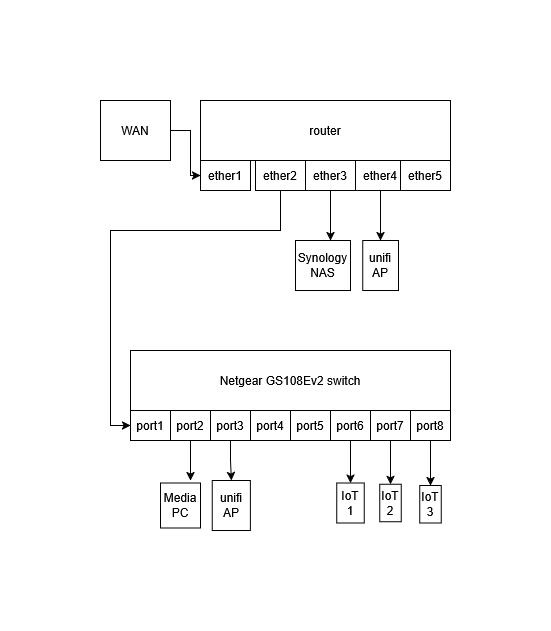
My physical devices configuration is (and was, with the Asus) as per the diagram:
The router has wifi disabled, wifi is only via the unifi access points (controlled with the controller running in a docker container on the NAS).
My VLAN setup with the Asus router: I had two VLANs, VLAN1 and VLAN20. VLAN1 was the default one for everything except guest devices and IoT (cameras, home automation) that were in VLAN20. VLAN1 has IP range 192.168.1.x and VLAN20 has 192.168.20.x. VLAN1 could access VLAN20 but not the reverse. The first ether port after the WAN one (equivalent to ether2 on the Mikrotik) was a trunk port. The rest were carrying VLAN1 traffic. The unifi wifi was also vlan aware, with the main wifi being in vlan1 and the guest one in vlan20.
The netgear switch had 802.1Q vlan configuration with port 1 as trunk port going to the router, ports 2-5 members of vlan1 and ports 6-8 of vlan20.
Now with the Mikrotik, I first tried creating vlan1 and vlan20 on the bridge, creating respective IP pools and DHCP servers, and replicating the same port rules (making ether2 a trunk port), but every time I enabled vlan filtering on the bridge the router kicked me out. If I had forgotten to press safe mode, I couldn’t even connect to it with the mac address and had to factory reset (I’ve gotten very good at factory resetting very quickly after many retries!).
Then I read that there’s a compatibility issue with equipment from other manufacturers that use vlan1 as the default, whereas Miktrotik uses vlan0, so I thought of renaming vlan1 to vlan10. So I created vlan10 and 20 and changed Netgear config to match that. Didn’t work either.
I have then tried modifying the default LAN to be the equivalent of vlan1 (so all devices directly on the bridge, with only one vlan (vlan20) under it, and changed IP range from 192.168.88.x to 192.168.1.x. This worked, and it seems most of the functionality is there. But I’m not sure it’s the right setup. Any advice?
SInce Unifi expects the trusted or management subnet to hit the AP untagged, any port to it from a Mikrotik device needs to be a hybrid port.
This means untagged for trusted vlan and all other data vlans tagged. After you read the article it will make more sense to see a sample config
/interface bridge port
add bridge=bridge interface=ether4 pvid=100 { where vlan100 is the trusted vlan }
add bridge=bridge ingress-filtering=yes frame-types=admit-only-vlan-tagged interface=ether2
/interface bridge vlan
add bridge=bridge tagged=bridge,ether2 untagged=ether4 vlan-id=100
add bridge=bridge tagged=bridge,ether2 vlan-id=IOT-vlan,MEDIA-vlan
I read the bible. Admittedly not fully digested yet but I believe I got the basic concept, please correct me if I’m wrong:
I should have three vlans, and each device should be in exactly one of them:
vlan99: management vlan. Presumably only the router would be part of that?
vlan10: main vlan for all trusted devices
vlan20: guesst and IoT devices vlan
My previous attempt didn’t have the management vlan, it had vlan10 and 20. But I still don’t know why/if this was the reason for crashing every time I enabled vlan filtering on the bridge.
By the way, as it stands now, I have the functionality I need, in that guest and IoT devices are segregated and can’t access trusted devices, but trusted devices can access them. So things work. But I still want to have a more “correct” setup, having the trusted devices as well in a separate vlan. How can I find out what causes the crash in order to fix it?
Having mixed or separate trusted users and device management networks is a matter of choice, risk profile, etc.
Using VLAN 1 is not wrong, you just have to be aware of how it is handled by different vendors - it is often reserved for any untagged traffic / not permited for tagged.
Mikrotik use VLAN ID 1 as the default PVID, and being the default it does not appear in /export. One major confusion is that a Mikrotik bridge is essentialy an embedded switch, in addition to any ports you add there is an intrinsic bridge-to-CPU port - see http://forum.mikrotik.com/t/routeros-bridge-mysteries-explained/147832/1 A common mistake is to add an /interface vlan for VLAN 1 without either changing the /interface bridge PVID, or configuring the bridge-to-CPU port as tagged-only instead of hybrid.
If you wish to replicate your Asus setup without reconfiguring everything else:
start with the factory default Mikrotik configuration,
change the LAN IP address, DHCP server & IP pool range to match your original VLAN 1 settings and enable vlan filtering on the bridge,
change the WAN settings if you require a PPPoE client and/or VLAN,
add a VLAN 20 interface, IP address, DHCP server & IP pool, plus bridge VLAN tagged membership of the bridge, ether2 & ether4 for VLAN 20,
add/modify firewall rules as required.
If you read the article, their management vlan name is called BASE…
Its not one device per vlan.
Its one or more devices (same purpose either function wise, or what you want security wise) to a specific vlan.
So I have
a. family
b. iot - many
c. cameraS
d. hvac
e. media deviceS
f. guest wifi
g. wifes work
h. my work
i. KID
etc…so a real mixed bag just to give you an idea
++++++++++++++++++++++++++++++++++++++++++++++++
One can decide to have a management vlan and your PC may be the only device in that managment VLAN so as to separate yourself from other trusted users.
Or simply identify only your PC as the one allowed to access the router from within the trusted vlan. Lots of ways to do this.
ANother thing I do is if I have an extra non-used port is to create an off bridge port ( remove from /interface bridge port settings ) /ethernet
set [ find default-name=ether5] name=OffBridge5
/interface list member
add interface=OffBridge5 list=TRUSTED
add interface=OffBridge5 list=LAN
/ip address
add address=192.168.76.1/30 interface=OffBridge5 network=192.168.76.0
++++++++++++++++
Connect laptop to port 5 and change IPV4 settings to 192.168.76.2 and you should be able to gain access and configure vlans in a safer spot.
Yes, that would be next step, once I successfully add a second vlan, the third one will be easier, and I plan to segregate further: kids, guests, iot in separate vlans.
so this would solve the disconnection issue even if my vlans are misconfigured? then i would need to test connections in another pc in one of the vlans, while my laptop stays connected to winbox throughout?
It depends, for a small home system where you only have a small number of devices and a few switches/APs/NAS, etc. you could leave it as-is and put guest/untrusted stuff on a separate VLAN with firewall rules. Postive points of having separate trusted and management networks include have finer access control and logging, negative points include potential discovery/access difficulties if devices use layer 2 discovery/control protocols. As most network devices these days use TLS ot SSH to protect communications then having them on the same network as trusted devices is not the same as when network devices only used unencrypted protocols.
As you are using UniFi it reserves VLAN 1 for untagged, although on their switches it is possible to create access, hybrid or trunk ports. Originally the AP and switch management had to be untagged, later firmware allows you to change it to be tagged when a device is adopted, but remember a new or factory reset device has to obtain an address using DHCP on an untagged network and be able to communicate with the controller to bootstrap itself to the desired configuration.
I think this is what happened when I first tried adding vlan1, but then why attempting to add vlan10 fails?
Likely a missing step / configuration item. Just as with VLAN 20 you would need an /interface vlan for VLAN 10, an IP address, DHCP server & network and IP pool, then /interface bridge port PVID setting for access ports and /interface bridge VLAN tagged membership for the bridge-to-CPU port plus any tagged/hybrid ports, and not forgetting management access firewall rules.