VLAN Untagged DHCP offering lease without success

I have a Mikrotik router with firmware 7.24.1 with three vlans, 10, 20, 30.

On port ether4 i have connected a unmanaged POE switch that a AP is connected that is using all three vlans for different SSIDs and this is working fine.

Now I want to connect a POE camera to same switch to access VLAN 20. So I change default VLAN id on the port to 20 and untagged VLAN20 on the bridge and the camera started communicating.
But some WiFi devices stopped getting new DHCP leases when I did this but not all. Why does this happen?

Config before POE Cam:

/interface bridge
add admin-mac=48:8F:5A:61:B1:D5 auto-mac=no comment=defconf ingress-filtering=no name=bridge port-cost-mode=short vlan-filtering=yes
/interface bridge port
add bridge=bridge comment=defconf frame-types=admit-only-untagged-and-priority-tagged interface=ether2 internal-path-cost=10 path-cost=10 pvid=10
add bridge=bridge comment=defconf frame-types=admit-only-untagged-and-priority-tagged interface=ether3 internal-path-cost=10 path-cost=10 pvid=10
add bridge=bridge comment=defconf frame-types=admit-only-untagged-and-priority-tagged interface=wlan1 internal-path-cost=10 path-cost=10 pvid=10
add bridge=bridge comment=defconf frame-types=admit-only-untagged-and-priority-tagged interface=wlan2 internal-path-cost=10 path-cost=10 pvid=10
add bridge=bridge comment=defconf ingress-filtering=no interface=ether4 internal-path-cost=10 path-cost=10 pvid=20
/interface bridge vlan
add bridge=bridge tagged=bridge,ether4 untagged=ether2,ether3,wlan1,wlan2 vlan-ids=10
add bridge=bridge tagged=bridge,ether4 vlan-ids=30
add bridge=bridge tagged=bridge,ether4 vlan-ids=20
add bridge=bridge untagged=bridge vlan-ids=1

and after POE cam

/interface bridge
add admin-mac=48:8F:5A:61:B1:D5 auto-mac=no comment=defconf ingress-filtering=no name=bridge port-cost-mode=short vlan-filtering=yes
/interface bridge port
add bridge=bridge comment=defconf frame-types=admit-only-untagged-and-priority-tagged interface=ether2 internal-path-cost=10 path-cost=10 pvid=10
add bridge=bridge comment=defconf frame-types=admit-only-untagged-and-priority-tagged interface=ether3 internal-path-cost=10 path-cost=10 pvid=10
add bridge=bridge comment=defconf frame-types=admit-only-untagged-and-priority-tagged interface=wlan1 internal-path-cost=10 path-cost=10 pvid=10
add bridge=bridge comment=defconf frame-types=admit-only-untagged-and-priority-tagged interface=wlan2 internal-path-cost=10 path-cost=10 pvid=10
add bridge=bridge comment=defconf ingress-filtering=no interface=ether4 internal-path-cost=10 path-cost=10 pvid=20
/interface bridge vlan
add bridge=bridge tagged=bridge,ether4 untagged=ether2,ether3,wlan1,wlan2 vlan-ids=10
add bridge=bridge tagged=bridge,ether4 vlan-ids=30
add bridge=bridge tagged=bridge untagged=ether4 vlan-ids=20
add bridge=bridge untagged=bridge vlan-ids=1
TL;DR you changed how untagged ethernet frames are handled. And the "unmanaged POE switch" can only forward ethernet frames "as is", it knows nothing about vlans, but is transparent to vlans (just like an ethernet cable knows nothing about vlans, but it can carry multiple vlans).

I don't think the "before" partial export is really "before you made changes", because you said it was working, and I don't see how it would have worked for vlan 20 (the pvid on port ether4 is 20, but you tell the switch to tag vlan 20 traffic on egress).

Reason: bridge port ether4 has pvid=20 in both before and after. The only changed line is under /interface bridge vlan

old
add bridge=bridge tagged=bridge,ether4 vlan-ids=20

new
add bridge=bridge tagged=bridge untagged=ether4 vlan-ids=20

You haven't provided enough information to make an accurate diagnosis, but you your before is inconsistent for bridge port ether4 (expects to receive untagged traffic from vlan 20, but sending vlan 20 with tags).

You specify nothing about how the wifi is working and what the Access point is using. You only tell us "On port ether4 i have connected a unmanaged POE switch that a AP is connected that is using all three vlans for different SSIDs and this is working fine."

But then later you state "But some WiFi devices stopped getting new DHCP leases when I did this but not all. Why does this happen?"

Again, no details provided. What used to work that does not now?

Please provide useful info, and someone will probably be able to help.

https://jdebp.uk/FGA/problem-report-standard-litany.html
https://jdebp.uk/FGA/put-down-the-chocolate-covered-banana.html
https://www.chiark.greenend.org.uk/~sgtatham/bugs.html

Summarized by Josephny in this post which had the following:

Not really:

The first part of config (/interface/bridge/port) just says that if there's an untagged frame on ingress, bridge should add tag with VLAN ID set to 20. But it will also accept frames with VLAN tags attached and VID set to 20.
There are two other settings which affect the behaviour: frame-types with default setting of admit-all which allows "hybrid" port setup (one untagged VLAN and multiple tagged VLANs). If this was changed to admit-only-vlan-tagged, then port "personality" changes to "tagged only", it then drops any untagged frame on ingress (making PVID setting irrelevant). The other setting is ingress-filtering and if enabled (I believe it might even be by default), bridge will check the VLAN table for port and drop frames on ingress if frames don't belong to any of VLANs configured on that port. This setting doesn't differentiate between tagged and untagged frames, it checks VLAN IDs after ingress frame gets tagged (if that's performed).

The second part (/interface/bridge/vlan) sets the egress behaviour ... this one says that frames belonging to VLAN 20 can go out via ether4 and they should retain the VLAN tag. The after configuration by @ressof changes this by instructing bridge to strop VLAN header from frames egressing through ether4 belonging to VLAN 20.

So basically the difference between both configs only changes egress behaviour (frames of VLAN 20 get untagged on egress after the change), ingress behaviour remains unchanged (both untagged frames and tagged with VLAN ID 20 are accepted on ingress in both cases).

You're completely right by saying that unmanaged switch is transparent to VLANs. So what remains is to see configuration on AP ... its configuration should reflect the change on router so that it should also work with untagged frames belonging to VLAN 20 on its wired side (connected to that infamous unmanaged switch) both for ingress and egress.

What I'm trying to achive is that VLAN10 and 30 should be as they were.

VLAN20 should be the "default" VLAN on the port so it both could be used in the AP to were VLAN20 gets an own SSID and so the POE Camera get an VLAN20 ip.

I'm not sure how to do this or if its possible?

The AP is a Grandstream GWN7630 where I have configured the POE port as a trunk port with PVID 1.

I have three SSIDs, with VLAN ID 10, 20 and 30.

Then you also need to make change to the AP configuration, so that it knows to use VLAN20 as untagged only. You cannot keep the old AP configuration (where it uses VLAN20 tagged) and expect things to work.

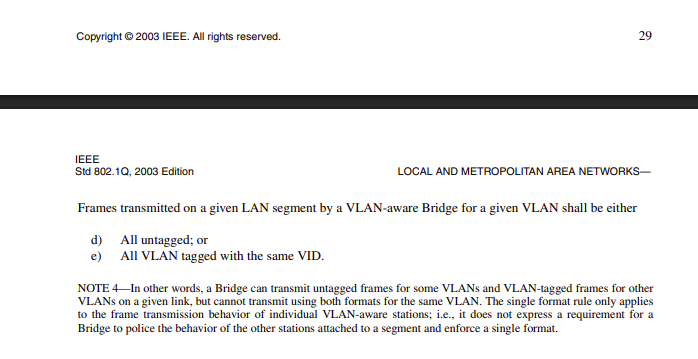
While what you say is true (i.e. that a port with pvid set to 20 will receive three different formats (explicitly tagged with vlan 20, untagged, with a priority only tag with vid 0) will all be "classified" as belonging to vlan 20; allowing this will cause problems, because the return traffic will all be sent with the same format. (source "the single format rule" see this post for more details, I am not sure why the format it the way it is in the post, probably the old forum didn't show it that way)

This is screen shot from the linked 2003 document

My conjecture is that when it was last working, the pvid of bridge port ether4 was not set to 20.

p.s. I just looked one of his previous post where the complete config was posted, and these are the sections in question as they were on Dec 14, 2022

/interface bridge port
add bridge=bridge comment=defconf frame-types=\
    admit-only-untagged-and-priority-tagged interface=ether2 pvid=10
add bridge=bridge comment=defconf frame-types=\
    admit-only-untagged-and-priority-tagged interface=ether3 pvid=10
add bridge=bridge comment=defconf frame-types=\
    admit-only-untagged-and-priority-tagged interface=wlan1 pvid=10
add bridge=bridge comment=defconf frame-types=\
    admit-only-untagged-and-priority-tagged interface=wlan2 pvid=10
add bridge=bridge comment=defconf interface=ether4 pvid=10

/interface bridge vlan
add bridge=bridge tagged=ether4,bridge untagged=ether2,ether3,wlan1,wlan2 \
    vlan-ids=10
add bridge=bridge tagged=bridge,ether4 vlan-ids=20,30

That's not proof by any means, but without a more complete post, it's at least circumstantial evidence that the pvid used to be 10 (not 20)

But if the pvid used to be 10 (but the AP was sending tagged 10), even though it was ambiguous (inconsistent was the word I used before), it was reportedly working. So @mkx was correct that just because pvid is that configured (which only affected received untagged traffic), that the egress behavior can be forced with the /interface bridge vlan section with the tagged and untagged lists. Note that if these are not specified, by default ROS will create a dynamic untagged entry for the ports in the /interface bridge port section using the specified pvid, and if not specified for the default pvid=1. These dynamic entries can be seen by using the cli command /interface/bridge/vlan print

If the pvid was 10 before, and it worked used to work when pvid was 10, then the AP must have been configured to use tagged 10,20,30.

My guess is that vlan 20 is the vlan that no longer works. Because now the router is sending vlan 20 packets without a tag, and the AP is expecting vlan 20 to be tagged.

You are correct. It used to be 10.
But the strange thing is that only one wifi device has problem getting a dhcp ip when using the after config on VLAN20. All the other devices is getting a renewal after the lease time expires but one device gets an offer but without success.

More info is needed.

What is the "one wifi device"?

What is different about it?

Are you sure you are getting dhcp addresses from the correct dhcp server on the other wifi devices that don't have a problem getting an ip address?

What type of troubleshooting and testing have you done? Can you share evidence?

You have changed the way that vlan 20 is handled from explicitly tagged to untagged on a hybrid link.

Because you have an unmanaged PoE switch, you can't have some ports use tagged vlan 20 and other ports use untagged. That's the disadvantage of an unmanaged switch that is not vlan-aware.

It seems to me you have the following choices.

Get the Grandstream AP to associate the SSID for vlan 20 to use untagged for vlan 20. Whether that's possible or not, I have no idea.

Configure the camera to use tagged vlan 20 (this is less likely to be possible, but some IP cameras may be able to be configured to use tagged access). It that's possible, then revert to the tagged 20 config on the router.

If neither of the above two options are possible, then you aren't going to be able to use the unmanaged switch for both the AP (trunk connection with tags) and cameras (using the untagged traffic on the hybrid link).

Since I assume the reason you want to use the unmanaged switch is to provide PoE, if you run a new cable from the router to the camera, you will need to use a power injector. But then you can configure a port on the router as an access port for vlan 20, and then everything should work. But that will require a dedicated port on the hap ac2. In Dec 2022 port 5 was not a member of the bridge. But it was your "emergency" off bridge port. Have you ever need to use it? If not, then you may be able to add ether5 to the bridge with pvid 20. Otherwise, you will probably need to get an additional vlan aware switch or router and then connect that to an available port on the non-managed switch. But that will still probably need a dedicated power injector for the camera.

The nicest solution would be to get a managed PoE switch that supports the PoE requirements of your existing Grandstream APs and the camera.