Here is a blog post I did with a VxLAN lab in EVE-NG between 3 routers and 3 linux servers:
The blog and configurations are available here:
https://stubarea51.net/2020/02/15/mikro … ook-vxlan/
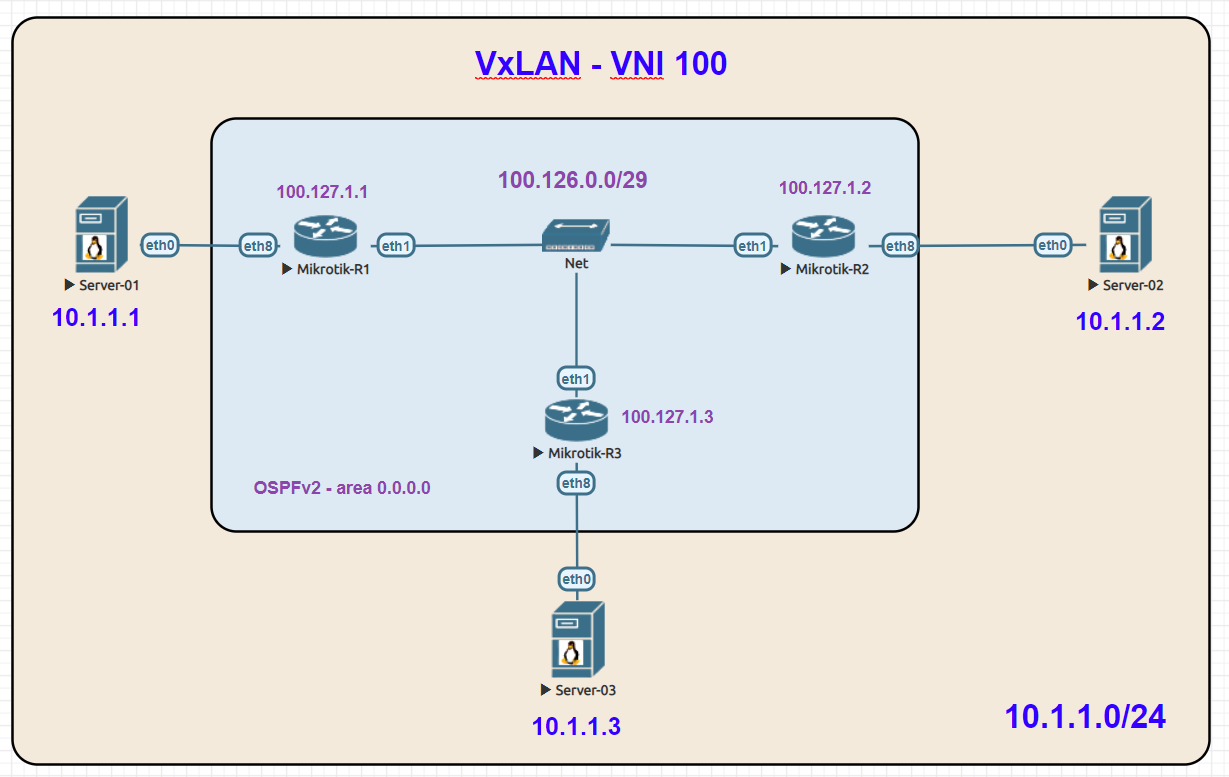
Here is a blog post I did with a VxLAN lab in EVE-NG between 3 routers and 3 linux servers:
The blog and configurations are available here:
https://stubarea51.net/2020/02/15/mikro … ook-vxlan/
Very Well Done and great example … Thank You!
Thanks Kevin, I replicate it now !
Thanks for sharing.
You’re welcome! I’m not sure if an IPv6 underlay is supported, but I may try that later today 
EDIT: Looks like the VTEPs and VxLAN interface group multicast address are IPv4 only for now.
Hello, thanks for sharing!
Would you give me your opinion about this please?
I 've made a small version of this, but without OSPF, an only two VTEP’s:
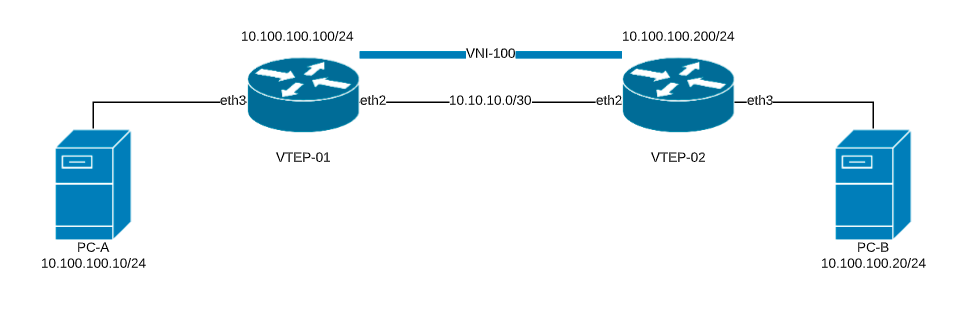
This is my config:
#***VTEP-01***
# apr/05/2020 13:18:18 by RouterOS 7.0beta5
# software id =
#
/interface bridge
add mtu=9000 name=BRIDGE-VXLAN
/interface ethernet
set [ find default-name=ether1 ] mtu=9000
set [ find default-name=ether2 ] mtu=9000
set [ find default-name=ether3 ] mtu=9000
/interface vxlan
add group=239.0.0.1 interface=ether2 name=vxlan-vni-100 port=8472 vni=100
/interface wireless security-profiles
set [ find default=yes ] supplicant-identity=MikroTik
/interface bridge port
add bridge=BRIDGE-VXLAN interface=vxlan-vni-100
add bridge=BRIDGE-VXLAN interface=ether3
/interface vxlan vteps
add interface=vxlan-vni-100 remote-ip=10.10.10.2
/ip address
add address=10.10.10.1/30 interface=ether2 network=10.10.10.0
add address=10.100.100.100/24 interface=BRIDGE-VXLAN network=10.100.100.0
/ip dhcp-client
add add-default-route=no disabled=no interface=ether1
#error exporting /ipv6/route/rule
#error exporting /routing/policy/selection
/system identity
set name=VTEP-01
/tool sniffer
set filter-interface=ether3
#
#
#***VTEP-02***
# apr/05/2020 13:20:48 by RouterOS 7.0beta5
# software id =
#
/interface bridge
add mtu=9000 name=BRIDGE-VXLAN
/interface ethernet
set [ find default-name=ether2 ] mtu=9000
set [ find default-name=ether3 ] mtu=9000
/interface vxlan
add group=239.0.0.1 interface=ether2 name=vxlan-vni-100 port=8472 vni=100
/interface wireless security-profiles
set [ find default=yes ] supplicant-identity=MikroTik
/interface bridge port
add bridge=BRIDGE-VXLAN interface=ether3
add bridge=BRIDGE-VXLAN interface=vxlan-vni-100
/interface vxlan vteps
add interface=vxlan-vni-100 remote-ip=10.10.10.1
/ip address
add address=10.10.10.2/30 interface=ether2 network=10.10.10.0
add address=10.100.100.200/24 interface=BRIDGE-VXLAN network=10.100.100.0
/ip dhcp-client
add add-default-route=no disabled=no interface=ether1
#error exporting /ipv6/route/rule
#error exporting /routing/policy/selection
/system identity
set name=VTEP-02
/tool sniffer
set filter-interface=ether3
Results:
PC-A can ONLY ping to: 10.100.100.100 (VTEP-01 bridge IP address)
PC-B can ONLY ping to: 10.100.100.200 (VTEP-02 bridge IP address)
VTEP-01 can ping to: PC-A and 10.100.100.200 (VTEP-02 bridge IP address)
VTEP-02 can ping to: PC-B and 10.100.100.100 (VTEP-01 bridge IP address)
End-to-end communication fails 
What am I doing wrong?
Thanks in advance!
can I use ipv6 over ipv4? that is vtep will be ipv4 but servers will communicate on ipv6.
Yes you can. VXLAN-Interface forms a transparent L2 tunnel, so you can use IPv6 inside it.
Best regards.
@IPANetEngineer
i was following your example and i wondering what exactly this does,because i’m able to ping remote site without adding this rules:
/interface vxlan vteps
add interface=VxLAN-VNI-100 remote-ip=100.127.1.2
add interface=VxLAN-VNI-100 remote-ip=100.127.1.3
Just a question.. this is VxLAN over 100.27 this is naked WAN ? Without any encryption ?
yes. Without
[quote=usednetua post_id=852136 time=1617780061 user_id=185260]
What about VxLAN over IPsec?
[/quote]
i was wondering about that too. or via wireguard maybe
[quote=spippan post_id=928821 time=1650801933 user_id=75626]
[quote=usednetua post_id=852136 time=1617780061 user_id=185260]
What about VxLAN over IPsec?
[/quote]
i was wondering about that too. or via wireguard maybe
[/quote]
vxlan via L2tp+ipsec
your remote IP’s will be those from L2TP connection
Do you have a vxlan over wireguard example.
Im confused as to the local address I assumed these would be addresses anchored to a local wireguard address at each end
just not sure if the VTEP setting applies only to an external vxlan aware device and not used when the MT is the VXlan smart device?
you got EVE-NG? i’ll export a basic setup
No need, working on it, almost there…
http://forum.mikrotik.com/t/wireguard-and-placing-a-client-on-the-lan-segment-of-my-network/165017/1
That was effort #3 ( vxlan over wireguard )
effort #2 is through DHCP options
effort #1 is via WG and EOIP ( not yet done as have to deal with where internet comes from on spanned subnets)
All three were to see how one could connect a unifi controller on one router to two APs at another location. Exercise in possibilities and learning new things.
okay
if you need something, i got a lab where i need L2 encryption with least overhead through a provider backbone which is L2-transparent but the traffic needs to be encrypted
could export configurations if anyone needs them
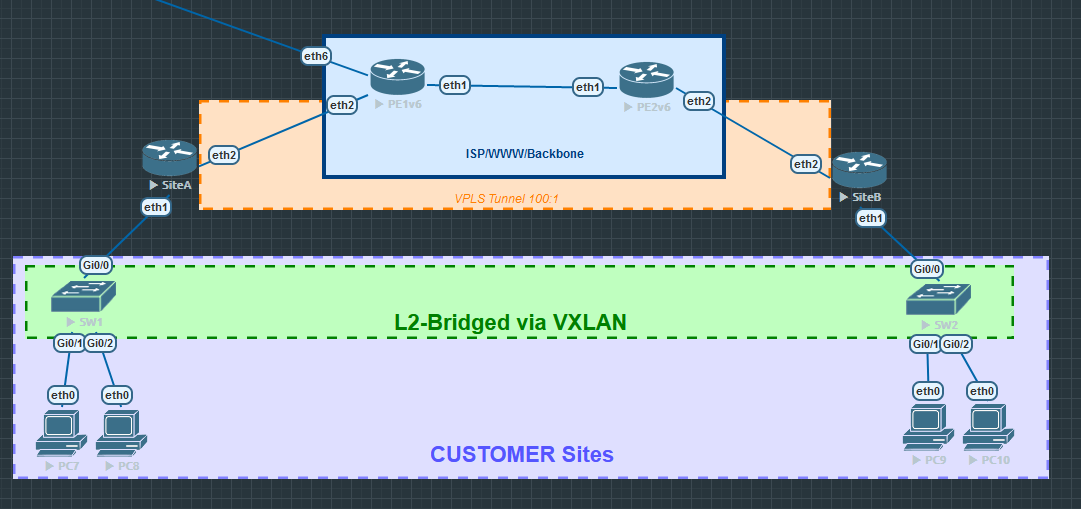
The article forgot to mention some key points ( drawbacks to need to solve )
1., How does arp learning/resolving works under VXLAN endpoints?
There are two options to choose from:
PIM-Multicast routing: 224.0.0.0/4
MP-BGP EVPN
2., The VNI range (4096x4096 = 1… 16777215 ) in theory, but this is only between router-to-router, but on the switch endpoint you will be limited to the VNI → VLAN mapping range ( 1..4094 ).
3., MTU problem ( MTU 2000 at least ).