WiFi settings for Metal52ac (OS ver.7.16.1)

Hi All.

My Object is Metal 52ac set station and connect to Access point. (OS ver.7.16.1 only main package)
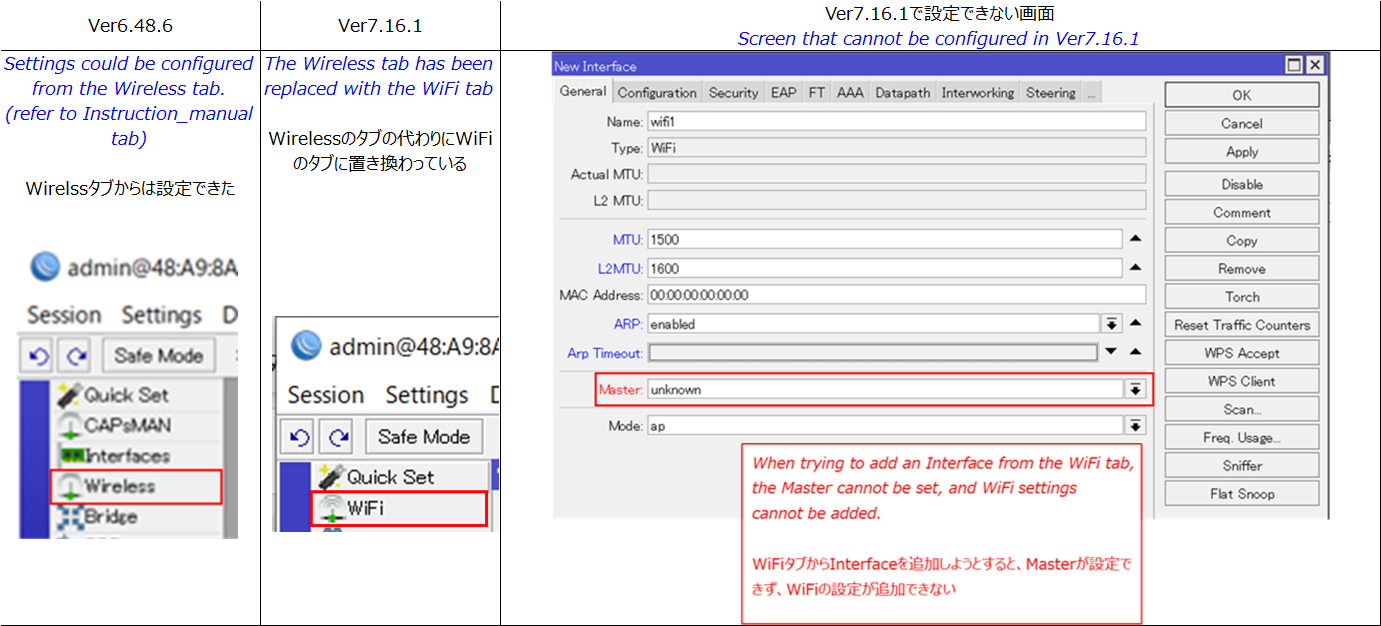
Current situation, I can’t set up it , in particular I can’t select master item in WiFi tab.

However, I could set up Metal 52ac (OS ver.6.48.6) from wireless tab.

Are there any restrictions on configuring the Metal52ac that require using the wireless tab?
If not, please let me know how to set it up from the WiFi tab.

I’m a novice, I ask you network experts for help.
settings_picture.png

Maybe you need to install the appropriate “external” package wifi-qcom-ac wireless package.
Starting from 7.13.x it is a separate package:
http://forum.mikrotik.com/t/7-13-wireless-package-split-question/172049/1
http://forum.mikrotik.com/t/v7-13-5-stable-is-released/171923/1

EDIT: post corrected.

Because the Metal is a MIPSBE device, it only supports configuring wifi through wireless menu.
The wifi menu is added to make it able to run CAPsMAN for new devices.

As you are running 7.16.1, besides the main package you also have to add the wireless package.

As indicated, Metal 52ac is a MIPSBE device so you can not install wifi-qcom-ac package (it is only for ARM based AC devices).
Only wireless can be used for this device.

Thank you for your very kind response. My question have been cleared.
I was able to package the wireless and confirm that I can configure it from the wireless tab.

However, after restarting, I experienced an issue where the IP address and MAC address cannot be detected in Winbox.
Do you have any ideas about what might be causing this?
The Metal 52ac itself appears to be powered on and seems to be functioning.

Can you share the config? That might give some insights:

/export file=anynameyoulike

Remove serial and any other private info, post between code tags by using the </> button.

Thank you for your support.
The relevant product is not accessible, so I researched information on similar products with the same settings.
I attached setting files.

# 1970-01-02 00:06:31 by RouterOS 7.16.1
# software id = SJ8D-F6KK
#
# model = RBMetalG-52SHPacn
# serial number = 
/interface list
add comment=defconf name=WAN
add comment=defconf name=LAN
/interface lte apn
set [ find default=yes ] ip-type=ipv4 use-network-apn=no
/ip pool
add name=default-dhcp ranges=192.168.88.10-192.168.88.254
/ip dhcp-server
add address-pool=default-dhcp interface=ether1 lease-time=10m name=defconf
/ip firewall connection tracking
set udp-timeout=10s
/ip neighbor discovery-settings
set discover-interface-list=LAN
/ip settings
set max-neighbor-entries=8192
/ipv6 settings
set disable-ipv6=yes max-neighbor-entries=8192
/interface list member
add comment=defconf interface=ether1 list=LAN
add comment=defconf interface=*1 list=WAN
/interface ovpn-server server
set auth=sha1,md5
/ip address
add address=192.168.88.1/24 comment=defconf interface=ether1 network=\
    192.168.88.0
/ip dhcp-client
add comment=defconf interface=*1
/ip dhcp-server network
add address=192.168.88.0/24 comment=defconf dns-server=192.168.88.1 gateway=\
    192.168.88.1
/ip dns
set allow-remote-requests=yes
/ip dns static
add address=192.168.88.1 comment=defconf name=router.lan type=A
/ip firewall filter
add action=accept chain=input comment=\
    "defconf: accept established,related,untracked" connection-state=\
    established,related,untracked
add action=drop chain=input comment="defconf: drop invalid" connection-state=\
    invalid
add action=accept chain=input comment="defconf: accept ICMP" protocol=icmp
add action=accept chain=input comment=\
    "defconf: accept to local loopback (for CAPsMAN)" dst-address=127.0.0.1
add action=drop chain=input comment="defconf: drop all not coming from LAN" \
    in-interface-list=!LAN
add action=accept chain=forward comment="defconf: accept in ipsec policy" \
    ipsec-policy=in,ipsec
add action=accept chain=forward comment="defconf: accept out ipsec policy" \
    ipsec-policy=out,ipsec
add action=fasttrack-connection chain=forward comment="defconf: fasttrack" \
    connection-state=established,related hw-offload=yes
add action=accept chain=forward comment=\
    "defconf: accept established,related, untracked" connection-state=\
    established,related,untracked
add action=drop chain=forward comment="defconf: drop invalid" \
    connection-state=invalid
add action=drop chain=forward comment=\
    "defconf: drop all from WAN not DSTNATed" connection-nat-state=!dstnat \
    connection-state=new in-interface-list=WAN
/ip firewall nat
add action=masquerade chain=srcnat comment="defconf: masquerade" \
    ipsec-policy=out,none out-interface-list=WAN
/ip hotspot profile
set [ find default=yes ] html-directory=hotspot
/ip ipsec profile
set [ find default=yes ] dpd-interval=2m dpd-maximum-failures=5
/routing bfd configuration
add disabled=no interfaces=all min-rx=200ms min-tx=200ms multiplier=5
/system note
set show-at-login=no
/system package update
set channel=testing
/tool mac-server
set allowed-interface-list=LAN
/tool mac-server mac-winbox
set allowed-interface-list=LAN

anynameyoulike.rsc (3.07 KB)

Currently it is configured as router…is that what you want?
Check your config for asterisks, I think the bridge was removed (missing both in dhcp-client and interface list).
That explains the problems you run into.

Thank you for your advise.
I continue to confirm this situation.

We can access to Metal52ac using MAC address or wireless connection(setting is below).
However IP address(Ethernet access) can’t see Winbox access page.
Is this related to the advice above?
I apologize for not having basic knowledge.

# 1970-01-02 00:26:56 by RouterOS 7.16.1
# software id = JKCS-J7VB
#
# model = RBMetalG-52SHPacn
# serial number = 
/interface bridge
add name=bridge1
/interface wireless
set [ find default-name=wlan1 ] band=2ghz-b country=japan disabled=no \
    frequency=auto installation=outdoor mode=ap-bridge ssid=Metal52ac_SN005 \
    wireless-protocol=802.11
/interface list
add comment=defconf name=WAN
add comment=defconf name=LAN
/interface lte apn
set [ find default=yes ] ip-type=ipv4 use-network-apn=no
/interface wireless security-profiles
set [ find default=yes ] supplicant-identity=MikroTik
/ip pool
add name=default-dhcp ranges=192.168.88.10-192.168.88.254
/ip dhcp-server
add address-pool=default-dhcp interface=ether1 lease-time=10m name=defconf
/ip firewall connection tracking
set udp-timeout=10s
/ip neighbor discovery-settings
set discover-interface-list=LAN
/ip settings
set max-neighbor-entries=8192
/ipv6 settings
set disable-ipv6=yes max-neighbor-entries=8192
/interface list member
add interface=ether1 list=WAN
add interface=wlan1 list=LAN
/interface ovpn-server server
set auth=sha1,md5
/ip address
add address=10.1.0.21/8 comment=defconf interface=ether1 network=10.0.0.0
add address=192.168.20.245/24 interface=wlan1 network=192.168.20.0
/ip dhcp-client
add comment=defconf interface=wlan1
/ip dhcp-server network
add address=192.168.88.0/24 comment=defconf dns-server=192.168.88.1 gateway=\
    192.168.88.1
/ip dns
set allow-remote-requests=yes
/ip dns static
add address=192.168.20.245 comment=defconf name=router.lan type=A
/ip firewall filter
add action=accept chain=input comment=\
    "defconf: accept established,related,untracked" connection-state=\
    established,related,untracked
add action=drop chain=input comment="defconf: drop invalid" connection-state=\
    invalid
add action=accept chain=input comment="defconf: accept ICMP" protocol=icmp
add action=accept chain=input comment=\
    "defconf: accept to local loopback (for CAPsMAN)" dst-address=127.0.0.1
add action=drop chain=input comment="defconf: drop all not coming from LAN" \
    in-interface-list=!LAN
add action=accept chain=forward comment="defconf: accept in ipsec policy" \
    ipsec-policy=in,ipsec
add action=accept chain=forward comment="defconf: accept out ipsec policy" \
    ipsec-policy=out,ipsec
add action=fasttrack-connection chain=forward comment="defconf: fasttrack" \
    connection-state=established,related hw-offload=yes
add action=accept chain=forward comment=\
    "defconf: accept established,related, untracked" connection-state=\
    established,related,untracked
add action=drop chain=forward comment="defconf: drop invalid" \
    connection-state=invalid
add action=drop chain=forward comment=\
    "defconf: drop all from WAN not DSTNATed" connection-nat-state=!dstnat \
    connection-state=new in-interface-list=WAN
/ip firewall nat
add action=masquerade chain=srcnat comment="defconf: masquerade" \
    ipsec-policy=out,none out-interface-list=WAN
/ip hotspot profile
set [ find default=yes ] html-directory=hotspot
/ip ipsec profile
set [ find default=yes ] dpd-interval=2m dpd-maximum-failures=5
/routing bfd configuration
add disabled=no interfaces=all min-rx=200ms min-tx=200ms multiplier=5
/system note
set show-at-login=no
/tool mac-server
set allowed-interface-list=LAN
/tool mac-server mac-winbox
set allowed-interface-list=LAN

You have:

/interface list
add comment=defconf name=WAN
add comment=defconf name=LAN

and:

/interface list member
add interface=ether1 list=WAN
add interface=wlan1 list=LAN

and:

/tool mac-server
set allowed-interface-list=LAN
/tool mac-server mac-winbox
set allowed-interface-list=LAN

i.e. you have two categories of interfaces, you attribute ether1 to WAN, and wlan1 to LAN, and then you allow Winbox on LAN only.

The device is generally configured as a router.

Is that your intended use?
Or do you want to use it as Access Point or Station?

In both these cases usually all interfaces are into a same bridge (that is LAN), and there is no firewall as everything is bridged, not routed, within a same (local) network.

Thank you for your advise.
I understand that my interface setting is wrong.
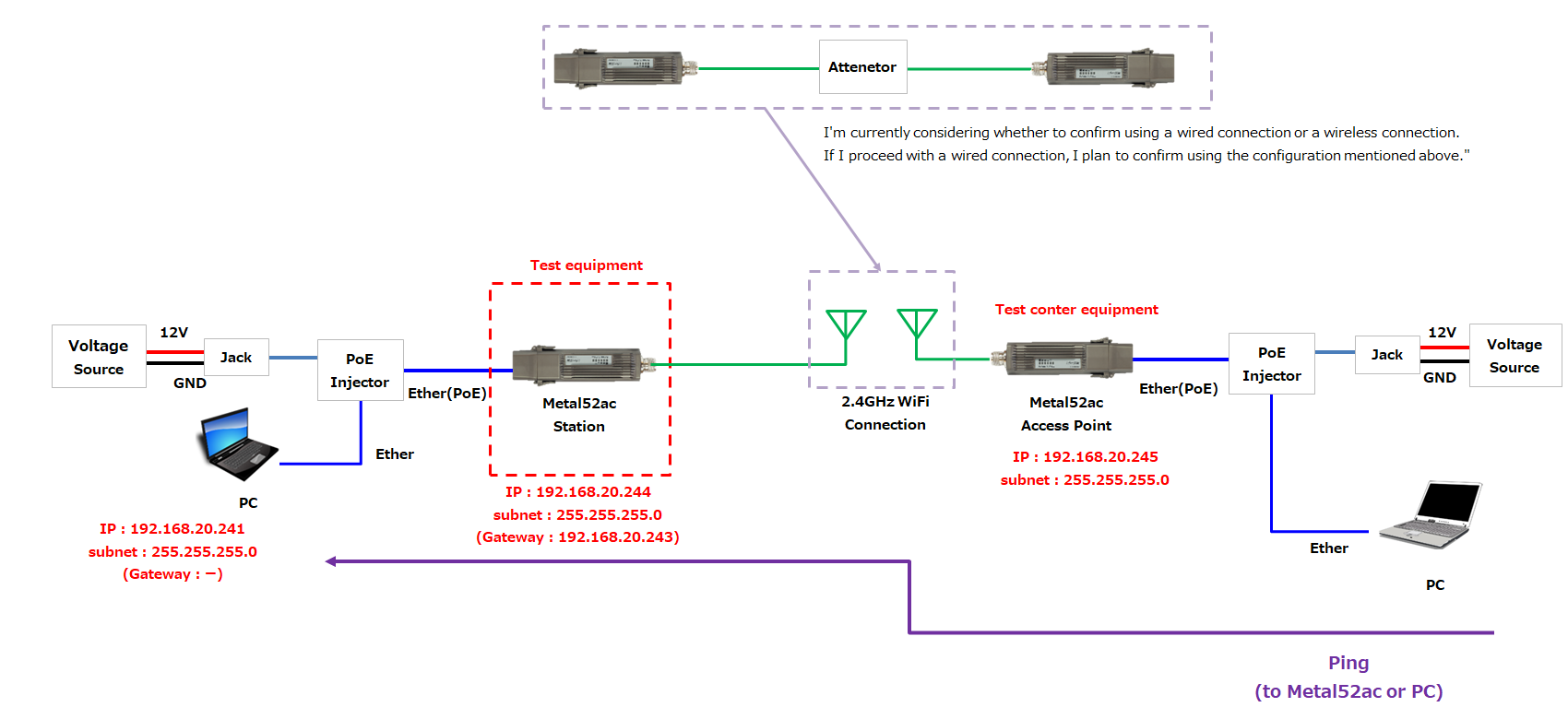
I’d like to two Metal52ac set AP and Station and connet to two device and check send to ping.

NG
add interface=ether1 list=WAN
add interface=wlan1 list=LAN	

OK
add comment=defconf interface=ether1 list=LAN
add comment=defconf interface=wlan1 list=WAN

Yep, but loosely at the end you want to have both interfaces in a bridge, (configured as station, yours is now in ap-bridge), i.e. something like:

/interface wireless
set [ find default-name=wlan1 ] band=2ghz-b country=japan disabled=no
frequency=auto installation=outdoor mode=> station-pseudobridge > ssid=[redacted] wireless-protocol=802.11

right now your AC Metal is expecting clients to connect to it via Wi-Fi, while in the opening post you said you want it to be a client (station) to another AP.

In both cases BOTH the wlan1 and ether1 belong to LAN, or if you prefer you need to configure the Mikrotik as a switch, not as a router (devices on the wlan1 and ether1 will be on a same subnet).

You already have a bridge, but it is now empty, you should have:

/interface list
add comment=defconf name=WAN
add comment=defconf name=LAN
/interface bridge port
add bridge=bridge1 interface=ether1
add bridge=bridge1 interface=wlan1

/ip neighbor discovery-settings
set discover-interface-list=LAN

/interface list member
add interface=bridge1 list=LAN
add interface=ether1 list=> LAN > ← this is only needed until you have both ports added to bridge
add interface=bridge1 list=> LAN > ← this is only needed until you have both ports added to bridge

/tool mac-server
set allowed-interface-list=LAN
/tool mac-server mac-winbox
set allowed-interface-list=LAN

:

Or if this is not what you actually want, try to expand on what you actually want.

Thanks for a lot of very kind advise.
I feel that my mistakes have been corrected.

My settings and test structure diagram are as follows.
If you have additional advise, please tell me it.

AP

# 1970-01-02 08:04:26 by RouterOS 7.16.1
# software id = JKCS-J7VB
#
# model = RBMetalG-52SHPacn
# serial number = HGZ0ABAN9E7
/interface bridge
add name=bridge1
add name=bridge2
/interface wireless
set [ find default-name=wlan1 ] band=2ghz-b country=japan disabled=no \
    frequency=auto installation=outdoor mode=ap-bridge ssid=Metal52ac_SN005 \
    wireless-protocol=802.11
/interface list
add comment=defconf name=WAN
add comment=defconf name=LAN
/interface lte apn
set [ find default=yes ] ip-type=ipv4 use-network-apn=no
/interface wireless security-profiles
set [ find default=yes ] supplicant-identity=MikroTik
/ip pool
add name=default-dhcp ranges=192.168.88.10-192.168.88.254
/interface bridge port
add bridge=bridge2 interface=ether1
add bridge=bridge2 interface=wlan1
/ip firewall connection tracking
set udp-timeout=10s
/ip neighbor discovery-settings
set discover-interface-list=LAN
/ip settings
set max-neighbor-entries=8192
/ipv6 settings
set disable-ipv6=yes max-neighbor-entries=8192
/interface list member
add interface=wlan1 list=WAN
add interface=ether1 list=LAN
add interface=bridge1 list=LAN
add interface=bridge1 list=WAN
/interface ovpn-server server
set auth=sha1,md5
/ip address
add address=10.1.0.21/8 comment=defconf disabled=yes interface=ether1 \
    network=10.0.0.0
add address=192.168.20.245/24 interface=wlan1 network=192.168.20.0
/ip dhcp-client
# DHCP client can not run on slave or passthrough interface!
add comment=defconf interface=wlan1
/ip dhcp-server
add address-pool=default-dhcp interface=ether1 lease-time=10m name=defconf
/ip dhcp-server network
add address=192.168.88.0/24 comment=defconf dns-server=192.168.88.1 gateway=\
    192.168.88.1
/ip dns
set allow-remote-requests=yes
/ip dns static
add address=192.168.20.245 comment=defconf name=router.lan type=A
/ip firewall filter
add action=accept chain=input comment=\
    "defconf: accept established,related,untracked" connection-state=\
    established,related,untracked
add action=drop chain=input comment="defconf: drop invalid" connection-state=\
    invalid
add action=accept chain=input comment="defconf: accept ICMP" protocol=icmp
add action=accept chain=input comment=\
    "defconf: accept to local loopback (for CAPsMAN)" dst-address=127.0.0.1
add action=drop chain=input comment="defconf: drop all not coming from LAN" \
    in-interface-list=!LAN
add action=accept chain=forward comment="defconf: accept in ipsec policy" \
    ipsec-policy=in,ipsec
add action=accept chain=forward comment="defconf: accept out ipsec policy" \
    ipsec-policy=out,ipsec
add action=fasttrack-connection chain=forward comment="defconf: fasttrack" \
    connection-state=established,related hw-offload=yes
add action=accept chain=forward comment=\
    "defconf: accept established,related, untracked" connection-state=\
    established,related,untracked
add action=drop chain=forward comment="defconf: drop invalid" \
    connection-state=invalid
add action=drop chain=forward comment=\
    "defconf: drop all from WAN not DSTNATed" connection-nat-state=!dstnat \
    connection-state=new in-interface-list=WAN
/ip firewall nat
add action=masquerade chain=srcnat comment="defconf: masquerade" disabled=yes \
    ipsec-policy=out,none out-interface-list=WAN
/ip hotspot profile
set [ find default=yes ] html-directory=hotspot
/ip ipsec profile
set [ find default=yes ] dpd-interval=2m dpd-maximum-failures=5
/routing bfd configuration
add disabled=no interfaces=all min-rx=200ms min-tx=200ms multiplier=5
/system note
set show-at-login=no
/tool mac-server
set allowed-interface-list=LAN
/tool mac-server mac-winbox
set allowed-interface-list=LAN

Station

# 1970-01-02 02:48:08 by RouterOS 7.16.1
# software id = JEZG-JYL8
#
# model = RBMetalG-52SHPacn
# serial number = HE108V4V78X
/interface bridge
add name=bridge1
/interface wireless
set [ find default-name=wlan1 ] band=2ghz-b country=japan disabled=no \
    frequency=auto installation=outdoor mode=station-bridge ssid=\
    Metal52ac_SN005 tx-power=20 tx-power-mode=all-rates-fixed \
    wireless-protocol=802.11
/interface list
add comment=defconf name=WAN
add comment=defconf name=LAN
/interface lte apn
set [ find default=yes ] ip-type=ipv4 use-network-apn=no
/interface wireless security-profiles
set [ find default=yes ] authentication-types=wpa-psk,wpa2-psk group-ciphers=\
    tkip,aes-ccm supplicant-identity=MikroTik unicast-ciphers=tkip,aes-ccm
/iot lora servers
add address=eu1.cloud.thethings.industries name="TTS Cloud (eu1)" protocol=\
    UDP
add address=nam1.cloud.thethings.industries name="TTS Cloud (nam1)" protocol=\
    UDP
add address=au1.cloud.thethings.industries name="TTS Cloud (au1)" protocol=\
    UDP
add address=eu1.cloud.thethings.network name="TTN V3 (eu1)" protocol=UDP
add address=nam1.cloud.thethings.network name="TTN V3 (nam1)" protocol=UDP
add address=au1.cloud.thethings.network name="TTN V3 (au1)" protocol=UDP
/ip pool
add name=default-dhcp ranges=192.168.88.10-192.168.88.254
/interface bridge port
add bridge=bridge1 interface=wlan1
add bridge=bridge1 interface=ether1
/ip firewall connection tracking
set udp-timeout=10s
/ip neighbor discovery-settings
set discover-interface-list=LAN
/ip settings
set max-neighbor-entries=8192
/ipv6 settings
set disable-ipv6=yes max-neighbor-entries=8192
/interface list member
add comment=defconf interface=ether1 list=LAN
add comment=defconf interface=wlan1 list=WAN
add interface=bridge1 list=LAN
add interface=bridge1 list=WAN
/interface ovpn-server server
set auth=sha1,md5
/ip address
add address=192.168.20.244/24 comment=defconf interface=ether1 network=\
    192.168.20.0
/ip dhcp-client
# DHCP client can not run on slave or passthrough interface!
add comment=defconf interface=wlan1
/ip dhcp-server
add address-pool=default-dhcp interface=ether1 lease-time=10m name=defconf
/ip dhcp-server network
add address=192.168.20.0/24 comment=defconf dns-server=192.168.20.244 \
    gateway=192.168.20.244 netmask=24
/ip dns
set allow-remote-requests=yes
/ip dns static
add address=192.168.20.244 comment=defconf name=router.lan type=A
/ip firewall filter
add action=accept chain=input comment=\
    "defconf: accept established,related,untracked" connection-state=\
    established,related,untracked
add action=drop chain=input comment="defconf: drop invalid" connection-state=\
    invalid
add action=accept chain=input comment="defconf: accept ICMP" protocol=icmp
add action=accept chain=input comment=\
    "defconf: accept to local loopback (for CAPsMAN)" dst-address=127.0.0.1
add action=drop chain=input comment="defconf: drop all not coming from LAN" \
    in-interface-list=!LAN
add action=accept chain=forward comment="defconf: accept in ipsec policy" \
    ipsec-policy=in,ipsec
add action=accept chain=forward comment="defconf: accept out ipsec policy" \
    ipsec-policy=out,ipsec
add action=fasttrack-connection chain=forward comment="defconf: fasttrack" \
    connection-state=established,related hw-offload=yes
add action=accept chain=forward comment=\
    "defconf: accept established,related, untracked" connection-state=\
    established,related,untracked
add action=drop chain=forward comment="defconf: drop invalid" \
    connection-state=invalid
add action=drop chain=forward comment=\
    "defconf: drop all from WAN not DSTNATed" connection-nat-state=!dstnat \
    connection-state=new in-interface-list=WAN
/ip firewall nat
add action=masquerade chain=srcnat comment="defconf: masquerade" \
    ipsec-policy=out,none out-interface-list=WAN
/ip hotspot profile
set [ find default=yes ] html-directory=hotspot
/ip ipsec profile
set [ find default=yes ] dpd-interval=2m dpd-maximum-failures=5
/routing bfd configuration
add disabled=no interfaces=all min-rx=200ms min-tx=200ms multiplier=5
/system gps
set set-system-time=no
/system identity
set name=RouterOS
/system note
set show-at-login=no
/tool mac-server
set allowed-interface-list=LAN
/tool mac-server mac-winbox
set allowed-interface-list=LAN

AP_Station_Compare_settings.xlsx (14.5 KB)
test_setup.png

The AP neds to be cleaned, you have two bridges (and one is unused) in it.
Bridge2 is used (it has ether1 and wlan1 inside it), bridge1 can be deleted.
You should also disable or delete the dhcp client, it is not running because it is attached to an interface that is now slave to the bridge, in any case from your scheme, this is the “main” device, so eventually should have a dhcp server running, not a client.

The station needs as well some attention.
Same issue with the dhcp client.
You’ll have to make up your mind, bridge1 should be either LAN or WAN, not both:

/interface list member
add comment=defconf interface=ether1 list=LAN
add comment=defconf interface=wlan1 list=WAN
add interface=bridge1 list=LAN
add interface=bridge1 list=WAN

(it won’t change anything in practice, but part of a good configuration is that its settings should be easy to understand weeks, months or years later when you need to review them).

On both you have a dhcp server (running or likely not running, in the sense of doing nothing) on ether1 that you should not need, if you want the AP to provide IP addresses via DHCP, the dhcp server should be on the bridge2 interface).
On the station, the dhcp server should be removed and the dhcp client put on bridge1 interface.

Them there are lots of settings that you could remove (or disable) that come from defconf (as a router) that you do not need when using the devices as switch (bridge), anything related to firewall is unneeded/not used.

I apologize for the delayed response.
I am very relieved to hear that the tests can proceed smoothly. Your reliable and thorough support has been truly helpful, and I sincerely appreciate it.
As per your advice, I have made the changes to the settings. I am attaching the file.
I would appreciate it if you could provide any feedback or suggestions.

I would like to express my gratitude once again for the strong support from jaclaz-san and everyone at MikroTik Forum.

AP

# 1970-01-02 00:45:41 by RouterOS 7.16.1
# software id = JKCS-J7VB
#
# model = RBMetalG-52SHPacn
# serial number = HGZ0ABAN9E7
/interface bridge
add name=bridge2
/interface wireless
set [ find default-name=wlan1 ] band=2ghz-b country=japan disabled=no \
    frequency=auto installation=outdoor mode=ap-bridge ssid=Metal52ac_SN005 \
    wireless-protocol=802.11
/interface list
add comment=defconf name=WAN
add comment=defconf name=LAN
/interface lte apn
set [ find default=yes ] ip-type=ipv4 use-network-apn=no
/interface wireless security-profiles
set [ find default=yes ] supplicant-identity=MikroTik
/ip pool
add name=default-dhcp ranges=192.168.88.10-192.168.88.254
/interface bridge port
add bridge=bridge2 interface=ether1
add bridge=bridge2 disabled=yes interface=wlan1
/ip firewall connection tracking
set udp-timeout=10s
/ip neighbor discovery-settings
set discover-interface-list=LAN
/ip settings
set max-neighbor-entries=8192
/ipv6 settings
set disable-ipv6=yes max-neighbor-entries=8192
/interface list member
add interface=wlan1 list=WAN
add interface=ether1 list=LAN
add interface=bridge2 list=LAN
/interface ovpn-server server
set auth=sha1,md5
/ip address
add address=10.1.0.21/8 comment=defconf disabled=yes interface=ether1 \
    network=10.0.0.0
add address=192.168.20.245/24 interface=wlan1 network=192.168.20.0
/ip dhcp-client
add comment=defconf disabled=yes interface=wlan1
/ip dhcp-server
# DHCP server can not run on slave interface!
add address-pool=default-dhcp interface=ether1 lease-time=10m name=defconf
/ip dhcp-server network
add address=192.168.88.0/24 comment=defconf dns-server=192.168.88.1 gateway=\
    192.168.88.1
/ip dns
set allow-remote-requests=yes
/ip dns static
add address=192.168.20.245 comment=defconf name=router.lan type=A
/ip firewall filter
add action=accept chain=input comment=\
    "defconf: accept established,related,untracked" connection-state=\
    established,related,untracked disabled=yes
add action=drop chain=input comment="defconf: drop invalid" connection-state=\
    invalid disabled=yes
add action=accept chain=input comment="defconf: accept ICMP" disabled=yes \
    protocol=icmp
add action=accept chain=input comment=\
    "defconf: accept to local loopback (for CAPsMAN)" disabled=yes \
    dst-address=127.0.0.1
add action=drop chain=input comment="defconf: drop all not coming from LAN" \
    disabled=yes in-interface-list=!LAN
add action=accept chain=forward comment="defconf: accept in ipsec policy" \
    disabled=yes ipsec-policy=in,ipsec
add action=accept chain=forward comment="defconf: accept out ipsec policy" \
    disabled=yes ipsec-policy=out,ipsec
add action=fasttrack-connection chain=forward comment="defconf: fasttrack" \
    connection-state=established,related disabled=yes hw-offload=yes
add action=accept chain=forward comment=\
    "defconf: accept established,related, untracked" connection-state=\
    established,related,untracked disabled=yes
add action=drop chain=forward comment="defconf: drop invalid" \
    connection-state=invalid disabled=yes
add action=drop chain=forward comment=\
    "defconf: drop all from WAN not DSTNATed" connection-nat-state=!dstnat \
    connection-state=new disabled=yes in-interface-list=WAN
/ip firewall nat
add action=masquerade chain=srcnat comment="defconf: masquerade" disabled=yes \
    ipsec-policy=out,none out-interface-list=WAN
/ip hotspot profile
set [ find default=yes ] html-directory=hotspot
/ip ipsec profile
set [ find default=yes ] dpd-interval=2m dpd-maximum-failures=5
/routing bfd configuration
add disabled=no interfaces=all min-rx=200ms min-tx=200ms multiplier=5
/system note
set show-at-login=no
/tool mac-server
set allowed-interface-list=LAN
/tool mac-server mac-winbox
set allowed-interface-list=LAN

Station

# 1970-01-02 00:14:16 by RouterOS 7.16.1
# software id = JEZG-JYL8
#
# model = RBMetalG-52SHPacn
# serial number = HE108V4V78X
/interface bridge
add name=bridge1
/interface wireless
set [ find default-name=wlan1 ] band=2ghz-b country=japan disabled=no \
    frequency=auto installation=outdoor mode=station-bridge ssid=\
    Metal52ac_SN005 tx-power=20 tx-power-mode=all-rates-fixed \
    wireless-protocol=802.11
/interface list
add comment=defconf name=WAN
add comment=defconf name=LAN
/interface lte apn
set [ find default=yes ] ip-type=ipv4 use-network-apn=no
/interface wireless security-profiles
set [ find default=yes ] authentication-types=wpa-psk,wpa2-psk group-ciphers=\
    tkip,aes-ccm supplicant-identity=MikroTik unicast-ciphers=tkip,aes-ccm
/iot lora servers
add address=eu1.cloud.thethings.industries name="TTS Cloud (eu1)" protocol=\
    UDP
add address=nam1.cloud.thethings.industries name="TTS Cloud (nam1)" protocol=\
    UDP
add address=au1.cloud.thethings.industries name="TTS Cloud (au1)" protocol=\
    UDP
add address=eu1.cloud.thethings.network name="TTN V3 (eu1)" protocol=UDP
add address=nam1.cloud.thethings.network name="TTN V3 (nam1)" protocol=UDP
add address=au1.cloud.thethings.network name="TTN V3 (au1)" protocol=UDP
/ip pool
add name=default-dhcp ranges=192.168.88.10-192.168.88.254
/interface bridge port
add bridge=bridge1 interface=wlan1
add bridge=bridge1 interface=ether1
/ip firewall connection tracking
set udp-timeout=10s
/ip neighbor discovery-settings
set discover-interface-list=LAN
/ip settings
set max-neighbor-entries=8192
/ipv6 settings
set disable-ipv6=yes max-neighbor-entries=8192
/interface list member
add comment=defconf interface=ether1 list=LAN
add comment=defconf interface=wlan1 list=WAN
add interface=bridge1 list=LAN
/interface ovpn-server server
set auth=sha1,md5
/ip address
add address=192.168.20.244/24 comment=defconf interface=ether1 network=\
    192.168.20.0
/ip dhcp-client
add comment=defconf disabled=yes interface=wlan1
/ip dhcp-server
add address-pool=default-dhcp interface=ether1 lease-time=10m name=defconf
/ip dhcp-server network
add address=192.168.20.0/24 comment=defconf dns-server=192.168.20.244 \
    gateway=192.168.20.244 netmask=24
/ip dns
set allow-remote-requests=yes
/ip dns static
add address=192.168.20.244 comment=defconf name=router.lan type=A
/ip firewall filter
add action=accept chain=input comment=\
    "defconf: accept established,related,untracked" connection-state=\
    established,related,untracked disabled=yes
add action=drop chain=input comment="defconf: drop invalid" connection-state=\
    invalid disabled=yes
add action=accept chain=input comment="defconf: accept ICMP" disabled=yes \
    protocol=icmp
add action=accept chain=input comment=\
    "defconf: accept to local loopback (for CAPsMAN)" disabled=yes \
    dst-address=127.0.0.1
add action=drop chain=input comment="defconf: drop all not coming from LAN" \
    disabled=yes in-interface-list=!LAN
add action=accept chain=forward comment="defconf: accept in ipsec policy" \
    disabled=yes ipsec-policy=in,ipsec
add action=accept chain=forward comment="defconf: accept out ipsec policy" \
    disabled=yes ipsec-policy=out,ipsec
add action=fasttrack-connection chain=forward comment="defconf: fasttrack" \
    connection-state=established,related disabled=yes hw-offload=yes
add action=accept chain=forward comment=\
    "defconf: accept established,related, untracked" connection-state=\
    established,related,untracked disabled=yes
add action=drop chain=forward comment="defconf: drop invalid" \
    connection-state=invalid disabled=yes
add action=drop chain=forward comment=\
    "defconf: drop all from WAN not DSTNATed" connection-nat-state=!dstnat \
    connection-state=new disabled=yes in-interface-list=WAN
/ip firewall nat
add action=masquerade chain=srcnat comment="defconf: masquerade" \
    ipsec-policy=out,none out-interface-list=WAN
/ip hotspot profile
set [ find default=yes ] html-directory=hotspot
/ip ipsec profile
set [ find default=yes ] dpd-interval=2m dpd-maximum-failures=5
/routing bfd configuration
add disabled=no interfaces=all min-rx=200ms min-tx=200ms multiplier=5
/system gps
set set-system-time=no
/system identity
set name=RouterOS
/system note
set show-at-login=no
/tool mac-server
set allowed-interface-list=LAN
/tool mac-server mac-winbox
set allowed-interface-list=LAN

AP_Station_Compare_settings.xlsx (19.5 KB)
You are welcome. :slight_smile:

I an attaching an Excel file with my comments.

The idea is:
1st device is AP with a single bridge, bridge2, with both ether1 and wlan1 interfaces in it, with a static IP of 192.168.20.245/24
2nd device is Station with a single bridge, bridge1, with both ether1 and wlan1 interfaces in it, with a static IP of 192.168.20.244/24
Commented.xls (48 KB)

Thank you and I fixed it.
I’ll try testing!!
AP_settings_20250326.rsc (3.55 KB)
Station_settings_20250326.rsc (4.09 KB)

Sorry I have additional question.
Could you tell me how to import settings for Metal52ac?
I tried below, however we can’t import settings.

  1. settings file drag and drop to files(or flash)
  2. input terminal " import file-name=****.rsc skip-errors=yes "
  3. /system reboot

Import can be done if there is no default config in place. Otherwise, you get conflicts.

Something like:

/system reset-configuration no-defaults=yes  run-after-reset="your-config.rsc"

Thank you for your advise.
I understood that this command initializes the settings and loads the configuration file.

Can I not write if there are duplicate entries with the above command?
However, is it not possible to load and apply settings, such as access point or station settings, to change the configuration?
After using the above command, not all settings were the same.

Kind regards