Always been interested in the wifi overhead calculations, and the corresponding performance prediction of the wifi connections.
MT classic drivers have dificulties to get above 360Mbps for a 2x2 MCS09 giving 866Mbps interface rate connection.
These values are in line with the overhead calculations, for low size of aggregation (A-MSDU=MPDU, A-MPDU) for VHT/wifi5 with lower values in MT than the competition.
Competition or OpenWRT on MT HW goes up to 500-600Mbps, this is still in line with the packet transmission overhead calculation.
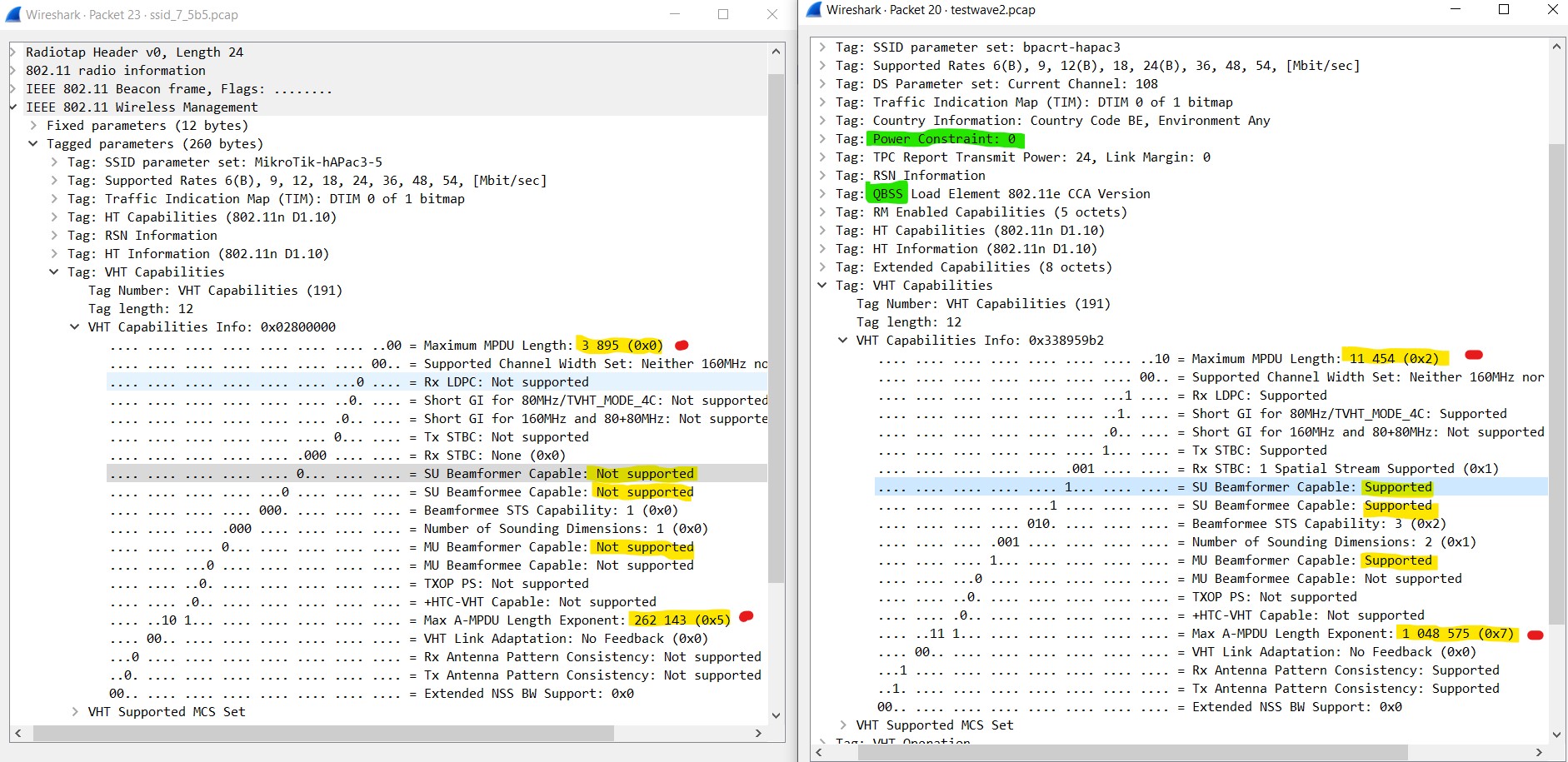
What to expect from “wifiwave2”? Even without doing the tedious performance tests, first looked at what the AP beacon is telling us.
Newly installed ROS7.5beta5 on a new hAP ac3, and looked at the 5GHz beacon for MT classic drivers and for wifiwave2.
My first preliminary findings are … (incomplete) as I do not understand the working of all parameters in the beacon.
But in short:
Beacon is very interesting. Some fields are now finally there (like QBSS).
Most interested in VHT performance right now (wifi5)
Power management now handles TPC, and allowed EIRP in the ETSI region is now 3 dB higher than with the classic drivers. (20->23dBm, 27->30dBm)
The received signal strength in my laptop on a diferent floor is indeed 3dB higher with wifiwave2 (TPC +3dB or beamforming ???) when using outdoor (high power) frequencies.
A-MSDU and A-MPDU are very different, and values are now similar to the other brands. Expected reduction in overhead is important, if wifiwave2 manages to fullfill the A-MPDU aggregation
SU-beamforming (SU-MIMO) and MU-beamforming (MU-MIMO) is announced as supported.
CAP AC and HAP AC2 are both WAVE2 devices and with a proper software can do it too. I’m very upset that i must use an open source / not payed software to achieve some standards from 10 years ago that the product i have buyed should offered me, because Mikrotik already have the money to pay someone to do what others make for free or as a hobby.
Ex of CAP AC beacon without RouterOS (it’s the same for HAP AC2):
Yes it is not the harware capability but the drivers used for some MT AP, probably due to memory limitations.
And the wifiwave2 extra package worries me.
What I liked so much in the standard drivers is gone, and I’m not sure this wifiwave2 is a feature rich implementation of 802.11ac-wave2 (A SNMPwalk might reveal more)
You cannot have both I assume, but wifiwave2 risks to make this wifi platform just another 3th party wifi AP.
Liked, but gone for now … lets hope it comes back
4-address mode, very transparent implementation (“AP bridge”/“station bridge” is just wonderful)
WDS and mesh setup (not found)
Informative Registration table ( e.g. Last IP, RADIUS comment field) with DUDE to collect them all from all AP in real time
Dynamic and simple VLAN id assignment in the wireless driver, default per SSID and dynamic based on RADIUS or on Access List setting (e.g. MAC address based for IOT, DLNA, and Home automation devices)
No direct need to define VLANs and enable VLAN filtering on the bridge, keeping HW offloading for ethernet interfaces operational
Improved …
minimal A-MSDU (MPDU) and A-MPDU values, this was wasting a lot of airtime for everyone on that channel, due to too small payload (A-MPDU)
No more CAPsMAN further reduction of the above payload size per timeslot. (Might come back with CAPsMAN 3.0 for wifiwave2)
TPC handling, avoiding the EIRP reduction by 3 dB, in the regions EIRP allowed list
Beam forming and 802.11rkv (no experience so far, having only one wifiwave2 unit)
A SNMPwalk might reveal even more
Still hoping that one day classic driver and wifiwave2 could run simultaneously on the same AP (be it on different radio), or better have the features merged.
And while whishfull thinking is on: usable on hAP ac2, wAP ac, cAP ac, cAP ac XL.
Wifiwave2 might have the same look and feel as CAPsMAN with either direct value entry in Wifiwave2, or pointers to Configuration, Security, channel, etc.
But ‘channel’ value does not stay in the wifiwave2 setting , must it be done via ‘channel’ tab only???
Maybe that hAP ac3 is not the best test device. Those long “hare ear / external HGO antenna?” makes one expect high antenna gains.
Wifiwave2 on hAP ax² will bring “BSS coloring”/“spatial reuse”, right?
Probably i will risk a ban for my words but i believe “memory limitations” (i don’t remember who started this myth) it’s an excuse for convenience/indifference/incompetence of Mikrotik on the wireless side : all pretzel shops like tenda, tp-link, iptime etc have wave2 on devices with 64-128M RAM / 8-16M Flash and their devices looks like olympic athletes while my cap ac with ROS is like an old man who smoked 40 years. All pretzel devices including ubiquity are based on openwrt and they don’t have any problems with memory limitations on small memory devices. Why MIkrotik can’t integrate the wireless part from openwrt when it’s free and everybody else is doing it?
I apreciate Mikrotik for routing/switching part but i’m completely dissapointed about their wireless and like an idiot i buyed a lot. For wireless, i buy pretzels.
Good experience with disabling wifiwave2 package (no uninstall, just disabled).
Classic wifi ports WLAN1/WLAN2 are back. So is the “Wireless Sniffer” and “Snooper”. Two tools still missing with wifiwave2.
Wifi1 and wifi2 are now “unknown” interfaces on the bridge ports.
WLAN configs did not fully return, and must be re-configured. (done from the export made, just before installing wifiwave2).
Hopefull and waiting for improved wifiwave2 drivers (classic MT features).
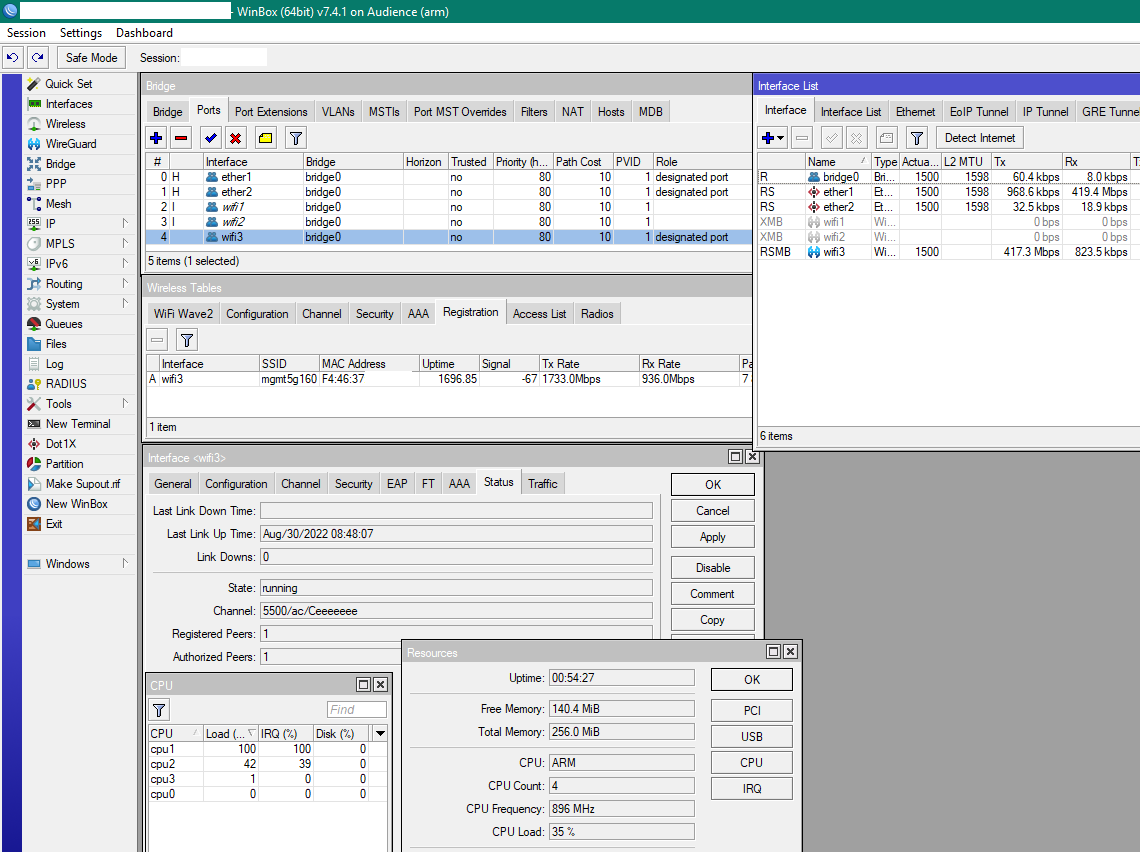
Audience, 3th wifi (4 chain radio) , set to 160MHz channel width , getting 1733,3Mbps interface rate . Hmmm … 2 chain 160MHz wide channel is 1733,3Mbps interface rate at MCS09/SGI, And also 4 chain 80 MHz wide channel is 1733,3Mbps interface rate at MCS09/SGI. Audience datasheet says 4 chain, max 1733Mbps wifi. It looks like 4 chain/160MHz wide cannot be fully used here (would be 3466.7Mbps interface rate in theory (mcsindex.com)).
Rx interface rate 936,0Mbps seems to be MCS05/80MHz/2S/LGI or could also be MCS03/160MHz/4S/LGI, if this number is indeed the interface rate.
TX Data rate is (only) 417.3Mbps. Correct? Difficult to asses, many many factors influence this, but could have been better, and probably is better at other moments.
MCS09/80MHz/2S/SGI should give 866Bbps interface rate, and 500+Mbps data rate for drivers with large MSDU/A-MPDU like wifiwave2 or OpenWRT. Classic MT drivers only get ±360Mbps data rate because of the relative importance of the wifi channel overhead with each transmission (There are fully documented calculators for this, 360Mbps is the result you get in the calculators as data rate, with 866Mbps interface rate and A-MPDU of 16000 bytes. Maybe that is what MT Classic is delivering. (8 MPDU/A-MSDU in one A-MPDU???))
So 491Mbps on MCS09/80MHz/4S/SGI (1733,3Mbps interface rate) is not special at all. But where is the 4x4 client?
Another outcome of this short test is that the classic MT driver in Europe, sets the TX-power 3dB lower than the wifiwave2 or OpenWRT driver or compared to other brand devices, and that on ALL MT AP’s. This might degrade the MCS for TX, and give a lower interface rate, due to the lower TX power, when compared to anything else.
I assume this has to do with TPC support of the drivers. If you do not support TPC, then the 3dB reduction on EIRP for TPC is always required. This might give a reduced MCS rate at some distance. Of course the small MSDU/A-MPDU is still the major performance degradation, due to larger overhead in the wifi channel.
i think around 400mbps over a single TCP/IP connection will be the ceiling because of only 1 CPU core is used and maxed out at 100% usage
i repeated the test with UDP btest.exe between wired PC and wireless PC, with 4 or more connections the max obtained was around 700mbps, only 2 cores at 100% usage
i think CPU core usage is limiting throughput, so maybe with 1.8ghz cpu AX devices we can see a better performance but with lower clock CPU like hap ax2 it can be limited by CPU to achieve the long-awaited ax speeds