I have just tried again and connected successfully. Problem being I was using the default username, rather than the active username.
I basically like the idea to save horizontal space and have the "tools" in the toolbar instead. But this dropdown-solution needs one additional click.

What was wrong with Winbox 3 way?

Winbox 4 beta introduced the tools as a sidebar. Now trying to solve a suboptimal UX decision with another compromise.
Aside from the extra click: hiding items in a "tools" dropdown menu I do not like.
I am aware of the situation where not all tools would fit. The dropdown-menu was the easy way out.
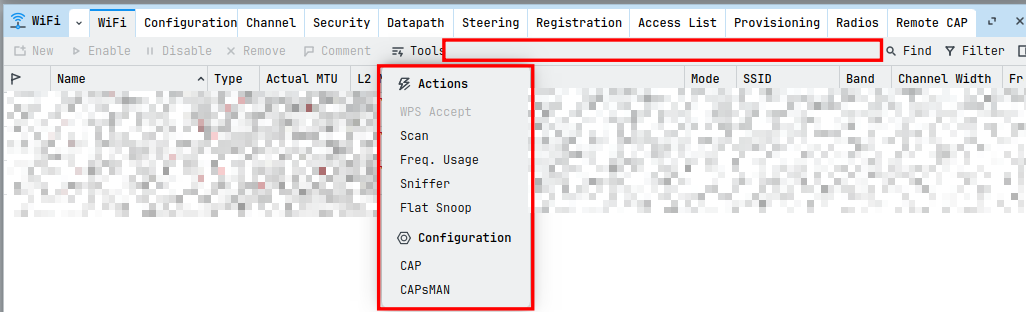
I would like you (Mikrotik) to re-evaluate possible alternative representations. Thank you!
I don't mind a click or 2, as long as the GUI follow the mantra "use the space" or "save the space".
Yes please, I would like to 2nd this proposal; The original WinBox 3.0 works 100% fine under wine / crossover preview on arm64 Linux, the new WinBox 4 does not. We do need a good solution to this issue for WinBox 4, so a build for arm64 Linux would be appreciated, its not much extra work for Mikrotik to do this given its the same compiler, so not much code changes needed. Even with box64 the x64 version of WinBox 4 for Linux (via dynarec) also does not run, please can we have either Linux x64 version working under box64 via dynarec, or a pure arm64 version that can run natively? The latter is preferred, thank you.
Example of what currently happens when trying to run Linux x64 WinBox 4 on arm64 Linux with box64:
martin@minis-sky1:/mnt/wwn-0x5000000000000001-part1/Downloads/WinBox_Linux$ ./WinBox
[BOX64] Box64 arm64 v0.4.3 8b1fbc150 with Dynarec built on Jul 20 2026 19:05:54
[BOX64] Dynarec for ARM64, with extension: ASIMD AES CRC32 PMULL ATOMICS SHA1 SHA2 USCAT FLAGM FLAGM2 FRINT AFP
[BOX64] Running on CIX P1 CP8180 with 12 cores, pagesize: 4096
[BOX64] Will use hardware counter measured at 1.0 GHz emulating 2.0 GHz
[BOX64] Detected 48bits at least of address space
[BOX64] Counted 63 Env var
[BOX64] Library search path:
[BOX64] Binary search path: ./:bin/:/usr/local/bin/:/usr/bin/:/bin/:/usr/local/games/:/usr/games/
[BOX64] Looking for ./WinBox
[BOX64] Rename process to "WinBox"
[BOX64] Using native(wrapped) libxcb-glx.so.0
[BOX64] Using native(wrapped) libxkbcommon-x11.so.0
[BOX64] Using native(wrapped) libxkbcommon.so.0
[BOX64] Using native(wrapped) libxcb-icccm.so.4
[BOX64] Using native(wrapped) libxcb-image.so.0
[BOX64] Using native(wrapped) libxcb-keysyms.so.1
[BOX64] Using native(wrapped) libxcb-randr.so.0
[BOX64] Using native(wrapped) libxcb-render-util.so.0
[BOX64] Using native(wrapped) libxcb-shm.so.0
[BOX64] Using native(wrapped) libxcb-sync.so.1
[BOX64] Using native(wrapped) libxcb-xfixes.so.0
[BOX64] Using native(wrapped) libxcb-render.so.0
[BOX64] Using native(wrapped) libxcb-shape.so.0
[BOX64] Using native(wrapped) libxcb-xkb.so.1
[BOX64] Using native(wrapped) libxcb.so.1
[BOX64] Using native(wrapped) libXau.so.6
[BOX64] Using native(wrapped) libXdmcp.so.6
[BOX64] Using native(wrapped) libX11-xcb.so.1
[BOX64] Using native(wrapped) libEGL.so.1
[BOX64] Using native(wrapped) libGL.so.1
[BOX64] Using native(wrapped) libfreetype.so.6
[BOX64] Using native(wrapped) libfontconfig.so.1
[BOX64] Using native(wrapped) libexpat.so.1
[BOX64] Using native(wrapped) libX11.so.6
[BOX64] Using native(wrapped) libz.so.1
[BOX64] Using native(wrapped) libdl.so.2
[BOX64] Using native(wrapped) libdbus-1.so.3
[BOX64] Using native(wrapped) libm.so.6
[BOX64] Using native(wrapped) libpthread.so.0
[BOX64] Using native(wrapped) libc.so.6
[BOX64] Using native(wrapped) ld-linux-x86-64.so.2
[BOX64] Using native(wrapped) libutil.so.1
[BOX64] Using native(wrapped) librt.so.1
[BOX64] Using native(wrapped) libbsd.so.0
dbus[71850]: arguments to dbus_pending_call_block() were incorrect, assertion "pending != NULL" failed in file ../../dbus/dbus-pending-call.c line 768.
This is normally a bug in some application using the D-Bus library.
D-Bus not built with -rdynamic so unable to print a backtrace
[BOX64] NativeBT: /usr/local/bin/box64() [0x34be9360]
[BOX64] NativeBT: /usr/local/bin/box64() [0x34c2daa8]
[BOX64] NativeBT: linux-vdso.so.1(__kernel_rt_sigreturn+0) [0xffffb9e10808]
[BOX64] NativeBT: /usr/lib/aarch64-linux-gnu/libc.so.6(+0x8ae1c) [0xffffb9c7ae1c]
[BOX64] NativeBT: /usr/lib/aarch64-linux-gnu/libc.so.6(gsignal+0x1c) [0xffffb9c26f7c]
[BOX64] NativeBT: /usr/lib/aarch64-linux-gnu/libc.so.6(abort+0x2c) [0xffffb9c11d48]
[BOX64] NativeBT: /usr/lib/aarch64-linux-gnu/libdbus-1.so.3(_dbus_clearenv+0) [0xffffb844a6a8]
[BOX64] NativeBT: /usr/lib/aarch64-linux-gnu/libdbus-1.so.3(+0x353f8) [0xffffb84453f8]
[BOX64] NativeBT: [0xffffb7fa89ac]
[BOX64] EmulatedBT: box64(pthread_condattr_destroy+0) [0x301e0340]
[BOX64] EmulatedBT: /mnt/wwn-0x5000000000000001-part1/Downloads/WinBox_Linux/WinBox+23469f1 [0x1023469f1]
[BOX64] EmulatedBT: ??? [0xffffb47ff940]
[BOX64] EmulatedBT: ??? [(nil)]
[BOX64] 71851|SIGABRT @0xffffb9c7ae1c (pthread_condattr_destroy) (x64pc=0x301e0353/"box64/pthread_condattr_destroy + 0x13", rsp=0xffffb47ff918, stack=0xffffb4000000:0xffffb4800000 own=0xffffb4000000 fp=0xffffac01cdf0), for accessing 0x3e8000118aa (code=-6/prot=0), db=(nil)((nil):(nil)/(nil):(nil)/???:clean, hash:0/0) handler=(nil)
RSP-0x20:0x0000ffffb47ff938 RSP-0x18:0x0000ffffb47ffb20 RSP-0x10:0x0000000100b7c2e2 RSP-0x08:0x0000ffffb47ff9a0
RSP+0x00:0x00000001023469f1 RSP+0x08:0x0000ffffb47ff940 RSP+0x10:0x0000ffffb47ff960 RSP+0x18:0x0000ffffb47ff950
RAX:0x0000000000000000 RCX:0x0000000000000000 RDX:0x0000ffffb9e13c98 RBX:0x0000ffffac01ce40
RSP:0x0000ffffb47ff918 RBP:0x0000ffffac01cdf0 RSI:0x0000ffffb47ff6a4 RDI:0x0000ffffb47ff6a4
R8:0x0000000000000000 R9:0x00000000ffffffff R10:0x0000ffffb47ff940 R11:0x0000ffffb47ffa80
R12:0x0000ffffac01d898 R13:0x0000000000000000 R14:0x0000000000000000 R15:0x0000ffffac01cdf0
ES:0x002b CS:0x0033 SS:0x002b DS:0x002b FS:0x0000 GS:0x0000 FSBASE=0xffffac0108e0 GSBASE=(nil)
Aborted ./WinBox
Looks like wine is failing in it's dbus support (I assume that WB4 binary runs OK on it's native platform) . . . . Perhaps WB3 didn't use it. Is your wine most current, or ???
Not sure what your host is, but you could always do full virtualization . . . . I can't recall ever having anything fail to work in that. Not ideal if that is all you need to run, but can be very useful overall depending on your needs in that you can run pretty much any architecture and/or OS (or multiples).
Thanks very much for your reply, and for pointing out the DBUS failure, I had already noticed it; The failure shown is not under wine, but box64 when trying to run WinBox 4 Linux x64 version, which is similar to how Windows 11 runs x64 Windows applications on Windows for arm64, Linux has a similar way of doing it, but one of the most popular applications is box64, although there are a couple of other apps too for that sort of thing, crossover & wine on arm64 uses a different one (FEX). It does work in full virtualization inside a KVM virtual machine, but its a total pain to run that up each time, plus there are issues with network isolation due to virtualization; whereas with WinBox 3 everything just works (via crossover whatever system x64 or arm64 on Linux). Trying either the Windows x64 or Windows arm64 version of WinBox 4 running from terminal under Crossover arm64 (wine), the application does not launch and nothing is printed as an error message either.
WinBox 3 was a very simple Windows GUI application, thus it works very well under emulation or cross compilation easily, WinBox 4 tries to use the GPU and is much more complex and resource hungry, and is not suitable for all desktop operating systems unless it has native versions for each. Currently Linux arm64 is missing, I have many machines here and can run it on other x64 systems, however it would be great if we could use it on arm64 Linux, without requiring KVM and having to boot Windows arm64.
What "network isolation" issues do you have with virtualization? I run QEMU/libvirt, and have found zero network issues . . . (but yes, it can be a PITA to setup initially).
On my particular arm64 machine the only way I have gotten Windows arm64 running is within docker with docker for Windows arm64, it wont run under qemu, believe me I have tried a lot to get that working. Obviously with docker there is network isolation by default. There are workarounds but those break other things for me. I suspect the reason is that my arm SoC has big little cores, in anycase it just doesnt work with qemu & KVM at present, ive tried to configure around the issue but cannot. Only KVM via docker is working presently.
OK, makes sense. I never found a reason to use docker - just libvirt/QEMU/KVM . . . and you can pretty much do anything there network wise.
Yep, my SoC is a bit of a pain because of how its cores are arranged, Windows arm64 doesnt currently like big little cores and with qemu its not possible currently to build a configuration that works, or a configuration that qemu doesnt try to revert. It is possible using command line or docker to make it work.
I experience complete hangs when qemu & KVM fails, just getting the Windows arm64 installer to reach past the BIOS screen is a major struggle, it frequently just freezes there!
Walk (rrun) away from Whinders, and run a lean x86_64 Linux load with WB4 for that?
Cheaper, and likely lacks the MS "baked in" stupidity . . . . 
(And I have never had virtualization change a config on me . . . that's a new one.)
When editing the XML file directly within virtmanger it frequently tries to revert changes because they violate its rules. Even if the changes are sound for what you are trying to do regarding the CPU cores. Only launching from command line can work. This is arm64 machine which is a 12 core SoC with big little cores, and qemu isnt really designed with the ability to make a configuration that can work for Windows arm64. I do have x64 Linux machines that I can run WinBox 4 on, but it would be nice to have native version for arm64 Linux. Personally I think Windows is utter bloatware and a pretty poorly designed OS these days, with a huge waste of RAM for ton's of useless processes that I never use. I'd rather not run it ever even under KVM if I did not need to for certain applications.
I was actually thinking more of running the x86_64 linux image under virtualization on the arm64 box . . . Not ideal, but not the bloat, load, and bogosity of Windows either . . . and thinking that Linux may well be tolerant of the virt config that Whinders barfs on.
Ah, sorry that wont work, theres no x64 CPU emulation there for that, and even if there was and it did work - it would be super slow. Running arm64 Linux through qemu / KVM is however possible, but then we have the same issue - WinBox 4 wont work there.
Hmmm . . . must not be a full qemu build then, I't part of the source.
FWIW, I have the following (it's an older version, so no arm yet :-)):
qemu-aarch64 qemu-nbd qemu-system-microblaze
qemu-aarch64_be qemu-nios2 qemu-system-microblazeel
qemu-alpha qemu-or1k qemu-system-mips
qemu-arm qemu-ppc qemu-system-mips64
qemu-armeb qemu-ppc64 qemu-system-mips64el
qemu-cris qemu-ppc64le qemu-system-mipsel
qemu-edid qemu-pr-helper qemu-system-nios2
qemu-ga qemu-riscv32 qemu-system-or1k
qemu-hexagon qemu-riscv64 qemu-system-ppc
qemu-hppa qemu-s390x qemu-system-ppc64
qemu-i386 qemu-sh4 qemu-system-riscv32
qemu-img qemu-sh4eb qemu-system-riscv64
qemu-io qemu-sparc qemu-system-rx
qemu-keymap qemu-sparc32plus qemu-system-s390x
qemu-kvm qemu-sparc64 qemu-system-sh4
qemu-loongarch64 qemu-storage-daemon qemu-system-sh4eb
qemu-m68k qemu-system-aarch64 qemu-system-sparc
qemu-microblaze qemu-system-alpha qemu-system-sparc64
qemu-microblazeel qemu-system-arm qemu-system-tricore
qemu-mips qemu-system-avr qemu-system-x86_64
qemu-mips64 qemu-system-cris qemu-system-xtensa
qemu-mips64el qemu-system-hppa qemu-system-xtensaeb
qemu-mipsel qemu-system-i386 qemu-x86_64
qemu-mipsn32 qemu-system-loongarch64 qemu-xtensa
qemu-mipsn32el qemu-system-m68k qemu-xtensaeb
(But then again, I don't load prebuilts - this is QEMU built from source . . .
and oddly, Whinders runs faster in emulation than native . . . )
If your CPU is arm64? it cant run x64 instructions, then its going to be using an emulated x64 CPU, on arm64 hardware as far as i'm aware there is absolutely no way that can run faster than on native x64 even if the emulator even exists, as the emulation would have to be pure software based. If your CPU is already x64 and you are running an x64 KVM then it will run at almost native speed, as it uses the CPU's native instruction set for both the host os and guest.
Nope, running x86_64 on x86_64 for the Whinders image. (32 core, 128GB Ram HP server . . . ).
(And never said my suggestion would be fast . . . BUT that it might get you WB4 on the box . . . )
Yep thats why its fast both the guest and the host are the same CPU type and both run on real CPU x64 instructions, KVM handles the context switching between guest and host in hardware, its seemless with instructions running at virtually the same speed on both due to the way the CPU is designed. arm64 is a completely different instruction set, its therefore not compatible with x64. arm64 systems to run x64 software either recompile it on the fly for arm64 instruction set (dynarec - fast) or have to process each instruction through a software x64 CPU instruction set emulator (very very slow) to make it work.
I can run the arm64 version of Windows on my arm64 machine on KVM at near native speed - minus 4 of the little cores that Windows arm64 doesnt understand... yet. But I cant do the same for x64 Windows.
Not seeing any difference in behaviour of scrolling performance, unfortunately.
The window selector would benefit greatly from being alphabetically sorted.