Strong disagree. The current order is correct, which is the stacking order / recently used order and is exactly what almost all window manager task switchers are using. Including MS Windows' Alt+Tab / Win+Tab (Task View).
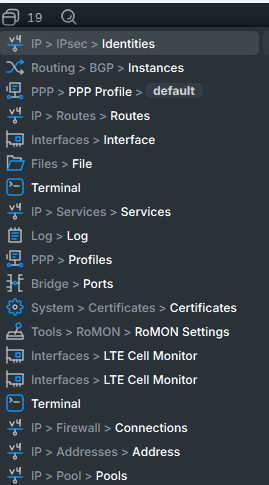
The window list is tied to the Alt+S / Alt+A shortcut, it even says so in the tool tip of the button.
I really can't make up my mind here.
Ordering by "last used" has the advantage of letting the 2 or 3 windows more used on top.
Ordering alphabetically has the advantage of a fixed position - and that would led to a more predictable place.
Maybe an option, to change defaults? I mean, some people keep a LOT of windows open - but only use a few. Those people would love the "order by usage" model. But some other people have a lot of windows open, AND use all of them. These people could see a benefit with the alphabetical ordering.
I'm neither of these types: I try to keep the number of open windows to a minimum, so really doesn't bother me which way this will go.
When using the window list button with the mouse (instead of Alt+A/Alt+S because my hand was right on the mouse instead of on the keyboard for example), then I find that with the speed that WinBox 4 is able to bring the window being highlighted to the top and dim the rest (thanks to composition with 3D graphics acceleration) when hovering the mouse over an item of the window list, I can completely skip reading the text labels of the items.
I just quickly move the mouse down (or up) the list, and the windows flashes on the screen. It's much easier for me to recognize the window that I currently need, by seeing it as a whole (plus visible properties like dimensions and positions), than to decrypt the text labels. Especially when the names of the items can start the same words (IP > xxxx > yyyy) and the real differentiator is the right most part of the text label, that is not aligned, and not easy to scan. So whether the labels are alphabetically ordered or not would not change much for me.
I still would prefer a more traditional taskbar-style layout where all open windows are visible as buttons as far as space permits, not in a separate dropdown list.
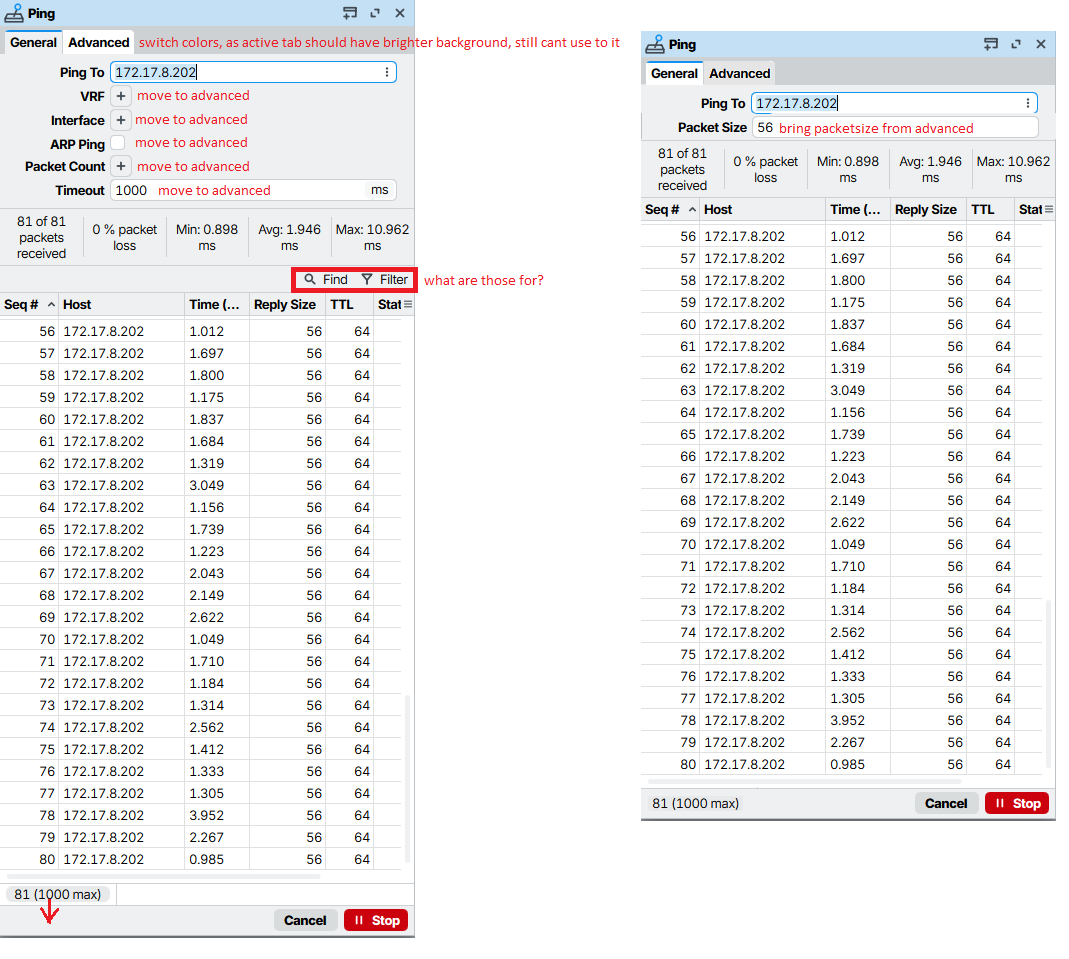
About the tab header: You screenshot actually looks out of place. The general idea is that the active tab header is connected to the active tab, which means usually the active tab header have the same background color as (or a smooth transition to) the background color of the tab content below, not with a harsh divider like your proposal. As example, look at the Win32 tab interface across MS Windows generations (which include the 9x/2000 look that WinBox 3 uses).
We can suggest MikroTik to dim the background of the inactive tab headers, but it's not right to make background of the active tab header white.
High cpu consumption in ccr2004 when using the latest version of winbox, also a green box has been put at the top right to update routers, that is very dangerous since any user with privileges can directly without realizing it update it and cause a disaster.
I have searched the system/users groups section and I have not seen a site where to prevent a user from updating the RouterOS version or the firmware, it is very important to add that an operator does not have privileges to update the router.
???? WinBox is for Admins. Admins should be people who only update RouterOS when they have authority to do so.
So don't give people Admin access if you can't trust them not to do things which they are not supposed to. If you cannot trust them not to update, then they can still cause problems even if updating is prevented.
Your problem is not about managing your routers, it is about managing your people.
There is also the ability to create read-only users. They should be able to check logs, etc. to debug network issues, but frankly, if I can't trust someone to not do an update, I'd trust them even less to make any changes whatsoever, and that person would get read-only (if even that).
Two functionalities from WinBox 3 that I'd like to have in WinBox 4 are these options that were available to all tables:
The first option is nice to have when combined with multi-column-sorting. For example, in the DHCP Leases table we can choose Server as the first sorting criteria, or in the WireGuard peer list Interface, etc.… then enable Show Categories and the items are nicely grouped by the first criteria column, with clear separation header.
The 2nd option is great for tables where you want to see the information from many columns, but they are wide, and you hate horizontal scrolling. For example, I enable this on the WireGuard peer list and have a much better overview of the peers' information, because each item spans over multiple rows. Modern grid view controls (that WB4 might be using) usually offer this kind of layout in the "band view" mode.