Well, I’m sort of impressed. WinBox for MacOS is becoming more useable every update. Now if you would allow it to save a workspace as another name/ip that would be great !! 
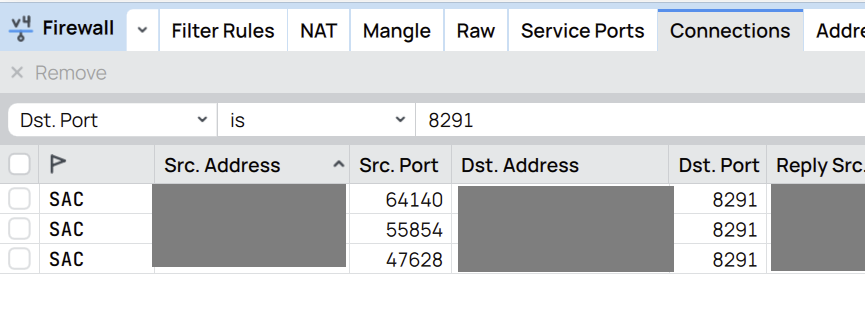
With the old version of Winbox 3 I could see the ports with the dst-address filter in ip/firewall/connection, for example “443” or “1194”… but with the new version of Winbox 4 it is not possible without Terminal, do you know any other way to do it with Winbox 4?
dst-port maybe?
There is no (or I don’t see) Dst.port in winbox 4
Wait for RouterOS 7.20. See previous post in this thread 📣 WinBox 4 is here 📣 - #2374 by CGGXANNX
MacOS winbox 4 disk click hard disk details crash
Winbox 4.0b24 on Linux (mint). I usually use Winbox to see the neighbors on the LAN.
If I update a Mikrotik then lose the winbox connection because of the update kicking off…
I go back to Winbox Select from: Saved instead of browsing neighbors.
Bug (Windows 11, WinBox 4.0beta24):
Select from Encrypted Saved List with “Open in New” resulted in an Incorrect Password error and sometimes infinite window spawning (about 1hz)
To break out of the infinite window spawning you have to uncheck “open in new” on the frontmost window before it spawns another.
Will there be an ARM64 port for Linux?
Currently, the x86_64 build does not work via Box64.
And it is a bit silly to use WINE on ARM64 via Box64 to start the Windows binary.
"Download" from Files always defaults to "root", not something sane like ~ / $HOME
On Mac at least, when you "Download" a file, the system dialog to pick a location always the "Macintosh HD" (root volume) however this is not writable. I really don't care if it pick "Download", actual ~/$HOME/etc., or "Documents". I have to image Qt has some option to set the default starting directory, and I suspect it not set to anything.
It does seem to remember for the same file dialog. But if you close and reopen files it goes back to root. If it persisted the "last download directory" for the workspace/whatever that be okay too. But right now, I occasionally get "cannot write" error - which is me just not changing the root dir, but still a bit confusing.
for me it remembers last download location and does not defautl to root.
I did a few tests on my Linux machine (Debian 13/ Gnome 48 on Wayland/ WinBox 4.0beta24) and it seems that:
- first time you use “Download” in Files section it will give you folder from where Winbox4 was started (if i run Winbox4 on linux from /home/user, then first “Download” folder would be “/home/user/”)
- next use of “Download” from the same Winbox4 run session will use last folder that was used as destination folder (so if you downloaded file via “Download” action to /tmp, the next use will default to “/tmp”)
So if you can somehow change “working directory” for your Winbox run shortcut, it will default to whatever you select it to be.
I’d say as default it should always use %homedir% as default download dialog dir regardless on OS if not user configurable.
Also as I already stated before, it would be great if dialog would use default system file browse dialog or at least something that has standard sytem folder shortcuts (like My Computer, Home Directory, Favorites, etc.)
Now, PLEASE add the double click on column edge to resize with of column to fit content  !
!
Until I can see SRC/DST Ports on connection tracking.. I wont use this.. if anything it is handy when im on my Mac and using Winbox on Parallels just doesnt do neighbor discovery well.. But real configuring.. and work.. Not letting go of 3.X
It remembers it while the same Winbox4 window is opens. When I close or open a new WinBox4 windows, it goes back to / (“Macintosh HD”). Even if I do an explicit save on the Workspace, it does not persist the last folder used across a new WinBox window.
If no one else has noticed, must be me. But you have to close-and-reopen to see it change back to root, perhaps.
I have seeen same behaviour all the time on Winbox4…
I dont see it.. 
I’ve checked on RouterOS 7.20beta2 with WinBox 4 beta24, it works
One of the main gripes with Winbox 4 still is the lack of 2-column sorting. I hope that will be added back in.
(sort on column1, then sort on column2, items with same value in column2 will remain sorted by column1 value)
It already is apparent in the initial connect page. I have 74 stored items, in Winbox 3 I have these sorted by Group then by Note. But in Winbox 4 that cannot be done, I either have to sort by Group or by Comment, and have too many items in either case to quickly find something.
(it also doesn’t help that the “Show Categories” function is gone, but that is less important)
Hey there,
few issues maybe already mentioned:
- PPP, Secrets → when you open record and enable it, it does not show that it is enabled in the pop-up window and also in the Secrets tab. It visually updates only if the PPP window is closed and reopened.
- In pop-up windows the Enable/Disable buttun could be same as in the bar - Green - enabled, Grey - disabled, not as the Check box. Not very intuitive..
- Comments could be as usual in the end of the columns..
-Main Bar on the left side (quick set, inteface,bridge, etc..) Could be separeted with lines between. - Not a fan on boxed menus like from IP> and System>
- External monitor Font issue - on external monitor fonts get bolder and more pixelated. Not sure if its my setup or app. Other apps don’t have such issue.
Other than that Thank you Mikrotik for native solution, hope you guys polish it up. At the moment still using old version