That already has been possible for quite some time.
With such amout of issues it’s very far from production.
Regarding zoom, it not only requires extra clicks, but also +/- buttons are jumping away from the mouse cursor, it’s quite annoying. I’ve already suggested this even with screenshots, but seems no one cares… 📣 WinBox 4 is here 📣 - #2020 by teslasystems
1 Like
That’s a very interesting idea. One way I think it could (could it?) be implemented is by reading the monitor DPI, and using the scale% based on this.
So “90% of the size” would become “90% of the size in centimeters, based on monitor DPI”.
It would change nothing to us, using either one monitor or several with same resolution/DPI depth.
It could lead to some weird things happening, though…
1 Like
Really? I don’t see it. I can sort columns by IP, by User, Group..byt not by Comment - in Winbox 3.x the column name was NOTE…
Click on the three tiny lines at the right edge of the column headers row and select “Comment”. Then the comment column will appear and you will be able to sort based on it. Also check whether it is collapsed (it is the only column than can be collapsed while still remaining partially visible).
1 Like
Thx very much, i needed to enable “Inline Comments” in settings a now it shows Comment column. Great, i can get rid of old Winbox.
1 Like
I just gave a try on Linux (Ubuntu 22.04). Looks good so far but have an issue connecting by MAC address. To the same device, it works using IP address, but by MAC address I get a “MacConnection syn timeout”

Lox, in your linux terminal type “ip a” and send us the output. Also note, which interface is your computer connected to. You can send this to support@mikrotik.com if you don’t want to share your IPs here.
1 Like
WinBox 4 does not display correctly VLAN interfaces attached to the bridge on my hEX running RouterOS 7.19.3
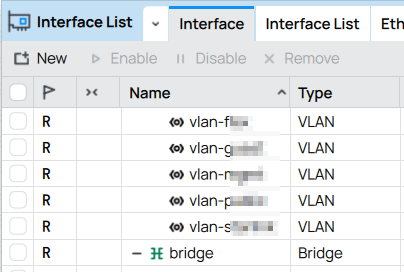
If I keep the Interface List window open and restart WinBox, nested interfaces are displayed correctly - below the bridge they are attached to:
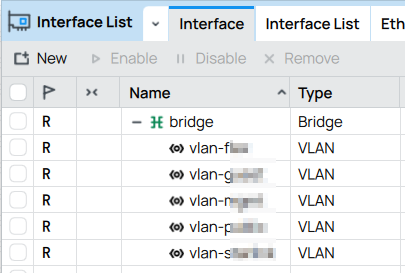
Once I start manipulating the Interface List window (close/open, switch to another tab and back), the VLANs get detached from the bridge again.
I cannot reproduce the same on my hAP ax3…
Can anyone check their hEX please? I am wondering whether that’s my local PC or hEX configuration problem or hEX+7.19.3 combination-specific.
Aren’t you sorting that table by any column what could change the order in Name column?
This table is sorted by Name column only in ascending order. If I click on the column header and change sort order to descending, VLAN interfaces jump out of the bridge. That’s a visual detachment only, “Interface” property of VLAN interfaces does not change.
I tested WinBox 4 on another computer and got the same weird result, whereas in WinBox 3 all VLAN interfaces stay connected no matter what.
Mail sent.
I just noticed that when importing a configuration, the file picker doesn’t show hidden files and folders. We should be able to access them, by checking a “hidden files” checkbox, or by typing in the location bar (or both).
Is this the only place to report bugs? Is there an official tracker?
The official place to report bugs is: Log into Atlassian - Support
However, in case of WinBox 4 it also works to report them here…
I think the app shouldn’t connect to Internet without user permission to check for updates. There should be the option to enable/disable automatic update check and a button or whatever to manually check for them. And I think it should be disabled by default.
3 Likes
Indeed it seems there is a difference between Winbox 3 and 4 in this case.
In Winbox 3, when you have subinterfaces and they are sorted reverse order, the subinterfaces still appear below the main interface (but appear in reverse order as requested).
In WInbox 4, selecting reverse order simply turns the whole list upside down, i.e. not only the names are shown in reverse order, but also the subinterfaces are ABOVE the main interface.
Probably not what would be preferred, but easier to code.
Strange, I have subinterfaces below the parent interface, doesn’t matter what sorting order is used 
I have downloaded Winbox4 beta26 on Win11 24h2. The application window does not show up, altough I can see the process in Task Manager / Details. If I try to open it again it creates a new process, still no window…
What’s new in 4.0beta29:
- table: implement large row count limits (for tables that support it)
- allow to “freeze/pause” any table data update
- table: reduce content height calculation delay for auto scrolling tables
- table: increase performance when closing files subtree with many elements
- ui: allow open new instance for query type windows (e.g. Ping/Traceroute)
- ui: remember field values for action/torch type of sub windows
- values are restored until router session is disconnected
- ui: improve combobox UX
- open popup on editable combobox only when clicking indicator (or up/down keyboard)
- fix reopening popup when focusing with mouse for first time
- fix again that prevents selecting disabled records
- fix digit grouping on numbers exceeding 1 billion
- fix crash when selecting User Manager → Generate Voucher
- terminal: accept Ctrl+D and close window when state is (Disconnected)
- terminal: correctly accept some symbols with InputMethod (dead/special key)
- problem was observed only on MacOS
- macos: set correctly target minimal version 12.0
- form: fix missing Actions in Certificate template objects
- also fixes action order on some generic objects
- form: implement range type field optional value setting (e.g. Packet Size for Traffic-Generator/Stream)
1 Like
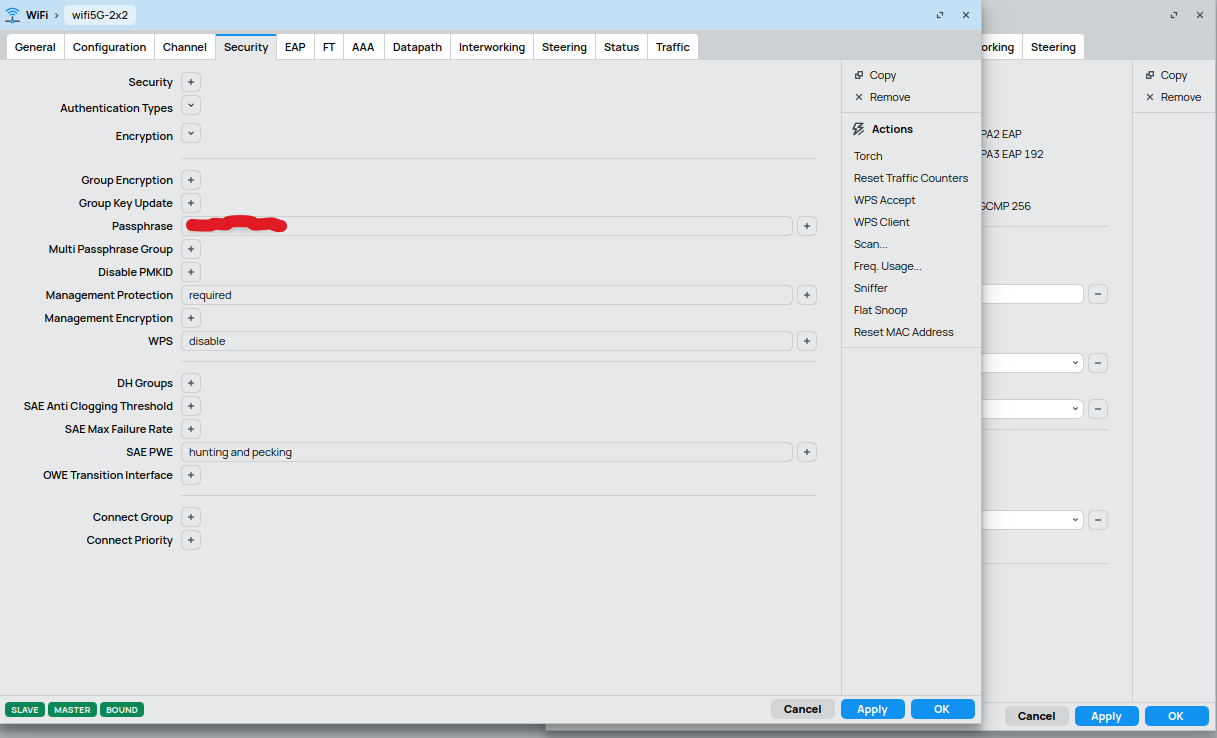
found a bug in WiFi when using a “configuration template”
password is shown in CLEARTEXT even though “hide passwords” is active
here on the right the config. which is applied to the “wifi5G-2x2” interface
(password hidden correctly)
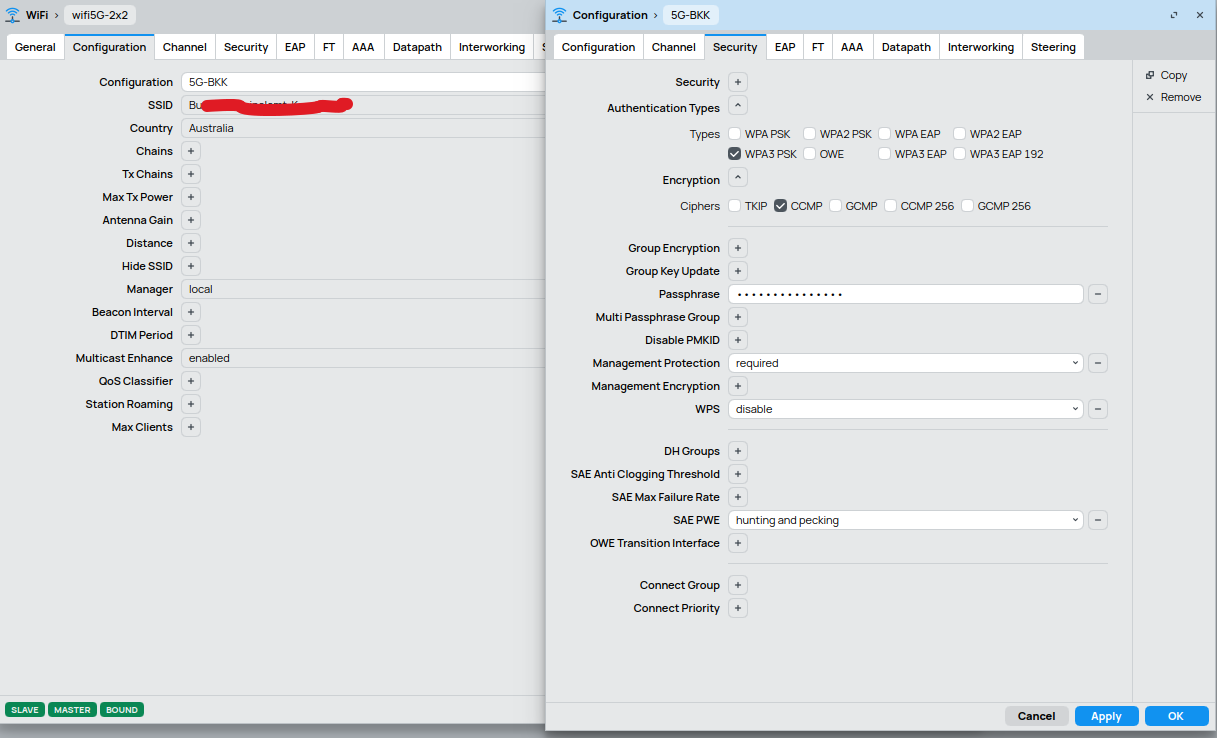
but here, on the “wifi5G-2x2” interface box, on “Security” the password from the template is shown in cleartext - obviously redacted here.