📣 WinBox 4 is here 📣

A small excerpt from the suggestion text:

A screen for displaying the arrays of queued commands should be created. The commands on the array would be read-only.
A command-button "apply all queued command" should be included on the same screen. When pressed that command-button the array of queue changes should be effectively applied.
There should be a way to choose between "apply in safe-mode" or "apply directly", and "apply in safe-mode" should be the default mode.

Small excerpts from the suggestion text:

On every screen of Winbox that has a grid of objects that are addable, when you select all, one, or more, objects on that grid, and you press "CTRL+C", it sends to clipboard the equivalent of "/export terse show-sensitive".

The "show sensitive" / "hide-sensitive" behavior could follow the respective Winbox session attribute.

Small excerpts from the suggestion text:

Some kind of "grep" with the current object name string being executed in background against the device's complete configuration file and bringing matches as likely references as an array.
A way to discover which other objects has possible reference to the current object.

The suggestion here is to create a "Possible references" command-button in respective window for each unique object in Winbox (e.g., a specific address list).
Clicking this button opens a screen with a grid in which each line contains the lines that matched the object's name using a grep. With "object-path" and "object string" columns.
Double-clicking one of these lines opens the object-path window, and then the specific object window above it.

I think a common problem with all your recent Winbox4 suggestions is that you are assuming that Winbox has knowledge about the workings of RouterOS.
I think it doesn't. It downloads tables at login that describe the available commands and their parameters, and how to layout the input boxes, but other than that it does not know what RouterOS is doing. E.g. how a command would change the state of RouterOS and what other places that could affect.
It has some knowledge about data types, so in theory it could be searching "where is this IP address used", but once it goes beyond such simple searching it will be lost.

It's a good idea, since you can go back and log into another router without losing Romon.

Bug: When using "open in new" with an Encrypted Saved list the Connect to, Login and Password fields aren't used in the new window so Login fails every time.

Note: The "infinite" scrolling and partial loading on the new forums is killing me- can it be turned off?

Yep! Imagine that also... I guess it could be described as a primitive and rustic way of doing what is done with JavaScript/TypeScript on MVVC model.

Actually, I don't assume Winbox has the full knowledge of whats is being done in RouterOS.

I tried to be careful to use verbs and constraints that made it clear that the result is not assertive, but rather rough and estimated. But my English isn't good enough(yet) to allow me to think everything in English. So I used a translator, and it may be that my intention to make "rough and estimated" explicit was lost in translation.

I believe the "Possible references" case is the most explicit of all in this regard.

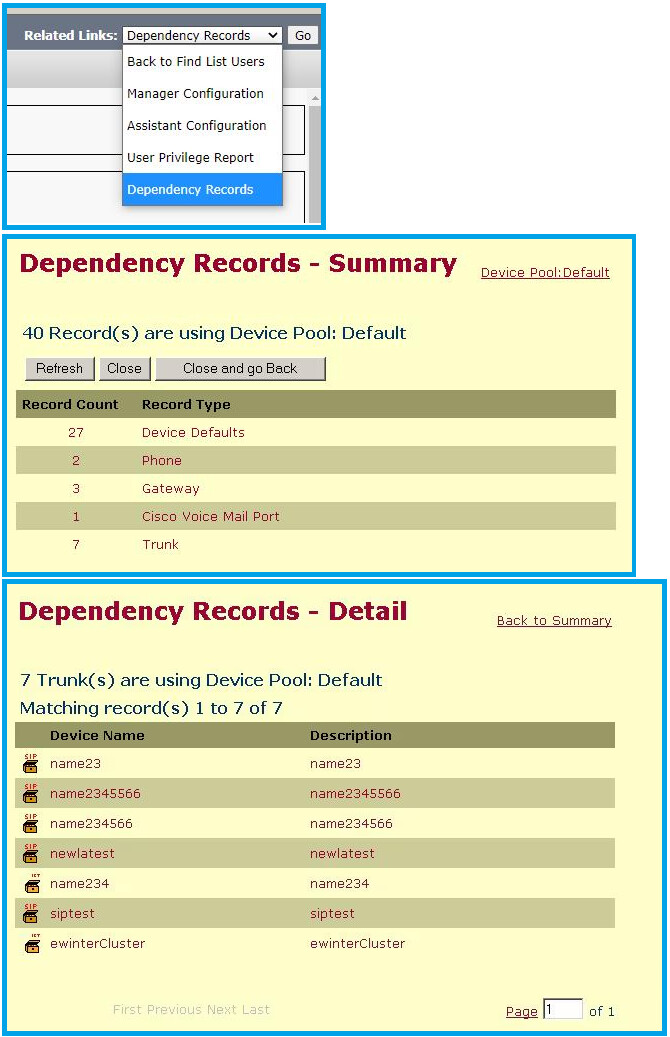
In my opinion, the "correct" way to perform this search I suggested is the way Cisco Call Manager does it in its "Dependency Records" feature. Everything is in a relational database, and the system relies solely on the database's referential integrity and queries it using PKs and FKs in the database.

Below are images of Cisco Call Manager and the dependency records function.

But in RouterOS, this type of strict implementation based on entity relationships is impossible.
The network configuration scenario itself requires that relationships between objects have weak referential integrity. An example of this is the YANG model.

So, the only alternative is to perform an approximate, rough search.
A "pipe-grep" in the configuration file, searching for the string.
Is the result perfect? No! But it's better than nothing.

Network engineers, network operators, old-school programmers, and all the animals of that species we belong to tend to only accept unequivocal associations. And in the real world, that's intangible.
For me, accepting that hurts!

But we can achieve decent results with good inferences and approximate estimates. The prerequisite for this is the use of good methodologies in the process.
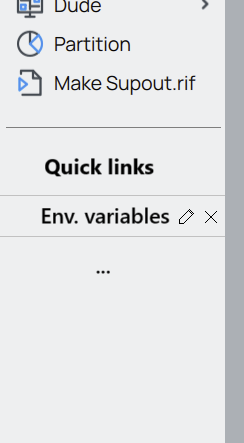
Can we have the ability to create shortcuts for quick access to some places?
For example, let's assume you want to open environment variables. So, instead of going to System->Scripts and then switching to 'Environment' tab, you can just use your shortcut and open it with one click. Of course, these quick links should be editable, removable and movable up/down to change the order.

Of course I have a firewall.

This is the rule I was missing. Thank you.

Should be added to the documentation.

I think when you are implementing a strict firewall (more strict than the default), it is a good idea to include something like:
add action=accept chain=input dst-address-type=broadcast in-interface-list=LAN
when you also have an output firewall, you need a similar rule in there.

Agreed - there should be info mentioned about this.

Is it possible to add a feature to collapse large firewall address lists. I have hundreds of IPs in a single list. Would be nice to start out as collapsed for each list.

You can already do that using "filter". It would be nice when it could be done via mouse-click, of course.

Edit: to elaborate on that: you set the filter "Dynamic is no" to suppress the dynamically added entries and the expansion of DNS names, and "Name contains not" to suppress your known large firewall address lists (of course it helps when you names have been chosen in a clever way).
Then when you want to look at a list you can change the filter to "Name contains".

It is already nice that you can now "disable" individual filter entries, and re-enable them without entering them again (as in Winbox 3).

@pe1chl I use UFW on Ubuntu and this rule made it work :

255.255.255.255/udp on br0 ALLOW IN 0.0.0.0/udp

Is it possible to make the status bar more "interactive", so that double-clicking on the items would bring up related dialogs?

I love this kind of smart links.

It should be brought to framework of Winbox4. And no specific to status bar.

Another example?
Go to [IP -> ARP->] Open any entry.
The interface to which the ARP entry is linked will be displayed.
A click(single or double) on the interface attribute, and the respective interface window is automatically open.

+1

@KiwiGuy's LTE APN confusion would also be help by some hyperlinks/button suggested.

While @KiwiGuy might be better off "pre-configuring" the common APN profiles in initial configuration so the APN profile is selectable later. But some link on "APN profile" that took the user to the APN profile dialog box would helpful.

Personally, I'd be in favor of bring back The Dude's . and ... buttons (bringing up new window with selected item's dialog or list view of all items, respectively)

As I am now going through the effort of changing my regular winbox 3 sessions to winbox 4, I encountered a problem that I did not find searching the topic. I cannot believe nobody else noticed that.

  • when opening a Tools->Graphing results window, the graph is displayed but nothing can be done to refresh it.

In winbox 3 it auto-refreshes, i.e. you can just leave a graph window open and the window contents will be updated as time progresses. In winbox 4 it does not only not auto-refresh, but it even cannot be manually refreshed. F5 does nothing.

Hello
is there any change for an open source code
of winbox with a closed API modules
thanks

Maybe what you are looking for may be close by as this post is going on: