came here for the answer to same question cant find anything, dont see anyway to add a Master password like winbox3, however it does prompt you for the password if its already set from winbox3.
really like this feature as it adds an extra layer of security that makes me feel warm and fuzzy
Yes, the answer that was given before was along the lines of "make an addresses file in winbox3 and import it in winbox4 and you will have the master password".
What's new in 4.0beta30:
- login panel: add option to set Saved routers database password
- login panel: add "Move" feature for Saved routers database
- also show current database path in table's status bar
- login panel: add option to Export user database
- login panel: update style for decrypt form panel
- login panel: fix changing to RoMON tab automatically when connected to RoMON
- widgets: force password field character to "bullet" unicode
- Manrope on Windows otherwise has very slow first render
- ui: add support for bar graphs in table and form
- ui: do not allow mdi windows to go out of viewport
- form: add/restore support for grid layout (torch/traceroute/quickset)
- form: fix some bitrate fields with big numbers (firewall/hotspot/queues)
- form: do not stretch inline buttons (quickset)
- form: add support for table and linked fields (quickset)
- form: fix first field autofocus for some types and also autofocus Saved router database password field
- fix crash when creating cloud backup file when there is error
- fix crash when copying not added object in ordered table
- consider field values depending on dynamic tab's state
- table: show empty column values of dynamically hidden tab (e.g. bridge IGMP snooping)
- form: do not send/package fields of dynamically hidden tab
- tooltip: keep showing when mouse hovered over tooltip
- table: elide text in status bar if width too small

Could you please clarify? If it aims to solve this issue:
it doesn't work...
Even better would be a setting to choose between Manrope and the default system font.
On Windows it just looks all horrible and blurry no matter how slow or fast rendering is. Groups in saved device list have disappeared as well - while all is fine on Mac.
It would be interesting to see if Wifi interface passphrase field ignoring "Hide passwords" setting will be fixed or not. We are 2 days away from exactly 1 year since first public beta came out...
I am doing this on my 96dpi Windows screens with ClearType for sharper text and more information density:
Getting rid of Manrope
-
Create a
qt.conffile, placed in the same folder asWinBox.exewith the content:[Platforms] WindowsArguments = fontengine=gdiThis forces the program to use Windows' API for text rendering instead of using the FreeType library, otherwise the next point would not work.
-
Add these string values to the
\HKEY_LOCAL_MACHINE\SOFTWARE\Microsoft\Windows NT\CurrentVersion\FontSubstituteskey of the Windows Registry (regedit.exe), executed with UAC: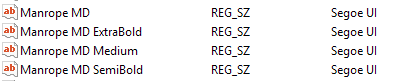
Windows Registry Editor Version 5.00 [HKEY_LOCAL_MACHINE\SOFTWARE\Microsoft\Windows NT\CurrentVersion\FontSubstitutes] "Manrope MD"="Segoe UI" "Manrope MD Medium"="Segoe UI" "Manrope MD SemiBold"="Segoe UI" "Manrope MD ExtraBold"="Segoe UI" -
Set Table row padding to
1. -
Set Zoom level to
92%.
If y'all are eliding things... perhaps the resource panel shown at bottom needs same treatment?
i.e.
The Linux WinBox 4 flatpak has not updated to the beta30 yet. What is the expected ETA for the WinBox Beta30 on flathub?
Thanks Mikrotik it has been fixed.
what Windows version, what resolution and what OS scale settings do you use? Does it look better when using whole number scaling? (100%/200%)?
Please provide as much details as possible.
about Flatpak, I have no idea, we are not maintaining that. The only official Linux download is in our webpage.
What about fixing all scaling issues that I posted a long time ago? I've provided as much details as possible, but only a couple of issues were fixed.
I've just decided to check after updating to b30, if there are any news on this item on the horizon. Sure thing, auto theme switching is not a must, but having this only, otherwise very nice, app which needs to turn the theme manually back and forth is annoying. Being a good OS citizen (macOS, I mean) means respecting its system-wide settings, so please put some effort into this feature.
P.S. I apologize if this was recently discussed in the topic, but search for "dark" returns only 2 results in the initial post. Also, I found strange that moving to the latest post is possible only via keyboard End button.
4.0b30 - Thanks for launching with the password field focused!
Looks like the initial typing delay is also resolved for me.
Good work!
What are you talking about? A got no response from MT about this change, and it's neither focused when you launch the app, or when you choose something from saved list.
Or it differs on different platforms? On Windows nothing works.
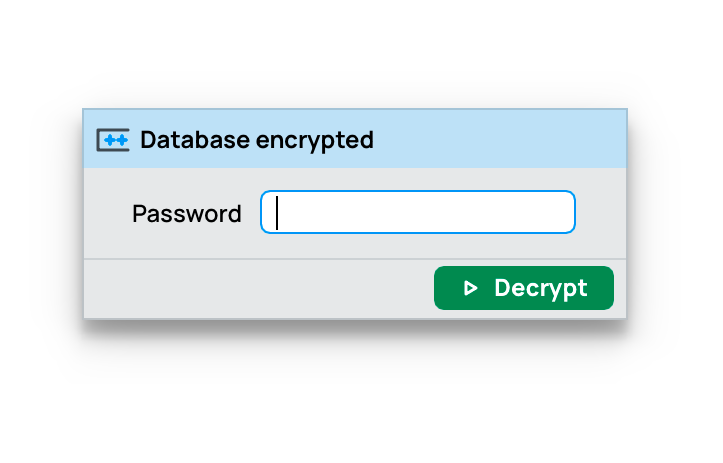
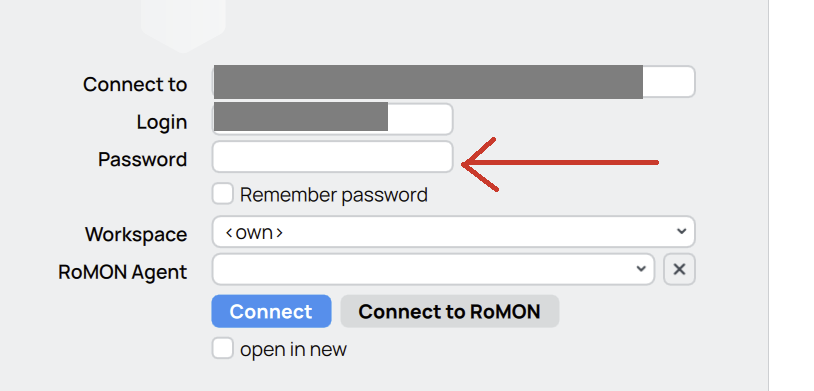
Yes - that would make sense if saved entry is saved without password. In addition to that Enter should invoke Connect action if password is entered before that.
It looks like assumption is that saved entries have passwords with them as all list can have a master password - therefore this thing is missed out in development
For those three metrics 0 dBm (for RSSI and RSRP) and 0 dB (for RSRQ) means best signal / highest quality. It doesn't get higher than 0, normal values are all negative. A RSRQ value of -1 dB is really excellent (-20 dB is normally the lowest quality).
See https://5gstore.com/blog/2021/04/08/understanding-rssi-rsrp-and-rsrq/
Here is the issue with WinBox 4 at default setting on a Windows installation with the standard 96dpi screen at 100%:
The default font size (100% zoom in WinBox) chosen is huge, in this screenshot you can compare the text size in WinBox 4 to WinBox 3 and the standard font and text size used by system programs of Windows itself:
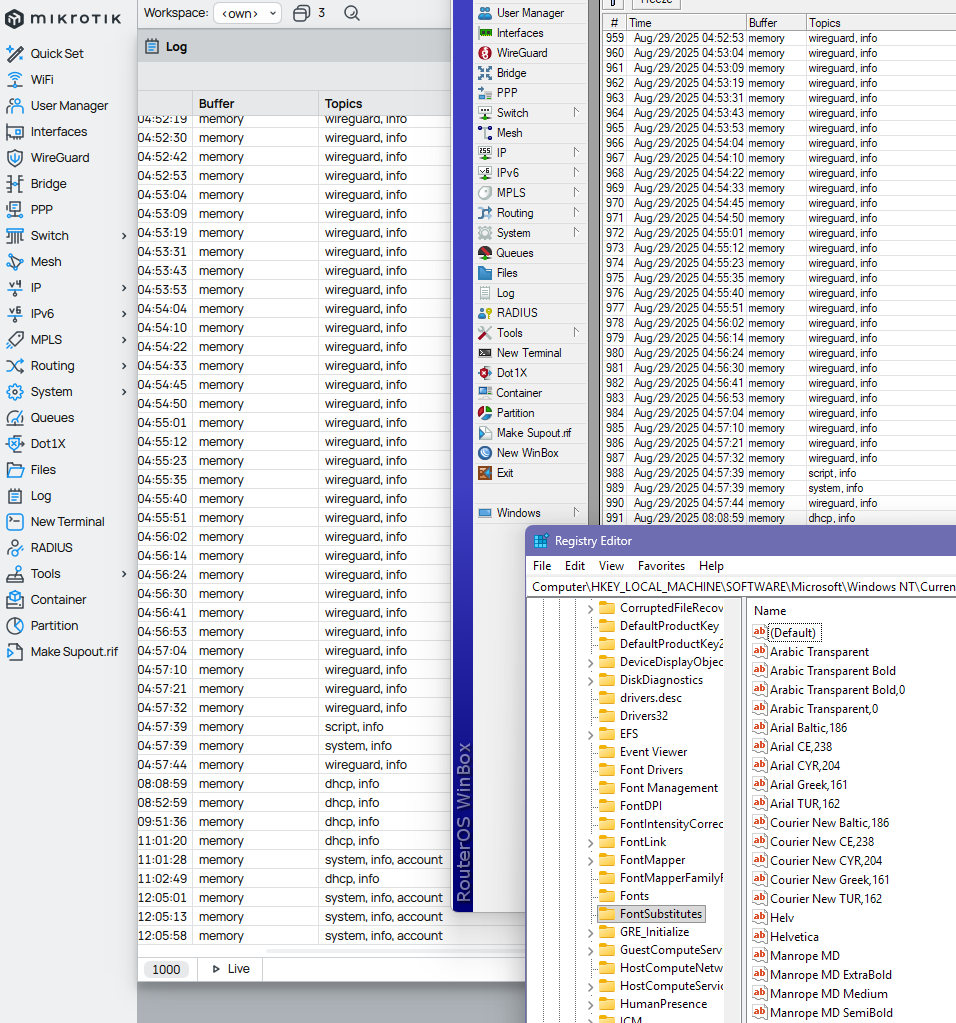
Please download the images and view at 100% on a non-hi-res screen, don't view it on your retina screen with zooming!!! Notice how much more information is visible in the WinBox 3 log window. And how bigger WinBox 4 text is compared to what is default in Windows. And how sharp is the text in WinBox 3 and the Windows system app, with good hinting the letters snap to the pixel boundary.
To have similar (still worse) information density in WinBox 4 as in WinBox 3, currently we have to use the Zoom feature and decrease the zoom level to 92% (actually, 92% is still too big, but the next step is too small) and then the lower quality of the Manrope font is apparent (bad hinting), it's a blurry mess:
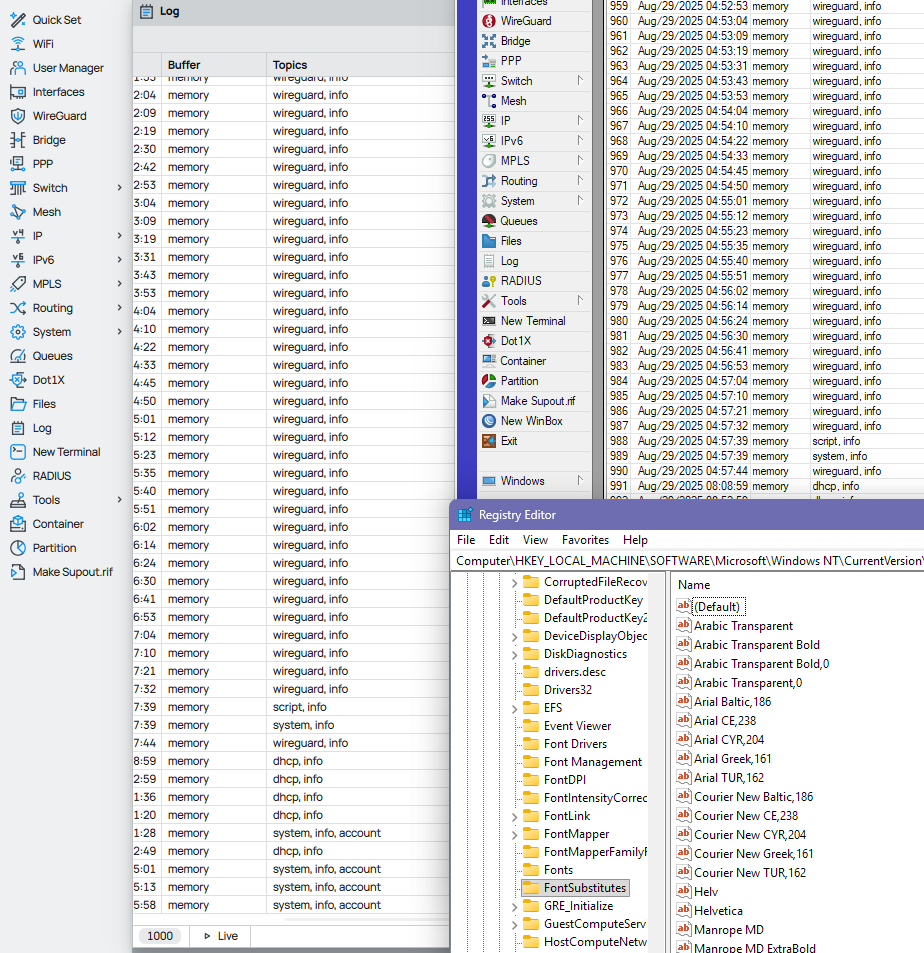
Please give us an option to select the font and font size so that the text looks like what's is shown in the Registry Editor program window from the screenshots above.
Please don't dismiss the 96dpi screens as obsolete. That's the perfect setting for those buying FHD screens at 21", QHD screens at 25-27" and 4K screens at >= 32", providing good readability and excellent use of pixel estate. 4K screens at 27" for example involve non integer scaling at 150% for normal reading sizes, and then only provide the same information density as QHD screens at the same monitor size.
You should buy your WinBox 4 devs some 21" FHD screens and let them test the Windows version of the app on those screens. Look at what resolution over the half of Steam users still use:
Steam Hardware & Software Survey
Even for those with multiple monitors, it's still 2 FHD screens placed next to each other. Not everyone has your 5K retina Apple display.