šŸ“£ WinBox 4 is here šŸ“£

Default window opening leaves a lot to be desired:

  • default position is 0,0
  • default size is too small
  • default column width is usually too small or too wide
  • default columns are often not useful (e.g. interfaces show the FP columns, likely added when the author was proud that FP was added, but not useful anymore to have by default)

They should go along all windows and change defaults. Probably a nice job for an intern.

I got tired of waiting for those issues to be fixed and I got around them with a 3rd party app (Desksoft WindowManager) on Windows and with Window Rules on KDE. That being on Winbox 3. I don’t use Winbox 4, but my guess is that it’s the same situation - since you mention it.

It’s stupid that such simple stuff need to be done externally.
I am sure that the lead developer of Winbox 3 can fix those in a few minutes. Especially considering that Winbox 2 did actually remember the last window position…

I agree about the default columns too. I am sick of having to remove the FP columns on every new router I log in to…

Well, I did not mean the Winbox window itself, which is also ridiculously small, but mainly the windows internal to it, maybe better to call them panels.

Whenever a menu entry is clicked for the first time, the shown panel is too small. It always has to be extended to show the entire contents. It is fortunate that the size and position of that is then remembered, but unfortunate that the workspace file that is stored in is a undocumented binary blob and not something like JSON, XML or even INI that one could manage using an externally written utility.

(to copy parts of an existing workspace into another one, to fix a broken one, etc)

Interface list, there is a dropdown/select field in the filter. but it has no values. what is the point? in winbox 3.x it was a simple input field. Now I think a dropdown containing all possible values depending on the select field would be a great enhancement. But currently it is empty.

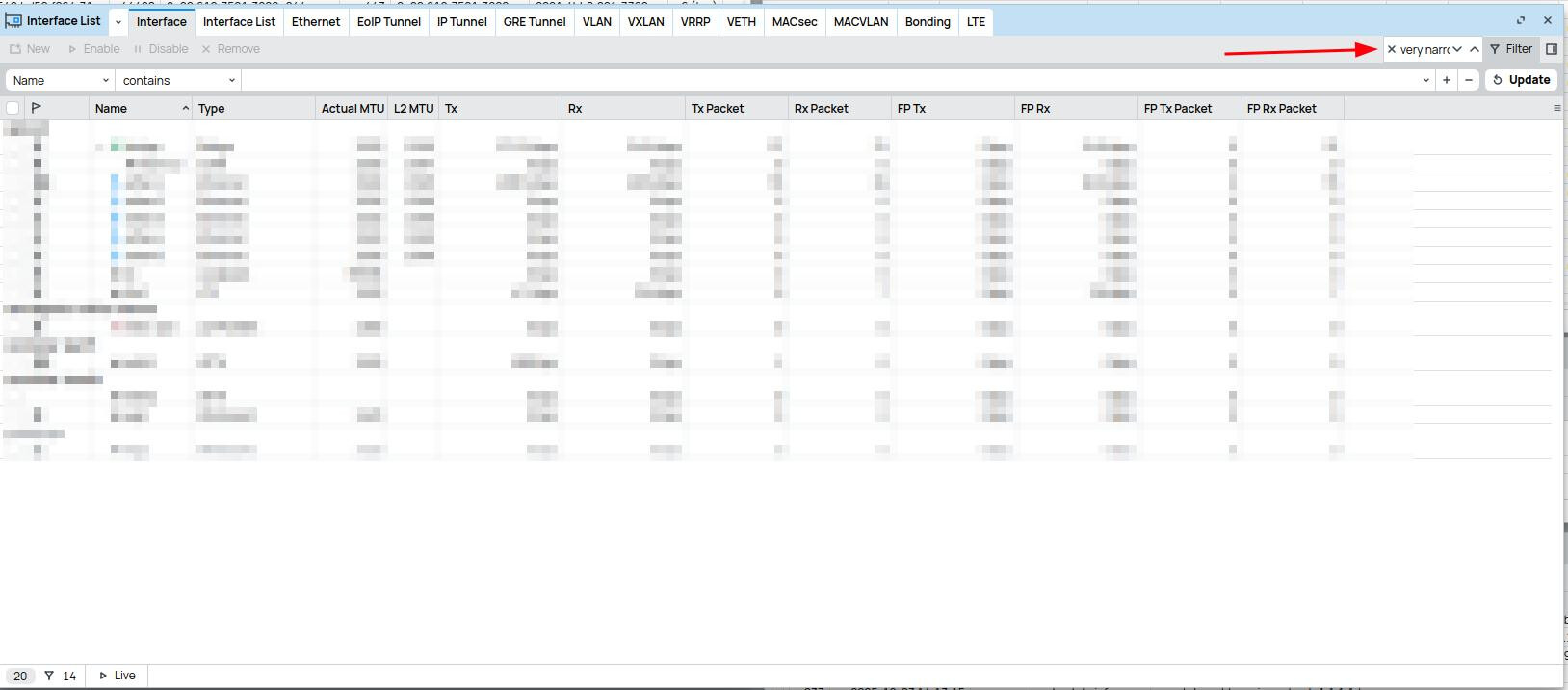
The search field is very narrow. The window would have plenty of space, still the field is only like 100px of width.

I noticed this bug in Winbox 4 (ATL 5G R16 with ROS 7.20.2, passthrough mode if that’s relevant):
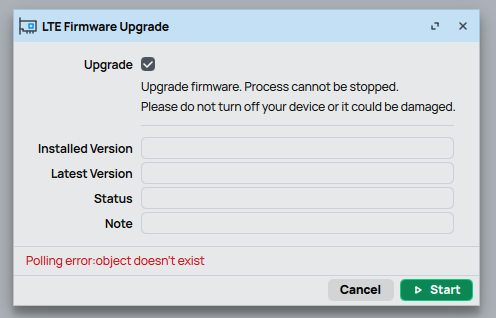
If I start a LTE modem firmware upgrade, a ā€œPolling error: object doesn’t existā€ message appears, and the upgrade status isn’t shown. It The upgrade runs properly in the background, but its status never updates in this window. This is the second time that I had this happen, my current Winbox version is 4.0beta45, the first time might have been on version 33 or 30.

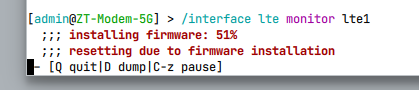
I can still see the status in the terminal:

atl-terminal

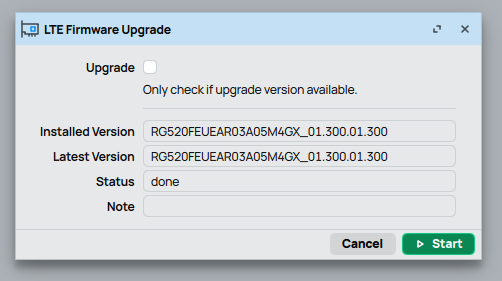
The firmware version check works properly (this is after the upgrade):

I’m not sure if it’s actually a WB4 bug or a RouterOS bug, but I haven’t ever had this happen on WB3. Though I’m also not sure if I ever updated this specific modem on WB3.

I had this exact same bug on WinBox v3.43 yesterday, so I don’t think this is a WinBox bug.

Implement a drag handle for table views. Accidentally moving around items is too easy.

The Live/Paused button is unintuitive. At least, until you first click it. The button of similar functionality in the WinBox 3 log is better. It has a much clearer intent. ā€œPause updatesā€ with a clearly distinguishable enabled state.

The little labels indicating total and selected items are needlessly terse. Just spell out ā€œX items (Y selected)ā€. There’s no shortage of space there.

I just want to report a bug that almost crash a GPU Driver

I found out that WinBox 4-35beta cause it.

Btw it cause. I have AMD GPU with latest drivers at the moment ( 7900XT ) + Windhawk with some modes for Windows explorer (blur etc) on W11 LTSC 24H2

I get artifacts on display, only if i run winbox in background. When its closed there is no problems, and even with old version of WinBox there is no problems.

You're reporting this in the wrong place,
AMD needs to be notified that something has found a bug in the driver that is crashing video...

Not sure I’d trust WinBox 4 yet with updates! That might just be me.

can anyone tell me what the pre requirments are? Im trying to run it on Xubuntu. when i try run its gives errors saying error while loading shared libraries : libxcb-image.so.0

Why do you still call it Winbox now that’s it’s multiplatform? Shouldn’t it be renamed to e.g. QTBox?

Do not focus on connotations with the Windows OS. Think out of the box, it's a program with windows.

Better ROSbox or CLIwin or WinCLI :slight_smile:

You could try to install the lib with
sudo apt install libxcb-image0

You can do like this to see whats libs are require:

[patrik@archlinux mikrotik]$ ldd ./WinBox
	linux-vdso.so.1 (0x00007f7230489000)
	libxcb-glx.so.0 => /usr/lib/libxcb-glx.so.0 (0x00007f723043c000)
	libEGL.so.1 => /usr/lib/libEGL.so.1 (0x00007f723042a000)
	libdl.so.2 => /usr/lib/libdl.so.2 (0x00007f7230425000)
	libGL.so.1 => /usr/lib/libGL.so.1 (0x00007f72303b3000)
	libz.so.1 => /usr/lib/libz.so.1 (0x00007f723039a000)
	libfreetype.so.6 => /usr/lib/libfreetype.so.6 (0x00007f722d530000)
	libfontconfig.so.1 => /usr/lib/libfontconfig.so.1 (0x00007f7230347000)
	libX11.so.6 => /usr/lib/libX11.so.6 (0x00007f722d3ef000)
	libxkbcommon.so.0 => /usr/lib/libxkbcommon.so.0 (0x00007f722d393000)
	libxkbcommon-x11.so.0 => /usr/lib/libxkbcommon-x11.so.0 (0x00007f723033d000)
	libxcb-icccm.so.4 => /usr/lib/libxcb-icccm.so.4 (0x00007f7230336000)
	libxcb-image.so.0 => /usr/lib/libxcb-image.so.0 (0x00007f7230330000)
	libxcb-keysyms.so.1 => /usr/lib/libxcb-keysyms.so.1 (0x00007f7230329000)
	libxcb-randr.so.0 => /usr/lib/libxcb-randr.so.0 (0x00007f7230317000)
	libxcb-render-util.so.0 => /usr/lib/libxcb-render-util.so.0 (0x00007f7230311000)
	libxcb-shm.so.0 => /usr/lib/libxcb-shm.so.0 (0x00007f723030c000)
	libxcb-sync.so.1 => /usr/lib/libxcb-sync.so.1 (0x00007f722d38a000)
	libxcb-xfixes.so.0 => /usr/lib/libxcb-xfixes.so.0 (0x00007f722d381000)
	libxcb-render.so.0 => /usr/lib/libxcb-render.so.0 (0x00007f722d372000)
	libxcb-shape.so.0 => /usr/lib/libxcb-shape.so.0 (0x00007f722d36c000)
	libxcb-xkb.so.1 => /usr/lib/libxcb-xkb.so.1 (0x00007f722d34d000)
	libxcb.so.1 => /usr/lib/libxcb.so.1 (0x00007f722d322000)
	libX11-xcb.so.1 => /usr/lib/libX11-xcb.so.1 (0x00007f722d31d000)
	libm.so.6 => /usr/lib/libm.so.6 (0x00007f722d20f000)
	libpthread.so.0 => /usr/lib/libpthread.so.0 (0x00007f722d208000)
	libc.so.6 => /usr/lib/libc.so.6 (0x00007f722ce00000)
	/lib64/ld-linux-x86-64.so.2 => /usr/lib64/ld-linux-x86-64.so.2 (0x00007f723048b000)
	libGLdispatch.so.0 => /usr/lib/libGLdispatch.so.0 (0x00007f722d18f000)
	libGLX.so.0 => /usr/lib/libGLX.so.0 (0x00007f722d15e000)
	libbz2.so.1.0 => /usr/lib/libbz2.so.1.0 (0x00007f722d14b000)
	libpng16.so.16 => /usr/lib/libpng16.so.16 (0x00007f722d10f000)
	libbrotlidec.so.1 => /usr/lib/libbrotlidec.so.1 (0x00007f722d100000)
	libexpat.so.1 => /usr/lib/libexpat.so.1 (0x00007f722d0d5000)
	libxcb-util.so.1 => /usr/lib/libxcb-util.so.1 (0x00007f722d0cf000)
	libXau.so.6 => /usr/lib/libXau.so.6 (0x00007f722d0ca000)
	libXdmcp.so.6 => /usr/lib/libXdmcp.so.6 (0x00007f722d0c0000)
	libbrotlicommon.so.1 => /usr/lib/libbrotlicommon.so.1 (0x00007f722d09d000)

Winning is definitely not about WinBox 4. FailBox is more suitable... At least for now.

WhinningBox vs WinningBox ... one small letter makes such a difference :slight_smile: :slight_smile:

Content deleted by author.

For touchscreen.