Different fonts look different size and there’s no way to change font size without zooming the whole UI. Definitely needs more work
What font does winbox 3 uses?
The default windows settings:
on terminal Courier New,
on windows Segoe UI
It doesn’t look the same to me.
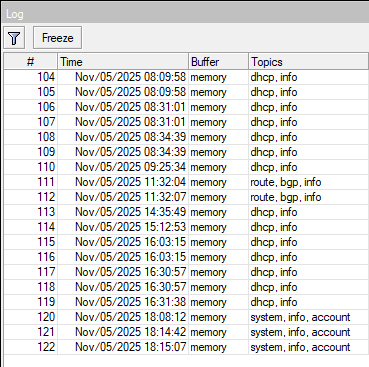
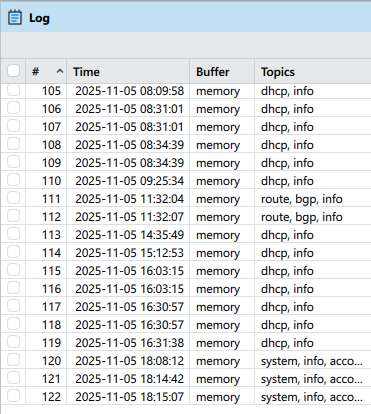
Other than that, Winbox 4 still sucks hard when it comes to font rendering. Everything is blurry and a pain in the ass (eyes) to use when zooming out to make winbox fix the same amount of information in the same space like winbox3..
On winbox 3 everything looks crisply clear.
Rounding and smoothing can change font appearence
Try Tahoma font...
I tried all fonts on my system, but that stupid blurriness makes every font look like shit.
Which OS are you using? The quality of font rendering and scaling may vary depending on OS.
Windows 10 with no scaling (96dpi / 100%), which renders every other Qt based app perfectly fine.
Ok I use Linux at 96dpi and 92% scaling and it looks fine here (like winbox 3).
If they added an option to change UI font, it would be logical to add the same option for Terminal.
On my Arch laptop (KDE 6.5.1, Wayland, 1080p no scaling/ 96dpi) Winbox 4 looks perfectly fine at 83%zoom.
I still don’t like it compared to Winbox 3, but at least I don’t want to tear my eyes out everytime I open it (ie: one time on each new version just to see if it sucks any less).
On my Windows 10 desktop (1440p, no scaling/96dpi) it’s unbearable to look at, at any zoom level. This is my main workstation, so here’s where it matters most to me for winbox to be usable and easy on my eyes. I use it all day everyday.
On my Windows 10 laptop (4K, 150% scaling) it’s the same as the desktop. But due to windows’ sucky window scaling, even winbox3 looks bad on it.
Emmm... What's wrong with WB 3 on 150 % scale? I also have the same scale and don't see any significant issues. Of course, scaling should be done by the app, not by Windows, because it just stretches a bitmap. Btw, OS scaling can be performed only by bitmap stretching and will always be "sucky". Anything else is impossible and won't work correctly. Scaling should be completely handled by the app for good appearance.
Most of us are not using Windows XP anymore…
How Windows XP is related to that? Looks like you don't know how scaling works.
I already wrote about this: 📣 WinBox 4 is here 📣 - #1887 by teslasystems
I think it is you who doesn’t know how scaling works in modern operating systems…
Windows (and Linux) do not first render the characters and then enlarge the bitmap anymore, they render the characters larger. How well that works depends on the font and things like anti-aliasing and subpixel hinting, but it isn’t bitmap scaling, that was in the XP days.
Reread the link above... If the app is DPI-aware, OS doesn't play any role in scaling, everything is performed by the app, including setting a correct font size. For DPI-unaware apps, OS just stretches them. The Dude is a good example (though the map is rendered by the app itself and not stretched).
Hi,
Thanks for the suggestion, however I cant make that work either. Here is the outcome (raspberry pi os debian trixie on pi 5). After what you see in that log on the console, no gui pops up.
alex@pi-desktop:~/Apps/Winbox $ box64 ./WinBox
[BOX64] Box64 with Dynarec v0.3.4 nogit built on Apr 24 2025 09:54:47
[BOX64] Dynarec for ARM64, with extension: ASIMD AES CRC32 PMULL ATOMICS SHA1 SHA2
[BOX64] Running on Cortex-A76 with 4 cores, pagesize: 16384
[BOX64] Will use hardware counter measured at 54.0 MHz emulating 3.4 GHz
[BOX64] Detected 48bits at least of address space
[BOX64] Counted 63 Env var
[BOX64] Library search path:
[BOX64] Binary search path: ./:bin/:/usr/local/sbin/:/usr/local/bin/:/usr/sbin/:/usr/bin/:/sbin/:/bin/:/usr/local/games/:/usr/games/
[BOX64] Looking for ./WinBox
[BOX64] Rename process to "WinBox"
[BOX64] Using native(wrapped) libxcb-glx.so.0
[BOX64] Using native(wrapped) libEGL.so.1
[BOX64] Using native(wrapped) libdl.so.2
[BOX64] Using native(wrapped) libGL.so.1
[BOX64] Using native(wrapped) libz.so.1
[BOX64] Using native(wrapped) libfreetype.so.6
[BOX64] Using native(wrapped) libfontconfig.so.1
[BOX64] Using native(wrapped) libexpat.so.1
[BOX64] Using native(wrapped) libX11.so.6
[BOX64] Using native(wrapped) libxcb.so.1
[BOX64] Using native(wrapped) libXau.so.6
[BOX64] Using native(wrapped) libXdmcp.so.6
[BOX64] Using native(wrapped) libxkbcommon.so.0
[BOX64] Using native(wrapped) libxkbcommon-x11.so.0
[BOX64] Using native(wrapped) libxcb-icccm.so.4
[BOX64] Using native(wrapped) libxcb-image.so.0
[BOX64] Using native(wrapped) libxcb-keysyms.so.1
[BOX64] Using native(wrapped) libxcb-randr.so.0
[BOX64] Using native(wrapped) libxcb-render-util.so.0
[BOX64] Using native(wrapped) libxcb-shm.so.0
[BOX64] Using native(wrapped) libxcb-sync.so.1
[BOX64] Using native(wrapped) libxcb-xfixes.so.0
[BOX64] Using native(wrapped) libxcb-render.so.0
[BOX64] Using native(wrapped) libxcb-shape.so.0
[BOX64] Using native(wrapped) libxcb-xkb.so.1
[BOX64] Using native(wrapped) libX11-xcb.so.1
[BOX64] Using native(wrapped) libm.so.6
[BOX64] Using native(wrapped) libpthread.so.0
[BOX64] Using native(wrapped) libc.so.6
[BOX64] Using native(wrapped) ld-linux-x86-64.so.2
[BOX64] Using native(wrapped) libutil.so.1
[BOX64] Using native(wrapped) librt.so.1
[BOX64] Using native(wrapped) libbsd.so.0
APP,INFO: version: "4.0beta35"
PERS,WARN: read error opening "No such file or directory" "/home/alex/.local/share/MikroTik/WinBox/settings.cfg.viw2"
APP,INFO: loading addrs db from: "/home/alex/.local/share/MikroTik/WinBox/Addresses.cdb"
PERS,WARN: read error opening "No such file or directory" "/home/alex/.local/share/MikroTik/WinBox/Addresses.cdb"
Any ideas?
Thanks,
Alex
I'd try creating the directory,mkdir -p /home/alex/.local/share/MikroTik/WinBox as the error suggest it's can't read that directory. Perhaps permissions on /home/alex/... are blocking your own account, although that be atypical since it's your home directory.
Thanks,
I have done as you suggest, no change. My understanding is those are warnings and are typical on first run of winbox, and they will be ccreated once its run, so I dont think its the issue. The issue is that the GUI never shows up though the app doesnt quit and I have to quit it with CTRL-C
Best,
Alex
Hi, can the first post be updated at each time like for routerOS releases ?