For anyone having the same issue, and for the future.
Updated to 4.0 beta41, still the same issue.
I have debugged it and it was because i had
QML_DISABLE_DISK_CACHE=1
QT_QPA_PLATFORMTHEME=qt5ct
QT_AUTO_SCREEN_SCALE_FACTOR=0
in env (coming from /etc/environment)
After removing them, Winbox started working!
Hi team,
First of all — thank you for the new WinBox 4, it looks modern and has some nice improvements.
Unfortunately, the change from single-column to three-column layout for menus and option lists (especially in RouterOS configuration windows) has made navigation significantly less convenient for many users, particularly:
-
On smaller screens or lower resolutions the items become too cramped
-
Keyboard navigation (arrows, Tab) became much harder — you have to jump between columns instead of just going down
-
Muscle memory from 15+ years of WinBox 3 is completely broken
-
Users with high-density configurations (dozens/hundreds of items in lists) now have to hunt for the right option across three columns instead of scrolling vertically
Please consider adding a simple toggle in WinBox settings:
View → Option List Layout → Single column or Multi-column (3)
or even better:
Appearance → Menu style → Classic (single column) / Modern (three columns)
This would make literally zero people unhappy: those who like the new look keep it, those who prefer the old proven workflow can switch back in one click.
Many of us have been using WinBox daily for over a decade — this single change has the biggest negative impact on workflow I’ve ever seen in a new major version.
Thank you for considering this request!
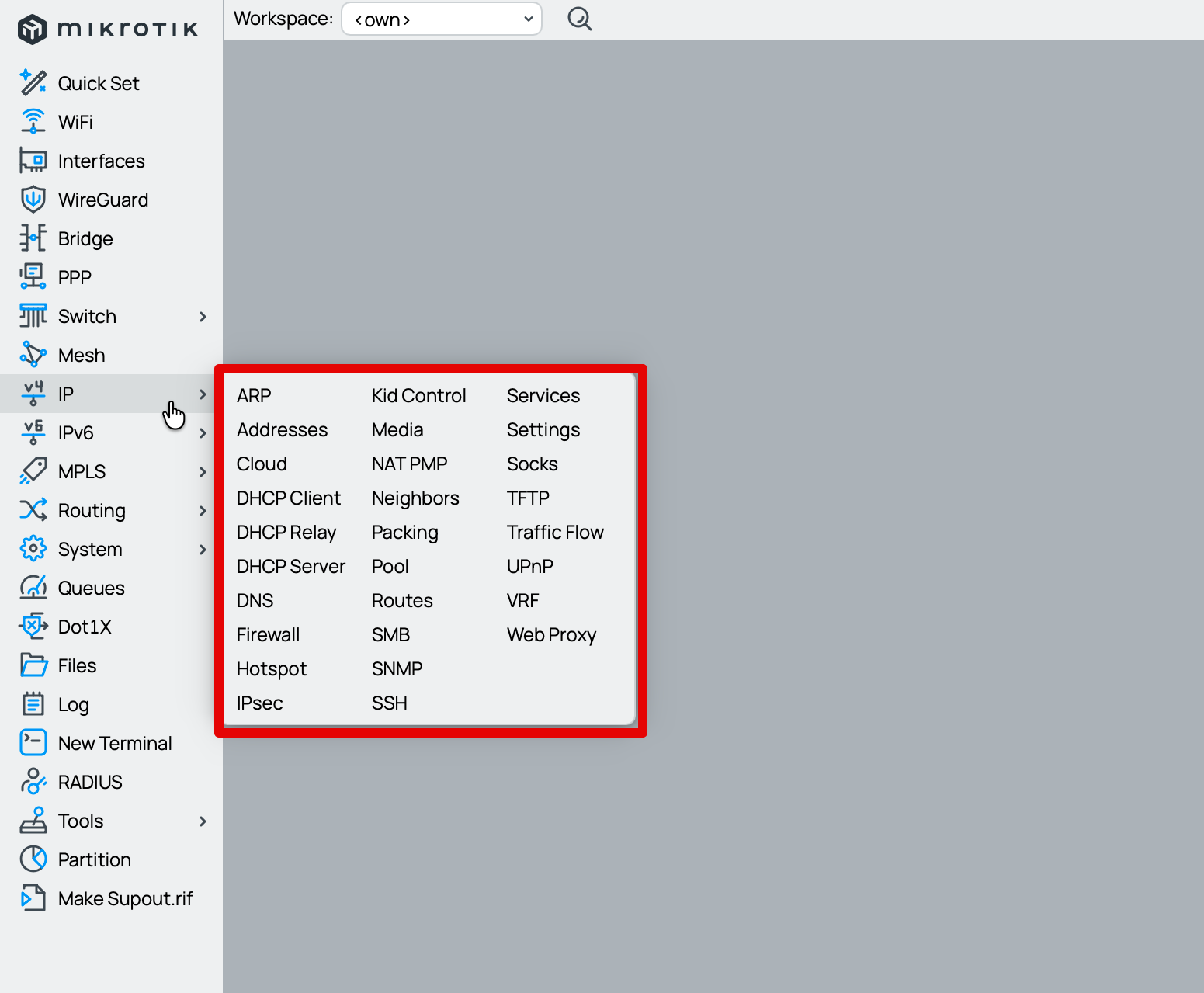
I presume that was done after complaints from other users, with small screens, that could not see the entire menu when it was vertical (or got a scrollbar in the menu which they found inconenient).
I guess you cannot please everyone.
Appearance → Menu style → Classic (single column) / Stupid (three columns)
There, I fixed the naming. 
That's exactly what I thought, but you had the courage to write it...
Even if we have to endure this stupid three-column system in the future, the ordering is still wrong and illogical...
Stupid (Actual)
A	C	D
B	C	D
B	C	E
B	D	F
Correct and logical:
A	B 	B
B	C	C
C	D	D
D	E	F
Exactly. 
The convention for most (all?) western languages is to read from left to right and THEN go to next line.
How do you read then books where page is split in two columns? Read first line from the first column and then first line from the second column and hope for the best?
Probably most people here are too young to remember telephone books or printed newspapers, but when content is printed in columns it used to be normal to read down the column and then start the next column from the top.
We are probably getting to age where there are people who do not have a concept of reading an actual book (or even e-book as text in e-book is not in “line-to-line-over-pages” either)
Offtopic, but a lot of published study papers are still split in columns
https://knowledge.lancashire.ac.uk/id/eprint/54180/9/54180%20Joonaki%20et%20al.%20VOR.pdf
Well, then add vertical lines to separate columns.
Or center the items. (to my - admittedly getting older - eyes, the rightmost layout is much more readable)
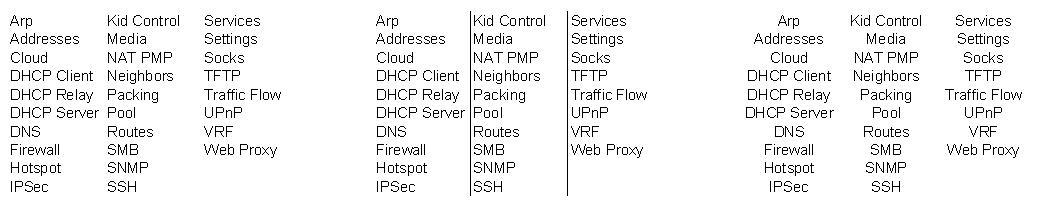
Columns in a multi-column document have two characteristics:
- they mostly contain more than a single world
- the multiple words fill completely the width of the column (justified both sides), so you can visually appreciate the blank vertical separation line (i.e. understand that there is a newline at the end)
Example:
https://as2.ftcdn.net/v2/jpg/06/15/39/73/1000_F_615397357_nG7ZK98NnvHYPzJRMYLvMw2nazNNCPAO.jpg
This layout is awful. It is much more natural to scan a small number of large columns than a large number of rows. I don’t see the logic in prefering a single column while simultaneously preferring to read row by row. The reason why fewer columns is better is that it reduces horizontal scanning.
Center alignment makes lists more difficult to scan.
with beta 41 i have completly lost my ability to insert characters “[“ and “]”
in the previous release i was able to do so.
furthermore… i was never able to input also “{“ and “}” without recurring to ALT+123/125 combination.
at os level i can do squarebracket with AltrGr + (è || +) and curly with AltrGr + Shift + (è || +)
(italian layout, Windows 11)
can you advice ?
thanks
Michele
{ = AltGr + Shift + <è>
} = AltGr + Shift + <+>
[ = AltGr + <è>
] = AltGr + <+>
# = AltGr + <à>
@ = AltGr + <ò>
NOT WORK ON TERMINAL...
( This list igonre on purpose all non ASCII-7 characters, like € = AltGr + <E> )

by “input” i meant : “input to terminal”.
nothing intercepts them…
in beta 39 (if i recall correctly), at least, AltGr + <è> and Altr + <+> was working fine to input “[“ and “]”
i was never able to input via key-combo the “{“ and “}”
in any other input fields that is not terminal, they all works correctly.
… not sure to have understood your point. sorry
If you don't specify, it could also be a comment...
I repeat: in the new version, they're having fun intercepting the ALT key instead of leaving it alone, compromising the multilingual functionality of both Windows and macOS for those who don't use an English/Latvian keyboard.
They don't work for me in the terminal either...
sorry if i didn’t have specified correctly the means of the failure…
in the first reply you didn’t specified either the “where” of the alleged interception: can be anywhere, also at the os level 
i see your point. make sense.
Hope they will drop this nonsensical (to me…) key-combos.
the only one that makes really sense is the Alt+t, very handy
Also lost on Windows-1252 Keyboard:
` = AltGr +<'>
~ = AltGr + <ì>
(and other non-ASCII-7 characters that are useless in the terminal)
So, on the terminal with the latest beta version on the IT keyboard,
you lose the ability to write those characters on the terminal: (apparently they work everywhere in other fields)
{ } [ ] # @ ` ~
with direct keys, and you are forced to use Alt+nnn,
(and the ALT+nnn work only if the device have also numeric keypad)