I would prefer this for almost every property dialog - and it almost was like this before they reintroduced tabs. There was just too many voices wishing to drag us back into the Winbox3 past.
(KiwiGuy)
Not sure if you are responding that it already exists in that format or that you agree with the request?
The router icon represented appears in the “Select from:” title bar however it does not display the extended info as shown with WinBox 4.0beta44 on my system. It also does not appear in any opened WinBox window for RouterBoards or CHR’s. WinBox 4 only shows the RouterBoard model as per the screen cap supplied.
It should appear in the bottom taskbar of Winbox, check if you have the “Resource Panel” enabled in the Winbox settings (hamburger/3 - icon in top right and in the middle section of the pop out). Replicates the bar that used to be along the top in Winbox 3 and provides resource utilisation/uptime/etc too.
The new font (Inter) is a big improvement. I have really struggled with the font previously - tried all sorts, including scaling, subpixel settings, etc.
It is similar with the music program Waveform by Tracktion. Font rendering is awful on Windows.
Anyway Inter looks much better.
I still find v3 much easier to see and focus on though.
If I find the ideal font for most info (non-bold, i.e. Inter Light or Inter Thin), then it looks really bad for the Bold stuff like settings headers, ‘operated by CAP’ capsman headers/statuses etc.
Perhaps this is because v4 puts these things in bold while v3 does not.
Maybe you could consider 2 font settings: “Regular Font” “Bold Font” or something?
edit: oh, wait, this is now perfect! hooray!
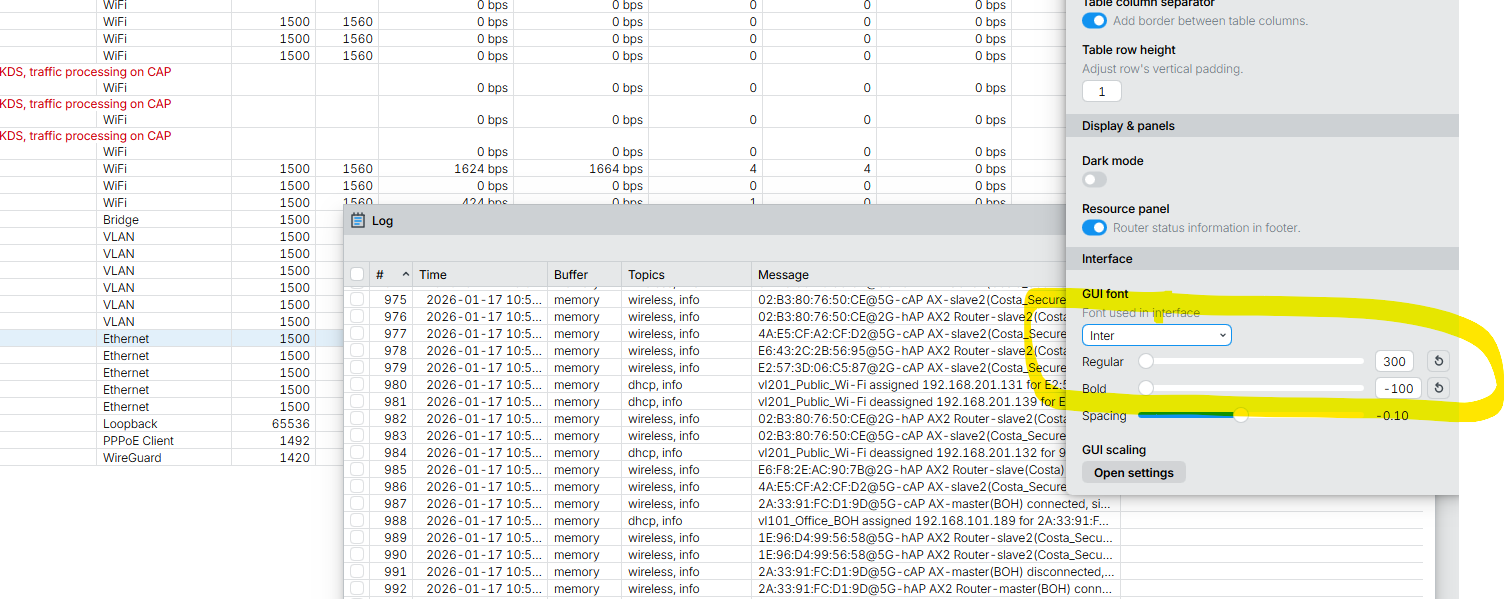
What's new in 4.0beta47 (2026-Jan-19 11:27):
- app settings: rework button, add shortcuts info popup and about window
- app settings: set default font spacing value to 0
- app settings: reduce the provided font list
- app settings: add reset button for row height field
- ui: limit internal window maximum size to available viewport
- this guarantees that dragging window into top left corner will always fit whole window and all controls will be accessible
- ui: add socksify icon from newer RouterOS
- ui: add support for confirmation messages
- ui: add support for mouse with horizontal scrolling
- ui: allow disabled(X) and inactive(I) flags to be active at the same time
- ui: close action panels dynamic dialog if finished signal received from RouterOS
- ui: close selected window with Alt(CMD)+W while using opened window panel
- ui: compact app top toolbar
- ui: disable mono numbers in resource status panel
- ui: disable moving/resizing some modal windows
- ui: fix "Setup" window showing wrong text
- ui: fix closing some modal popup windows on disconnect (e.g. file selection, password change)
- ui: fix font hinting for multiline textarea in some places
- ui: fix font settings in form's combobox popup elements
- ui: restore System/License "Paste Key" button
- ui: set zoom panel size on current size when opening
- ui: show password prompt on login if user's password expired
- ui: show popup info message if connected RouterOS has trial/demo/old license
- ui: show shortcut in button tooltips in some places
- ui: simplify WinBox new version update button
- form: fix IPv6/ND/Prefixes field state in some cases
- graphs: fix legend fonts to follow global settings
- graphs: improve legend quality a little for small fonts by disabling tnum
- login panel: clip right side table panel when OS window too small not to overlap with input elements
- login panel: fix rendering quality for input fields in some zoom levels
- scale: work on MikroTik logo scaling
- scale: work on resource panel better scaling
- skins: add support for hiding table tabs
- skins: rework which views are prioritized when skin hides main ones
- table: clip toolbar's view if it exceeds window's width
- table: show action result in events when moving files within table
- terminal: fix CTRL+L command on some situations (clear display command)
- widget: show tooltip for combobox if a popup row's text is truncated
- widgets: fix rare cases where input field does not accept text updates when text was pasted
- fix command line --version parameter
Is there a way to hide the left menu like many interfaces permit ? click on the mkt logo to see it, disappear after click anywhere. And double click for toggle permanent display....
I believe that i found the cause of why winget ins not installing the latest version of Winbox.
Is related to naming standards on manifests.
I opened an issue on winget-pkgs point the probable cause, and suggesting a method to correct this.
If some could give a thumbs-up onde the issue. Or even help with some good suggestions.
It would be good.
Thanks!
Unfortunately, it is still the same.
Update today and ….
Unfortunately, the terminal opened in Winbox is still useless.
PLEASE could we look into grouping sessions together on macosx, or at the very elast renaming the hover title from Winbox to the session name (system identity or user@ip etc) when having many sessions open it gets really disorienting finding the right one sometimes.
Can we get Winbox as an official Flatpak release? then it will work universally and be in the apps list, which I need for Mullvad VPN split tunnelling.
There is a third-party packaging of Winbox4 listed in the Flatpak repo already.
In fact, I just tried the WinBox4 flatpak on a Steamdesk running SteamOS recently... it just worked. Since Steamdeck is ARM64, this all works via the Steam's Proton wine-variant and WinBox4's intel binary in the Flatpak. So a more standard x86 Linux distro using Flatpak should also just work.
Now, "official" be nice...given all the supply chain attacks, it would be better if MikroTik did package WinBox4 into the various common repos.
One issue that I face frequently with Winbox 4 (NOT with Winbox 3 though) is the following: I select a device from the list and Connect to RoMON. The list of RoMON Neigbor devices is shown and I select one. When I try to connect to the RoMON Neighbor device, very often I get a “RoMON agent does not exist” error.
As I said, Winbox 3 connects to the RoMON Neighbor without any problem.
Just provide an AppImage for Linux, please!
It is just a standalone package that can be executed in any modern distro without requirements like Flatpak and Snap. Furthermore, AppImage can update itself like Trezor Suite and Joplin do. Mikrotik doesn't have to keep a repository and push to some app store; everything can be done through the current continuous delivery.
/cc @normis
There you already see the issue: MikroTik generate an executable for download, and the Linux world already has 3 demands for other formats (and the advocates saying their format is best). And then we are not even considering the deployment via distros.
I can fully understand MikroTik not doing one of the many formats, they probably will get slack from all the advocates of all the others.
I partially agree with @pe1chl and @KiwiGuy.
This silly fights between snap, flatpack, nix and everything else... It's really a pain in the A55.
Me too!
For that, probably wolud be necessary to have some deeper access that is not acceptable for a company producing a not opensource package.
P.S.: To be clear, I’m not defending to make Winbox become Opensource. This would be contra-productive for MikroTik as a company, considering the context.
The part I disagree:
For practically all of those package format, after the base binary is available, the packaging process can be fully automated.
- A new release hit CI/CD?
- This triggers the creation of packages in various flavors.
- And obviously with automated tests for all formats.
This would have to be done by a team separate from Winbox development. But a team made up of people from Mikrotik itself.
- Who might eventually have access to privileged information about the software.
- And who could also freely interact with the Winbox developers, asking them to adjust thing X to fit the requirements of packaging format Y.
The great advantage of this is that this team could practically all be made up of trainees and juniors... Which would represent a not-so-high cost, and would function as a natural selection of new midfielders and future seniors.
Another good feature of AppImage: if you want to repack it to another format, just execute the file with --appimage-extract (ex.: ./WinBox4.AppImage --appimage-extract) and voilá, you have a directory with similar content like Mikrotik provides today with its tarball.
It’s just a win-win for everybody, even for people who prefer to repack to RPM, DEB, PKGBUILD, Flatpak and Snap.
But in MikroTik's defense on packaging, WinBox4 is still in beta. And WinBox is already mostly dependency-free, so it already runs almost anywhere already. So value of AppImage is minimal, especially compared to the OS default stores.
If you look at the market, Microsoft Store and Apple App Store should be the first targets for packaging, since those two get a majority of OSes covered. On Linux, taking your list, there are 6 formats: RPM, DEB, PKGBUILD, Flatpak, Snap, and AppImage. I could add apk for Alpine Linux with X11. No dis on Linux, but it ain't a majority of WinBox users, and adding 6+ different formats is asking a lot. I suppose adding winget and brew, we're now at 11 possible packaging format...for a single executable app. And, no doubt, someone will suggest some I missed one, so let assume "bakers dozen" of formats.
Anyway, I can see MikroTik waiting until WinBox4 ships might be reasonable approach... than changing build process, testing, and "paperwork" involved in formally packaging WinBox during beta. Don't get me wrong, WinBox4 should be the "common app stores".
That is right. I download winbox4 for Linux and on my systems it just works. Maybe on some minimally configured systems it does not work first time because a required library is missing, but that is an easy one-time fix installing the distributor’s package for that library. When it happens to be libc and the distributor is boasting to not use libc, well that is your own fault to choose that.
I do not like to get half an OS in some kind of portable application image. Maybe Python fans love that? (and they usually do require it)
Now the lack of a ARM64/aarch64 version of Linux and Windows to me a higher order of operation on the packaging front...since someone no doubt will want a ARM-based package...so dozen formats get squared. And there is no ARM version to even package for Windows/Linux.
The fans of those portable formats undoubtedly know how to package an amd64 executable together with an emulator to make it run on an arm64 processor…