Request: Please add a manual button “Check for Updates” and a setting “Automatically Check for Updates” that we can turn off if desired.
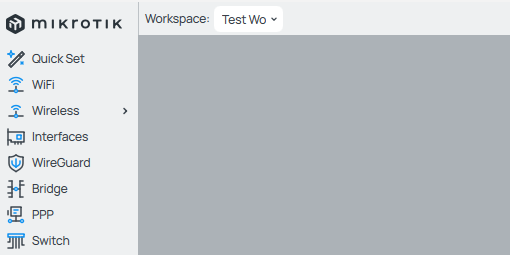
Workspace Pulldown doesn’t show full workspace name even if there is plenty of room. Example is “Test Workspace”:
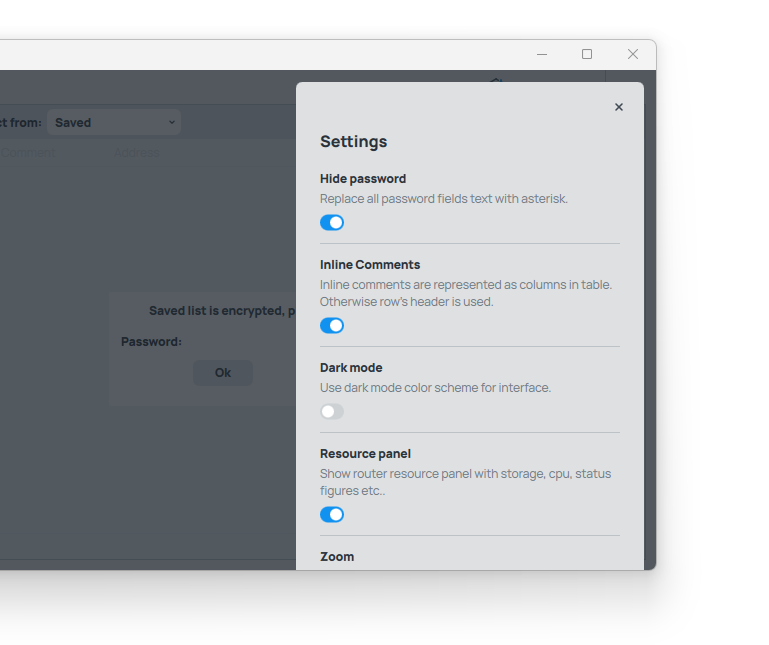
There’s no scrolling in the Settings pane which can result in the inability to see or interact with options for short window heights.
The Settings header could also be moved up to the top across from the close button and perhaps move the descriptive text into forthcoming hover Tooltips
Winbox Beta 4 - Windows 11
- I appreciate the zoom option…how about a compact option to reduce the whitespace waste while keeping readable sized text, even line-height would be a big improvement.
- Darker Internal Window Border Pinstripes
- Log Text Selection Please (with Copy)
- Page Up/Page Down, Home/End for all scroll targets
- Name (Comment) and IP in Saved List aren’t aligned in Non-Inline Mode and isn’t adjustable
- Scroll Speed seems low on Windows 11 compared to other applications.
- Some action are on top, some on the right and some on the bottom (For instance /firewall add is on top, Rest Counters on the right and Enable/Disable/Remove are on the bottom. Please just keep them all on the top, even if it sometimes wraps.
- Context Menu should include [Enable | Disable | Remove | Duplicate | Comment]. Give each context menu some thought and make them useful

- Remove Button should not appear if the user has no permissions.
- User Re-ordering columns would be helpful
Keep up the good work!
am i missing something, how to get in to → *) added command line launch parameters ( WinBox );
on a mac, this works for me:
open /Applications/WinBox.app --args
i just upgraded to WinBox4.0beta4 for Linux. I believe i found a bug. I noticed that i cannot upgrade the RouterOS of my mikrotiks. i have tried uploading several times (all of which were successful uploads). but after the reboot, the RouterOS version was not upgraded. I defaulted to WinBox 3.41 and was able to upgrade RouterOS with no problems.
Moreover, when I click refresh on WinBox4.0beta4, it takes longer for it to detect recently powered up mikrotiks as compared to WinBox 3.41.
Parrot Security 6.2
Wow! Great news! I’m using CLI but it’s good to see native client for macOS and GNU/Linux. Also the UI is looking far more fresh
hope will add this small feature from v3 to v4.
easy to identify the parent and child.
v4

v3

Do you mean that you manually upload the files and manually issue the reboot?
Did you try to use the built in self upgrade in RouterOS (menu System > Packages > Check for Updates) ?
- you can use "
open -a Winbox
" and you will not have to specify the path to applications
2) if you don’t want to use the “open” tool, you can also do the full path:
/Applications/WinBox.app/Contents/MacOS/WinBox 192.168.99.1 username password
Is that an actual monitor resolution in your case, or just a small sized Winbox window?
Could not repeat the issue. What operating system are you using, and is this WinBox 4beta4 ?
Can you clarify what you mean? Or make a support ticket. This type of general complaining does not help anyone, just spams the topic.
hAP ax2 vs hAP ac2
As there is no Hearth menu on it, the order is different in both, and this makes you have to look for the options, it would be good to follow a pattern, even if it does not have the sensor the option should appear just like it does with an rb433 or a hap mini, I noticed that it only occurs in the hAP ac2 but the same thing may occur in others!

and see
http://forum.mikrotik.com/t/winbox-4-is-here/178358/692
Some devices simply do not support health monitoring. It’s not a winbox bug!
Please do not suggest things that are already in this list
Known issues to be addressed (updated Sept 6.) :
- Keyboard shortcuts missing (currently only cmd/ctrl+W works)
- Improve contrast in both light and dark modes for old displays with low contrast ratio
- Most people prefer Tabs over Dropdowns
- Needs list of open windows
- Comment column functionality is confusing for many people
- Many UI buttons need Hover help text
- Needs clear UI to import Winbox3 saved routers, and for saving the database to Cloud Folders
- Some font legibility issues in some Linux installations, also in some cases where Windows OS has non standard DPI or scaling.
- Special characters lost when upgrading from WinBox3, but work fine when entered via WinBox4
- Side menu popup (IP etc) is lost too quickly, when moving mouse diagonally
- Columns can’t change order by dragging
- Log, Ping etc. windows don’t automatically go to end of entries
- Log colors for severity levels missing
- macOS trackpad does not scroll sideways
- Can’t Select All items with keyboard
- Some drag and drop issues with files. Can’t drag file to Desktop
- Skins not supported
- Quick Find missing
- Vertical grid requested by several users
- Vertical row height needs to be more compact, as requested by several users
- Linux distribution users wish for better distribution methods (unclear, many say current way is OK!)
- Windows version is sluggish when quickly moving around windows, lags behind mouse. Known bug and will be fixed.
- Needs ability to “select many routers and connect to all” in Loader
- Need auto light-dark mode setting based on OS settings
- Missing tree view of sub-items in tables, like VLANs, Queues, etc.
- LTE Interface graphs are missing
- Can’t ping DNS name
- if you connect from the Saved list it will automatically choose “Keep Password”
- should be some vertical split control between the login/password on left and the neighbors
- a few people on macOS can’t auto upgrade, winbox closes, no upgrade happens, as file can’t be overwritten
- router experiences load and possible crash, when workspace tries to load certain non existing windows (routerOS bug, not winbox)
I can understand @maisondasilva where he’d like to have the “pull out” list of items invariant. So perhaps the items, not feasible for a particular connected device could be present on the list but inactive (and displayed, but in a very low contrast) so that it does consume space on the list and thus doesn’t affect the place of other, active, items.
@normis, what about this dangerous bug? Have you been able to reproduce it? I can’t use WinBox 4 when it’s that unsafe.
Saduff, we managed to repeat the issue. It does not crash the router, but there is high load and a delay, when the Workspace tries to load certain non-existing switch related windows. We are fixing it.
Edit: Although it turns out, this is a RouterOS bug, not winbox. I also added it to the list.