The thing is it is not only FW rules, it is everything. Every single window now has less viewable data to work with, which makes your advice to copy it elsewhere even more riddiculous.
And no, Mikrotik does not have to change the heigh of the lines for me when I add more FW rules/whatever else, it would be completely sufficient to keep the original height.
But I would like to thank strods for noticing and hopefully bringing back the original (or variable) line height in future versions.
I can’t get WinBox to update itself this time.
I run WinBox.exe on my desktop, use “Tools → Check for updates”, can see the patch notes for v3.21 and when I click “Update” it downloads and then restarts WinBox, but is still running v3.20.
Attempting to run WinBox.exe on my desktop as admin has the same result, but it doesn’t start WinBox by itself after supposed download.
I am just gonna download it off the website, but I am curious as to what the issue here is and if it is my company network or a general issue.
“It allows …” does not mean that it should be full ASCII editor.
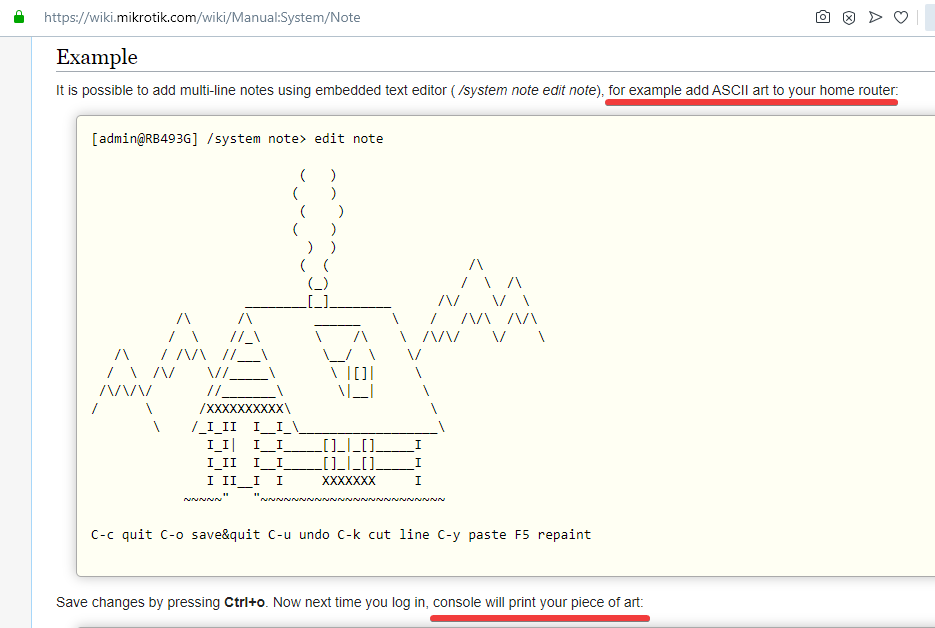
Is it possible now to make such a piece of art? Yes or no?
As I wrote … use any editor to prepare your logo and just paste it into a note.
Exactly. The wiki says you can add ASCII art to your HOME ROUTER. Your use case doesn’t count your running a professional production network no ASCII for you.
Is it not possible to alter the existing ASCII to account for the new way its presented? Or to temporarily utilize a reduced complexity note?
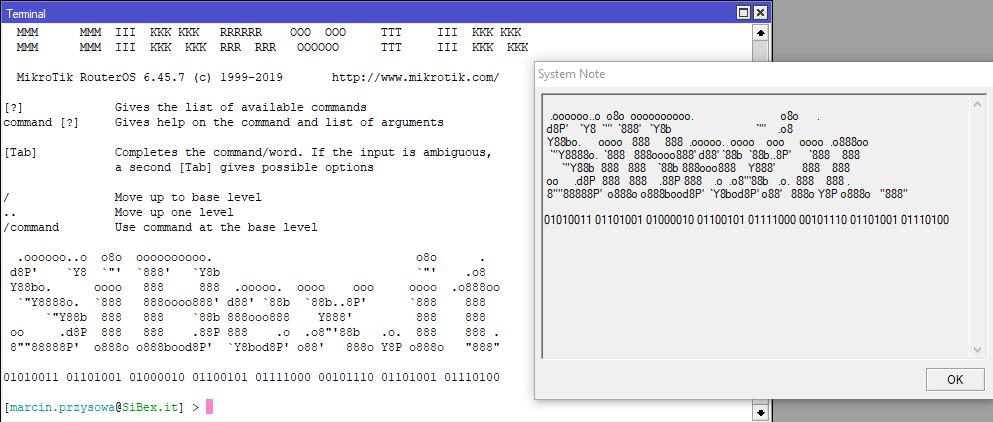
Sorry but what you say is not correct. ROS give us one Note for CLI and WinBox - not separated.
Currently we can only edit one note and this is used on both CLI motd and WinBox splashscreen who is just a new feature and should have other font with “fixed/monospaced width” propertis and give us both result’s the same.
MikroTik Team, please change WinBox font at Note splashscreen to “monospaced font”=“fixed width”=“where all characters are identical in width” like in CLI to repair situation.
I tried both new versions (3.20 and 3.21 x64) and they both crash on any host I try to connect to in the “downloading descriptors” phase. I tried clearing the cache, moving the sessions folder, nothing has helped. 3.19 does not do this. Any idea as to why this is happening?
I got V3.21 working. I cannot explain why, but this worked.
Opening V3.19 and using the Tools / Check for Update command. This performed an in-place upgrade and in doing so overwrote the executable file.
What I was doing previously was downloading winbox64.exe directly from the MikroTik website, and running it in the same folder as my existing winbox.exe
I do not know why it was necessary to use the Tools / Check for Updates command. Prior to V3.20 my process to upgrade winbox was to simply overwrite the executable in my installation folder, which, no longer appears to work.
People who asked to do the interface smaller probably work on a FullHD monitor because on a 4K monitor (3840x2160) the interface looks incredibly small even with the maximal zoom.
Please make the interface bigger or add more zoom levels.
Compared to minimum zoom, maximum zoom has fonts a little bit less than double size. So physical size on equally sized 4k monitor (with max zoom) would be smaller than on FullHD (with min zoom). In practice, most 4k monitors are larger than FullHD. But still, if you prefer bigger fonts, I agree that even current maximum may not be enough and there should be option to zoom in even further, which shouldn’t be difficult to add.
QHD, and I still prefer it smaller than the default.
The more information that can be displayed in one window at a time, the best. Otherwise, what is the point of upgrading to a higher resolution monitor? (IMHO)
Efficiency is more important to me than looks. And modern looks (ie: large everything) is a waste of screen real estate.
Can the software developer for Winbox make the columns in the LOG window resize-able please? They are currently fixed and as such when the “Zoom In” feature is used, it is impossible to see the exact time of events because the column is truncated due to it being too narrow for the field data.
I noticed lock icon (encryption indicator) in Winbox 3.21 gone (as well as the options to use encryption). Does this mean Winbox traffic is no longer being encrypted?
(I too experience problems with my 4K display with 200% scaling on Windows 1909)
Zoom In function does not remembered, so new connection to new devices gone back to default zoom…
And new zoom in function does not enlarge rows… Too bad…
On Retina screen, default presentation is way too small to read.
At max zoom, it is barely smaller than the previous Winbox, and Log window (only!) is totally unreadable because the top and bottom of every line is sheared off.
Needs at least one more zoom level; needs to remember the zoom level or be able set a default zoom level other than “smallest”; and a fix for log window is needed before this can be used in production.