*) added support for mouse wheel scroll in field & table show columns windows;
*) double click on word in “Terminal” now automatically selects and copies it to clipboard;
*) fixed WinBox disconnect when selecting entries in QuickSet’s “WiFi Clients” table;
*) fixed crash when all inner windows were closed;
*) fixed crash when opening some of interfaces;
*) fixed glitches while resizing column widths or reordering table entries;
*) fixed visual glitch when showing table filters and categories;
*) fixed visual glitches when scrolling “Terminal” window and Zoom In or Zoom Out is used;
*) made Ctrl++ & Ctrl± still work if focus is on checkbox;
*) made Ctrl+C and Enter right after text selection in “Terminal” window work as copy to clipboard;
*) made Ctrl+D pass-through to “Terminal”, so it is possible to terminate inner telnet or SSH sessions;
*) made Ctrl+V work as paste from clipboard;
*) made double click in “Torch” window work again;
*) properly show “I” flag for invalid entries;
*) use router’s time when filling default time in “Scheduler” items;
If you experience version related issues, then please report them to support@mikrotik.com.
Thanks for swap back Close and Stop, but: is not better use one unique [Start | Stop] button, like [Simple Mode | Advanced Mode] on Wireless interface???…
(probably now some user complain about swap because they got addicted to the new position :lol: :lol: :lol: )
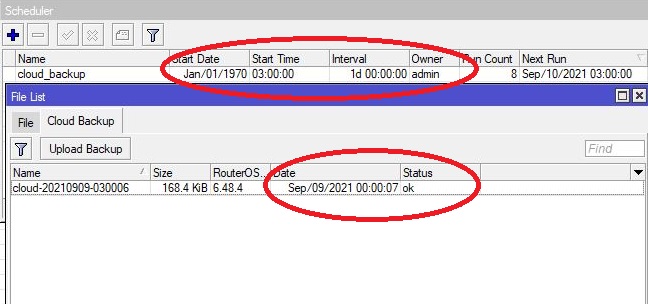
can you fix cloud backup time not shown correctly. i run every day at 0300 and it says 0000. i think cloud backup window does not use correct time zone.
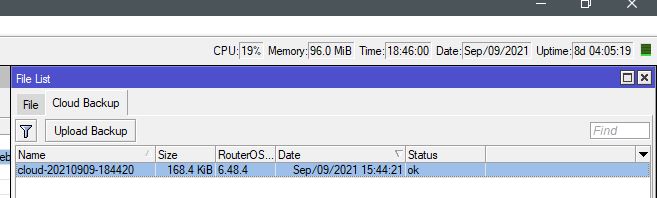
my timezone is setup correctly +0300. also time on dashboard top right is showing correctly. only cloud backup window has wrong time shown.
i run the script manually now and it should says backup time 18:44 but it says 15:44
YES, this annoying problem that was present ever since version 3.22 has finally been fixed! Hooray! Finally I can use new versions again.
(I had already received 3.30rc versions this week so I knew it was fixed…)
Another (less) annoying problem I reported is still present: the column width is not saved in the Log window.
Whenever I open a new session, the Log window has the same column width as before, although window size and “Show columns…” are saved OK.
So on my large screen the Message column is truncated and I need to resize it to see the full message, for which there is ample space.
It would be nice when the set column width is saved, and even nicer when the Message column automatically takes all remaining space instead of having a blank column to the right of it (but that is of course true for all windows…).
is this the one where if you were dragging an entry in routing filters, it’d keep being sent down to the last position even though you were still holding the mouse button?
if so, thank god.
Yes, that is it! It was reported over and over again and dismissed with “we cannot reproduce it” until finally this week, after I sent a .viw file and provided access to our router they were able to reproduce it and it was fixed.
Indeed a critical fix, without this the use of winbox on routers with lots of configuration was outright dangerous!
*) made Ctrl+C and Enter right after text selection in “Terminal” window work as copy to clipboard;
*) made Ctrl+V work as paste from clipboard;
One thing, when I use Ctrl+c it generates an automatic “carriage return” in Terminal . Not handy when you are copying in the same line.
Please split Ctrl+C and select+Enter.
Update: behavior is a bit strange for the Enter. [SUP-60072]
Example, I like for testing scripts to paste it into terminal and I put it between {…} and then press Enter to start the script. Now I have to press twice Enter before the script is ran. This has to if you add comment to script.
One Enter needed:
{:put "test"}
Two Enters needed:
{# running a test;
        :put "test"}
Ctrl-C is also tricky. I have text on the clipboard but in terminal still waiting for excution of the script. Because of a syntax error display I want to past the the corrected script so I press Ctrl-C to exit. Oops now is the clipboard empty.
If you press ctr + D when the terminal is open ( without an active SSH / telnet connection ), the terminal closes and the next terminal that will open continues from the previous number + 1…
For example, if you open terminal1 and press ctr + D, the terminal closes, if you open again Terminal2 appears not Terminal 1 …
As a new user of Mikrotik I wonder, how a software that looks 1:1 the same on screenshots on some MUM slides from 2013, has still so many bugs to fix in 2021.
While it’s possible to resize the column selector dialog, I wasn’t able to make IP - Firewall - NAT column “To Addresses” to show - I set a checkmark, instead other column shows in the list but not the “to addresses” - repeatedly:
Yes, that problem seems to also be present in others lists as well.
Try “Interface List” → “Ethernet” and select only the first 5 columns and any one at the end like “Tx Unicast”.
I see that another random column got selected.
Now if I remove the “Tx Unicast” and select another one at random, winbox showed a bunch of random columns (but not the one I wanted)