I have complaints about many areas in WinBox 4 but this particular point is fine and I find it reduces mouse travel distance, especially for the long menu like IP. Let's compare the total distance, for both the "diagonal" and the "right" then "down" approach:
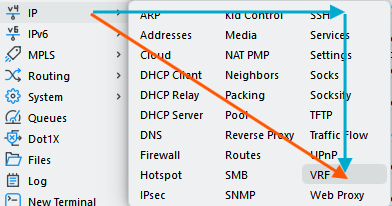
VS.
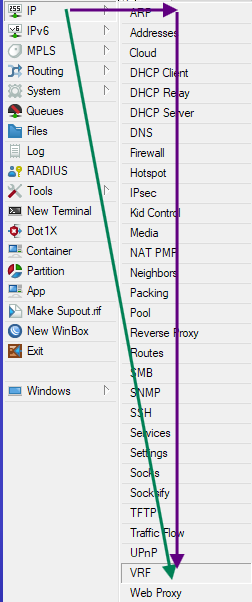
If your monitor has not enough height, you'll even have to scroll with WinBox 3, another kind of movement.
But, what is also very important, is that there is less vertical movement to be performed. Particular in menus, where the height of the individual items are very small (compared to the width), hitting the right vertical spot is more difficult when there are a lot of vertically stacked items. You have to pick a small-height region out of 30 small-height regions, compared to only 10 for the "square" menu layout.
Look at the first screenshot and the blue arrows. Although the horizontal blue arrow appears to be long, that move can be done quickly because there are only 3 very wide items to pinpoint. The vertical movement is slower because you have to be more precise. With the old menu, it's this slow movement that have the most travel distance.
Open any dictionary or old school phone book or most restaurant menus, and you also see that the entries are organized in columns for faster lookup and access.