Yes, that could be considered “default column width”, just as there is a “default window size” for every window that is opened for the first time. Both of them are much too small for current typical monitor sizes.
Maybe it could be considered to change the defaults (i.e. the sizes when windows are first opened), maybe the default window sizes could be made into a percentage of the total window size of WinBox so we would not get those tiny windows to work with on our 2560x1440 screens…
And also indeed the column sizes would preferably be based on what is typically shown in such a column, maybe a good solution would be to base them on what is initially shown in them on the first open.
You are running RouterOS 7 already. However, looking at the package size, with routeros being 6.9MiB and wireless 676.1KiB, it looks like your device is one with the SMIPS CPU architecture. If that's the case, then there was this change made in 7.20:
Hotspot is no longer part of the main routeros package. For 7.20.7, you'll need to download this extra package (133KiB):
Alternatively, click on "Check For Updates" on the right of the screenshot, and the hotspot package should appear grayed out in the list too. and can "Enabled" from there. Please note that the latest long-term version is 7.20.8. So maybe upgrade to that too.
I encountered this funny thing:
In version 4, you can select saved devices using checkboxes and simply delete them all at once without confirmation... The "delete" button is practically right next to the "remove/select all devices" button... Who the hell thought of adding a "remote" button there and doing this without confirmation?
For all there respect this WINBOX is a ***
Only thing that keep me was old winbox
NOW i am free
scrolling is not natural even on windows when disable scroll enchantment is still scrolling like crap too much on RDP scroll scroll nothign happens then 3 pages WTF is THIS SHIT
on RPD is a disaster is a f crap cant do f shit try to resize windows cursor change milione times nothing happens
moving window where i have to click to movie window son 2px to 2px element to get it nowme
old one was compact
on my screen 1380x0000 i can see shit everything is too big try to see lease DHPC and i have to scroll now on left to see all elements
f animation who de f duck net this on RDP
scrollbar is to f small i can click them need buy stronger glasses?
this s is a 47Mb let me f guess a browser inside
sorry guys i move my routers swithes from shit SHIT
cant even resize move window as is too big LOL ROTF cant resize windows from right sit is shit for designers on 19000x193838x screen
element don't fit on dinwod have to million times scroll to left to see my element that need
this tools are not for admin only for some webdesigner who like it NOT FOR ADMIN
Same thing can appear anywhere where New or Enable/Disable buttons are absent in this part of UI. It is obvious that nobody that has anything to do with UI design has thought about possible consequences.
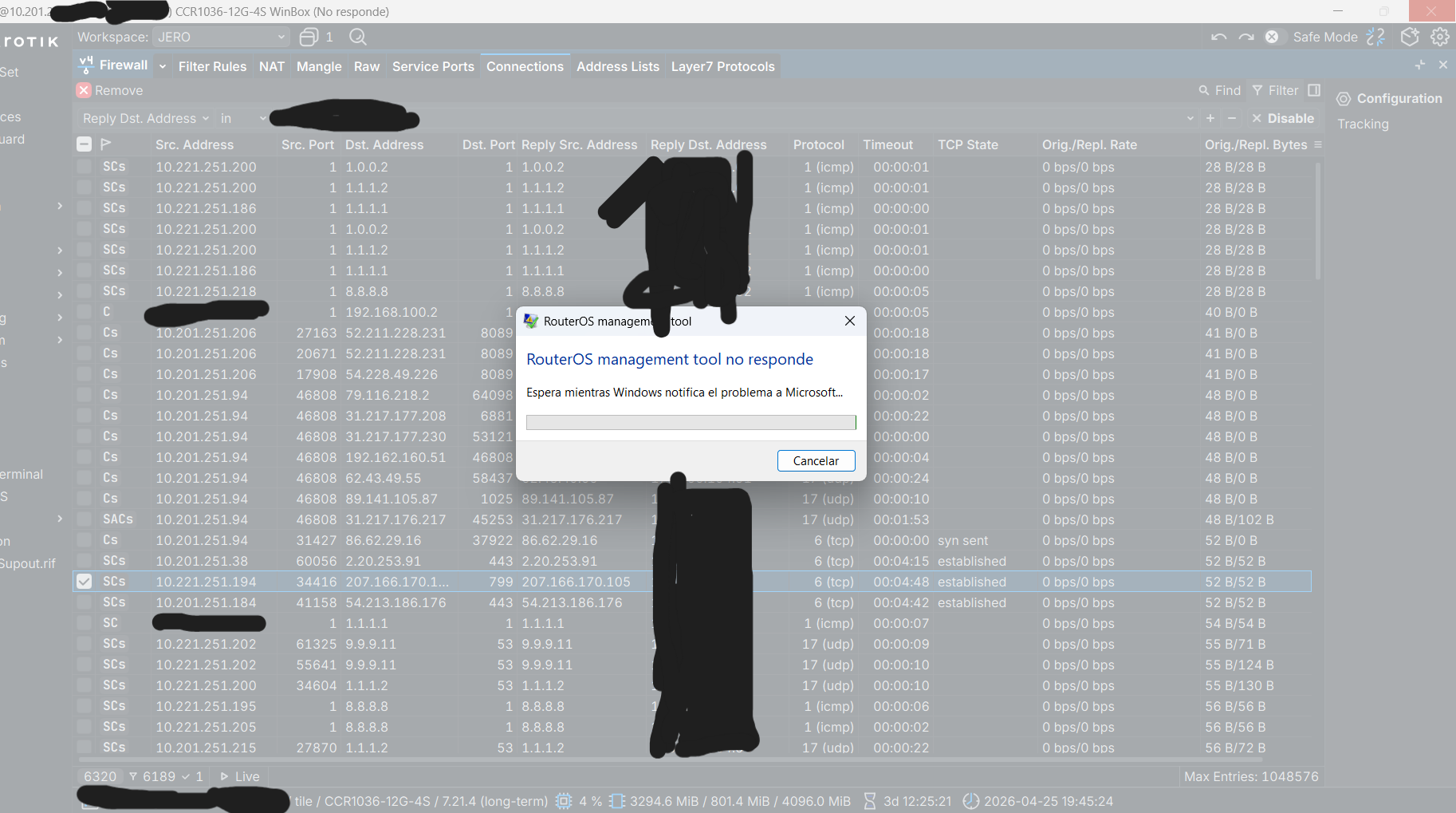
Most of this can be tolerated, but if firewall connection list disappears periodically with “Too many entries” message, then this is really sh** product. Developers must find a way to be able to display what data device is able to offer or admit that this thing needs serious work to be usable.
Hello, is it normal that since I started using Winbox4 (from the very first versions...), navigating through the menus is so slow?
I have several network devices, from RB750Gr2 to CCR1036, and on all of them, when I’m for example in the Interfaces window and inside IP/Firewall connections, everything takes several seconds to respond. There’s a lot of lag between clicks and data refresh, it’s very sluggish to navigate, and it also occasionally throws errors and closes Winbox.
I have 3 computers: 2 with Windows 11, where everything except Winbox4 works fine, and another with Windows 10 with the same issue.
If more information is needed or anything specific, feel free to let me know.
This probably means you are out of memory. It can always be debated whether your computer does not have enough memory or winbox is using too much of it, but it is kind of “the modern times”.
Windows systems today usually have 16GB and that is plenty for winbox. When you have significantly less memory and/or other large programs in use (like a webbrowser) that will affect the speed at which winbox operates. Recently I had an issue where memory got swapped out, and indeed it caused the behavior you describe.
Hello, I can confirm that this is not a RAM issue. Winbox is currently using almost 200 MB of RAM, and I still have more than 7 GB of RAM available. This problem has been happening to me since the early versions of Winbox4; with Winbox3 I didn’t have any similar issues.
I don't experience the issues you described on Windows or Linux. What graphics adapter do you have? The problem might be caused by outdated or buggy 3D graphics driver (because WinBox 4 now uses the 3D graphics API).
Reposting these. The latter is really rather frustrating when working with scripts.
Scrolling quickly through any table view causes the window to kinda stop rendering until you stop scrolling.
Selecting text using the mouse cursor behaves strangely. It doesn’t register until you’ve moved the mouse cursor a dozen pixels over, making selecting single characters annoying. More importantly, if you delay moving the mouse cursor for more than a brief moment after having pressed the button, it just won’t start selecting, at all.
Not an issue here. Probably something with your system.
(I remember that in the past I have set a minimal mouse movement distance for select and move in Windows on systems at work because people kept drag/dropping folders into other folders in Explorer list view. Maybe the same setting was done on your system?)
Tell me, does any of the developers of this app (Winbox 4) even visit here? Do they even check feedback? Or should I contact support to get something done?
Great, then please make Winbox 4 more user-friendly and enjoyable. After v3, v4 is simply awful.
Also, remove the "delete" buttons away from the main buttons like "on" and "off." I'd also like to see the action buttons at the top instead of on the right side. Bring back the drop-down menus like in v3 (not multiple columns, but one (or add a selection option).) Also, the program's zoom mechanism is simply idiotic. If you've already removed v3, try to make v4 at least minimally user-friendly as soon as possible.
P.S. I beg you - add a quick "poe power cycles" button, as well as a button to reboot AP from the Capsman menu.
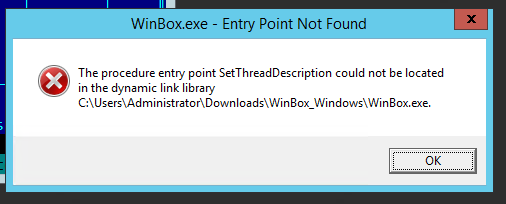
WHERE IS OLD VERSIONS??? I had VERY hard time trying to run Winbox on Windows Server 2012R2. New version does not work AT ALL but old versions NOT AVAILABLE. I don’t wont to download older versions on 3rd party websites because of security issues but you REMOVED ALL OLD VERSIONS from your website. I found changelogs for old versions but not software. ARE YOU CRAZY?