WInBox 3 uses the old GDI API for rendering plus the standard Win32 controls and dialogs provided by COMCTL32.DLL, COMDLG32.DLL, here are the direct dependencies:
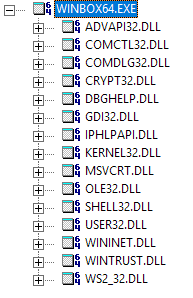
So very old APIs that are properly implemented by Microsoft itself for Windows on ARM.
WinBox 4 apparently uses Qt Quick, which draws the controls (like tables, buttons, input boxes) itself and output using an 3D API (by default Direct3D 11 under Windows):
Qt for Windows - Graphics Acceleration | Qt 6.11
Which means two different technology stack, and in case of WinBox 4, more of the drawing is handled by the code bundled in WinBox.exe, which is x86-64, instead of the operating system APIs implemented in native ARM64.
Taken from that Qt documentation, you might try to switch the output backend to OpenGL, to see if the rendering bugs occur there too. On the command prompt, set the QSG_RHI_BACKEND environment variable before running WinBox.exe:
set QSG_RHI_BACKEND=opengl
WinBox.exe