I would like to suggest “I/F” instead of “Int…” or “Inte…” with mouse-over “Interface”.
If the windows gets big enough, “I/F” should change to “Interface”. If … then “I/F”, if not … “Interface”.
I would like to suggest “I/F” instead of “Int…” or “Inte…” with mouse-over “Interface”.
If the windows gets big enough, “I/F” should change to “Interface”. If … then “I/F”, if not … “Interface”.
I guess the issue shows up here because the passkey value is not defined on the interface itself but inherited from configuration and/or security profile.
In security profile, where I defined my passphrase, the value is hidden properly. In configuration and interface settings, where this security profile is used, the passkey is indeed visible as plain text.
This whole value inheritance and the WinBox support for it has to be seriously overhauled anyway!
Values inherited from another place (profile, template) should be shown in a different color and should not be copied into the current instance when saving it to modify something else. They should remain inherited.
Yes it is hidden in security profile template. Interface object is the only place where it is not hidden while it is inherited from security setting template.
One piece of good news - all versions of 4.0 for Mac were very often crashing on disconnecting. Now on 4.1rc2 it is not possible to reproduce it any more.
You have been requesting this for years. I think not even Winbox 3 did that right. One reason why I use CLI, because Winbox never got that wifi configuration inheritance right. It was always copying over stupidly.
Yes, it is the same in v7 BGP. It was given to us with that completely new configuration structure (I guess it was written by a newly hired employee who never fit quite well in the company) and the remainder of the system never caught up. Values in Templates still get incorrectly copied into Connections, the Sessions window still does not auto-refresh to show actual data. The excuse back then was “a new version of WinBox will be required to fix this” but now that we have that new version, it still hasn’t been fixed…
IDK if the already the logic, but if you "manually" installl 4.1rc2, and then down the road WinBox 4.1 is released... will it update back to stable?
Otherwise, you might get someone "stuck" with the 4.1rcX RC once WinBox that may become stale if user does not remember they installed the rc/beta version. AFAIK, there are no "channels" for WinBox4. Now, this may already work (as I cannot test yet)... but something to consider if not.
And the word for today Is:
MATURE
defined as:
what this tool is not.
Content deleted by author.
My saved addresses list has 75 entries in 5 groups, and they are all shown correctly.
Am I the only one who suffers from weird UI bugs on Windows while scrolling some long lists like IP routes, routing filter rules, log entries, etc.?
When I open a subwindow in WinBox, its table gets filled with entries, but once I scroll down the table, it shows blank rows. Running it on Windows 11 ARM64 25H2, connected via RDP.
I've been facing these UI issues since the first v4 betas, and I'm surprised they are still unfixed in 4.1rc2.
There is a topic about that.
Winbox 4 windows 11 arm64 missing devices in saved - RouterOS / General - MikroTik community forum
It looks like it's specific to the ARM64 platform. WinBox 4 is not compiled for ARM64 on Windows so it runs with the help of an emulation layer that does JIT compilation/translation. If the issue is caused by this layer, then the way for MikroTik to fix it might be to compile an ARM64 version.
Thanks. Although the topic isn't strictly about that, there are a few posts mentioning UI bugs similar to what I'm facing. To be noted by the support team as well.
WinBox 3 isn't an ARM64-native app either, but it works/looks fine on the same platform.
Now that middle-mouse-button directly pastes the buffer into terminal, please add a warning when pasting multiple lines of text just like several terminal programs for Windows and Linux already do: the content of the buffer is displayed in a dialog with “paste” and “cancel” buttons, so you are reminded what you are going to paste.
See topic: Preventing accidental paste
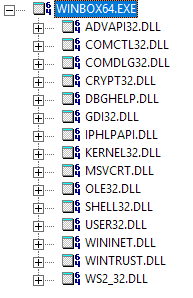
WInBox 3 uses the old GDI API for rendering plus the standard Win32 controls and dialogs provided by COMCTL32.DLL, COMDLG32.DLL, here are the direct dependencies:
So very old APIs that are properly implemented by Microsoft itself for Windows on ARM.
WinBox 4 apparently uses Qt Quick, which draws the controls (like tables, buttons, input boxes) itself and output using an 3D API (by default Direct3D 11 under Windows):
Qt for Windows - Graphics Acceleration | Qt 6.11
Which means two different technology stack, and in case of WinBox 4, more of the drawing is handled by the code bundled in WinBox.exe, which is x86-64, instead of the operating system APIs implemented in native ARM64.
Taken from that Qt documentation, you might try to switch the output backend to OpenGL, to see if the rendering bugs occur there too. On the command prompt, set the QSG_RHI_BACKEND environment variable before running WinBox.exe:
set QSG_RHI_BACKEND=opengl
WinBox.exe
Nooo!
The whole point of middle click is that it saves time and clicks:
double-click or highlight something - select and copy
middle-click somewhere else - paste
Much faster than having to additionally press Ctrl-C or right-click, find "copy" in menus that always change, click on "copy", then again right-click in Winbox, find "paste" (ok, that is much easier than in some random editor/browser/whatever the source is), then click on it, especially if you have to do that many times in a short period.
Why would anyone want to slow that down with additional questions? Are you sure that you want to paste? Are you sure that you are sure? Maybe think again? Please solve captcha and enter passkey before paste???
Terminals ask the question only when the text you want to paste contains control characters. So, if you don't want to be asked when somebody tries to inject (potentially malicious) hidden control characters you copied right from some "trustful" source: okay, not everyone can be helped to stay secure. But I prefer to be warned when something looks fishy.
It is only about warning the user if the string in the clipboard contains LineFeeds (Enter) which would lead to direct command execution on paste without prior notice. This might be surprising for the user end cause unintended config changes.
The same as Windows Terminal, macos zshell and all modern Linux terminal emulators do. With an option to turn it off so copy-pasting YOLO style is still possible if preferred by the user.