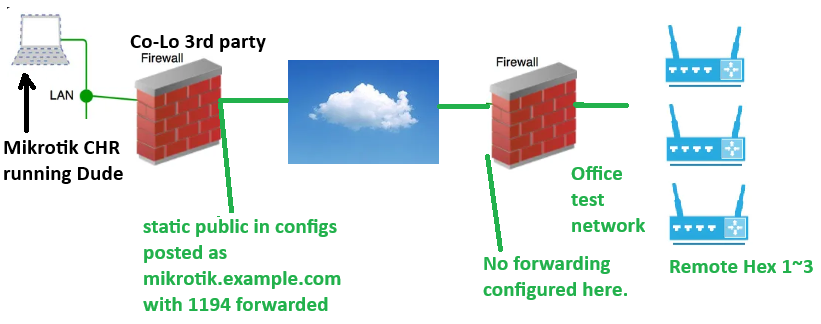
Situation is I have a central RouterOS Cloud Hosted Router running Dude. It itself is behind a NAT firewall but I have 1194 forwarded to it from a static public IP address, that’s where the CHR Wireguard is listening.
I have three Hex routers remotely connecting back to that CHR over Wireguard. At one point I had each one individually working over wireguard but as I add connections the old one that was working stops working. No Dude, no ping to virtual wireguard IP, nothing. I do not understand what is going on with that.
IP planning wise on Wireguard I want the CHR at 10.50.1.254 and /24 network
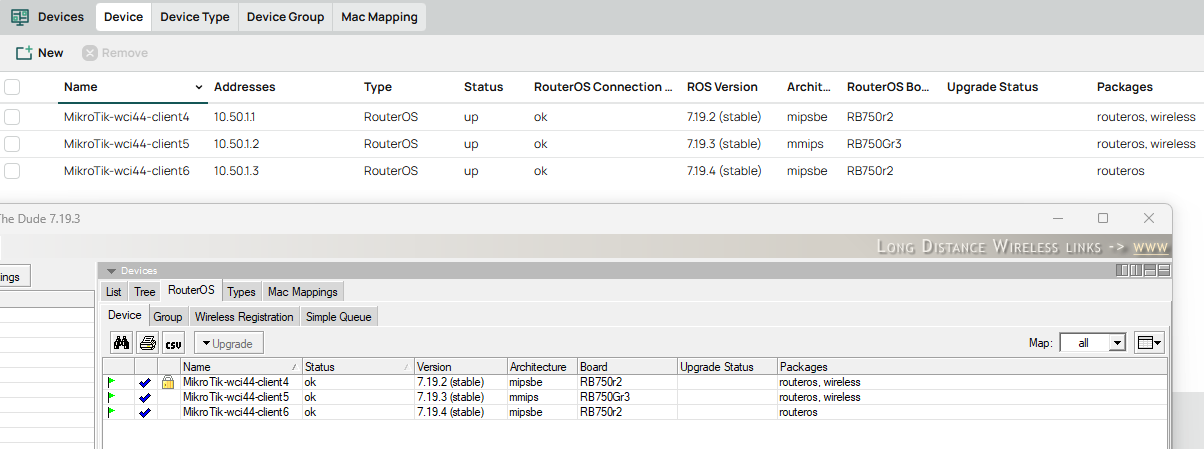
Remote wireguard client1 would be 10.50.1.1, client2 would be 10.50.1.2, client 3 10.50.1.3
I don’t want wireguard to route all the way down to the LAN of the remote Hex’s; as long as CHR Dude can reach them via the 10.50.1.x address that should do it.
Right this second I have remote router three connected and I can ping it from the CHR CLI. CHR Dude can sort of see it, connection status OK, shows model etc but status unknown. That’s likely a completely separate problem, I just want to know why the first two can’t connect anymore, despite all three being connected in Wireguard.
A diagram would be helpful but this is what I understand.
You have four MT routers at four different locations.
Each router used to be reachable through the CHR presumably rented cloud server.
Time has passed and things are not quite working as originally setup. The new requirement is the fourth router and you would like to port forward to the router over port 1194 to some server.
I dont want to waste any of my time looking at configs until the network is well understood including any wireguard requirement, including where is the CHR located, which devices have either a public IP or access to public IP ( upstream ISP router can forward ports).
Which devices need internet access via the CHR.
Which devices need to be accessed by external users for servers…
Which devices need to be reached by admin for config purposes
Which devices need to be reached by admin for to see subnets
Which devices have incoming users/workers to subnets
Assuming admin could be local any device and wants access to all other devices ( conf or subnets).
Assuming admin could be remote on wireguard and through CHR wants access to all other device ( conf and subnets )
Which devices need internet access via the CHR. None, this only exists to run Dude. Because mikrotik demands we have this I figured we would terminate wireguard here for management.
Which devices need to be accessed by external users for servers; do not understand the question
Which devices need to be reached by admin for config purposes; remote hex routers need dude management and remote web page available through CHR.
Which devices need to be reached by admin for to see subnets; remote hex, via CHR, and I don’t need to see remote hex LAN, management only.
Which devices have incoming users/workers to subnets; remote hex also host OpenVPN to another server. LAN in remote Hex gets routed through OpenVPN to that other server for PLC devices. This is working fine, we’ve used OpenVPN for years and I understand it well now.
Remote Hex are in our office test right now, but in the future they would be deployed on customer sites where there are no public static IP or port forwarding available. We have the same in the current test environment.
I am on mobile, so I can’t read your .rsc files, but from your screenshot the problem is because you put /24 in the Allowed Addresses fields of the 3 peers on the CHR config. Edit the 3 peers and change those addresses to /32 and your problem should be solved.
If you put /24 in Allowed Addresses, you cause the 3 peers to have overlapping address ranges, all 3 peers say they can receive packets destined to any addresses under that /24 subnet, including those with the destination address of the two other peers. Which means the last peer entry that has been edited and saved will catch all packets that are for the two others, and it will appear to be the only peer working.
Change the prefix length to /32 and each peer will only get the packets really destined to their IP addresses.
I think I see what you are talking about, and that’s a pretty fundamental misunderstanding on what is happening on my part. I’m mixing this up with OpenVPN in my mind.
Also please note that the change is only to be made on the CHR router. On the 3 other routers, you’ll keep /24 in the peer configuration. Because each of those 3 routers only has 1 peer in their list (the CHR router) and you really want to direct all traffic destined for 10.50.1.0/24 to the CHR (it serves as gateway) and not just 10.50.1.254/32.
Think about the logic…
On the Main router ( server peer for initial handshake), if we put in a /24 for each client peer you should realize that only the first peer will be reached, as the others will be ignored regardless…
In wg crypto routing, when selecting destination address for return traffic, it looks at the peers starting from the FIRST ENTRY, to find a match to know which tunnel to send the traffic down to…
/32 is specific and works, /24 means only the first peer will ever get selected…
At the peer client, the 24 works, especially if its the admin and he needs to be able to remotely reach other devices on the wireguard subnet, so for outbound matching purposes it works. It also works at a peer router client as the remote user (admin) needs to be recognized coming into that router (his source IP)
You should have seen the *2 and *3 on your /interface list member. Also interface=*2 on your dhcp client settings.
In other words its pointing out errors…
I dont know what silly game your playing by re-naming ether1 to ether3 and ether2 to ether4 but its obviously not helping.
Additionally if your ip dhcp client is disabled and there is no IP address pointing to WAN, how do yo get internet???
as noted need /32 for client peer allowed addresses.
I see the problem now, you made the bridge the wan connection from the CHR source…
Firewall rules need work…
I see a nat rule to do port forwarding on 24701 on port 80, WHY? Port forwaring is not secure, why not just be able to access that server via wireguard??
Finally what is the point of sending port forwarding to a wireguard address, its nonsensical, Assuming that the traffic is headed to one of the three routers?
If so you need the actual LANIP…
You also need to tell the CHR how to reach that subnet!!
The allowed Ips for that peer idenfified on the CHR peer settings should include that subnet.
It would seem that you are getting an IP address at the CHR from an upstream router and are being supplied with a private IP address using one of its subnets. It is very weird, why are you not provided a public IP address??
So without a public IP, how are you getting access from the hex routers?
In other words, is the CHR behind a VPS actually in the cloud or some other setup. I dont understand your diagram.
1&3; There is a fortigate in the colo that handles the public IP and WAF. It has port forwarding for the one thing I need for wireguard to the Mikrotik CHR. The CHR sits on LAN inside our network.
The silly games and bridge I agree with you on and I think I might have to do something as I have some log entries “ether4: bridge RX looped packet” etc. Unfortunately I wasn’t the one that set this up as I don’t have access to the hypervisor, and I think our guy was also struggling with the concept.
Bottom line there; I just need an appliance that can run Dude and receive these wireguard connections to support dude. It would have been so much easier if mikrotik made dude server a windows or linux app. Also if dude would accept a web socket connection like ubiquiti UNMS that would have been perfect. But this is what I’m given and I have to work with it. Let me know if you have better thoughts there.
Definitely, I think the drop rules are disabled at the moment. But it’s inside our LAN so I’m not panicking right now.
Okay, fair enough becoming a bit clearer.
So the purpose of the wireguard behind the fortinet is for the other hex routers to be able to access the dude server on the CHR mikrotik?
I have not used DUDE so accessing it feels weird, but I imagine its not like a LAN server with respect to the config and thus needs careful thinking and thankfully you pointed to something similar which gives us clues.
For me the questions are how does this work.
Does dude on router talk directly to dude on CHR,
Is it a user on Hex that needs to access dude on CHR
How exactly and what exactly is needed for dude between routers if it exists, or is this simply a case of the admin accessing the dude server on the CHR???
Yes, Dude management server is the only reason for CHR to exist. I haven’t even gotten into this yet but minimum I expect from dude is mass device firmware updates. Other questions I’ve asked here and elsewhere previously assure me that Dude is the answer to that. Basically this mirrors the functionality of Ubiquiti UNMS/UISP that I’m very familiar with now, but moving away from because Ubiquiti is dropping the Edgerouter line.
There will eventually be hundred or more remote Hex routers on private LAN’s that I don’t control, like behind a cellular cradlepoint/peplink router.
So the deployment is a little different than typical building where you could just put a IP in dude and have it reach out to the remote mikrotik devices over the building or even campus LAN. Mine has to happen over the internet.
I’m reasonably certain Dude server in CHR reaches out to remote mikrotik routers via winbox 8291 for management purposes. The remote mikrotiks don’t have dude server or even a client I’m aware of.
A user (me) access the dude server on the CHR via CHR webfig or the dude client app, which gets pointed to the CHR.
The crazy port forwarding question you asked above was me wanting to get into the remote Hex routers through the CHR LAN. Mainly because I’m not so comfortable with mikrotik CLI yet, I want to see webfig of those remotely.
Hope that all makes sense. I have to think this isn’t a unique use case for this gear but what I’m finding is this is a very much pile of possibility situation and you assemble your own solution situation.
Being new to the Mikrotik community to me this model seems archaic? Most modern tools and things I work with have shifted from the old app/api model to browser/webpage model. I'm coming from 22 years in the HVAC/PLC world and backing myself into IT but that's definitely the pattern I've seen in that equipment, all moving to web GUI. Although now that I'm thinking of it Ubiquiti also seems to have turned that direction as their newest UISP gear is remote management operated only, no SSH or even web GUI (and thus the whole reason I'm here, it's lacking the ability to configure OpenVPN through that interface even though the binaries are in the device).
I think that's one thing I will come to appreciate with Mikrotik, there are some choices in how you can operate instead of being forced into doing things one particular way.
Ubiquiti is hands down far superior from a one stop shopping monitoring and control of all ubiquiti devices. For MT, if you want similar behaviour you have to pay through the nose for services like from Admiral ( very good but pricing is defn enterprise ).