Wireguard not working behind internet facing router with DSTNAT v7.1beta2

Problem described in detail here: https://www.reddit.com/r/mikrotik/comments/inkuqp/trying_to_port_forward_wireguard_connection_to/

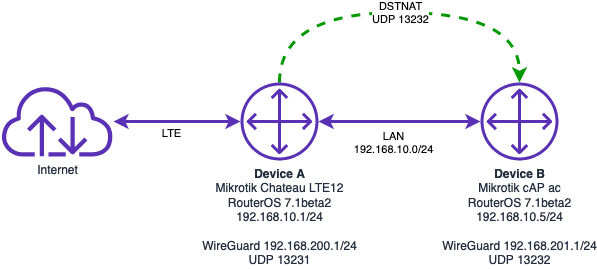
I have two MIkrotik devices. I am testing Wireguard on the internal (behind internet router) Mikrotik device before I send it off to my parents to use behind their ISP router using a port forward (non-Mikrotik router):

Device A - Mikrotik Chateau LTE12 which is internet facing.
Device B - Mikrotik cAP ac; sits behind Device A; both ether interfaces in the same bridge; firewall disabled, no NAT; WireGuard running on UDP port 13232.

There is a DSTNAT rule on Device A which NATs inbound traffic from internet on UDP 13232 to Device B on UDP 13232.

From a device on the internal network I can successfully make a WireGuard connection to Device B but from the internet I get the constant message, “Handshake did not complete after 5 seconds, retrying”.

I have also enabled a different DSTNAT rule through to the Device B routerOS web interface and it works fine from the internet so I know the routing and NAT’ing is working. I also know WireGuard keys are working on Device B because I can connect from the internal network.

I think there is an issue with running WireGuard behind a DSTNAT rule on the Mikrotik device.

Mikrotik.png

Ok, some questions here:

Why do you configure wireguard on device B, not device A?

What does the other side look like? Does it have a public address without NAT? If it does: Things should work without destination NAT if connection is initiated from device behind NAT.

Because as I said, I am setting this device up to send to my parents to use as a wireless access point but also to give me a WireGuard VPN for remote access. They have an ISP issued VoIP router that can’t be swapped out so I need to place the cAP ac behind the ISP router and use a port forward.


What other side? The client? The client is using the WireGuard iOS app, on an iPhone (for testing) over an LTE interface that IS NAT’d. Its the way Telstra here in Australia does things, LTE / 4G clients get a CGNAT’d IP address, not a public routable IP address. In saying this, the same iPhone with its CGNAT IP can connect to all other WireGuard instances I use, but none of these are being DSTNAT’d to from another router.

Ah, I misread and misunderstood some details. So both peers are behind NAT, one is supposed to be reachable via destination NAT.
Never tried that with wireguard, no idea if this should work.

I used to have a setup where port 51820 was mapped from a Mikrotik router to my old laptop, and I connected to it from my current laptop (both linux) using wireguard.

When I upgraded my travel router to 7.1beta2 I cloned into it my current laptop configuratiion and it works like a charm. Of course handshake can only be initiated from my travel router, that knows the IP of my office one, but one it is done it keeps going until my doubly NATted travel router using USB tethering with a mobile operator that has rfc1918 addresses times out the connection and comes out through a different IP.

In other words, it works like a charm. I don’t understand why it does not work for the original poster, but I don’t think it is a problem in the MT software.

I tried quick test with RouterOS as WG server behind NAT with forwarded port, same as OP has, and it works fine. Exactly as expected, since WG shouldn’t care about NAT at all.

Could it be that the LTE stick has a NAT address? CGNAT.

There’s no “LTE stick”. Internet facing router is a Mikrotik Chateau LTE12.

As I said, other port forwards work through to the cAP ac so I know DSTNAT from Device A and all routing is working. I know WireGuard works on Device B because I can connect to it locally and handshake is successful. I also know how to successfully set up WireGuard as I have it running at work and home for remote access.

Device A has a public IP address (no CGNAT) via its LTE modem. I port forward (DSTNAT) UDP 31232 to Device B which has the WireGuard instance.

The client device that his attempting to connect has a CGNAT’d IP address. This same client connects to my other WireGuard instances without any issues.

What routerOS version is running on the Mikrotik router doing your port forward?

I’ve done some more testing and can’t make sense of this.

I can successfully DSTNAT TCP 8080 traffic from the internet to Device B on TCP port 80 (just a test to the Device B webfig app) - DSTNAT works from Device A to Device B:

http://mikrotik2020.duckdns.org


[admin@MikroTik] /ip/firewall> nat/ pr
Flags: X - disabled, I - invalid; D - dynamic
 0    ;;; defconf: masquerade
      chain=srcnat action=masquerade out-interface-list=WAN log=no log-prefix="" ipsec-policy=out,none

 1    ;;; ;;; force DNS
      chain=dstnat action=dst-nat to-addresses=192.168.10.2 protocol=udp src-address=!192.168.10.2 dst-address=!192.168.10.2 in-interface=bridge dst-port=53 log=no log-prefix=""

 2    ;;; ;;; force DNS
      chain=srcnat action=masquerade protocol=udp src-address=192.168.10.0/24 dst-address=192.168.10.2 dst-port=53 log=no log-prefix=""

 3    ;;; DSTNAT for Device B WireGuard
      chain=dstnat action=dst-nat to-addresses=192.168.10.5 to-ports=13232 protocol=udp in-interface=lte1 dst-port=13232 log=no log-prefix=""

 4    ;;; DSTNAT for Device B webfig
      chain=dstnat action=dst-nat to-addresses=192.168.10.5 to-ports=80 protocol=tcp in-interface=lte1 dst-port=8080 log=yes log-prefix="8080_dstnat"
[admin@MikroTik] /ip/firewall>

I can make a successful Wireguard connection to Device B from inside the LAN so I know the Device B WireGuard keys are working.

I still can’t make a connection to the Device B WireGuard from the internet via the DSTNAT rule above. I don’t understand why, if I can DSTNAT the port 8080 traffic, why I wouldn’t be able to DSTNAT the WireGuard traffic.


Device A - 192.168.10.1 / Public IP on WAN:

IP Addresses:

[admin@MikroTik] > ip address/ print
Flags: D - DYNAMIC
Columns: ADDRESS, NETWORK, INTERFACE
  #     ADDRESS            NETWORK         INTERFACE
;;; defconf
  0     192.168.10.1/24    192.168.10.0    ether1
  1  D  123.209.117.65/32  123.209.117.65  lte1
[admin@MikroTik] >

Routes:

[admin@MikroTik] >  ip route/ pr
Flags: D - DYNAMIC; A - ACTIVE; C - CONNECT, m - MODEM
Columns: DST-ADDRESS, GATEWAY, DISTANCE
       DST-ADDRESS       GATEWAY     D
  DAm  0.0.0.0/0         lte1        2
  DAC  123.209.117.65    lte1        0
  DAC  192.168.10.0/24   bridge      0
[admin@MikroTik] >

Firewall Rules:

[admin@MikroTik] > /ip fire ex
# sep/09/2020 20:32:55 by RouterOS 7.1beta2
# software id = 8DD5-P647
#
# model = RBD53G-5HacD2HnD
# serial number = C8CA0CB0B626
/ip firewall address-list
add address=192.168.10.11-192.168.10.255 list=lan_clients
add address=192.168.10.100 list=support
/ip firewall filter
add action=accept chain=input comment="defconf: accept established,related,untracked" connection-state=established,related,untracked
add action=drop chain=input comment="defconf: drop invalid" connection-state=invalid log=yes log-prefix=drop
add action=accept chain=input comment="defconf: accept ICMP" protocol=icmp
add action=accept chain=input comment="defconf: accept to local loopback (for CAPsMAN)" dst-address=127.0.0.1
add action=drop chain=input comment="defconf: drop all not coming from LAN" in-interface-list=!LAN log=yes log-prefix=drop
add action=accept chain=forward comment="defconf: accept in ipsec policy" disabled=yes ipsec-policy=in,ipsec
add action=accept chain=forward comment="defconf: accept out ipsec policy" disabled=yes ipsec-policy=out,ipsec
add action=fasttrack-connection chain=forward comment="defconf: fasttrack" connection-state=established,related
add action=accept chain=forward comment="defconf: accept established,related, untracked" connection-state=established,related,untracked
add action=drop chain=forward comment="defconf: drop invalid" connection-state=invalid
add action=drop chain=forward comment="defconf: drop all from WAN not DSTNATed" connection-nat-state=!dstnat connection-state=new in-interface-list=WAN
/ip firewall nat
add action=masquerade chain=srcnat comment="defconf: masquerade" ipsec-policy=out,none out-interface-list=WAN
add action=dst-nat chain=dstnat comment=";;; force DNS" dst-address=!192.168.10.2 dst-port=53 in-interface=bridge protocol=udp src-address=!192.168.10.2 to-addresses=192.168.10.2
add action=masquerade chain=srcnat comment=";;; force DNS" dst-address=192.168.10.2 dst-port=53 protocol=udp src-address=192.168.10.0/24
add action=dst-nat chain=dstnat comment="DSTNAT for Device B WireGuard" dst-port=13232 in-interface=lte1 protocol=udp to-addresses=192.168.10.5 to-ports=13232
add action=dst-nat chain=dstnat comment="DSTNAT for Device B webfig" dst-port=8080 in-interface=lte1 log=yes log-prefix=8080_dstnat protocol=tcp to-addresses=192.168.10.5 to-ports=80
[admin@MikroTik] >

Device B - 192.168.10.5:

IP Addresses:

[admin@MikroTik] > ip address/ print
Columns: ADDRESS, NETWORK, INTERFACE
  #  ADDRESS           NETWORK        INTERFACE
  0  192.168.10.5/24   192.168.10.0   ether1
  1  192.168.201.1/24  192.168.201.0  wireguard1
[admin@MikroTik] >

Routes:

[admin@MikroTik] > ip route/ pr
Flags: D - DYNAMIC; A - ACTIVE; C - CONNECT, S - STATIC, m - MODEM
Columns: DST-ADDRESS, GATEWAY, DISTANCE
  #       DST-ADDRESS       GATEWAY       D
  0   AS  0.0.0.0/0         192.168.10.1  1
     DAC  192.168.10.0/24   bridge        0
     DAC  192.168.201.0/24  wireguard1    0
[admin@MikroTik] >

Firewall Rules:

[admin@MikroTik] > /ip fire ex
# sep/09/2020 20:28:42 by RouterOS 7.1beta2
# software id = 50RA-6BBJ
#
# model = RBcAPGi-5acD2nD
# serial number = BECD0C73D111
[admin@MikroTik] >

WireGuard Config:

[admin@MikroTik] /interface/wireguard> export
# sep/09/2020 20:41:56 by RouterOS 7.1beta2
# software id = 50RA-6BBJ
#
# model = RBcAPGi-5acD2nD
# serial number = BECD0C73D111
/interface wireguard
add listen-port=13232 mtu=1420 name=wireguard1 private-key="xxxxxxxxxxxxxxxxxxxxxxxxxxxxx"
/interface wireguard peers
add allowed-address=192.168.201.10/32 endpoint=100.103.197.44:61497 interface=wireguard1 persistent-keepalive=25 preshared-key="xxxxxxxxxxxxxxxxxxxxxxxxxxxxx" public-key=\
    "meLYM9lu4ViXIOkwB8qCre452hBwV9asGJ/2DIzuiCQ="
[admin@MikroTik] /interface/wireguard>

I am hoping this is just something stupid in the config but I feel its a bug in WireGuard in routerOS 7. I have done this type on thing for years on Ubiquiti EdgeOS without an issue. I just don’t think the problem is in my config.
Have you tried to access Wireguard on device A via port 8080 and set up DSTNAT to device B to the Wireguard port. Some ISPs block various ports. If port 8080 (TCP) works, it should also work on WG.

As expected it behaves exactly the same. Packets were always getting through the DSTNAT to the WireGuard instance on Device B. Something happens with the replies to the client attempting connection.

Is there are firewall rule that does source NAT just after destination NAT for the incoming packet? Possibly that confuses wireguard…
What interfaces are in interface list “WAN”?

SRCNAT / masquerade rule is above the DSTNAT rule for Device B WireGuard instance:

/ip firewall nat
add action=masquerade chain=srcnat comment="defconf: masquerade" ipsec-policy=out,none \
    out-interface-list=WAN
add action=dst-nat chain=dstnat comment=";;; force DNS" disabled=yes dst-address=!192.168.10.2 \
    dst-port=53 in-interface=bridge protocol=udp src-address=!192.168.10.2 to-addresses=192.168.10.2
add action=masquerade chain=srcnat comment=";;; force DNS" disabled=yes dst-address=192.168.10.2 \
    dst-port=53 protocol=udp src-address=192.168.10.0/24
add action=dst-nat chain=dstnat comment="DSTNAT for Device B WireGuard" dst-port=13232 in-interface=\
    lte1 protocol=udp to-addresses=192.168.10.5 to-ports=13232
add action=dst-nat chain=dstnat comment="DSTNAT for Device B webfig" disabled=yes dst-port=8080 \
    in-interface=lte1 log=yes log-prefix=8080_dstnat protocol=tcp to-addresses=192.168.10.5 \
    to-ports=13232
[admin@MikroTik] >

WAN interface list (Device A):

/interface list member
add comment=defconf interface=bridge list=LAN
add comment=defconf interface=lte1 list=WAN
[admin@MikroTik] >

Someone over in the Reddit Mikrotik group has, today, responded to my initial attempts to troubleshoot and has verified the issue when DSTNAT’ing WireGuard traffic to Device B from Device A.

My device A has 6.45.8, but it has nothing to do with it, you can use literally any RouterOS version. Device A doesn’t do anything related to WG, it just forwards one udp port to device B and doesn’t care what’s inside those packets.

I’d try packet sniffer on client device, to verify that response packets from server are making it back to it. There’s no reason why they shouldn’t, but for the lack of better ideas… Only you may need to use something other than iPhone, I’m not familiar with it, but I somehow doubt that it has packet sniffer.

But there’s one thing I noticed now, you have 192.168.201.0/24 as address on wireguard1 interface. But it’s not correct address, with .0 at the end it’s subnet address. Change it to something else, e.g. .1.

That was a configuration typo during testing! I have fixed now and it behaves the same. I am away from home tonight so I can get a different client set up and perform a Wireshark capture.

[admin@MikroTik] > ip add print
Columns: ADDRESS, NETWORK, INTERFACE
  #  ADDRESS           NETWORK        INTERFACE
  0  192.168.10.5/24   192.168.10.0   ether1
  1  192.168.201.1/24  192.168.201.0  wireguard1
[admin@MikroTik] >

After a lot of messing around I have captured the USP packet stream for both the client and Device B.

https://transfer.sh/Poqim/client_connect.pcapng

172.20.1.195 - hotel room IP address
124.19.6.93 - hotel WAN IP address
123.209.117.65 - Device A WAN IP address (LTE modem interface where DSTNAT to 192.168.10.5 is done)
192.168.10.5 - Device B LAN IP aaddress (wireguard server on UDP 13232)

And how exactly did you capture this? It looks like strange mix. Some packets are wrapped in TZSP, from 192.168.10.5 to 192.168.200.11 (what’s that?), while others look like direct capture from interface. But if it’s captured using packet sniffer on 192.168.10.5, as TZSP suggests, then it shouldn’t see hotel’s 172.20.1.195, but it’s in there.

Also, how does client’s config look like? I don’t think you posted it before.