Hello My friends..! so anyone try to use wireguard on android phone, and the connection work proberly ..?
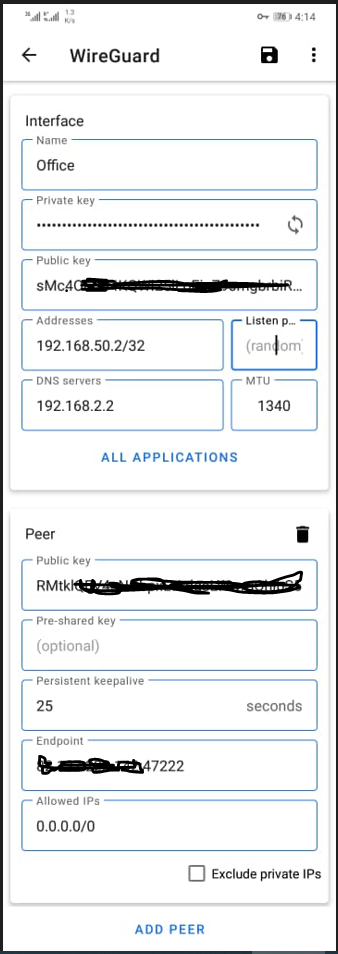
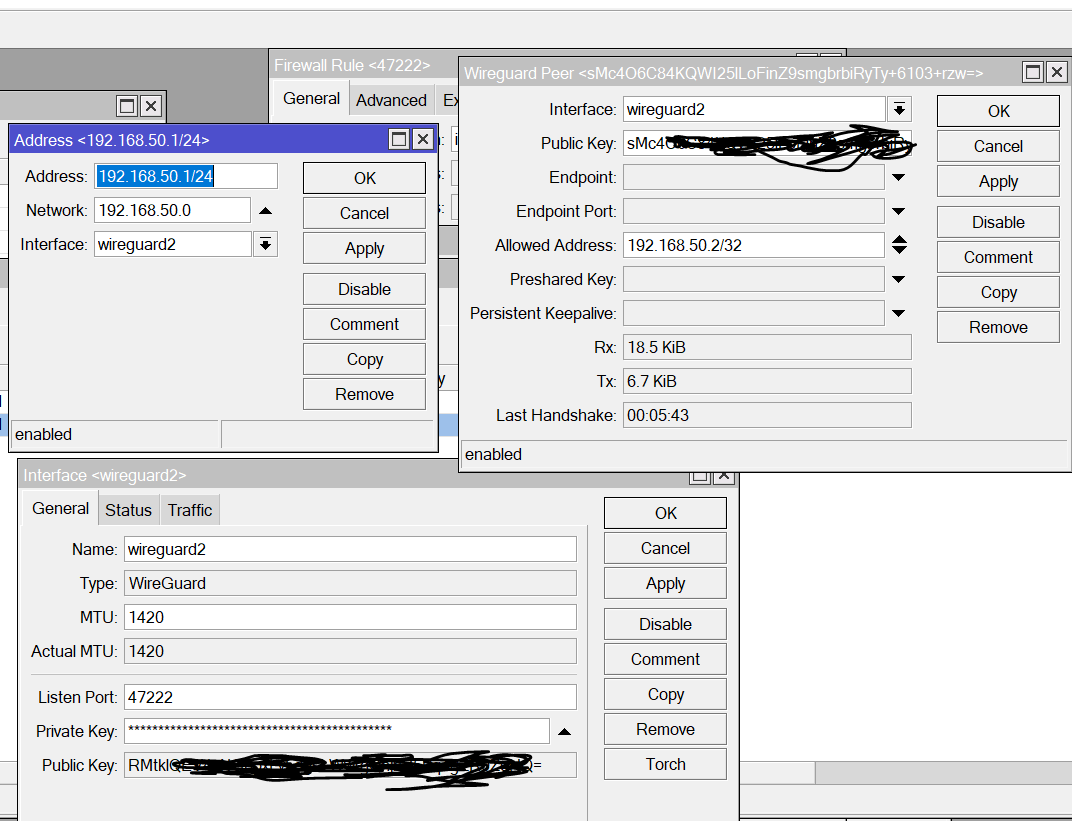
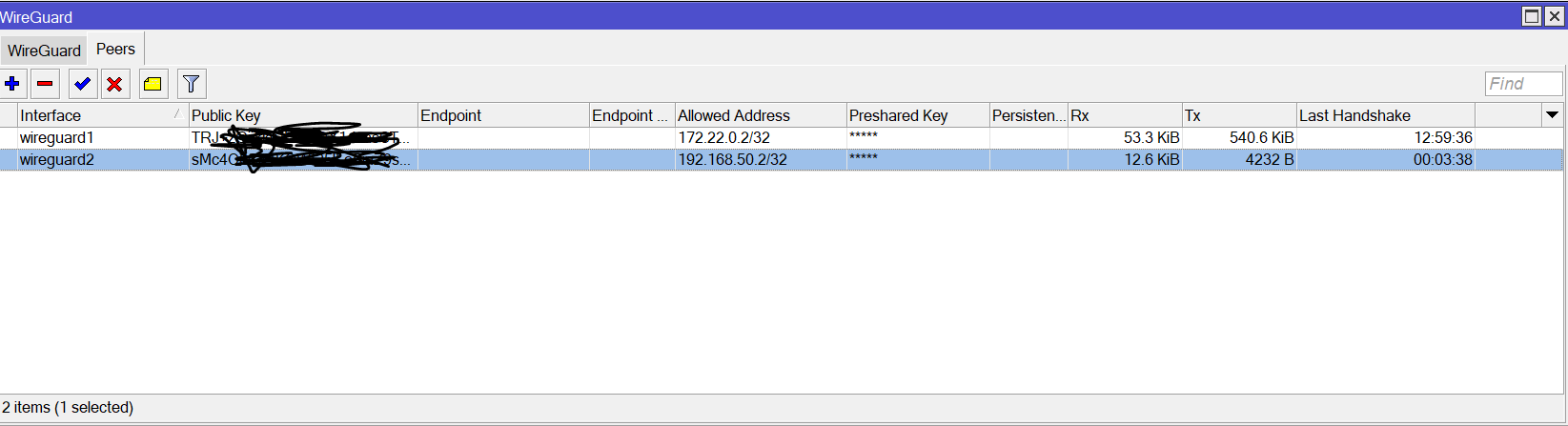
this is my configuration in both mikrotik and in my phone and until now i don’t have a connection .
side Note-1: i previously setup wireguard on my pc and the connection work normaly.
Side Note-2: in endpoint section i put my public ip address
Side Note-3:i set up a firewall rule in my mikrotik router for this connection as follow
chain:input
protocol:UDP
DStPort:47222
action:accept
Works fine here.
In your screenshots I see counters on both Rx / Tx and "last handshake values so it seems a connection WAS established.
I would think THE CONNECTION itself is working, but perhaps DNS not working ?
What do you mean “I don’t have a connection” ?
Difference I see when I look at my settings in Android (and please provide /wireguard export excluding the keys):
MTU left auto
Persistent keepalive left empty
What you can do (besides above):
Check if the firewall filter rule is hit
Check if the peer shows on the router
yes i notice that but the connection is not exist, every 1 minute i get 2KiB -give or take- i compare those value with my PC that already have an active wireguard so there is a big difference in the value
i try your setting but still no connection ..
so what about allow address, is this 0.0.0.0/0 good..?
in my windows machine wireguard i remember that when i change the allowed address from 0.0.0.0/0 to 172.16.0.1/24 -that's represent My LAN address- the connection became active. but in my android scenario i cant change the allowed address to any thing have /24 i don't know why ..! so any suggestion..?
0.0.0.0/0 is fine, I also have it on my Android phone. (meaning = everything is pushed through the tunnel)
but remember, make sure your Mikrotik is configured correctly then to allow this Wireguard-client to make DNS-lookups, make sure it has NAT-config to access internet if the range of wireguard-peer is differently from your Mikrotik-LAN/Bridge range etc.
Meaning, putting 0.0.0.0/0 has consequences! If you only put like 192.168.0.0/16 or something then nothing destined for “Internet” is going to the central Mikrotik! Only packets with destinations 192.168.0.0/16
I don’t use any keepalives on my phone-config, that field is empty.
As indicated above (and verified on my setup):
Leave MTU to auto
No persistent keepalive
0.0.0.0/0 is perfectly fine
The fact you see TX/RX moving on that peer, means there is handshake so both peers see each other.
192.168.2.2 is your local DNS server ? Already tried replacing it with the more common (and Evil  ) Google DNS 8.8.8.8 (just to rule out that problem) ?
Then I am more interested in the complete config on your MT device (masquerade sensitive info like serial number, keys, etc…)
terminal: /export show-sensitive file=
And post here between [__code] quotes.
Complete config is needed for sure. /export (minus serial number and any public WANIP info as well).
Two comments:
First, try using 192.168.50.1 as DNS server on the android client, rest looks fine
Second, which config will show are the firewall rules on the MT device, which may not be set up right.
The return route from the client will be auto created at the MT so thats not an issue.
so this is my MT configuration .. i try all this stuff but until now it seems that there is no traffic between my android device and my mikrotik router
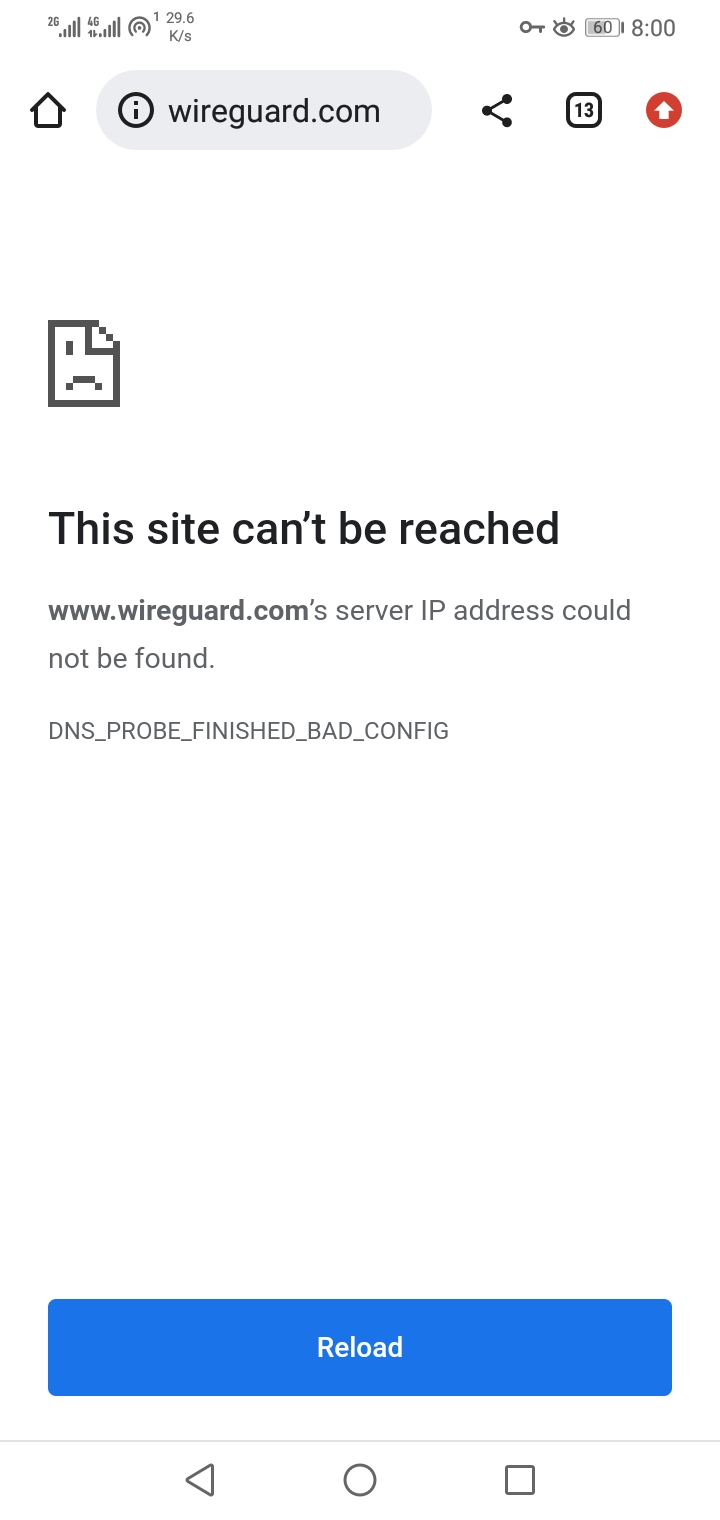
Side Note: when i turn the wireguard tunnel on my android on, i lose the internet connection, as you see in the screen below
MTR.rsc (6.72 KB)
(1) Why the duplicate pool?
/ip pool
add name=dhcp_pool1 ranges=192.168.10.2-192.168.10.200
add name=dhcp_pool2 ranges=192.168.10.2-192.168.10.200
add name=dhcp_pool3 ranges=192.168.1.100-192.168.1.150
add name=l2tp ranges=192.168.100.1-192.168.100.200
(2) What is the purpose of this rule…??
add action=passthrough chain=forward
Its best practice to put all rules in one chain together so they are easy to read and less prone to error
(3) Wouldnt hurt to add a forward chain rule
add chain=forward action=accept in-interface=wireguard2 out-interface=ether1
1- the duplicate rule is for testing purpose so no thing significant
2-most firewall rules that you see here is from mikrotik default firewall rules, so this passthrough is one of them, really i don’t know what is the purpose of this rule
3-yes i add this rule but still no connection
Not that it probably makes a difference but the MTU on the android does not match the setting on the MT device.
Other than that I dont see the issue in plain sight.
What interface list wireguard belongs to ?
I was looking for the drop rule to see if it is allowed to pass but those firewall rules are a bit too messy to my liking… especially when reading that config on a phone screen.
It does not, but the forward chain rules are basically non-existant and thus everything is allowed (poor setup).
I concur, if it was my MT, I would remove all the ddos and other crappy rules and firewall address lists, and go with a modern clean set of firewall rules…
/ip firewall filter
{Input Chain}
add action=accept chain=input comment=“defconf: accept established,related,untracked” connection-state=established,related,untracked
add action=drop chain=input comment=“defconf: drop invalid” connection-state=invalid
add action=accept chain=input comment=“defconf: accept ICMP” protocol=icmp
add action=accept chain=input comment=“android handshake” dst-port=47222 protocol=udp
add action=accept chain=input in-interface-list=LAN
add action=drop chain=input comment=“drop all else”
{forward chain}
add action=fasttrack-connection chain=forward comment=“defconf: fasttrack” connection-state=established,related
add action=accept chain=forward comment=“defconf: accept established,related, untracked” connection-state=established,related,untracked
add action=drop chain=forward comment=“defconf: drop invalid” connection-state=invalid
add action=accept chain=forward comment=“allow internet traffic” in-interface-list=LAN out-interface-list=WAN
add action=accept chain=forward comment=“allow wg to internet” in-interface=wireguard out-interface-list=WAN
add action=accept chain=forward comment=“allow port forwarding” connection-nat-state=dstnat
add action=drop chain=forward
/ip firewall nat
add action=masquerade chain=srcnat comment=“defconf: masquerade” out-interface-list=WAN
In your example wireguard interface also needs to be added to LAN list or you will not be able to access the router nor forward traffic.
Correct ?
Nope, did not presume LAN list since the fellow seems to avoid list as you can see I added a wg to internet forward rule, but concur one small change to what I have would be needed.
I suppose one should change all WAN interface-list entries to interface=ether1 as well…
{Input Chain}
add action=accept chain=input comment=“android handshake” dst-port=47222 protocol=udp
add action=accept chain=input in-interface=wireguard comment=“android dns udp” dst-port=53 protocol=udp
add action=accept chain=input in-interface=wireguard comment=“android dns tcp” dst-port=53 protocol=tcp
{forward chain}
add action=accept chain=forward comment=“allow wg to internet” in-interface=wireguard out-interface=ether1
I do agree if he used lists then
add wireguard2 list=LAN
Then Would simplify matters to such that the three rules i created would not be required and would be covered by already existing two rules.
{Input Chain}
add action=accept chain=input comment=“android handshake” dst-port=47222 protocol=udp
add action=accept chain=input in-interface-list=LAN
add action=accept chain=forward comment=“allow internet traffic” in-interface-list=LAN out-interface=ether1
the MTU in client side must be lower than server side inorder for this connection to work..! .however, i try alot of different values but with no avail.
i disable my rules and put your rules, and know i am out of mikrotik so your rule kick me out, so know i have to go back to my office to disable the rule. my wireguard tunnel that’s already active in my windows machine is know unactive and also i can’t reach my mikrotik via puplic ip …
so this is my last config
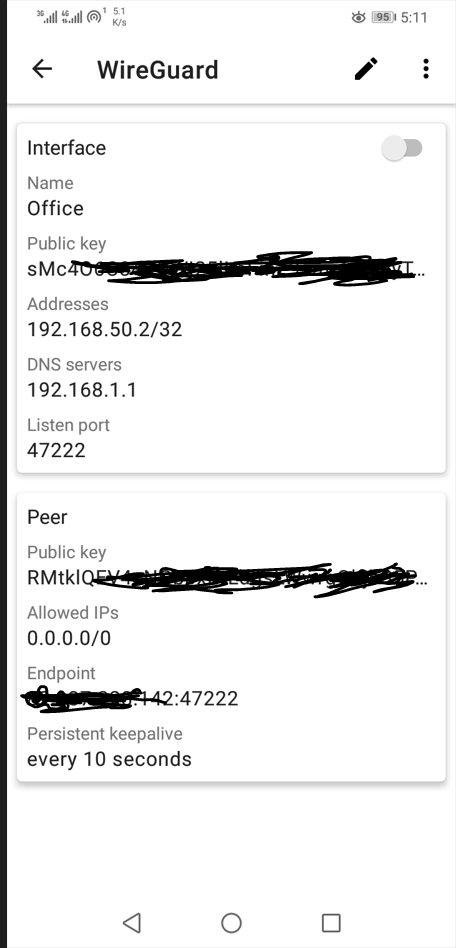
:You are missing the interface list and interface list members in your config… otherwise you would not have been locked out.
If I had known you were goiing to get rid of all your rules I would have provided additional info