WireGuard on Mikrotik with 2 WANs (Public + CGNAT) – routing issue

Hello,

I’ve been trying several approaches but haven’t found a working solution for my setup:

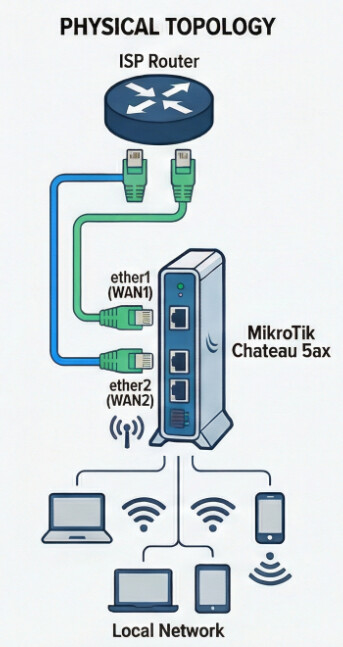
  • I have 2 WAN IPs from my ISP:

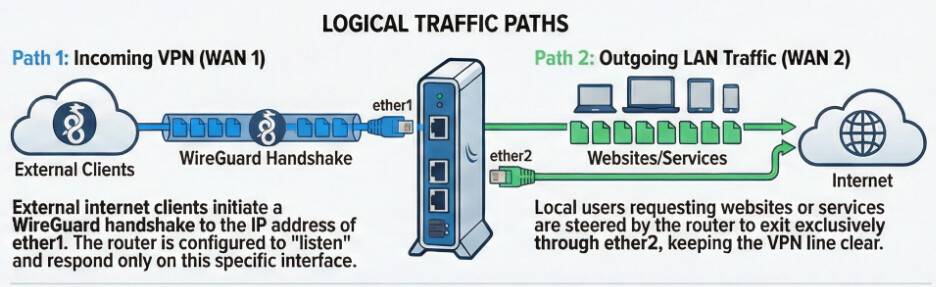
    • WAN1 (ether1) – public IP, should accept incoming WireGuard connections from outside.

    • WAN2 (ether2) – behind CGNAT, should be used for normal internet traffic from local LAN clients.

  • Requirements:

    • WireGuard clients must access the local LAN.

    • WireGuard clients should also have internet access, through WAN2.

  • Hardware/Software:

    • Mikrotik Chateau 5AX

    • RouterOS 7.22rc

    • Connected via 2 ports to ISP modem

I’ve noticed that incoming UDP packets on ether1 reach the interface but never get processed by wg1 — the packets even show up on ether2 sometimes. I suspect this is related to routing tables / VRF, but I’m not sure how to configure WireGuard and routing marks properly.

Does anyone have an idea what the optimal configuration would be for this scenario? Any suggestions for routing or WireGuard setup that would satisfy these requirements would be appreciated.

Thanks in advance,
Tim

Additional diagram to clarify this case

Hi Something like the following might work.

/routing table
add disabled=no fib name=VIA-WAN1

/routing rule
add action=lookup disabled=no min-prefix=0 table=main
add action=lookup-only-in-table disabled=no src-address=WAN1_IP table=VIA-WAN1

/ip route
add disabled=no distance=1 dst-address=0.0.0.0/0 gateway=WAN1_GATEWAY_IP routing-table=VIA-WAN1 scope=\
    30 suppress-hw-offload=no target-scope=10

Optionally?? (needed if multiple IP addresses on WAN1)
Move below rule to the top of the nat rules.

/ip firewall nat
add action=accept chain=srcnat out-interface=WAN1 src-address=WAN1_IP

Note:

In recent versions of RouterOS, you can setup the alternate routing table /ip route entry shown above via the dhcp client settings.

Alternate option, WAN1 IP Non static (Or maybe better in general)

If your wan1 IP is not static you can make an inbound DST-NAT rule to a static IP address on your router.
(eg. Add one to the LO interface) And use that instead for the /routing rule.
This is a good general purpose method and also means you don't need the above source nat rule.

eg.

/ip address
add address=192.168.87.1 interface=lo network=192.168.87.1

/ip firewall nat
add action=dst-nat chain=dstnat dst-port=WG-PORT in-interface=WAN1 protocol=udp to-addresses=\
    192.168.87.1

Then routing rules become

/routing rule
add action=lookup disabled=no min-prefix=0 table=main
add action=lookup-only-in-table disabled=no src-address=192.168.87.1 table=VIA_WAN1

And setup dhcp to create the VIA-WAN1 /ip route entry.

1 Like

Update: 7.22rc3 has been released that fixes the issue below, downgrade to 7.21.3 is no longer required.

Old warning because of issues with 7.22beta1-7.22rc2

Because you are running 7.22rc and we'll be using routing rules, try to downgrade the router to 7.21.3 first! The reason is that the current 7.22rc handling of the routing rule table is in a buggy and incompatible state with past and future RouterOS versions, you can follow up the discussion chain between MikroTik @mrz and I for more details. You should avoid adding new routing rules for the versions 7.22beta1-7.22rc2!

Once you've downgraded to 7.21.3 upgraded to 7.22rc3, you can try this idea (that does not require any NAT workaround or the new WireGuard VRF support).

The idea, which is the reverse of what @rplant proposes above, is to let the main routing table have WAN1 as primary and WAN2 as fail-over. Then to add another routing table where it's the reverse, WAN2 is primary and WAN1 is failover. And then add routing rules to steer all LAN clients to the 2nd table. It works with dynamic WAN IP addresses and fasttrack.

  • First, create the 2nd routing table:

    /routing table
    add disabled=no fib name=prefer-WAN2
    
  • Assuming your WANs use DHCP client, you can configure the clients like following to automatically populate the two routing tables with default routes:

    /ip dhcp-client
    add default-route-tables=main:1,prefer-WAN2:5 interface=ether1 name=client1
    add default-route-tables=main:5,prefer-WAN2:1 interface=ether2 name=client2
    
  • Populate the routing rules table with rules for all your LAN subnet, for example assuming your LAN and VLANs have the subnets 192.168.88.0/24, 172.24.0.0/16, 10.20.30.0/24 (*):

    /routing rule
    add action=lookup min-prefix=0 table=main
    add action=lookup table=prefer-WAN2 src-address=192.168.88.0/24
    add action=lookup table=prefer-WAN2 src-address=172.24.0.0/16
    add action=lookup table=prefer-WAN2 src-address=10.20.30.0/24
    # ...
    # add more rules if you have more subnets
    

No NAT is requires, except for the standard SRCNAT masquerade for out-interface=ether1 and out-interface=ether2. The LAN clients will use WAN2 by default, while the router itself uses WAN1.


(*) As alternative for the above routing rules, instead of listing the subnets, you can also list the interfaces instead, example:

/routing rule
add action=lookup min-prefix=0 table=main
add action=lookup table=prefer-WAN2 dst-address=0.0.0.0/0 interface=bridge1
add action=lookup table=prefer-WAN2 dst-address=0.0.0.0/0 interface=vlan123
add action=lookup table=prefer-WAN2 dst-address=0.0.0.0/0 interface=wireguard1
# ...
# add more rules if you have more LAN interfaces

Remove dst-address=0.0.0.0/0 if you want to apply to IPv6 too.

Hi,

@RPLANT and @CGGXANNX – thanks for the tips.

I will first upgrade to 7.22rc3, since it is available, and then I will try the suggested solutions.

WAN1 has a static public IP address. WAN2 is behind CGNAT and receives a dynamic IP from the ISP.

I will inform you about the test results soon :slightly_smiling_face:

Best regards,

Tim

Update after testing:

I upgraded to RouterOS 7.22rc3.

As a first attempt, I applied the solution proposed by @CGGXANNX — creating a separate routing table for WAN1 and adding a routing rule to ensure that traffic sourced from the public IP uses that table.

Also, I added NAT masquerade for both WAN interfaces as suggested, so all traffic is properly NATed to the respective WAN.

After completing the setup, everything works perfectly.

WireGuard now accepts connections via WAN1, and LAN traffic continues to use WAN2 as intended.
The internet connection is also redundant now.

What I also realized is how simple and clean this solution actually is in my case — once I understood how routing tables and rules work, the setup became very logical.

The more I work with MikroTik, the more I appreciate the flexibility and control RouterOS provides :slightly_smiling_face:

@CGGXANNX and @RPLANT — thanks again for the help!

Best regards,
Tim

Hello again,

One strange thing I found in test release 7.22rc4 – when I edit a routing rule in the UI, and I do not choose any chain, then apply any other changes, it assigns some empty chain (chain=""), which makes the rule invalid.

Am I doing something wrong, or is it a bug in the UI rule editor?

Below is how it looks after just adding a simple comment in the UI:

/routing rule print
Flags: X - DISABLED, I - INACTIVE; * - DEFAULT

0 I  ;;; all-not-managed-to-main
      ;;; invalid chain name
      action=lookup table=main min-prefix=0 chain=""

1 I  ;;; Other-to-ether1
      ;;; invalid chain name
      src-address=192.168.55.20/32 action=lookup table=main chain=""

2 I  ;;; Lan-to-ether2
      ;;; invalid chain name
      src-address=192.168.55.0/24 action=lookup table=prefer-WAN2 chain=""

3 I  ;;; Wireguard-to-internet
      ;;; invalid chain name
      interface=wg1 action=lookup table=prefer-WAN2 chain=""

It seems like the UI forces a chain="" even if none is selected, which breaks the rule.

Has anyone else seen this behavior in 7.22rc4?

BR
Tim

7.22 is already released as stable.

Please check discussion for this bug.

It's a bug in the integration with WinBox (probably the specified default value sent to WinBox is wrongly set to "" instead of nothing), either use only the CLI to add/edit routing rules, or you can set the chain to user when adding/editing them with WinBox for now.

OK thanks .

Can you share a link to place where can i find a simple explanation of how to use those chains ?

BR

Tim

This is the section in the document, but it's currently in a Frankenstein state:

IP Routing - RouterOS - MikroTik Documentation

You'll notice that it mentions "rule 3" and "rule 4" that you see nowhere. That's because a part that has not yet been updated. See my post in another thread.


EDIT: Documentation has been updated and old mentions of the rules have been removed.

Thanks.

Hi everyone,

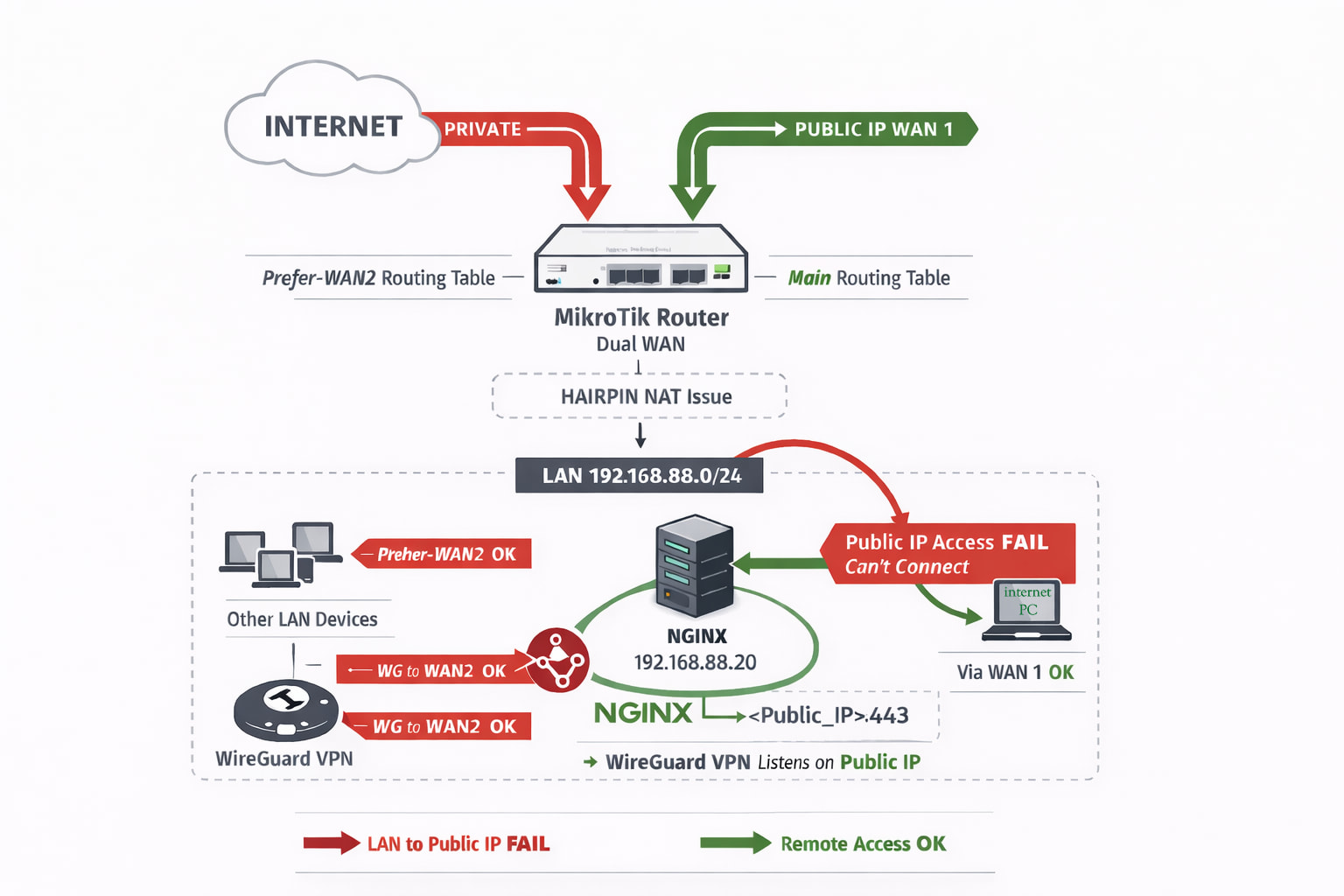
Regarding the main topic - I’m setting up an Nginx server that should be accessible via WAN1 (public IP), and I want it to have a LAN IP in the same subnet as other LAN devices: 192.168.88.20.

Other LAN devices use a routing table that sends traffic through WAN2.

My goal is for all traffic from this device (.20 Nginx ) to use the main routing table (routing via WAN1 ). The internal WireGuard server will also use the main table, while the rest of the LAN should follow prefer-WAN2.

Here are my current routing rules:

/routing rule print Flags: X - DISABLED, I - INACTIVE; * - DEFAULT
0    ;;; all-not-managed-to-main action=lookup table=main min-prefix=0

1    ;;; Headscale + Nginx src-address=192.168.88.20/32 action=lookup table=main

2    ;;; LAN-to-ether2 src-address=192.168.88.0/24 action=lookup table=prefer-WAN2

3    ;;; WireGuard-to-internet interface=wg1 action=lookup table=prefer-WAN2

Nginx diagnostic issue

From the server itself (.20), these commands work correctly:

curl -k https://192.168.88.20/health
{"status":"pass"}

curl -k https://localhost/health
{"status":"pass"}

But these do not work locally from Nginx server or LAN devices :

curl -k https://<Public IP>/health
curl -k https://<Public domain>/health
# Error:
# curl: (7) Failed to connect to <Public IP> port 443 after 0 ms: Couldn't connect to server

Interestingly, these same commands work fine from the internet.

I have configured hairpin NAT:

0 ;;; Hairpin NAT
   chain=srcnat action=masquerade src-address=192.168.88.0/24 dst-address=<Public IP> log=no log-prefix=""

Whole NAT :
/ip firewall nat print
Flags: X - DISABLED, I - INVALID; D - DYNAMIC
0 ;;; Hairpin NAT
chain=srcnat action=masquerade src-address=192.168.88.0/24 dst-address= log=no log-prefix=""

1 ;;; Nginx 443
chain=dstnat action=dst-nat to-addresses=192.168.88.20 to-ports=443 protocol=tcp in-interface=ether1 dst-port=443 log=no log-prefix=""

2 ;;; Nginx 80
chain=dstnat action=dst-nat to-addresses=192.168.88.20 to-ports=80 protocol=tcp in-interface=ether1 dst-port=80 log=no log-prefix=""

3 ;;; Nginx 3478
chain=dstnat action=dst-nat to-addresses=192.168.88.20 to-ports=3478 protocol=udp in-interface=ether1 dst-port=3478 log=no log-prefix=""

4 ;;; defconf: masquerade
chain=srcnat action=masquerade out-interface=ether2 log=no log-prefix="" ipsec-policy=out,none

5 ;;; pihole
chain=srcnat action=masquerade src-address=172.17.0.0/24 log=no log-prefix=""

…but it does not solve the issue.


When I enter my public IP in a browser from a computer on the local LAN, the MikroTik router's web page opens instead of being redirected to the Nginx server. However, accessing the same IP from the Internet works correctly and reaches Nginx.
Disabling WWW services on router does not solve the issue.**

Question:**

  • Is my routing rule setup correct for this scenario?

  • Why can’t I reach Nginx from LAN via public IP / domain, even with hairpin NAT?

  • Could this dual WAN / routing table setup cause unexpected issues with NAT or traffic flow?

Thanks in advance for any advice!
Tim
Update:
I believe I have solved the issue, and it now works as intended. Here is what I did:

  1. Added regular Hairpin NAT:
chain=srcnat action=masquerade src-address=192.168.88.0/24 dst-address=192.168.88.20
  1. Added additional dst-nat rules (one for each port):
chain=dstnat action=dst-nat to-addresses=192.168.88.20 to-ports=443 protocol=tcp dst-address=<Public_IP> dst-port=443

This is probably not the perfect solution, and CGGXANNX or RPLANT would likely come up with a better one. :slightly_smiling_face:

I hope this helps someone.

Tim