Wireguard VPN setup

Oh, that is an old config, in new config i don’t have src addresses at all, I deleted the old config on all routers and started over. I only have endpoint addresses (mikrotik’s own DDNS addresses).

I did some tests, I open 2 ping windows on R1 and i start pinging both of routers, and router that i added the last needs only about 1 minute to start responding to the ping.

The first router is not responding at all except if i have laptop connected for example. If laptop is connected it works like it should.

Other router doesn’t have anything connected to it.

Took me a while to get it working on my Chromecast (with GoogleTV) yesterday because the WireGuard-app is very basic on that thing. But indeed works fine once done, my Plex server now sees it coming in as a “remote” client etc.
I’ll give it a try when I’m away from home and want to access some home-resources (like Plex)

So this is R1 config (main, office router)

# jan/17/2022 09:44:17 by RouterOS 7.1.1
# software id = CD7M-66CD
#
# model = RB952Ui-5ac2nD
# serial number = **********
/interface bridge
add admin-mac=********** auto-mac=no comment=defconf name=bridge
/interface wireless
set [ find default-name=wlan1 ] band=2ghz-g/n country=croatia disabled=no \
    distance=indoors frequency=2472 installation=indoor mode=ap-bridge ssid=\
    "Fidens 2.4G" wireless-protocol=802.11
set [ find default-name=wlan2 ] band=5ghz-a/n/ac channel-width=\
    20/40/80mhz-XXXX country=croatia disabled=no distance=indoors frequency=\
    auto installation=indoor mode=ap-bridge ssid="Fidens 5G" \
    wireless-protocol=802.11
/interface wireguard
add listen-port=***** mtu=1420 name=wg1
/interface list
add comment=defconf name=WAN
add comment=defconf name=LAN
/interface lte apn
set [ find default=yes ] ip-type=ipv4
/interface wireless security-profiles
set [ find default=yes ] authentication-types=wpa-psk,wpa2-psk mode=\
    dynamic-keys supplicant-identity=MikroTik
/ip ipsec proposal
set [ find default=yes ] auth-algorithms=sha512
/ip pool
add name=dhcp ranges=192.168.1.1-192.168.1.254
add name=vpn ranges=192.168.89.2-192.168.89.255
/ip dhcp-server
add address-pool=dhcp interface=bridge name=defconf
/ppp profile
add local-address=192.168.89.1 name=VPN_Ured remote-address=vpn
set *FFFFFFFE local-address=192.168.89.1 remote-address=vpn
/interface bridge port
add bridge=bridge comment=defconf ingress-filtering=no interface=ether2
add bridge=bridge comment=defconf ingress-filtering=no interface=ether3
add comment=defconf ingress-filtering=no interface=ether4
add bridge=bridge comment=defconf ingress-filtering=no interface=ether5
add bridge=bridge comment=defconf ingress-filtering=no interface=wlan1
add bridge=bridge comment=defconf ingress-filtering=no interface=wlan2
/ip neighbor discovery-settings
set discover-interface-list=LAN
/ip settings
set max-neighbor-entries=8192
/ipv6 settings
set disable-ipv6=yes max-neighbor-entries=8192
/interface detect-internet
set detect-interface-list=all
/interface l2tp-server server
set authentication=mschap2 default-profile=VPN_Ured enabled=yes use-ipsec=\
    required
/interface list member
add comment=defconf interface=bridge list=LAN
add comment=defconf interface=ether1 list=WAN
/interface sstp-server server
set default-profile=default-encryption
/interface wireguard peers
add allowed-address=192.168.25.0/24,10.255.255.0/24 endpoint-address=\
    **********.sn.mynetname.net endpoint-port=***** interface=wg1 \
    public-key="********************************************"
add allowed-address=192.168.20.0/24,10.255.255.0/24 endpoint-address=\
    **********.sn.mynetname.net endpoint-port=***** interface=wg1 \
    public-key="********************************************"
/ip address
add address=192.168.1.1/24 comment=defconf interface=bridge network=\
    192.168.1.0
add address=10.255.255.1/29 interface=wg1 network=10.255.255.0
/ip arp

/ip cloud
set ddns-enabled=yes ddns-update-interval=15m
/ip dhcp-client
add comment=defconf interface=ether1
/ip dhcp-server lease

/ip dhcp-server network
add address=192.168.1.0/24 comment=defconf gateway=192.168.1.1 netmask=24
/ip dns
set allow-remote-requests=yes
/ip dns static
add address=192.168.1.1 comment=defconf name=router.lan
/ip firewall filter
add action=accept chain=input comment=\
    "defconf: accept established,related,untracked" connection-state=\
    established,related,untracked
add action=accept chain=input comment="allow IPsec NAT" dst-port=4500 \
    protocol=udp
add action=accept chain=input comment="allow IKE" dst-port=500 protocol=udp
add action=accept chain=input comment="allow l2tp" dst-port=1701 \
    ipsec-policy=in,ipsec protocol=udp
add action=accept chain=input comment="allow pptp" disabled=yes dst-port=1723 \
    protocol=tcp
add action=accept chain=input comment="allow sstp" disabled=yes dst-port=443 \
    protocol=tcp
add action=accept chain=forward comment="defconf: accept in ipsec policy" \
    ipsec-policy=in,ipsec
add action=accept chain=forward comment="defconf: accept out ipsec policy" \
    ipsec-policy=out,ipsec
add action=accept chain=input comment=Wireguard dst-port=30700 protocol=udp
add action=accept chain=forward comment=\
    "Wireguard FWD GRAWE_VDC_HEINZELOVA -> URED" dst-address=192.168.1.0/24 \
    src-address=192.168.25.0/24
add action=accept chain=forward comment=\
    "Wireguard FWD URED -> GRAWE_VDC_HEINZELOVA" dst-address=192.168.25.0/24 \
    src-address=192.168.1.0/24
add action=accept chain=forward comment="Wireguard FWD FIDENS_LTE - > URED" \
    dst-address=192.168.1.0/24 src-address=192.168.20.0/24
add action=accept chain=forward comment="Wireguard FWD URED -> FIDENS_LTE" \
    dst-address=192.168.20.0/24 src-address=192.168.1.0/24
add action=accept chain=input comment="allow ipsec-esp" protocol=ipsec-esp
add action=accept chain=input comment="defconf: accept ICMP" protocol=icmp
add action=accept chain=input comment=\
    "defconf: accept to local loopback (for CAPsMAN)" dst-address=127.0.0.1
add action=accept chain=forward comment=\
    "defconf: accept established,related, untracked" connection-state=\
    established,related,untracked
add action=drop chain=input comment="defconf: drop invalid" connection-state=\
    invalid
add action=drop chain=input comment="defconf: drop all not coming from LAN" \
    in-interface-list=!LAN
add action=fasttrack-connection chain=forward comment="defconf: fasttrack" \
    connection-state=established,related hw-offload=yes
add action=drop chain=forward comment="defconf: drop invalid" \
    connection-state=invalid
add action=drop chain=forward comment=\
    "defconf: drop all from WAN not DSTNATed" connection-nat-state=!dstnat \
    connection-state=new in-interface-list=WAN
/ip firewall nat
add action=masquerade chain=srcnat comment="defconf: masquerade" \
    ipsec-policy=out,none out-interface-list=WAN
add action=dst-nat chain=dstnat comment="Port 21 za FTP server" dst-address=\
    192.168.10.8 dst-port=21 in-interface=ether1 protocol=tcp to-addresses=\
    192.168.1.39 to-ports=21
add action=masquerade chain=srcnat comment="masq. vpn traffic" src-address=\
    192.168.89.0/24
add action=dst-nat chain=dstnat comment="Divar IP kockica" disabled=yes \
    dst-address=192.168.10.8 dst-port=442 in-interface=ether1 protocol=tcp \
    to-addresses=192.168.1.139 to-ports=442
add action=dst-nat chain=dstnat comment="VDC BL2/0 - VPN" disabled=yes \
    dst-address=192.168.10.8 dst-port=500 in-interface=ether1 protocol=udp \
    to-addresses=192.168.1.6 to-ports=500
add action=dst-nat chain=dstnat disabled=yes dst-address=192.168.10.8 \
    dst-port=4500 in-interface=ether1 protocol=udp to-addresses=192.168.1.6 \
    to-ports=4500
/ip firewall service-port
set udplite ports=500
/ip route
add dst-address=192.168.25.0/24 gateway=wg1
add dst-address=192.168.20.0/24 gateway=wg1
/ip upnp
set enabled=yes
/ip upnp interfaces
add interface=bridge type=internal
add interface=ether1 type=external
/ppp secret
add name="********" profile=VPN_Ured service=l2tp
/system clock
set time-zone-name=Europe/Zagreb
/system ntp client
set enabled=yes
/system ntp client servers
add address=161.53.128.17
add address=45.87.77.15
/tool mac-server
set allowed-interface-list=LAN
/tool mac-server mac-winbox
set allowed-interface-list=LAN
/tool netwatch
add comment="Divar IP3000 \"Kockica\"" host=192.168.1.139
add comment="NAS server" host=192.168.1.39
add comment="Biostar 2 server" host=192.168.1.20
add comment="Dinioin IP4000" down-script="Ispad kamere" host=192.168.20.108 \
    up-script="Kamera ukljucena"

And this is R3 (LTE router 2), this is the one that don’t want to connect if there is nothing connected to it.

# jan/17/2022 09:55:08 by RouterOS 7.1.1
# software id = J61H-4XD4
#
# model = RBwAPR-2nD
# serial number = **********
/interface bridge
add admin-mac=********** auto-mac=no comment=defconf name=bridge
/interface lte
set [ find ] allow-roaming=no band="" name=lte1
/interface wireless
set [ find default-name=wlan1 ] band=2ghz-b/g/n channel-width=20/40mhz-XX \
    distance=indoors frequency=auto installation=outdoor mode=ap-bridge ssid=\
    MikroTik-7FCF0A wireless-protocol=802.11
/interface wireguard
add listen-port=***** mtu=1420 name=wg1
/interface list
add comment=defconf name=WAN
add comment=defconf name=LAN
/interface lte apn
set [ find default=yes ] apn=********************* ip-type=ipv4 name=Telemach
/interface wireless security-profiles
set [ find default=yes ] supplicant-identity=MikroTik
/ip pool
add name=dhcp ranges=192.168.25.244-192.168.25.254
add name=vpn ranges=192.168.89.2-192.168.89.255
/ip dhcp-server
add address-pool=dhcp interface=bridge name=defconf
/ppp profile
set *FFFFFFFE local-address=192.168.89.1 remote-address=vpn
/interface bridge port
add bridge=bridge comment=defconf ingress-filtering=no interface=ether1
add bridge=bridge comment=defconf ingress-filtering=no interface=wlan1
/ip neighbor discovery-settings
set discover-interface-list=LAN
/ip settings
set max-neighbor-entries=8192
/ipv6 settings
set disable-ipv6=yes max-neighbor-entries=8192
/interface l2tp-server server
set use-ipsec=yes
/interface list member
add comment=defconf interface=bridge list=LAN
add comment=defconf interface=lte1 list=WAN
/interface sstp-server server
set default-profile=default-encryption
/interface wireguard peers
add allowed-address=192.168.1.0/24,10.255.255.0/24 endpoint-address=\
    **********.sn.mynetname.net endpoint-port=30700 interface=wg1 \
    public-key="********************************************"
/ip address
add address=192.168.25.1/24 comment=defconf interface=bridge network=\
    192.168.25.0
add address=10.255.255.2/30 interface=wg1 network=10.255.255.0
/ip cloud
set ddns-enabled=yes
/ip dhcp-server network
add address=192.168.25.0/24 gateway=192.168.25.1 netmask=24
add address=192.168.88.0/24 comment=defconf gateway=192.168.88.1
/ip dns
set allow-remote-requests=yes
/ip dns static
add address=192.168.25.1 comment=defconf name=router.lan
/ip firewall filter
add action=accept chain=input comment=\
    "defconf: accept established,related,untracked" connection-state=\
    established,related,untracked
add action=accept chain=input comment=Wireguard dst-port=30700 protocol=udp
add action=accept chain=forward comment="fwd wireguard" dst-address=\
    192.168.25.0/24 src-address=192.168.1.0/24
add action=accept chain=forward comment="fwd wireguard" dst-address=\
    192.168.1.0/24 src-address=192.168.25.0/24
add action=accept chain=input comment=WinBox dst-port=8291 protocol=tcp \
    src-address=192.168.1.20
add action=accept chain=input comment="defconf: accept ICMP" protocol=icmp
add action=accept chain=input comment=\
    "defconf: accept to local loopback (for CAPsMAN)" dst-address=127.0.0.1
add action=accept chain=forward comment=\
    "defconf: accept established,related, untracked" connection-state=\
    established,related,untracked
add action=fasttrack-connection chain=forward comment="defconf: fasttrack" \
    connection-state=established,related hw-offload=yes
add action=drop chain=forward comment="defconf: drop invalid" \
    connection-state=invalid
add action=drop chain=input comment="defconf: drop invalid" connection-state=\
    invalid
add action=drop chain=input comment="defconf: drop all not coming from LAN" \
    in-interface-list=!LAN
add action=drop chain=forward comment=\
    "defconf: drop all from WAN not DSTNATed" connection-nat-state=!dstnat \
    connection-state=new in-interface-list=WAN
add action=accept chain=input comment="allow IPsec NAT" disabled=yes \
    dst-port=4500 protocol=udp
add action=accept chain=input comment="allow IKE" disabled=yes dst-port=500 \
    protocol=udp
add action=accept chain=input comment="allow l2tp" disabled=yes dst-port=1701 \
    ipsec-policy=in,ipsec protocol=udp
add action=accept chain=input comment="allow ipsec-esp" disabled=yes \
    protocol=ipsec-esp
add action=accept chain=input comment="allow pptp" disabled=yes dst-port=1723 \
    protocol=tcp
add action=accept chain=input comment="allow sstp" disabled=yes dst-port=443 \
    protocol=tcp
add action=accept chain=forward comment="defconf: accept in ipsec policy" \
    disabled=yes ipsec-policy=in,ipsec
add action=accept chain=forward comment="defconf: accept out ipsec policy" \
    disabled=yes ipsec-policy=out,ipsec
/ip firewall nat
add action=masquerade chain=srcnat comment="defconf: masquerade" \
    ipsec-policy=out,none out-interface-list=WAN
add action=masquerade chain=srcnat comment="masq. vpn traffic" src-address=\
    192.168.89.0/24
/ip route
add dst-address=192.168.1.0/24 gateway=wg1
/ip upnp
set enabled=yes
/ip upnp interfaces
add interface=bridge type=internal
add interface=lte1 type=external
/ppp secret
add name=vpn
/system clock
set time-zone-name=Europe/Zagreb
/system identity
set name=GRAWE_VDC_HEINZELOVA
/system leds
# using RSRP, modem-signal-threshold ignored
add interface=lte1 leds=led1 type=modem-signal
# using RSRP, modem-signal-threshold ignored
add interface=lte1 leds=led2 modem-signal-threshold=-71 type=modem-signal
# using RSRP, modem-signal-threshold ignored
add interface=lte1 leds=led3 modem-signal-threshold=-51 type=modem-signal
/tool mac-server
set allowed-interface-list=LAN
/tool mac-server mac-winbox
set allowed-interface-list=LAN

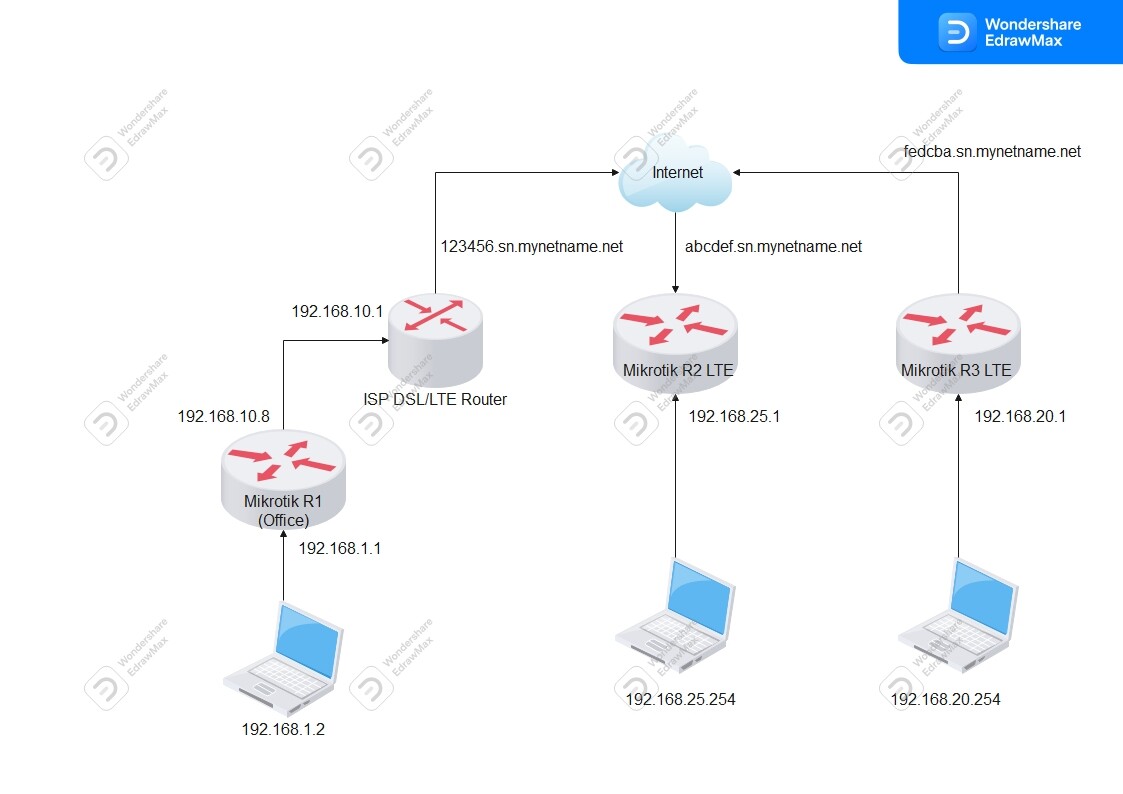
Please provide a network diagram showing the devices involved.

Here it is, it’s not much but i tried to give as much details as possible.
Drawing1.jpg
Office R1 is in DMZ because due to or office connection (DSL/LTE hybrid) we can’t put router into the bridge mode.

Okay this is starting to make more sense.
Now you have R1, R2, and R3
What is the plan tunnels between each R1-R2 and R1-R3 and R2-R3 (3 tunnels total)

So for each connection detail
a. which is server and which is client for the initial connection establishing the tunnels
b. is traffic for each connection going to be two way or one way ( in other words do users, on both devices travel out over the tunnel)

  • server to client y/n
  • client to server y/n
  • both y/n
    (Hint its either y/y/y or n/y/n or y/n/n
    c. if traffic is to subnets, or to internet

Example lets say Green is Server, blue is client

R1-R2 -----------> n/y/n -----------> n / to subnet and internet / n- not applicable
R2-R3 -----------> y/y/y ----------------> internet / subnet / y- not applicable
R1-R3 ------------> y/n/n --------------> subnet / n / n- not applicable

Conclusions
Router 1 connects as a client to Router 2 (server) and R1 users will need to access R2 subnets and R2 internet
Router 2 connects as a client to Router 3 (server) and R3 users will access R2 internet and R2 users will access R3 subnets
Router 1 connects as a client to Router 3 (server) and R3 users will access R1 subnets.

+++++++++++++++++++++++++++++++++++++++++++++++++++++++++++++++++++++++++++++

Finally last step is access router for config purposes
R1 to others y/n if so which ones will be managed
R2 to others y/n if so which ones will be managed
R3 to others y/n if so which ones will be managed

R1 - N
R2 - Y (R1, R3)
R3 -Y (R1, R2)

Conclusion no configuring of routers will take place from admin at location R1
Admin at location R2 will want to be able to config R1 or R3
Admin if at location R3 will want to be able to config R1 or R2
Typically only one admin is at play from one location though so its probably one or the other…

That is the level of detail and requirements needed to properly config… :slight_smile:

Some mistakes in configs:

R1 has 10.255.255.0/24 in allowed-address for both peers, that’s wrong, you can’t have overlapping subnets. Use only 10.255.255.x/32 for each peer. That’s on R1, and also on R2 and R3, if you are going to add direct tunnel between them. If not, and you’d want R2 and R3 communicate with each other via R1, they’d each need 10.255.255.0/ and also subnets of the other one in their allowed-address.

R1 has 10.255.255.1/29 as address, R2 has 10.255.255.2/30 as address, and you have /24 in allowed-address. You should pick one large enough subnet and use it everywhere.

But neither of the above should break communication between LAN subnets.

And about “this is the one that don’t want to connect if there is nothing connected to it”, WG is by default silent, it only connects when there are some data to be sent. If you want it to be more active, setting keepalive for peer should do the trick.

Good attempt to muddle through the config, (noted the same things).
I wanted a clear path and thus set the bar high for a definitive set of requirements logically laid out prior to commenting/recommending.
With the response hopefully to be provided, the mistakes in the config will be highlighed and changes needed more readily added.
It was too messy for me to respond to with any guidance worth writing down for now.

@anav

I will try to provide you as much information as possible.

a. which is server and which is client for the initial connection establishing the tunnels ?

R1 should be the server, as it’s the main router in our network and R2 and R3 are clients as I see it.

b. is traffic for each connection going to be two way or one way ( in other words do users, on both devices travel out over the tunnel)

Yes, traffic is going to be two way

c. if traffic is to subnets, or to internet

I presume to subnets, as i only need to access device on remote network and the router itself.

Finally last step is access router for config purposes

So only R1 should be able to admin R2 and R3

If I forgot something just say.

@Sob

Okey, I added /24 subnet because that is in the tutorial, so if i understand you right, for tunnels i shouldn’t use /24 subnet, as right way is to change subnet to /32, so R1 should be 10.255.255.1/32, R2 should be 10.255.255.2/32 and R3 should be 10.255.255.3/32 so WG interface on R1 can only comunicate with WG interface on R2 and R3 like they are directly connected by cable and have static IP ?

I don’t need R2 to communicate with R3 as all the data is comming back to R1 and any configuration is sent via R1 to R2 or R3


And about “this is the one that don’t want to connect if there is nothing connected to it”, WG is by default silent, it only connects when there are some data to be sent. If you want it to be more active, setting keepalive for peer should do the trick.

I didn’t know that, maybe that is the problem all the time, because, if I setup ping on 192.168.1.1 and start pinging 192.168.25.1 it says timeout, until i connect laptop for example, then it took about 3 seconds or less to start seeing response to pings.
There are two things, peer’s allowed-address and routes (that can be also created dynamically from IP address). They are related, but not the same.

IP addresses and routes are same as with regular interfaces. You can have R1 with .1/29, R2 with .2/29, R3 with .3/29, etc. It just says that other addresses from that subnet are reachable on that interface where this IP address is. It’s definitely true for R1, which can reach both R2 and R3 on same WG interface. It may be also true for R2 and R3, only without direct link, communication between them will have to go via R1.

But then you have allowed-address, and it’s slightly different, it belongs to peer and says what can come from peer and what can be sent to peer. So for R1, definition for R2 must be only .2/32 (plus its LAN subnet), because you don’t want R2 sending traffic from e.g. R3’s .3. Same for R3, peer’s definition on R1 should be only .3/32 (plus LAN). In your config you have 0/24 for both, that wouldn’t work, because router wouldn’t know if it should send e.g. .2 to R2 or R3. On R2 and R3 it can be different, they can have full subnet for R1 as peer, because that allows also routing between them via R1.

Gigabyte I have started a user article to help you and me (sob doesnt need any…yet, reading my posts may lead to madness) work through these setups, that on the surface seem simple but when gets to have a few more requirements, it gets trickier.
Not completed but you get the idea.
https://forum.mikrotik.com/viewtopic.php?t=182340

I think I get it, so interface address is the same for example as address that laptop, and other devices gets from the router and they have their subnet, (in our case we assign that address manually) but allowed address says router where to send our data, and it must be only one address, that’s why we are using /32 subnet so that data from 10.255.255.1/32 end up at 10.255.255.2/32 like is supposed to, but if i leave that at /24 then data can end up where is not suppose to.

If you leave overlapping subnets in allowed-address, it won’t work correct (I think only first peer will). And no, it doesn’t have to be strictly /32. If it’s interface with multiple peers, only important thing is to have not overlaps. So in R1, it must be /32 for peers R2 and R3. But on R2 and R3 that have only one peer, it can be whole subnet. But if you know that they only need to communicate with R1 and never with others, it can be just R1’s /32.

Allow address has two functions and it depends if your device is the source of traffic flow or recipient of traffic flow.
If you are source, peer settings are the destination IPs that the local router can select to ENTER the tunnel.
If you are recipient, peer settings are the filtered/allowed source IPs that the local router will permit to EXIT the tunnel.

As was explained to me, the first example I use the word select, because the router will ‘capture’ the outbound destination address
and then search all the peer addresses for a match, when its matched the traffic will pass. Therefore, its quite possible that a different peer with the same destination address will never get matched because the router always finds the first peer… Not sure if I have that exactly right…

The second case of incoming traffic I use the word filter because its not a selection but more is it allowed…

Thank you both, i understand now. I will make config changes tomorrow, and i think we can continue on the other topic.

So, little update from me, I took your advice @Sob, and in address list I put 10.255.255.1/29 for R1 or main router, 10.255.255.2/29 for R2 or LTE1 router, and 10.255.255.3/29 for R3 or LTE2 router, and it working for now, tunnel is established even without anything connected to the router. (Also changed allowed addresses)

If I understand correctly, I can, in address list on R1 (main router, the one with two peers) put only 10.255.255.1, there is no need for /29, and in allowed addresses on R2 and R3 i can put 10.255.255.1/32. But if I put for example on R2 in address list under WG interface 10.255.255.2/32 it won’t work because it’s not the same network anymore ? that would be 10.255.255.2 network so there must be /29 or other CIDR.

And router with x.x.25.1 network again sometimes won’t connect to R1 if no device is connected. When I say sometimes, i unplugged them, leave for 5 minutes, then reconnect them, and both routers connects, then i leave them disconnected for half hour, reconnected them, and it’s working. Then i tried again for 5 minutes and router with 192.168.20.1 connects, and 25.1 no. When I connect laptop then i can see that router is connected and stays connected for some time if I disconnect laptop.

When i tried to ping again, 192.168.20.1 router says timeout first two pings, and then it’s working. 192.168.25.1 says timeout until i connect PC. Is this possible CGNAT problem ?

If by “address list” you mean IP addresses in “/ip address”, you need /29 mask on all routers, because it creates dynamic connected route. If R1 has 10.255.255.1/29, it knows that 10.255.255.2 and 10.255.255.3 are reachable using WG interface. With 10.255.255.1/32 it wouldn’t know that.

As for the problem with not automatically connecting, you can use Netwatch and let it ping 10.255.255.1, that should bring the tunnel up.

Yes, i left /29 subnet. (IP/Addresses) It’s working now. I noticed that it connects without a problem if there is some device that go to the internet. I can setup Netwatch and check every 5 or so minutes for link up or down. Should i setup some script to ping interface if link is down ? or ping that netwatch sends is enough for link to reestablish ?

Because if I use /32 then 10.255.255.1 would be separate network ? Then it wouldn’t be reachable from /29, for eg. 10.255.255.2/29