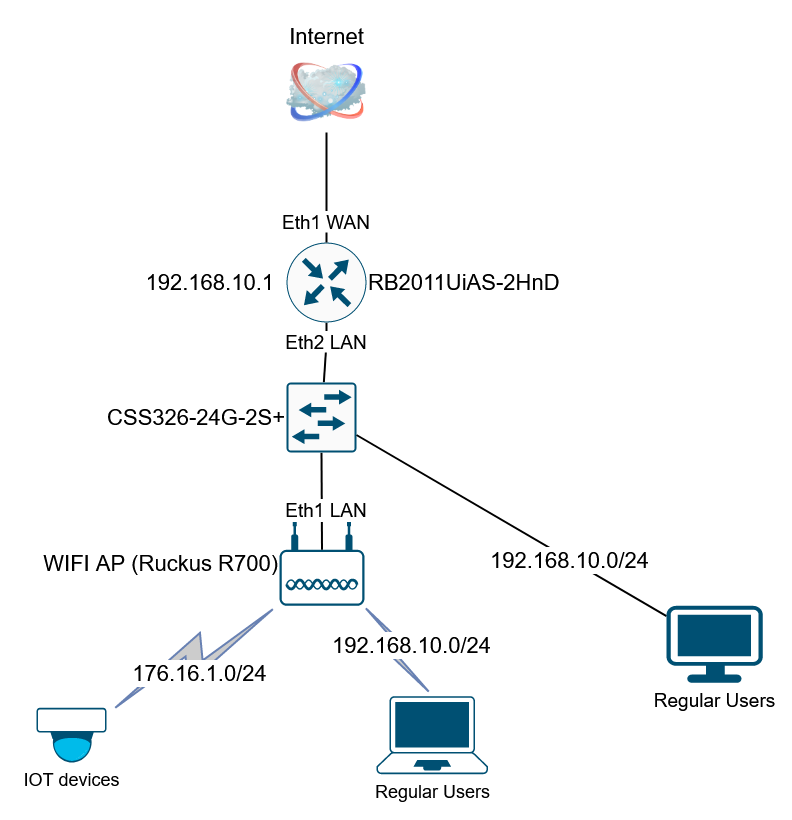
I’m trying to figure out how to migrate from a “regular” setup to a VLAN based one, but honestly I’m struggling to understand the basics, even if I have read a few guides.
I have a RB2011 router which is connected to internet through eth1. I have two bridges on the RB to separate personal devices and IOT devices, and IPs are assigned by two DHCP servers (192.168.10.0/24 and 172.16.1.0/24 respectively). Local devices are connected to internet both by wifi and ethernet. Wifi connection is provided by a Ruckus R700 AP.
What I’d like to achieve is having two VLANS, one for IOT and one for the rest of the devices. Both need internet access but IOT won’t be allowed to access other local devices.
Ruckus AP is setup to have two SSID, one for IOT and one for personal devices. I have attached a picture of what is the connection.
Problem is I don’t have the least idea on how to migrate this setup to VLANS in order to allow the AP to use the dhcp server on the router and not having to NAT wifi connections…
You can use ether2 on your 2011 as your Trunk port (ether2 must be not be a slave interface)… No need to configure Bridge VLAN filtering on your router…
Just create your VLANs under /interface VLAN (on ether2 port), set addresses on each vlan, create your DHCP server and you are almost done…
Your switch can then be configured using Bridge VLAN filtering…
But ofcorse as @anav suggested, we should see your config…
Thank you guys for the help. I’ll try to post an export asap.
In the meantime, if I’m not mistaken, I shoud set both eth1 on the WiFi AP and eth2 on the router as Trunk ports, since I have two VLANS on the AP going through a single ethernet port, right?
Is it necessary configuring VLAN on the switch as well or I can simply configure the router and the access point?
I have finally managed to work a little bit on the configuration. It seems it’s working… almost.
I modified a little bit the topology:
Ruckus WiFi AP has two SSIDs, with VLAN ID 10 and 20, configured in “bridged to WAN” mode, and it is connected directly to ether5 on the RB2011, thus bypassing the ethernet switch
I setup both VLAN 10 and 20 (LAN and IOT respectively) on RB2011 port eth5
I added dhcp pools for the two networks.
The strangest thing is when I try to configure the Ruckus AP via a pc on the LAN network, the connection is extremely slow.
Any suggestion on how I could improve the configuration?
Assuming two vlans, ether2 to ruckus, ether3 to switch, ether 4,5 to PCs etc…
Ether1 should not be disabled if its going to your WAN, eventually… once config is done I suppose.
Detect internet set to None (otherwise can cause issues).
Firewall rules… suggest you go back to default rules.
Then we can add to them as required.
The only one you will need to add to defaults is
in the forward chain
add chain=forward action=drop in-interface=one-bridge out-interface=vlan10 source-address=subnetofvlan20
In source nat rule you do not need a separate rule for IOT devices.
YOU WERE MISSING bridge vlan settings too!!
/interface bridge
add  name=one-one-bridge
/interface vlan
add interface=one-bridge name=homevlan10 vlan-id=10
add interface=one-bridge name=iotvlan20 vlan-id=20
/interface list
add name=WAN
add name=LAN
add name=VLAN
/ip pool
add name=dhcp_pool-homeLAN ranges=192.168.2.100-192.168.2.160
add name=dhcp_pool-vpn ranges=192.168.89.100-192.168.89.140
add name=dhcp_pool-IOTLAN ranges=172.16.1.20-172.16.1.100
/ip dhcp-server
add address-pool=dhcp_pool-homeLAN disabled=no interface=one-bridge name=\
    dhcp-LAN
add address-pool=dhcp_pool-IOTLAN disabled=no interface=bridge-IOT name=\
    dhcp-IOT
/ppp profile
set *FFFFFFFE local-address=192.168.89.1 remote-address=dhcp_pool-vpn
/caps-man manager
set ca-certificate=auto certificate=auto upgrade-policy=suggest-same-version
/caps-man manager interface
set [ find default=yes ] forbid=yes
/interface bridge port
add bridge=one-bridge comment=defconf disabled=yes interface=ether1
add bridge=one-bridge interface=ether2 allow only tagged frames ingress filtering=yes {goes to ruckus)}
add bridge=one-bridge interface=ether3  allow only tagged frames ingress filtering=yes (goes to switch)
add bridge=one-bridge interface=ether4  pvid=10 only allow priority or untagged frames  ingress filtering=yes
add bridge=one-bridge interface=ether5  pvid=10 only allow priority or untagged frames  ingress filtering=yes
/interface bridge vlans
add bridge=one-bridge tagged=one-bridge,eth2,eth3  untagged=ether4,ether5  vlan-ids=10
add bridge=one-bridge tagged=one-bridge,eth2 vlan-ids=20
/ip firewall connection tracking
set tcp-established-timeout=5h
/ip neighbor discovery-settings
set discover-interface-list=none
/interface detect-internet  {DE}
set detect-interface-list=NONE
/interface l2tp-server server
set enabled=yes use-ipsec=yes
/interface list member
add interface=ether1 list=WAN
add interface=one-bridge list=LAN
/interface wireless cap
set caps-man-addresses=127.0.0.1 certificate=request interfaces=wlan1
/ip address
add address=192.168.2.1/24 interface=homeLAN10 network=192.168.2.0
add address=172.16.1.1/24 interface=IOTLAN20 network=172.16.1.0
add address=192.168.1.2/24 interface=ether1 network=192.168.1.0
/ip cloud
set ddns-enabled=yes
/ip dhcp-client
add comment=defconf interface=ether1
/ip dhcp-server network
add address=172.16.1.0/24 dns-server=208.67.222.222,208.67.220.220 gateway=\
    172.16.1.1 netmask=24
add address=192.168.2.0/24 gateway=192.168.2.1 netmask=24  {DNS SERVER ????????????}
/ip dns
set cache-size=4096KiB servers=208.67.222.222,208.67.220.220,8.8.8.8
/ip firewall address-list
add address=172.16.1.0/24 list=IOT
add address=192.168.2.0/24 list=LAN
add address=192.168.2.11 comment="IOT allowed" list=IOT-allowed
add address=216.218.206.0/24 list=blacklist
/ip firewall filter
{USE DEFAULT FIREWALL RULES}
{ADD to forward chain,--- drop vlan20 to vlan10 traffic }
/ip firewall nat
add action=masquerade chain=srcnat out-interface=ether1
add action=masquerade chain=srcnat comment="Masquerade vpn traffic" \
    src-address=192.168.89.0/24
I cannot assign two separate dhcp-servers to the same bridge, so this seems correct, but conflicts with the initial statement you only need one bridge for the VLANs…
OOPS thats a typo from doing so many versions of setups for so many posts LOL.
Let me fix it for you.
/ip dhcp-server
add address-pool=dhcp_pool-homeLAN disabled=no interface=homevlan10 name=
dhcp-home
add address-pool=dhcp_pool-IOTLAN interface=iotvlan20 name=
dhcp-IOT
I have WAN on ether1 (192.168.1.2), Ruckus on ether2, switch on ether3.
Switch is setup as to have VLAN ID 10 on all port connected to home PCs and on port 24 which is connected to Router’s ether3.
Firewall is default 3 rules.
From my pc I cannot access any other pc on my LAN nor the Router. I can access Ruckus AP. From wifi I can access only devices connected to wifi.
You are correct, ether6 is just an emergency access because I locked myself out of the router so many times, it was getting boring
The idea is having the router providing internet access to all the ethernet device in the house, separate IOT devices from the rest of the PCs, provide internet access to wifi devices connected to Ruckus AP through ether2 on the router itself, and provide firewall protection to all of this. All the PCs of the house are connected to the Routher through a switch, as in the scheme in my first post.
This is something which was working perfectly until I had to convert to VLANs because that’s what’s needed by the WiFi AP.
Okay So with that in mind, I will assume ether6 on the router is an available port that is not actuallly hooked up to your PC all the time and that regularly you manage the network from a PC on vlan10.
Will post the config shortly. The firewall rules need work, for example you made a specific rule for admin access to the router but in another rule (default rule) allow everyone on the LAN access to the router. Once you start configuring one has to adjust the default rules as required.
Assuming 4 and 5 are PCs attached to the ROUTER on vlan10.
/interface bridge
add name=bridge1
/interface ethernet
set [ find default-name=ether1 ] name=ether1-WAN
set [ find default-name=ether2 ] name=ether2-RUCKUS
set [ find default-name=ether3 ] name=ether3-SWITCH
set [ find default-name=ether3 ] name=ether4-general_use
set [ find default-name=ether3 ] name=ether5-my_pc
set [ find default-name=ether6 ] name=ether6-EMERG

/interface vlan
add interface=bridge1 name=vlan10 vlan-id=10
add interface=bridge1 name=vlan20 vlan-id=20

/interface list
add name=WAN
add name=LAN
add name=MGMT

/ip pool
add name=dhcp_LAN ranges=192.168.2.100-192.168.2.160
add name=dhcp-vpn ranges=192.168.89.100-192.168.89.140
add name=dhcp_IOT ranges=172.16.1.20-172.16.1.100
add name=dhcp-emerg ranges=10.10.0.2-10.10.0.5

/ip dhcp-server
add address-pool=dhcp_LAN disabled=no interface=vlan10 name=dhcp-LAN
add address-pool=dhcp_IOT disabled=no interface=vlan20 name=dhcp-IOT
add address-pool=dhcp_emerg disabled=no interface=ethernet6-EMERG name=emer-server

/ip dhcp-server network
add address=192.168.2.0/24 dns-server=192.168.2.1 gateway=192.168.2.1
add address=172.16.1.0/24 dns-server=172.16.1.1 gateway=172.16.1.1
add address=10.10.0.0/24 dns-server=10.10.0.1 gateway=10.10.0.1

/interface bridge port
add bridge=bridge1 frame-types=admit-only-vlan-tagged ingress-filtering=yes interface=ether2-RUCKUS
add bridge=bridge1 frame-types=admit-only-vlan-tagged ingress-filtering=yes interface=ether3-SWITCH
add bridge=bridge1 frame-types=admit-only-untagged-and-priority-tagged ingress-filtering=yes interface=ether4-general_use pvid=10
add bridge=bridge1 frame-types=admit-only-untagged-and-priority-tagged ingress-filtering=yes interface=ether5-my_pc pvid=10

/ip firewall connection tracking
set tcp-established-timeout=5h

/ip neighbor discovery-settings
set discover-interface-list=LAN

/interface bridge vlan
add bridge=bridge1 tagged=bridge1,ether2-RUCKUS,ether3-SWITCH untagged=ether4,ether5 vlan-ids=10
add bridge=bridge1 tagged=bridge1,ether2-RUCKUS vlan-ids=20

{It is also correct not to enter the untagged vlans as the router will automatically insert them however I like to manually do them as a visual crosscheck when making the config and later whenever checking the config}
{add bridge=bridge1 tagged=bridge1,ether2-RUCKUS,ether3-SWITCH  vlan-ids=10   -  also legit   }
{add bridge=bridge1 tagged=bridge1,ether2-RUCKUS vlan-ids=20  }

/interface list member
add interface=ether1-WAN list=WAN
add interface=bridge1 list=LAN
add interface=ether6-EMERG list=LAN
add interface=ether6-EMERG list=MGMT
add interface=vlan10 list=MGMT

/ip address
add address=192.168.2.1/24 interface=vlan10 network=192.168.2.0
add address=172.16.1.1/24 interface=vlan20 network=172.16.1.0
add address=192.168.1.2/24 interface=ether1-WAN network=192.168.1.0
add address=10.10.0.1/24 interface=ether6-EMERG network=10.10.0.0

/ip dhcp-client
add comment=defconf interface=ether1-WAN

/ip dns
set cache-size=4096KiB servers=208.67.222.222,208.67.220.220,8.8.8.8

/ip firewall address-list
add address=192.168.2.11 comment="IOT allowed" list=IOT-allowed   {okay this makes sense, its not covered by an interface and is specific, however I didn't see when you use it?? }
add address=IP of Admin Desktop (on vlan10) list=AdminAccess
add address=IP of Admin Laptop (on vlan10) list=AdminAccess
add address=IP of Admin Smartphone (on vlan10) list=AdminAccess
add address=IP of Admin Desktop/laptop (on ethernet-6_EMERG) list=AdminAccess

/ip firewall filter
{NEEDS WORK!}
{input chain}
add action=accept chain=input connection-state=\
    established,related,untracked
add action=drop chain=input connection-state=\
    invalid
add action=accept chain=input protocol=icmp
add action=accept chain=input comment="Allow admin access" in-interface-list=MGMT source-address-list=AdminAccess
add action=accept chain=input comment="Allow LAN DNS queries - TCP" \
    connection-state=new dst-port=53 in-interface-list=LAN protocol=tcp
add action=accept chain=input comment="Allow LAN DNS queries-UDP" \
    connection-state=new dst-port=53 in-interface-list=LAN protocol=udp
add action=drop chain=input comment="drop all else"
{forward chain}
add action=accept chain=forward comment="defconf: accept in ipsec policy" \
    ipsec-policy=in,ipsec
add action=accept chain=forward comment="defconf: accept out ipsec policy" \
    ipsec-policy=out,ipsec
add action=fasttrack-connection chain=forward comment="defconf: fasttrack" \
    connection-state=established,related
add action=accept chain=forward comment=\
    "defconf: accept established,related, untracked" connection-state=\
    established,related,untracked
add action=drop chain=forward comment="defconf: drop invalid" \
    connection-state=invalid
add action=accept chain=forward comment="ENABLE LAN to WAN Traffic" \
    in-interface-list=LAN out-interface-list=WAN
add action=accept chain=forward comment="Allow Port Forwarding" \  {disable if not using}
    connection-nat-state=dstnat connection-state=new in-interface-list=WAN
add action=accept chain=forward comment="MGMT access to all subnets" \
    in-interface-list=MGMT out-interface-list=LAN  source-address-list=AdminAccess
add action=drop chain=forward comment="drop all else"

/ip firewall nat
add action=masquerade chain=srcnat out-interface-list=WAN
add action=masquerade chain=srcnat comment="Masquerade vpn traffic" src-address=192.168.89.0/24
…
As for the switch pretty simple. You will note two options for bridge vlan filtering as the bridge will automatically create the untagged ports when required.
I prefer to manually insert them as a cross check when doing my config and later when checking my config.
/interface bridge port
add bridge=bridgeSW frame-types=admit-only-vlan-tagged ingress-filtering=yes interface=ether24-router
add bridge=bridgeSW frame-types=admit-only-untagged-and-priority-tagged ingress-filtering=yes interface=ether1 pvid=10
{repeat for all other bridge ports}

/interface bridge vlan
add bridge=bridgeSW tagged=bridgeSW,ether24-router  vlan-ids=10    {if prefer the automated constructiond}
OR ...........
add bridge=bridgeSW tagged=bridgeSW,ether24-router untagged=eth1,eth2,eth2....ethR  vlan-ids=20
Thank you for the great amount of work you did to help…
Unfortunatly, and inexplicably, it still doesn’t work correctly. Devices connected by ethernet to VLAN10 are unreacheable.
I’m gonna try tomorrow, a fresh reset and a total reconfiguration may help, hopefully.