Upgraded Chateau 5G R17 ax from 7.21.5, no issues for now and also Queue tree issue reported here and here is finally fixed.
I know that none of the routing protocols are L3HW offloaded. That's my point. When all traffic flow is moved to the ASIC, what's left is routing protocols on my single-core and dual-core 600-800MHz CRS300's. And that is 1% load.
On the 800MHz dual-core switches (like CRS309, CRS310, CRS317), I can route about 800Mbps-1Gbps with L3HW offload disabled (CPU-only).
At any rate, if someone's running a small network with few link state changes, then they're not going to see a ton of CPU load by running routing protocols while the switch is in L3HW offload mode.
No, Mikrotik want to make us suffer (or to buy ax device)
can not use find name=xxxx after upgrade to 7.24
[admin@RouterOS-home] /interface> find name="sfp1->vlan46"
bad parameter name (line 1 column 25)
[admin@RouterOS-home] /interface> find name~"sfp1->vlan46"
```
Apparently only for /interface:
I already bought hap be3 media)) as a replacement for my hap ac2, but I want to use it in the parent house that is far away for me, and it is quite critical when you are upgrading it and get errors about lack of space.
Moved back to 7.23.3 again tea time yesterday and devices are solid again.
0 A interface=wifi2 ssid="001" mac-address=84:2A:FD:F9:55:FB uptime=14h5m11s last-activity=2m18s signal=-53 auth-type=wpa2-psk band=2ghz-n
I've got 6 cAP AC devices (all RBcAPGi-5acD2nD), all with wifi-qcom-ac package.
4 are controlled by capsman and configured exactly the same way (just different identity), 2 are standalone and have different config.
3 of them upgraded to 7.24 without issue from 7.23.
2 of them failed to upgrade and came back with 7.23 after reboot. I just had to retry and then they upgraded fine.
1 of them (one of the cAPsman clients) was going from 7.22.1 and it wouldn't upgrade even after several retries and reboots. Always came back with no free space (doesn't have any files on it at all) and couldn't make any config changes. On that one I had to:
- uninstall wifi-qcom-ac package, reboot, came back up without errors about no space left
- upgrade to 7.24, reboot
- upgrade bootloader, reboot
- install wifi-qcom-ac, apply changes. No cigar, log now says "upgrade failed, free 5 kB of disk space" and a bunch of "can't save config changes, no disk space" errors.
- went to system->certificates to see if something there is taking up space. And sure enough, several ancient certificates which were used years ago when this AP was my CAPsMAN
- uninstall wifi-qcom-ac package to free some space because otherwise certificates can't be deleted (no disk space to save config)
6.1. reboot, came back up without errors and config can now be saved - deleted unnecessary certificates, install wifi-qcom-ac, apply changes
Now it rebooted fine, no errors and everything working, reconnected to CAPsMAN just fine, no errors anywhere. Rebooted it again just to make sure it's all good and it is.
At this point I'm seriously thinking about taking some flash and soldering iron to these APs. Because decent wifi7 replacement doesn't appear to be coming. And even if/when it does, I'll still want to use these APs in less important areas.
What you observed (lingering certificates, etc.) are all result of device being re-purposed (multiple times) without full configuration purge. You were lucky to have some obsolete stuff actually visible so you could remove that. Sometimes there are remnants of old config which are not visible via any of UI.
In such case it's recommended to perform netinstall (without keeping configuration) and apply minimum required configuration for intended future device role. This most often frees enough storage space to go forward (with a few ROS versions at least).
I usually do netinstall, and after restore (not from a .backup file, but from a .rsc file and I usually skip some configs during restoring).
Cannot use ‘=’ in "interface find" after upgrade to 7.24
Actual facts:
work on D53G-5HacD2HnD [Chateau 5G] ARM, WITHOUT any wifi-* package
work on C52iG-5HaxD2HaxD [hAP ax²] arm64, with wifi-qcom package
work on RB5009UPr+S+ [RB5009 PoE] arm64, tested with and without wireless package
work on [RBL009] with arm64
work on CHR VMDK disk (x86_64)
do not work on CHR ???
do not work on RB5009UG+S+ [RB5009 with 10G SFP+] arm64 ???
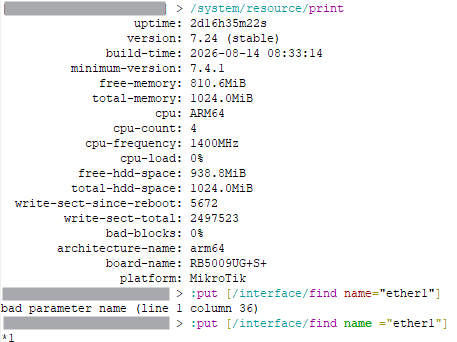
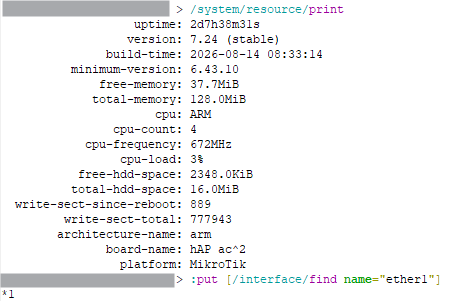
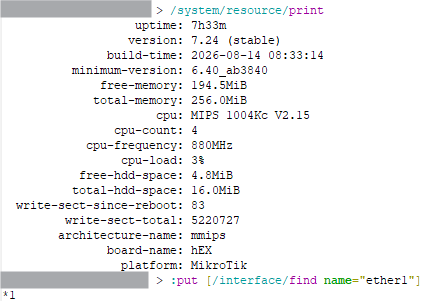
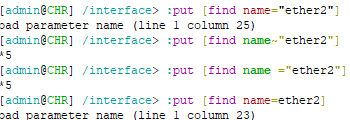
Yes, works on arm.

This is what MikroTik support once recommended to me. My response was like "I already have a wifi-qcom device, but prefer to use the wifi-qcom-ac device". 
(merged with previous for not pollute this topic)
Device, please?
D53G-5HacD2HnD and also verified on cAP ac.
(merged with previous for not pollute this topic)
D53G-5HacD2HnD without any wifi-*.
Thanks!