Anyone using /bgp/vpn across VRFs and can confirm it works? Mikrotik won't

I just had the most disappointing experience with Mikrotik support: For months I have had a ticket regarding route leaks with /bgp/vpn not working across VRFs. I provided a detailed problem description, full supout.rif and after a few rounds the answer is just "We still cannot repeat the problem". This is so disappointing and seemingly there isn't even any interest in fixing a potential bug.

I am also starting to self-doubt myself ... is there an obvious reason this shouldn't even work? And Mikrotik doesn't even bother to mention it?

So I'm hoping someone from the community has mercy and can confirm/disconfirm:

Two VRFs: vrf-fiber contains the internet uplink (via vlan2) and vrf-main contains the rest:

[admin@SunGate2] > /ip/vrf/print
Flags: * - BUILTIN
0   name="vrf-main" interfaces=vlan99,vlan4,vlan3,vlan10,vlan11,vlan12,vrrp3,wg-mobile,vrrp12,vrrp11,vrrp99,vrrp4,xvrf-main

1   name="vrf-fiber" interfaces=vlan2,xvrf-fiber

2 * name="main" interfaces=all

vrf-main has a default route leak:

[admin@SunGate2] > /ip/route/print where routing-table=vrf-main
Flags: D - DYNAMIC; A - ACTIVE; c - CONNECT, s - STATIC, o - OSPF, d - DHCP
Columns: DST-ADDRESS, GATEWAY, ROUTING-TABLE, DISTANCE

DST-ADDRESS         GATEWAY                              ROUTING-TABLE  DISTANCE

DAd 0.0.0.0/0           135.180.56.212@vrf-fiber              vrf-main            100
[...]

For return packets coming back from the internet, vrf-fiber needs to have routing entries for each network in vrf-main. As an example, let's take vlan3 (10.227.79.0/24). If I put a static route leak in the routing table everything works as expected:

[admin@SunGate2] > /ip/route/print where routing-table=vrf-fiber
Flags: D - DYNAMIC; A - ACTIVE; c - CONNECT, s - STATIC, d - DHCP
Columns: DST-ADDRESS, GATEWAY, ROUTING-TABLE, DISTANCE

DST-ADDRESS       GATEWAY                  ROUTING-TABLE  DISTANCE

DAd 0.0.0.0/0           135.180.56.212@vrf-fiber  vrf-fiber             1
1  As 10.227.79.0/24    vlan3@vrf-main            vrf-fiber             1
DAc 135.180.56.212/22   vlan2@vrf-fiber           vrf-fiber             0
DAc 172.18.0.0/24       xvrf-fiber@vrf-fiber      vrf-fiber             0
[...]

From a random station in vlan3/vrf-main, e.g. 10.227.79.104, I can ping www.kernel.org (151.101.129.55) without issues and the packet sniffer confirms it too:
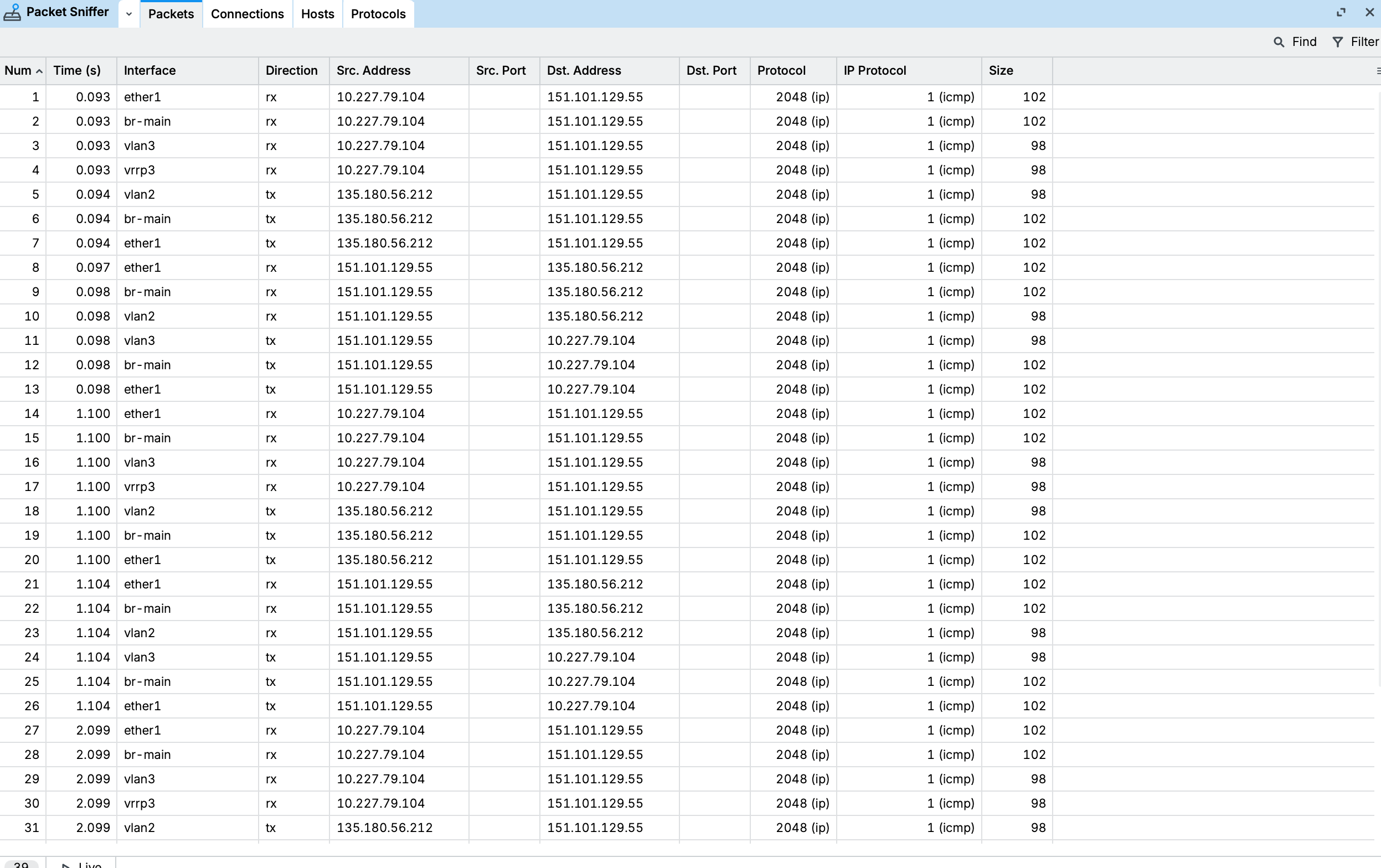
Then I remove the static route and use /bgp/vpn instead:

[admin@SunGate2] > /routing/bgp/export

2026-11-07 14:44:22 by RouterOS 7.25.1

system id = ***********

/routing bgp instance
add as=64513 disabled=no name=bgp-rtleaks
/routing bgp vpn
add export.redistribute=connected .route-targets=64513:100 import.route-targets=64513:101,64513:102 instance=bgp-rtleaks label-allocation-policy=per-vrf name=vrf-main route-distinguisher=64513:1 vrf=vrf-main
add export.redistribute=connected .route-targets=64513:101 import.route-targets=64513:100 instance=bgp-rtleaks label-allocation-policy=per-vrf name=bgp-mpls-vpn-2 route-distinguisher=64513:3 vrf=vrf-fiber

The routes look ok in the main table:

/routing route print detail where routing-table=main afi=vpnv4
[…]
 Ay   afi=vpnv4 contribution=active dst-address=10.227.79.0/24&64513:1 routing-table=main label=136 gateway=vlan3@vrf-main
       immediate-gw=vlan3 distance=200 scope=40 target-scope=30 belongs-to="vrf-main-connected-export"
       bgp.ext-communities=rt:64513:100 .origin=incomplete
       debug.fwp-ptr=0x203043C0 

However, in vrf-fiber’s table something fails and the intermediate gateways are not resolved properly (you can see gateway=vrf-main@vrf-main and intermediate-gw=vrf-main which doesn't look right, IMO it should be **vlan3@**vrf-main as in the output above):

/routing route print detail where routing-table=vrf-fiber
  y   afi=ip contribution=best-candidate dst-address=10.227.79.0/24 routing-table=vrf-fiber gateway=vrf-main@vrf-main
       immediate-gw=vrf-main distance=200 scope=20 target-scope=10 belongs-to="bgp-mpls-vpn-2-vrf-main-connected-export-import"
       bgp.ext-communities=rt:64513:100 .origin=incomplete
       route-distinguisher="64513:1"
       debug.fwp-ptr=0x203047E0 

Now needless to say, the moment I disable the static route and use /bgp/vpn, ping starts to timeout. In the packet sniffer it's clearly visible than the ping reply arrives at vlan2@vrf-fiber and is then sent to vrf-main interface:
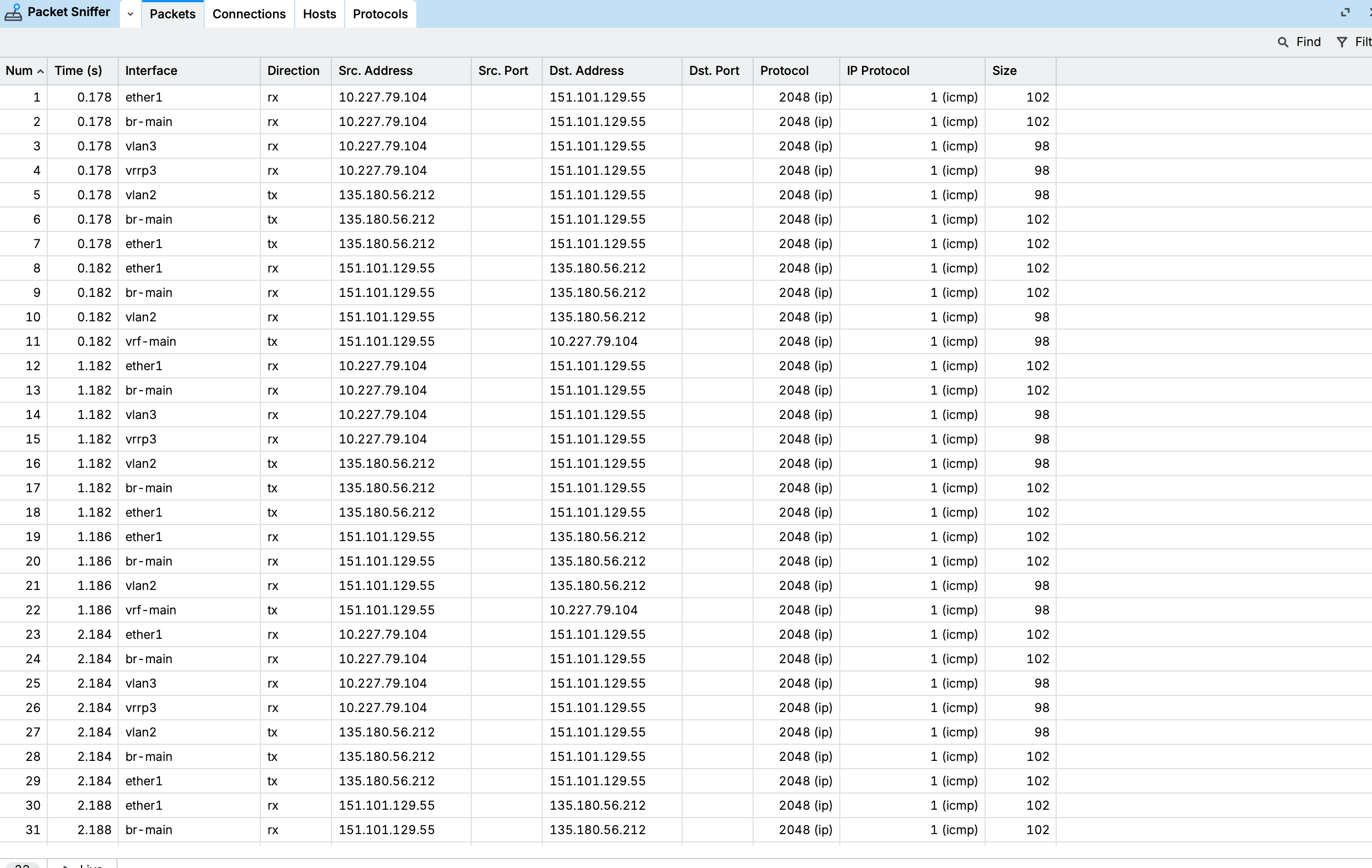
In my opinion, it should go to vlan3 (vlan2@vrf-main), not vrf-main itself. Mikrotik is even unwilling to confirm that.

Please, has anyone used /bgp/vpn and can confirm it works? If yes, anything that could explain the issue I am seeing?

please post full config.

Btw, is this the same setup as your earlier thread VRRP brings my entire network down? It looks like the same vlan3 (10.227.79.0/24) and vrrp3, now in vrf-main. Is SunGate2 the CHR or the hEX?

I never heard back on my last suggestions in that thread. Did you ever solve it? The two issues might be related.

Two things worth considering meanwhile:

With label-allocation-policy=per-vrf the imported route points to the VRF device (gateway=vrf-main) which should trigger a second lookup in vrf-main. Your sniffer suggests that lookup never happens. It might be worth trying label-allocation-policy=per-prefix on the vrf-main entry.

Does vrrp3 also have a /24 address? If so vrf-main has two connected routes for 10.227.79.0/24 which could confuse the export. Please post /ip address print where interface~"vlan3|vrrp3".

Anyways, those are just my own guesses though. Post the full config and we can look at the details.

I tried your configuration and it works in my lab. As Larsa wrote, please share your configuration here.

Worth of note: in my lab, the issue I had was that the outbound connections were not translated despite the NAT rule and the disabled fasttrack rule.

Thanks the both of you!

I was able to create a minimum config that fully reproduces the issue (Note: this is a full configuration that reproduces the issue).

/interface ethernet
set [ find default-name=ether1 ] disable-running-check=no
set [ find default-name=ether2 ] disable-running-check=no
/interface list
add name=WAN
/ip vrf
add interfaces=ether2 name=vrf-main
add interfaces=ether1 name=vrf-fiber
/routing bgp instance
add as=64513 name=bgp-rtleaks
/interface list member
add interface=ether1 list=WAN
/ip address
add address=10.99.0.2/24 interface=ether1 network=10.99.0.0
add address=192.168.10.1/24 interface=ether2 network=192.168.10.0
/ip firewall filter
add action=passthrough chain=forward in-interface=vrf-fiber log=yes log-prefix="PASS1 "
add action=passthrough chain=forward in-interface=vrf-main log=yes log-prefix="PASS2 "
add action=accept chain=forward connection-state=established,related,untracked
add action=drop chain=forward connection-state=invalid log=yes log-prefix=INVALID
add action=accept chain=forward connection-state=new
/ip firewall nat
add action=masquerade chain=srcnat dst-address=10.99.0.0/24 src-address=192.168.10.0/24
/ip route
add dst-address=0.0.0.0/0 gateway=10.99.0.1@vrf-fiber routing-table=vrf-main
add disabled=yes distance=1 dst-address=192.168.10.0/24 gateway=ether2@vrf-main routing-table=vrf-fiber comment="This uses static leak instead of /bgp/vpn to ether2@vrf-main; Works if enabled."
add disabled=yes dst-address=192.168.10.0/24 gateway=ether2@vrf-main routing-table=main comment="This makes the route resolvable via main table. Also works if enabled."
/routing bgp vpn
add export.redistribute=connected .route-targets=64513:100 import.route-targets=64513:999 instance=bgp-rtleaks label-allocation-policy=per-vrf name=vrf-main route-distinguisher=64513:1 vrf=vrf-main
add export.redistribute=connected .route-targets=64513:101 import.route-targets=64513:100 instance=bgp-rtleaks label-allocation-policy=per-vrf name=vrf-fiber route-distinguisher=64513:3 vrf=vrf-fiber
  • Client 192.168.10.10 pings 10.99.0.1
  • With a static route leak (if/ip route add distance=1 dst-address=192.168.10.0/24 gateway=ether2@vrf-main routing-table=vrf-fibe is enabled), ping works
  • If it is disabled (and the /bgp/vpn route is selected) is fails
  • Additionally, if /ip route add dst-address=192.168.10.0/24 gateway=ether2@vrf-main routing-table=main is enabled, it works too

My hypothesis: The vrf@vrf syntax results in two routing decisions and this process somehow looses the link to VRF: The second lookup is looked up via "main" which explains why it works if the route can be resolved via "main".

At this point I want to emphasize that the whole point of this is to not use main VRF at all and as a reminder, /bgp/vpn officially does not support main VRF! So if main becomes a requirement to make leak from vrf-main to vrf-fiber work, this whole thing is broken.


Yes it is the same setup (but different issue). SunGate2 is the CHR, SunGate1 the hEX. Thanks for following up on this issue too, it's not resolved yet and still on my TODO list. It's will respond on this in the other thread once I've done more analysis (it's harder for me to debug because every attempt brings down the entire network)

Sadly no change.

Can you try the following -

  • Change the route-targets for import and export. Currently the one in vrf-main exports :100 and imports :999, the other one exports :101 and imports :100.
/routing bgp vpn
add export.redistribute=connected .route-targets=64513:100 import.route-targets=64513:101 instance=bgp-rtleaks label-allocation-policy=per-vrf name=vrf-main route-distinguisher=64513:1 vrf=vrf-main
add export.redistribute=connected .route-targets=64513:101 import.route-targets=64513:100 instance=bgp-rtleaks label-allocation-policy=per-vrf name=vrf-fiber route-distinguisher=64513:3 vrf=vrf-fiber
  • Start by pinging 10.99.0.2 from 192.168.10.10 - does it work?
  • On 10.99.0.1, add a route back to 192.168.10.0/24 via 10.99.0.2 (In my test, NAT never worked correctly).

I asked for the full config and got a snippet of a lab setup. That's not enough to figure this out.

A snippet can hide exactly what's causing the problem. A strict rp-filter could drop replies going via the VRF device, routing rules or mangle marks could send them to another table, and the xvrf-main/xvrf-fiber link from your first post isn't in the snippet at all and could be competing with the BGP leak.

Since it's the same setup as the VRRP thread, did you try any of my suggestions there? The two issues might be related. You also skipped my question about whether vrrp3 has a /24 address. The full export would've answered that too.

So please post the full /export from SunGate2 and answer the questions above. If not, I’m out and vingjfg can take over the guessing.

I think you misunderstood. Above is not a snippet. It is the full config. Exported with /export. I tested it exactly as I described in Proxmox with CHR and two Linux VMs (10.99.0.1 and 192.168.10.10).

Exactly above config reproduces the issue.

  1. Restore exactly this snippet into a CHR VM with the two 10.99.0.1 and 192.168.10.10. ping from 192.168.10.10 to 10.99.0.1 will not work.
  2. Enable the first route (see comment). Ping will work
  3. Enable the second route (see comment). Ping will work too

I think you misunderstood. Above is not a snippet. It is the full config. Exported with /export. I tested it exactly as I described in Proxmox with CHR and two Linux VMs (10.99.0.1 and 192.168.10.10).

Exactly above config reproduces the issue.

  1. Restore exactly this snippet into a CHR VM with the two 10.99.0.1 and 192.168.10.10. ping from 192.168.10.10 to 10.99.0.1 will not work.
  2. Enable the first route (see comment). Ping will work
  3. Enable the second route (see comment). Ping will work too

Yes in the full config vrrp3 has a /24 address.

Since I have provided a full config that reproduced with issue I am convinced the full config for SunGate2 is not just not needed but creates unnecessary complexity. However, I will still post it in the evening but I need to anonymize it because it contains a lot of private data.

I am using exactly the config from Anyone using /bgp/vpn across VRFs and can confirm it works? Mikrotik won't - #4 by divB with Proxmox VMs (CHR and 2xLinux).

  1. No adding the reverse route does not change anything -- see below
  2. I have updated to these route-targets; no change
  3. No, 10.99.0.2 does not work either
root@test:~# ip route add 192.168.10.0/24 via 10.99.0.2
root@test:~# ip route
default via 10.99.0.2 dev eth0 onlink
10.99.0.0/24 dev eth0 proto kernel scope link src 10.99.0.1
192.168.10.0/24 via 10.99.0.2 dev eth0
root@test:~#
root@test2:~# ip addr
1: lo: <LOOPBACK,UP,LOWER_UP> mtu 65536 qdisc noqueue state UNKNOWN group default qlen 1000
link/loopback 00:00:00:00:00:00 brd 00:00:00:00:00:00
inet 127.0.0.1/8 scope host lo
valid_lft forever preferred_lft forever
2: eth0@if32: <BROADCAST,MULTICAST,UP,LOWER_UP> mtu 1500 qdisc noqueue state UP group default qlen 1000
link/ether bc:24:11:e5:75:1e brd ff:ff:ff:ff:ff:ff link-netnsid 0
inet 192.168.10.10/24 brd 192.168.10.255 scope global eth0
valid_lft forever preferred_lft forever
root@test2:~# ip route
default via 192.168.10.1 dev eth0 onlink
192.168.10.0/24 dev eth0 proto kernel scope link src 192.168.10.10
root@test2:~# ping 10.99.0.2
PING 10.99.0.2 (10.99.0.2) 56(84) bytes of data.
^C
--- 10.99.0.2 ping statistics ---
3 packets transmitted, 0 received, 100% packet loss, time 2050ms

root@test2:~#

Thanks for clarifying.

I think your setup looks just fine and the vrf-main@vrf-main gateway is as expected. To me it looks like the traffic just dies there. Since it's been reported before without a fix, I'd say it might be a bug unless vingjfg's lab shows otherwise.

@vingjfg, which RouterOS version did you test on, and what gateway does /routing route print detail where routing-table=vrf-fiber show for 192.168.10.0/24? You also said NAT didn't translate in your lab, so I wonder if your test really went through the same path.

@divB, your idea that the second lookup goes through main fits what you see. Can you confirm that the main route alone, with the static leak disabled, makes it work? Just as a test, not as a fix. If it does, that's the clearest way to describe the bug to support.

Since support couldn't reproduce it last time, I'd give them as much info as possible this time: the full /export with the header line, the test steps, a supout.rif made while the ping fails, /routing route print detail where routing-table=vrf-fiber and /routing route print detail where afi=vpnv4.

I'd also send the PASS1/PASS2/INVALID log lines and simultaneous captures from the same ping on both Linux hosts, the Proxmox bridge and the CHR. On the CHR use /tool/sniffer/start ip-protocol=icmp without interface= so it captures all interfaces including vrf-main, then /tool/sniffer/stop and /tool/sniffer/save file-name=capture.pcap. That way support can see if the reply goes into vrf-main and never comes out on ether2, which would show exactly where it dies.

And add what you already ruled out (route targets, per-prefix, reverse route) and links to this thread and your earlier one.

MikroTik should manage with the lab alone, but I think it would help to also send the SunGate2 config so they can see the real setup. Just make sure to point out that the lab is the main case and SunGate2 is only there as a reference.

Sure thing. Here is the full export.

RB5009 with 7.25.1.

# 2026-11-10 07:58:14 by RouterOS 7.25.1
# software id = ACWF-4F55
#
# model = RB5009UG+S+
# serial number = <nope>
/interface list
add comment=defconf name=WAN
add comment=defconf name=LAN
/ip neighbor discovery-settings
set discover-interface-list=LAN
/interface wireless security-profiles
set [ find default=yes ] supplicant-identity=MikroTik
/ip dhcp-server network
add address=192.168.88.0/24 comment=defconf dns-server=192.168.88.1 gateway=192.168.88.1
/ip dns static
add address=192.168.88.1 comment=defconf name=router.lan type=A
/ip pool
add name=default-dhcp ranges=192.168.88.10-192.168.88.254
/ipv6 firewall address-list
add address=::/128 comment="defconf: unspecified address" list=bad_ipv6
add address=::1/128 comment="defconf: lo" list=bad_ipv6
add address=fec0::/10 comment="defconf: site-local" list=bad_ipv6
add address=::ffff:0.0.0.0/96 comment="defconf: ipv4-mapped" list=bad_ipv6
add address=::/96 comment="defconf: ipv4 compat" list=bad_ipv6
add address=100::/64 comment="defconf: discard only " list=bad_ipv6
add address=2001:db8::/32 comment="defconf: documentation" list=bad_ipv6
add address=2001:10::/28 comment="defconf: ORCHID" list=bad_ipv6
add address=3ffe::/16 comment="defconf: 6bone" list=bad_ipv6
/interface bridge
add admin-mac=78:9A:18:9F:1F:BF auto-mac=no comment=defconf name=bridge vlan-filtering=yes
/interface ethernet
set [ find default-name=ether1 ] l2mtu=1514
set [ find default-name=ether2 ] l2mtu=1514
set [ find default-name=ether3 ] l2mtu=1514
set [ find default-name=ether4 ] l2mtu=1514
set [ find default-name=ether5 ] l2mtu=1514
set [ find default-name=ether6 ] l2mtu=1514
set [ find default-name=ether7 ] l2mtu=1514
set [ find default-name=ether8 ] l2mtu=1514
set [ find default-name=sfp-sfpplus1 ] l2mtu=1514
/interface vlan
add interface=bridge name=bridge.100 vlan-id=100
/disk settings
set auto-media-interface=bridge auto-media-sharing=yes auto-smb-sharing=yes
/interface bridge vlan
add bridge=bridge comment="Separate LAN" vlan-ids=100
/interface list member
add comment=defconf interface=bridge list=LAN
add comment=defconf interface=ether1 list=WAN
add interface=bridge.100 list=LAN
/ip address
add address=192.168.88.1/24 comment=defconf interface=bridge network=192.168.88.0
add address=192.168.89.1/24 interface=bridge.100 network=192.168.89.0
/ip dhcp-client
add comment=defconf interface=ether1 name=client1
/ip dhcp-server
add address-pool=default-dhcp interface=bridge name=defconf
/ip dns
set allow-remote-requests=yes
/ip firewall filter
add action=accept chain=input comment="defconf: accept established,related,untracked" connection-state=established,related,untracked
add action=drop chain=input comment="defconf: drop invalid" connection-state=invalid
add action=accept chain=input comment="defconf: accept ICMP" protocol=icmp
add action=accept chain=input comment="defconf: accept to local loopback (for CAPsMAN)" dst-address=127.0.0.1
add action=drop chain=input comment="defconf: drop all not coming from LAN" in-interface-list=!LAN
add action=accept chain=forward comment="defconf: accept in ipsec policy" ipsec-policy=in,ipsec
add action=accept chain=forward comment="defconf: accept out ipsec policy" ipsec-policy=out,ipsec
add action=fasttrack-connection chain=forward comment="defconf: fasttrack" connection-state=established,related disabled=yes
add action=accept chain=forward comment="defconf: accept established,related, untracked" connection-state=established,related,untracked
add action=drop chain=forward comment="defconf: drop invalid" connection-state=invalid
add action=drop chain=forward comment="defconf: drop all from WAN not DSTNATed" connection-nat-state=!dstnat connection-state=new in-interface-list=WAN
/ip firewall nat
add action=masquerade chain=srcnat comment="defconf: masquerade" ipsec-policy=out,none out-interface-list=WAN
/ipv6 firewall filter
add action=accept chain=input comment="defconf: accept established,related,untracked" connection-state=established,related,untracked
add action=drop chain=input comment="defconf: drop invalid" connection-state=invalid
add action=accept chain=input comment="defconf: accept ICMPv6" protocol=icmpv6
add action=accept chain=input comment="defconf: accept UDP traceroute" dst-port=33434-33534 protocol=udp
add action=accept chain=input comment="defconf: accept DHCPv6-Client prefix delegation." dst-port=546 protocol=udp src-address=fe80::/10
add action=accept chain=input comment="defconf: accept IKE" dst-port=500,4500 protocol=udp
add action=accept chain=input comment="defconf: accept ipsec AH" protocol=ipsec-ah
add action=accept chain=input comment="defconf: accept ipsec ESP" protocol=ipsec-esp
add action=accept chain=input comment="defconf: accept all that matches ipsec policy" ipsec-policy=in,ipsec
add action=drop chain=input comment="defconf: drop everything else not coming from LAN" in-interface-list=!LAN
add action=fasttrack-connection chain=forward comment="defconf: fasttrack6" connection-state=established,related
add action=accept chain=forward comment="defconf: accept established,related,untracked" connection-state=established,related,untracked
add action=drop chain=forward comment="defconf: drop invalid" connection-state=invalid
add action=drop chain=forward comment="defconf: drop packets with bad src ipv6" src-address-list=bad_ipv6
add action=drop chain=forward comment="defconf: drop packets with bad dst ipv6" dst-address-list=bad_ipv6
add action=drop chain=forward comment="defconf: rfc4890 drop hop-limit=1" hop-limit=equal:1 protocol=icmpv6
add action=accept chain=forward comment="defconf: accept ICMPv6" protocol=icmpv6
add action=accept chain=forward comment="defconf: accept HIP" protocol=139
add action=accept chain=forward comment="defconf: accept IKE" dst-port=500,4500 protocol=udp
add action=accept chain=forward comment="defconf: accept ipsec AH" protocol=ipsec-ah
add action=accept chain=forward comment="defconf: accept ipsec ESP" protocol=ipsec-esp
add action=accept chain=forward comment="defconf: accept all that matches ipsec policy" ipsec-policy=in,ipsec
add action=drop chain=forward comment="defconf: drop everything else not coming from LAN" in-interface-list=!LAN
/system clock
set time-zone-name=Europe/Stockholm
/tool mac-server
set allowed-interface-list=LAN
/tool mac-server mac-winbox
set allowed-interface-list=LAN
/ip vrf
add interfaces=bridge.100 name=otherlan
add interfaces=ether1 name=internet
/routing bgp instance
add as=65432 disabled=no name=routeleak
/routing bgp vpn
add export.redistribute=connected .route-targets=65432:100 import.route-targets=65432:101 instance=routeleak label-allocation-policy=per-vrf name=otherlan \
    route-distinguisher=65432:1 vrf=otherlan
add export.redistribute=connected,dhcp .route-targets=65432:101 import.route-targets=65432:100 instance=routeleak label-allocation-policy=per-vrf name=\
    internet route-distinguisher=65432:2 vrf=internet
/interface bridge port
add bridge=bridge comment=defconf interface=ether2
add bridge=bridge comment=defconf interface=ether3
add bridge=bridge comment=defconf interface=ether4
add bridge=bridge comment=defconf interface=ether5
add bridge=bridge comment=defconf interface=ether6
add bridge=bridge comment=defconf interface=ether7 pvid=100
add bridge=bridge comment=defconf interface=ether8
add bridge=bridge comment=defconf interface=sfp-sfpplus1

Route detail for the internal VRF

[jeff@RB5009UG] > /routing route print detail where routing-table=otherlan 
Flags: A - ACTIVE; c - CONNECT, y - BGP-MPLS-VPN
Ay afi=ip contribution=active dst-address=0.0.0.0/0 routing-table=otherlan gateway=192.168.1.1@internet immediate-gw=192.168.1.1%ether1 distance=200 scope=20
   target-scope=10 belongs-to="otherlan-internet-dhcp-export-import" bgp.ext-communities=rt:65432:101 .origin=incomplete route-distinguisher="65432:2"
   debug.fwp-ptr=0x202C24E0
 
Ay afi=ip contribution=active dst-address=192.168.1.0/24 routing-table=otherlan gateway=internet@internet immediate-gw=internet distance=200 scope=20
   target-scope=10 belongs-to="otherlan-internet-connected-export-import" bgp.ext-communities=rt:65432:101 .origin=incomplete route-distinguisher="65432:2"
   debug.fwp-ptr=0x202C2480
 
Ac afi=ip contribution=active dst-address=192.168.89.0/24 routing-table=otherlan gateway=bridge.100@otherlan immediate-gw=bridge.100 distance=0 scope=10
   target-scope=5 belongs-to="connected" local-address=192.168.89.1%bridge.100@otherlan debug.fwp-ptr=0x202C22A0
 
Ac afi=ipv6 contribution=active dst-address=fe80::%bridge.100/64 routing-table=otherlan gateway=bridge.100@otherlan immediate-gw=bridge.100 distance=0
   scope=10 target-scope=5 belongs-to="connected" local-address=fe80::7a9a:18ff:fe9f:1fbf%bridge.100@otherlan debug.fwp-ptr=0x202C2240
 
A  afi=link contribution=active dst-address=bridge.100 routing-table=otherlan distance=0 belongs-to="interface"
 
A  afi=link contribution=active dst-address=otherlan routing-table=otherlan distance=0 belongs-to="interface"

Route detail for the internet vrf

[jeff@RB5009UG] > /routing route print detail where routing-table=internet  
Flags: A - ACTIVE; c - CONNECT, d - DHCP, y - BGP-MPLS-VPN
Ad afi=ip contribution=active dst-address=0.0.0.0/0 routing-table=internet gateway=192.168.1.1@internet immediate-gw=192.168.1.1%ether1 distance=1 scope=30
   target-scope=10 vrf-interface=ether1 belongs-to="dhcp" debug.fwp-ptr=0x202C2180
 
Ac afi=ip contribution=active dst-address=192.168.1.0/24 routing-table=internet gateway=ether1@internet immediate-gw=ether1 distance=0 scope=10
   target-scope=5 belongs-to="connected" local-address=192.168.1.28%ether1@internet debug.fwp-ptr=0x202C21E0
 
Ay afi=ip contribution=active dst-address=192.168.89.0/24 routing-table=internet gateway=otherlan@otherlan immediate-gw=otherlan distance=200 scope=20
   target-scope=10 belongs-to="internet-otherlan-connected-export-import" bgp.ext-communities=rt:65432:100 .origin=incomplete route-distinguisher="65432:1"
   debug.fwp-ptr=0x202C2420
 
Ac afi=ipv6 contribution=active dst-address=fe80::%ether1/64 routing-table=internet gateway=ether1@internet immediate-gw=ether1 distance=0 scope=10
   target-scope=5 belongs-to="connected" local-address=fe80::7a9a:18ff:fe9f:1fbe%ether1@internet debug.fwp-ptr=0x202C2120
 
A  afi=link contribution=active dst-address=ether1 routing-table=internet distance=0 belongs-to="interface"
 
A  afi=link contribution=active dst-address=internet routing-table=internet distance=0 belongs-to="interface"

And the route details for the main routing table

Flags: A - ACTIVE; c - CONNECT, y - BGP-MPLS-VPN
Ac afi=ip contribution=active dst-address=192.168.88.0/24 routing-table=main gateway=bridge immediate-gw=bridge distance=0 scope=10 target-scope=5
   belongs-to="connected" local-address=192.168.88.1%bridge debug.fwp-ptr=0x202C2060
 
Ac afi=ipv6 contribution=active dst-address=::1/128 routing-table=main gateway=lo immediate-gw=lo distance=0 scope=10 target-scope=5 belongs-to="connected"
   local-address=::1%lo debug.fwp-ptr=0x202C2000
 
Ac afi=ipv6 contribution=active dst-address=fe80::%bridge/64 routing-table=main gateway=bridge immediate-gw=bridge distance=0 scope=10 target-scope=5
   belongs-to="connected" local-address=fe80::7a9a:18ff:fe9f:1fbf%bridge debug.fwp-ptr=0x202C20C0
 
Ay afi=vpnv4 contribution=active dst-address=192.168.89.0/24&65432:1 routing-table=main label=16 gateway=bridge.100@otherlan immediate-gw=bridge.100
   distance=200 scope=40 target-scope=30 belongs-to="otherlan-connected-export" bgp.ext-communities=rt:65432:100 .origin=incomplete debug.fwp-ptr=0x202C2300
 
Ay afi=vpnv4 contribution=active dst-address=65432:2 routing-table=main label=17 gateway=192.168.1.1@internet immediate-gw=192.168.1.1%ether1 distance=200
   scope=40 target-scope=30 belongs-to="internet-dhcp-export" bgp.ext-communities=rt:65432:101 .origin=incomplete debug.fwp-ptr=0x202C23C0
 
Ay afi=vpnv4 contribution=active dst-address=192.168.1.0/24&65432:2 routing-table=main label=17 gateway=ether1@internet immediate-gw=ether1 distance=200
   scope=40 target-scope=30 belongs-to="internet-connected-export" bgp.ext-communities=rt:65432:101 .origin=incomplete debug.fwp-ptr=0x202C2360
 
A  afi=link contribution=active dst-address=lo routing-table=main distance=0 belongs-to="interface"
 
A  afi=link contribution=active dst-address=ether8 routing-table=main distance=0 belongs-to="interface"
 
A  afi=link contribution=active dst-address=bridge routing-table=main distance=0 belongs-to="interface"

@CGGXANNX do you think this is another incarnation of the same issue as you discovered here?

@vingjfg, thanks for the export, it gives a much clearer picture of what differs between your two runs. Your masquerade rule uses out-interface-list=WAN with ether1 inside a VRF. Since 7.14 rules like that match the VRF interface and not its members, so I guess that's why your NAT never translated. So your lab tests the leak without NAT and divB's lab tests it with NAT. Could you change your rule to out-interface=internet, check that NAT actually translates and test again? If it breaks then, we've got it on an RB5009 too.

@divB, your masquerade rule only matches on addresses, so the reverse route test didn't take NAT out of the picture. My bad for calling that ruled out.

And yes, I think it might possibly be the same issue as in the other thread. The screenshots there show two conntrack entries for the same flow, and in the second one the source port got rewritten from 51820 to 61436 without any NAT rule for it. My guess is that the reply gets tracked a second time when it passes the VRF device after de-NAT. WireGuard doesn't care much about a changed port, but for a ping it would mean a changed ICMP id and a reply that never counts.

I'd try this in your lab with the static leak disabled. First disable the masquerade rule, keep the reverse route on 10.99.0.1 and ping again. Then turn NAT back on, run /ip firewall connection print detail where protocol=icmp on the CHR during the failing ping and tcpdump -ni eth0 icmp on 192.168.10.10, and see if there are two entries and if a reply shows up with another id.

Still just my own guesses, but if they hold up it's a much clearer case for support than "BGP VPN doesn't work".

We can repeat the problem, fix is coming.

@Larsa, I did some more tests this morning but did not achieve anything. Here are the results.

The RB5009's outside interface (VRF internet) has IP 192.168.1.28, a local machine on which I have tcpdump running has 192.168.1.17, default gateway is 192.168.1.1. Laptop on the inside network (VRF otherlan) has IP 192.168.89.2 and default gateway 192.168.89.1 (RB5009)

No NAT

  • Ping to 192.168.1.x: ICMP arrives with source IP 192.168.89.2
  • Ping to 8.8.8.8: ICMP arrives with source IP 192.168.89.2

Connection detail from RB5009:

0   C protocol=icmp src-address=192.168.89.2 dst-address=8.8.8.8
      reply-src-address=8.8.8.8 reply-dst-address=192.168.89.2 icmp-type=8
      icmp-code=0 icmp-id=2363 timeout=9s orig-packets=8 orig-bytes=672
      orig-fasttrack-packets=0 orig-fasttrack-bytes=0 repl-packets=0
      repl-bytes=0 repl-fasttrack-packets=0 repl-fasttrack-bytes=0
      orig-rate=672bps repl-rate=0bps

Masquerade

/ip firewall/nat/add action=masquerade chain=srcnat out-interface=internet 

Ping to 192.168.1.xx: ICMP doest not arrive, no conn created

Ping from the RB5009 itself fails, likely the reason for this and the above is that the VRF interface internet does not have an IP address - hence masquerade cannot work.

ping 192.168.1.17 src-address=192.168.89.1 vrf=otherlan
  SEQ HOST                                     SIZE TTL TIME       STATUS                                          
    0                                                              packet rejected                                 
    1                                                              packet rejected                                 

Ping 8.8.8.8: ICMP arrives with source 192.168.89.2, showing that the packet does not go through the VRF interface internet for anything not local to the external interface.

The connection detail on the RB5009:

0   C protocol=icmp src-address=192.168.89.2 dst-address=8.8.8.8 reply-src-address=8.8.8.8
      reply-dst-address=192.168.89.2 icmp-type=8 icmp-code=0 icmp-id=2454 timeout=9s orig-packets=41
      orig-bytes=3 444 orig-fasttrack-packets=0 orig-fasttrack-bytes=0 repl-packets=0 repl-bytes=0
      repl-fasttrack-packets=0 repl-fasttrack-bytes=0 orig-rate=672bps repl-rate=0bps

Masquerade on the external interface

/ip firewall/nat/add action=masquerade chain=srcnat out-interface=ether1
  • Ping to 192.168.1.xx: ICMP arrives with source 192.168.89.2
  • Ping to 8.8.8.8: ICMP arrives with source 192.168.1.28, replies does not make it to source

The connection detail on the RB5009 shows the reply-dst-address correctly set to the external IP of the router.

1 S Cs protocol=icmp src-address=192.168.89.2 dst-address=8.8.8.8 reply-src-address=8.8.8.8
       reply-dst-address=192.168.1.28 icmp-type=8 icmp-code=0 icmp-id=2463 timeout=9s orig-packets=10
       orig-bytes=840 orig-fasttrack-packets=0 orig-fasttrack-bytes=0 repl-packets=10 repl-bytes=840
       repl-fasttrack-packets=0 repl-fasttrack-bytes=0 orig-rate=672bps repl-rate=672bps

Also tried using a source nat instead of masquerade:

/ip firewall/nat add action=src-nat chain=srcnat out-interface=internet to-addresses=192.168.1.28

Ping to 192.168.1.28: ICMP arrives with source 192.168.1.28, but replies don't make it to the source.

Connection detail on the RB5009:

1 S Cs protocol=icmp src-address=192.168.89.2 dst-address=192.168.1.17 reply-src-address=192.168.1.17
       reply-dst-address=192.168.1.28 icmp-type=8 icmp-code=0 icmp-id=2471 timeout=9s orig-packets=2 orig-bytes=168
       orig-fasttrack-packets=0 orig-fasttrack-bytes=0 repl-packets=2 repl-bytes=168 repl-fasttrack-packets=0
       repl-fasttrack-bytes=0 orig-rate=672bps repl-rate=672bps

ping to 8.8.8.8: ICMP arrives with source 192.168.89.2, so no translation applied.

Connection detail on the RB5009:

1   C protocol=icmp src-address=192.168.89.2 dst-address=8.8.8.8 reply-src-address=8.8.8.8
      reply-dst-address=192.168.89.2 icmp-type=8 icmp-code=0 icmp-id=2472 timeout=9s orig-packets=26
      orig-bytes=2 184 orig-fasttrack-packets=0 orig-fasttrack-bytes=0 repl-packets=0 repl-bytes=0
      repl-fasttrack-packets=0 repl-fasttrack-bytes=0 orig-rate=672bps repl-rate=0bps

Interestingly, the combination of source NAT and ping to a local address works from the router itself. In the packet capture, I see the ICMP traffic coming from the expected 192.168.1.28.

[jeff@RB5009UG] > /ip firewall/nat print                       
0  chain=srcnat action=src-nat to-addresses=192.168.1.28 out-interface=internet
[jeff@RB5009UG] > ping vrf=otherlan src-address=192.168.89.1 192.168.1.1
  SEQ HOST                                     SIZE TTL TIME       STATUS                                                                      
    0 192.168.1.1                                56  63 3ms695us  
    1 192.168.1.1                                56  63 2ms258us  
    2 192.168.1.1                                56  63 1ms777us  
    sent=3 received=3 packet-loss=0% min-rtt=1ms777us avg-rtt=2ms576us max-rtt=3ms695us 

So similar to the other post you linked: NAT and VRF don't play nice together in 7.25.1.

I saw @mrz confirming they reproduced the bug. Cool.

@vingjfg, thanks for testing!

Just to sum up your findings for others: looks like NAT translates the source address and the replies show up in conntrack but don't reach the client. You get that with both masquerade and src-nat. Your tests also line up with what the routes show: internet for the connected subnet and ether1 for the default route.

Btw, since pinging from the router works with src-nat, I'd try pinging the same address from both the router and the client with the same NAT rule. If only the client's ping still fails, that gives support two cases to compare against the same destination: a working ping from the router and a failed ping from the client. They can then trace the client's replies and see where they get lost on the way back.

To summarize even further, I believe this is the issue: When a return packet is received by RouterOS, it is first processed in the right VRF context but after address translation the packet looses VRF context. Now, if a second lookup needs to happen (in this case due to vrf@vrf route instead of interface@vrf) RouterOS uses main VRF because VRF context was lost.

I am now sure this is the same underlying issue of the topic I linked above.

So the fix would be to make sure NAT back-translation doesn't loose VRF context of packets.

Amazing, thank you so much! I am happy this is acknowledged.

Just for reference, I believe this would address both SUP-219962 and SUP-221017 .

@Larsa

So - in bold when ping shows a reply.

Source NAT on the interface internet

  • Ping from client to 192.168.1.1 - translated, seen on interfaces ether7 (not translated), bridge (vlan 100) (not translated), bridge.100 (not translated), internet (translated), ether1 (translated); reply seen on ether1 (translated), otherlan (not translated)
  • Ping from router to 192.168.1.1 - translated, seen on interfaces internet (translated) and ether1 (translated); reply seen on interfaces ether1 (translated) and otherlan (not translated)
  • Ping from client to 8.8.8.8 - not translated, seen on interfaces ether7, bridge (vlan 100), bridge.100, ether1.
  • Ping from router to 8.8.8.8 - translated, seen on interface ether1 (translated), reply seen on interface ether1 (translated)

Source NAT on the interface ether1

  • Ping from client to 192.168.1.1 - not translated, seen on interfaces ether7 (not translated), bridge (vlan 100) (not translated), bridge.100 (not translated), internet (not translated) and ether1 (not translated)
  • Ping from router to 192.168.1.1 - not translated, seen on interfaces internet (not translated) and ether1 (not translated).
  • Ping from client to 8.8.8.8 - translated, seen on interfaces ether7 (not translated), bridge (vlan 100) (not translated), bridge.100 (not translated), internet (not translated) and ether1 (translated); reply seen on interfaces ether1 (translated) and otherlan (not translated)
    Ping from router to 8.8.8.8 - not translated, seen on interface ether1 (not translated)

@vingjfg, thank you so much for taking the time to test once more. That trace pretty much nails it down!

As I see it, for the client ping the reply comes back on ether1, gets translated back and shows up on otherlan, but not on bridge.100 or ether7. The router's own ping takes the same path and gets a reply, I guess because it only has to reach the VRF device. So one working and one failing case with the same NAT rule (on the RB5009 with 7.25.1).

That also backs up @divB's idea of the packet losing its VRF context.