So, I am new to MikroTik. I am new to these forums. I am not a complete newcomer to networking due to my work.
After spending 6 hours troubleshooting with a colleague (who uses MikroTik at work and at home) we are stumped. The router will not connect properly to my carrier (Vodafone UK) and shows good signal before even putting the external antenna in (Which I am not doing until the base device works.)
I am using the same settings as my previous 4G router (and have tried multiple different suggestions).
We keep seeing -internal error on the LTE interface.
We are only getting Transmit on the LTE interface nothing back. We have tried manually configuring and quick setup (Which for a home router should work)
A little surprised that it shipped with a Beta OS and cannot go back to stable. I cannot find v7 Beta6 online.
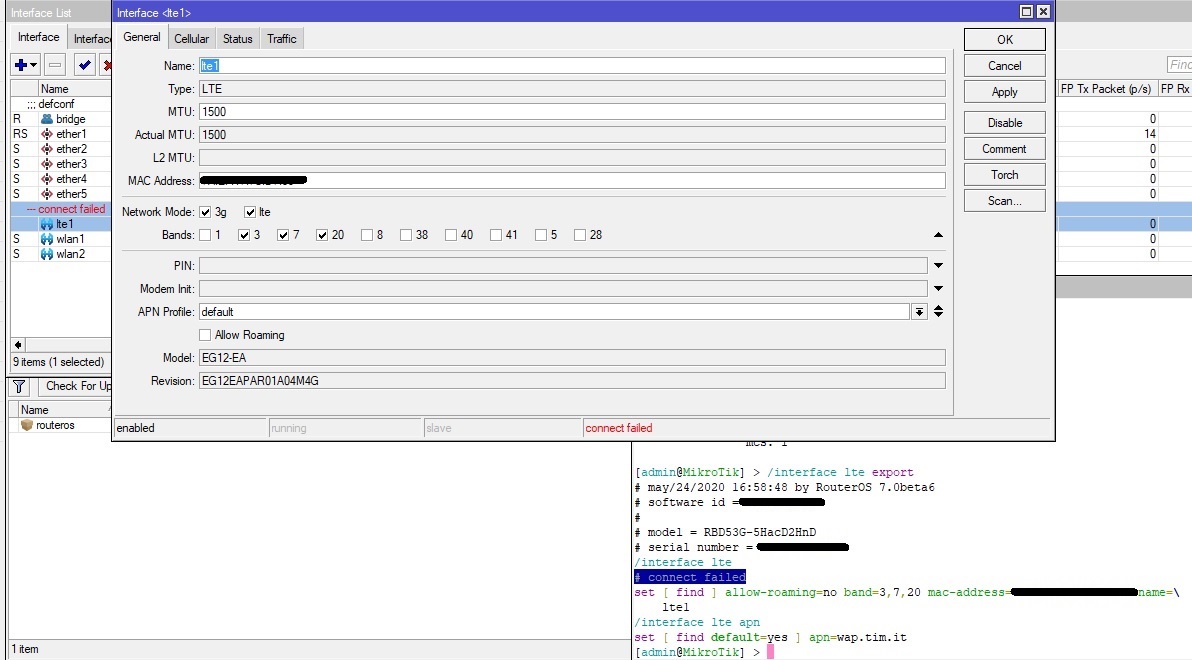
What settings you have for the lte interface?
Look in the Cellular tab on the LTE interface to see in which lte band it connects and if is uses CA when connection is established when doing data-transfer.
I’m new to this forum. My MikroTik Chateau LTE interface has a similar behavior.
The router will not connect properly to my carrier, but i receive a “–connect failed” error instead “–internal error” message like @th2000125
I have tried with two sims that work properly on other MikroTik 4G routers and the behavior is the same.
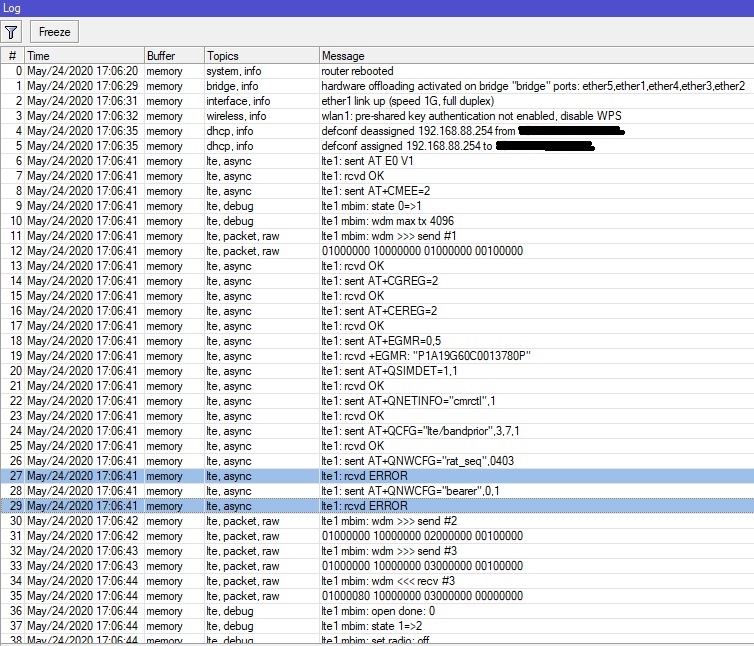
This is the LTE log at routerboard boot
[admin@MikroTik] > /interface lte monitor lte
status: connect failed
model: EG12-EA
revision: EG12EAPAR01A04M4G
current-operator: I TIM
current-cellid: *********
enb-id: ******
sector-id: 42
phy-cellid: 46
access-technology: LTE
imei: ***************
imsi: ***************
uicc: ********************
primary-band: B3@20Mhz earfcn: 1350 phy-cellid: 46
rssi: -79dBm
rsrp: -113dBm
rsrq: -14dB
sinr: -4dB
cqi: 6
ri: 1
mcs: 1
Don’t pay attention to the connection parameters because I did the tests indoor without any external antennas in a poor signal zone.
The CA seems to work well (appear only for few seconds and disappear) but first i need to solve the LTE connection problem.
Now I’m doing some tests to try the software and firmware downgrade to the routeros version 7.0beta4.
If i need to upgrade again to 7.0beta6 , where i can find it?
YOU DO NOT DO DOWNGRADE because MikroTik not publish ROS7b6 jet, you should very stuff ask at support@mikrotik.com insted of forum because we not have documentation jet, this is beta device with beta software.
I sold a Chateau and when I installed the SIM it put it self in boot-loop with no return.. I had to do a netboot and downgrade it to B5. B6 is not public soo..
It has worked fine sins.
I’ve had a quick snoot around our test one this afternoon
It does seem like that the v7beta6 version it comes with is quite broken,
The way it’s reacting is as if the LTE package isn’t loaded onto the main system package (as they got merged into one some versions back)
Even changing the setting from Auto to Internal or External Ant (with an antenna attached once rebooted of-course) made no difference,
Checked via CLI by monitor lte 0 but nothing there either,
LTE Scan brought nothing – now all 4 carriers I know I can access inside the building as we have 2 masts at either end of the Ind. Estate which I get belting signals inside (EE, O2, Voda & three)
Perhaps some of the other tests that people have tried were on other versions (like beta4) have been able to spark the modem card into life a bit but as quite rightly mentioned beta6 is not available so hesitant to change the software version at the mo to do any further testing,
booted it up today after the tests yesterday and it seems to be working.. which is rather odd,
Seems that in the tinkering with the /system > routerBOARD > modem and changing the mode from Auto to Serial and then back to Auto along with changing the Main and Diversity Antennas (cycling through Auto, Internal External) seems to have forced it to do something,
Its now showing selected antenna as Internal
It also seems to be reading the “usb” PCI card for the LTE cat12 module (EG12-EA)
So perhaps it needed a further reboot after its booted up (and loaded in default script) to get it running – much like you would when firmware updating and then upgrading bootloader etc,
Only differences to the “default” config that I’ve added is adding in the APN for the carrier the sim is currently using in it..
Rather odd…
Still running v7.0beta6
Kev
EDIT
Possible bug with Antenna selection – despite adding external antenna and selecting from Auto to External for /system routerboard modem it seems to prefer the internal antenna and states it as being internal selected even tho external is selected in dropdown
auto | serial | Internal | External
must be finish with a RB reboot.
beta6 have got roblems with APN… when you use default one and change his value to other one then ROS can remember old one and still use it ?!.
At telit lm940 the at-chat not work.
Sometimes change who not should do anythink with lte1 can do reconnection…
just beta system.
I would like to echo the last post - reboot after setting external antennas seems to work here. I have setup APNs for my providers and tested both with their separate different SIM cards and had no problem with this on my Chateau LTE12.
The thing that does not work that I really need is passthrough support. It is not supported in beta 6 on this device, contacted support and they have confirmed this but they did also say it will be supported and might be in the next beta.
Hi,
I have quite the same issue here (in France) tested with 2 different seems and always connect failed, we did try to create APN / Reset etc. and it’s the same.
So trying to reach support from email, the main dif between one Chateau that works it’s the difference on firmware on Quectel :
EG12EAPAR01A05M4G → Working
EG12EAPAR01A04M4G → Not working
Note the diff between A05 and A04 !
Is there the issue ?
Thanks.
EDIT : upgrading the LTE firmware did the trick
interface lte firmware-upgrade lte1 upgrade=yes
It changes to A06 and now no connect error, we can try more now
Yes
Ok for now the speed is not the same as other brand, not sure why
3CA can’t keep up here on 4G French provider “FREE”
When disable LTE and re-enable 3CA are working and after few minutes it goes to 2CA (same WAN IP/same PCC) and/or 1CA right after !!! it happens also on Netgear but seems less faster than LTE12.
I’m just doing another test and only 5 minutes after enable/disable the LTE interface : 3CA goes to 1CA and can’t be reallocated
For sure on French 4G FREE provider, the aggregation is activated dynamically when data download is trigger at certain level. Maybe it’s the root of this issue ?
I don’t know for elsewhere (other country, etc.) but maybe aggregation is always activated whenever data download is idle or used !
EP06 display not CA or sometimes CA state=1 (not active but configured). When you use traffic then CA is activated.
It’s like differ firmware at differ module have other behavior. This is the politics of ISP too and that’s why it’s hard to predict how you have that in your country.
It’s like differ firmware at differ module have other behavior. This is the politics of ISP too and that’s why it’s hard to predict how you have that in your country.
So something can be done ? by supplying log or whatever information to support ?
Maybe I should open an own thread for it
Btw, i have seen official Quectel EM12 firmware :
EM12GPAR01A17M4G
EM12GPAR01A19M4G_01.001.01.001
Currently it’s A06 and like we know now, A04 was not good but A05 and A06 fix the connection issue. So maybe latest modem firmware handle CA better ?
EG12 have few version with differ FW. Thats why we have other numbers and EM12 have other numeration.
Please be notive that xxAbb, it;s like:
xx main version
bb sub version
e.g. means, 01A08 is older then 02A01 who is the new one.